

Audio Editing: Complete Beginner’s Guide (2026)

Audio editing has become an essential skill in today’s digital world. Whether you’re creating podcasts, YouTube videos, music tracks, or voiceovers, audio editing helps improve sound quality and produce professional results.

With modern software tools, even beginners can easily edit audio, remove noise, mix tracks, and enhance sound clarity.

In this guide, we’ll explain what audio editing is, how it works, the best software tools, and essential techniques every creator should know.

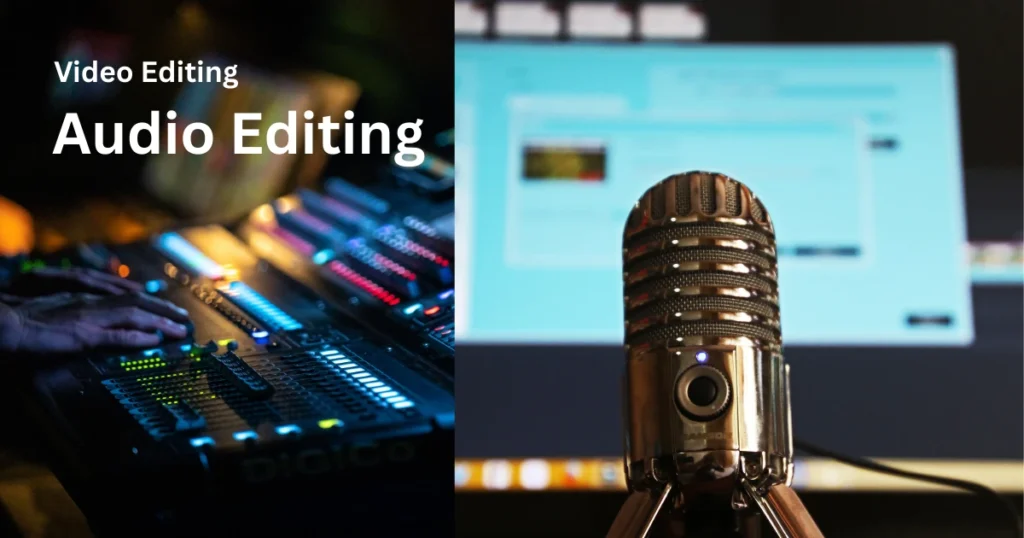
Audio Editing
Image Credit: Canva

What Is Audio Editing?

Audio editing is the process of modifying and improving recorded sound using specialized software.

Common tasks include:

  • Cutting and trimming audio clips
  • Removing background noise
  • Adjusting volume levels
  • Adding effects
  • Mixing multiple tracks

Audio editing is widely used in:

  • Podcast production
  • Music recording
  • Video production
  • Film and television
  • Online content creation

It helps transform raw recordings into polished and professional audio.

Why Audio Editing Is Important

Good audio quality can dramatically improve the overall experience for listeners.

Key benefits include:

✔ Clearer sound
✔ Professional production quality
✔ Removal of background noise
✔ Balanced volume levels
✔ Creative effects and enhancements

Poor audio quality can make even great content difficult to listen to, which is why editing is essential.

Popular Audio Editing Software

Many powerful tools are available for beginners and professionals.

1. Audacity (Best Free Audio Editor)

Audacity: Audacity is one of the most popular free audio editing tools.

Features

  • Multi-track editing
  • Noise reduction tools
  • Audio effects and filters
  • Cross-platform support

Best For: Beginners, podcasters, and students.

Pros

✔ Free and open source
✔ Easy to learn
✔ Large plugin library

Cons

✖ Interface feels outdated

2. Adobe Audition (Professional Editing)

Adobe Audition: Adobe Audition is a professional audio editing tool used by filmmakers, podcasters, and sound engineers.

Features

  • Advanced noise reduction
  • Spectral editing
  • Multitrack mixing
  • Integration with video editing tools

Best For: Professional creators and studios.

Pros

✔ Powerful tools
✔ Professional sound processing

Cons

✖ Requires subscription

3. GarageBand (Mac Users)

GarageBand: GarageBand is a beginner-friendly audio production tool designed for macOS users.

Features

  • Virtual instruments
  • Multi-track recording
  • Built-in effects
  • Music loops

Best For: Musicians and beginners.

4. FL Studio (Music Production)

FL Studio: FL Studio is widely used in music production and electronic music creation.

Features

  • Beat creation tools
  • MIDI support
  • Synthesizers
  • Mixing tools

Best For: Music producers and DJs.

Basic Audio Editing Techniques

To produce professional sound, you need to understand some basic techniques.

1️⃣ Cutting and Trimming

Removing unwanted sections of audio.

Examples include:

  • Long pauses
  • Mistakes in speech
  • Background noise

Trimming keeps your content clean and concise.

2️⃣ Noise Reduction

Background noise is common in recordings.

Audio editors use filters to remove:

  • Fan noise
  • Room echo
  • Electrical hum

Noise reduction tools analyze the sound and eliminate unwanted frequencies.

3️⃣ Equalization (EQ)

Equalization adjusts different frequencies in audio.

EQ helps:

  • Improve vocal clarity
  • Reduce harsh sounds
  • Balance bass and treble

This is essential for podcasts and music production.

4️⃣ Compression

Compression controls volume levels.

It:

  • Reduces loud peaks
  • Boosts quieter sounds
  • Creates consistent audio levels

Compression makes audio sound more professional.

5️⃣ Adding Effects

Effects enhance creativity and sound design.

Common audio effects include:

  • Reverb
  • Echo
  • Delay
  • Distortion

These effects are widely used in music production and film sound design.

🎙 Audio Editing for Podcasts

Podcast editing usually involves:

  • Removing mistakes
  • Adjusting voice levels
  • Eliminating background noise
  • Adding intro and outro music

Clean audio is one of the most important factors in podcast success.

Audio Editing for Video Creators

YouTube creators and filmmakers rely heavily on audio editing.

Typical tasks include:

  • Syncing audio with video
  • Improving voice clarity
  • Adding background music
  • Sound effects

Good audio editing can make videos more engaging and professional.

Audio Editing for Music Production

Music producers use digital audio workstations (DAWs) to:

  • Record instruments
  • Edit vocals
  • Mix tracks
  • Master songs

Professional music production involves multiple editing stages including mixing and mastering.

⚙ Audio File Formats

Audio editing software supports several formats.

Common formats include:

| Format            | Description |
| ————————————————–
| MP3                | Compressed, smaller size |
| WAV                | High-quality, uncompressed |
| AAC                | Efficient compression |
| FLAC               | Lossless compression |

WAV and FLAC are preferred for professional editing.

Tools Needed for Audio Editing

Besides software, you may also need:

  • A good microphone
  • Headphones or studio monitors
  • Audio interface
  • Quiet recording environment

Better equipment improves recording quality and reduces editing work.

Tips for Better Audio Editing

Follow these tips for professional results:

✔ Record in a quiet room
✔ Use pop filters for microphones
✔ Keep audio levels consistent
✔ Use EQ and compression carefully
✔ Always export high-quality audio

Good recording practices make editing much easier.

The Growing Demand for Audio Editing

Audio editing skills are increasingly valuable due to the growth of:

  • Podcasting
  • YouTube content creation
  • Online courses
  • Music streaming platforms

Many freelancers now earn income through audio editing services.

Common Audio Editing Mistakes

Beginners often make these mistakes:

✖ Overusing audio effects
✖ Excessive noise reduction
✖ Poor volume balance
✖ Ignoring audio clipping

Learning proper editing techniques improves sound quality significantly.

Final Verdict: Is Audio Editing Worth Learning?

Absolutely.

Audio editing is an essential skill for content creators, musicians, podcasters, and filmmakers.

With modern tools like Audacity and Adobe Audition, anyone can start editing audio and produce professional-quality sound.

As digital media continues to grow, mastering audio editing will remain a valuable and in-demand skill for creators in 2026 and beyond.

Best software Guide

Best Audio Editing Software (2026)
Video Editing vs Audio Editing
Best Free Audio Editing Software
Podcast Editing Guide for Beginners

Trending Post

Audio Editing
Audio Editing: Complete Beginner’s Guide (2026)
Operating Systems Windows
Operating Systems Windows: Complete Guide (2026)
Web Hosting
Web Hosting: Complete Beginner’s Guide (2026)
VPN for Android
VPN for Android (2026 Guide): Best Apps for Privacy, Security & Streaming

Follow Telegram whatsapp

Post

Audio Editing
Audio Editing: Complete Beginner’s Guide (2026)
Operating Systems Windows
Operating Systems Windows: Complete Guide (2026)
Web Hosting
Web Hosting: Complete Beginner’s Guide (2026)
VPN for Android
VPN
VPN for Android (2026 Guide): Best Apps for Privacy, Security & Streaming
Scroll to Top