


Web Hosting: Complete Beginner’s Guide (2026)
If you want to create a website, blog, online store, or business portal, web hosting is the foundation that makes everything possible.
Without web hosting, your website cannot be accessed online.
In this complete 2026 guide, we’ll explain:
- What web hosting is
- How it works
- Types of hosting
- Best hosting providers
- How to choose the right plan
Let’s get started.
What Is Web Hosting?
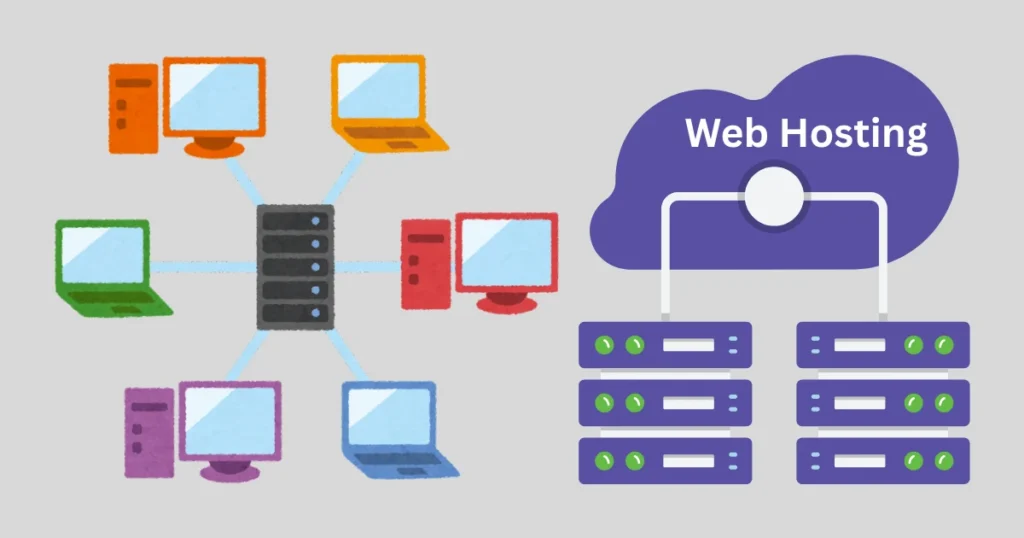
Web hosting is a service that stores your website files on a server and makes them accessible on the internet.
When someone types your domain name into their browser:
1. The browser connects to your hosting server
2. The server sends website files (HTML, images, scripts)
3. The website loads on the visitor’s screen
Think of web hosting as renting space on the internet.
How Web Hosting Works
Every website consists of:
- Files (HTML, CSS, images)
- Databases
- Application scripts
These are stored on powerful computers called servers.
Hosting companies maintain:
- Server hardware
- Internet connectivity
- Security
- Software updates
- Backup systems
You pay a monthly or yearly fee to use their server resources.
Types of Web Hosting
Not all hosting services are the same. Your needs determine which type is best.
1️⃣ Shared Hosting (Best for Beginners)
Shared hosting means your website shares server resources with other websites.
Pros:
✔ Affordable
✔ Easy to use
✔ Beginner-friendly
Cons:
✖ Slower performance under heavy traffic
✖ Limited control
Best for:
- Personal blogs
- Small business websites
- Portfolio sites
2️⃣ VPS Hosting (Virtual Private Server)
VPS hosting divides a physical server into virtual servers.
You get:
✔ Dedicated resources
✔ Better performance
✔ More control
But it costs more than shared hosting.
Best for:
- Growing websites
- Medium traffic businesses
- Developers
3️⃣ Dedicated Hosting
Dedicated hosting means you rent an entire server.
✔ Maximum performance
✔ Full control
✔ Custom configurations
But it’s expensive and requires technical knowledge.
Best for:
- Large businesses
- High-traffic websites
- Enterprise applications
4️⃣ Cloud Hosting
Cloud hosting uses multiple connected servers instead of one physical machine.
✔ High scalability
✔ Excellent uptime
✔ Flexible pricing
If one server fails, another takes over.
Best for:
- eCommerce websites
- SaaS platforms
- Rapidly growing sites
Popular Web Hosting Providers (2026)
Here are some of the most trusted hosting providers.
1. Bluehost
Bluehost
- Beginner-friendly
- Free domain (first year)
- WordPress optimized
- 24/7 support
Good for beginners starting their first website.
2. Hostinger
Hostinger
- Affordable pricing
- Fast loading speeds
- Custom control panel
- Great value for money
Ideal for budget-conscious users.
3. SiteGround
SiteGround
- Strong performance
- Excellent customer support
- Advanced caching
Best for business websites and WordPress users.
4. HostGator
HostGator
- Flexible plans
- Unmetered bandwidth
- Beginner-friendly
Good for small businesses.
Key Features to Look for in Web Hosting
When choosing a hosting provider, consider:
✔ Uptime Guarantee: Look for at least 99.9% uptime.
Downtime means lost visitors and lost revenue.
✔ Speed & Performance: Fast servers improve:
- User experience
- SEO rankings
- Conversion rates
✔ Security Features: Important features include:
- Free SSL certificate
- Malware scanning
- Firewall protection
- Automatic backups
✔ Customer Support: 24/7 live chat or phone support is important for beginners.
✔ Scalability: Choose hosting that allows easy upgrades as your site grows.
How Much Does Web Hosting Cost?
Prices vary depending on hosting type:
| Hosting Type | Average Monthly Cost
—————————————————-
| Shared Hosting | $2 – $10 |
| VPS Hosting | $20 – $80 |
| Dedicated Hosting | $80 – $300+ |
| Cloud Hosting | $10 – $200+ |
Long-term plans often provide discounts.
🌍 Web Hosting & SEO
Good hosting improves SEO.
Search engines like Google consider:
- Website speed
- Uptime reliability
- Security (HTTPS)
Slow hosting can hurt your rankings.
Web Hosting for eCommerce
Online stores require:
- Fast loading times
- Strong security
- Payment integration
- High uptime
Cloud or VPS hosting is recommended for eCommerce websites.
Web Hosting vs Domain Name
Many beginners confuse these.
- Domain name = website address (example.com)
- Web hosting = storage space for website files
You need both to launch a website.
How to Choose the Right Web Hosting
Ask yourself:
1. How much traffic do I expect?
2. What is my budget?
3. Do I need technical control?
4. Am I running an online store?
5. Do I need email hosting?
For beginners, shared hosting is usually enough.
For growing businesses, VPS or cloud hosting is better.
Pros & Cons of Web Hosting Services
Advantages
✔ Makes website accessible online
✔ Professional email options
✔ Secure storage
✔ Scalable growth options
Disadvantages
✖ Monthly or yearly cost
✖ Requires basic setup knowledge
✖ Cheap hosting may affect performance
Is Free Web Hosting Good?
Free hosting exists but comes with:
- Limited storage
- Ads on your website
- Poor performance
- No professional support
For serious projects, paid hosting is recommended.
Final Verdict: Is Web Hosting Necessary?
Yes — absolutely.
Web hosting is the backbone of your online presence. Whether you’re launching:
- A blog
- A business website
- An eCommerce store
- A portfolio
Reliable hosting ensures:
✔ Fast loading
✔ Security
✔ High uptime
✔ Professional credibility
In 2026, investing in good web hosting is one of the smartest steps for building a successful online presence.
Choose the right hosting type based on your needs, and your website will have the strong foundation it deserves.
Best software Guide
Best Web Hosting for Beginners
Shared vs VPS Hosting Comparison
Best Hosting for WordPress
Web Hosting SEO Optimization Guide