If you click on the links and make a purchase, we may earn a commission.
Finding the best tablet for students can make studying more convenient, especially for digital note-taking, reading textbooks, watching lectures, researching assignments, creating presentations, and attending online classes. Unlike traditional laptops, tablets are lightweight, portable, and often provide excellent battery life.
Table of Contents

Image Credit: Pixabay
The best student tablets depends on your budget and how you plan to use it. Some students need a powerful tablet capable of replacing a laptop, while others simply need an affordable device for reading PDFs, taking notes, browsing the web, and watching educational videos.
In this guide, we compare the best tablets for students in 2026, including premium iPads, Android tablets, Windows alternatives, and affordable options.
Quick Comparison: Best Tablets for Students
| Tablet | Best For | Key Feature | Display | Battery | Rating |
|---|---|---|---|---|---|
| iPad Air M3 | Best Overall | Powerful M3 chip | Liquid Retina | Excellent | 9.6/10 |
| iPad 11th Gen | Best Value | Affordable iPad experience | Liquid Retina | Excellent | 9.2/10 |
| iPad Pro M5 | Best Premium | Desktop-class performance | Ultra Retina XDR | Excellent | 9.5/10 |
| Samsung Galaxy Tab S11 | Best Android | AMOLED display & multitasking | Dynamic AMOLED 2X | Excellent | 9.4/10 |
| Microsoft Surface Pro 12 | Laptop Replacement | Windows 11 | PixelSense Flow | Very Good | 9.1/10 |
| OnePlus Pad 3 | Performance Value | Large display & fast hardware | 13.2-inch LCD | Excellent | 9.0/10 |
| Amazon Fire HD 10 | Best Budget | Affordable entertainment & study | Full HD | Good | 8.3/10 |
Specifications, accessories, prices, and availability can vary by region and configuration.
1. iPad Air M3: Best Tablet for Students Overall
The iPad Air M3 is our top overall choice for students because it offers an excellent combination of performance, portability, software, accessories, and long-term usability.
The M3 processor provides more than enough power for everyday school and university tasks. Students can use it for taking handwritten notes, reading PDFs, attending online lectures, browsing research papers, editing documents, creating presentations, drawing, and even more demanding creative applications.
When paired with an Apple Pencil and keyboard, the iPad Air can become a highly capable study and productivity device.

- WHY IPAD AIR — iPad Air is powerful, versatile, and comes in a choice of two sizes. Featuring the incredible performance…
- APPLE INTELLIGENCE — Apple Intelligence is the personal intelligence system that helps you write, express yourself, and …
- PERFORMANCE AND STORAGE — M3 is a powerful chip built for Apple Intelligence that brings amazing performance for advance…
Key Features
- Apple M3 chip
- 11-inch and larger display options
- Liquid Retina display
- Apple Pencil support
- Magic Keyboard compatibility
- USB-C connectivity
- Strong battery life
- iPadOS multitasking
- Lightweight design
The iPad Air is especially attractive for students who already use an iPhone or Mac because of Apple’s ecosystem integration.
Best for: College students, university students, note-taking, creative work, research, and general productivity.
Our Rating: 9.6/10
👉 Check the latest iPad Air M3 prices and student deals.
2. iPad 11th Generation: Best Affordable iPad for Students
Students who want the iPad experience without spending premium money should consider the 11th-generation iPad.
It provides a straightforward combination of performance, portability, battery life, and access to Apple’s extensive tablet app ecosystem.
For basic academic tasks such as reading textbooks, browsing websites, taking notes, watching lectures, writing assignments, and communicating with classmates, it can be an excellent choice.

- WHY IPAD — The 11-inch iPad is now more capable than ever with the superfast A16 chip, a stunning Liquid Retina display,…
- PERFORMANCE AND STORAGE — The superfast A16 chip delivers a boost in performance for your favorite activities. And with …
- 11-INCH LIQUID RETINA DISPLAY — The gorgeous Liquid Retina display is an amazing way to watch movies or draw your next m…
Key Features
- A16 chip
- 11-inch Liquid Retina display
- Apple Pencil support
- USB-C
- iPadOS
- Strong app ecosystem
- Excellent portability
- Long battery life
It is particularly suitable for students who don’t require the additional performance of an iPad Air or iPad Pro.
Best for: School students, college students, casual users, reading, research, and note-taking.
Our Rating: 9.2/10
👉 Compare iPad 11th-generation prices and available storage options.
3. iPad Pro M5: Best Premium Tablet for Students
For students who want the most powerful tablet experience available, the iPad Pro M5 is a premium option.
It is particularly suitable for demanding academic disciplines such as architecture, engineering, graphic design, animation, video production, photography, and other creative fields.
The combination of Apple’s M5 processor, advanced display technology, powerful apps, and optional keyboard accessories makes the iPad Pro capable of handling professional workloads.
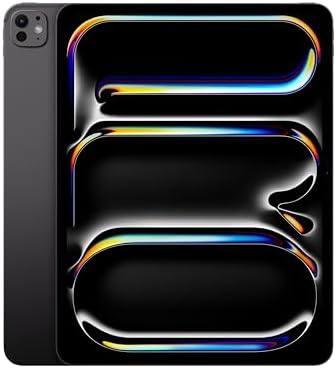
- WHY IPAD PRO — iPad Pro is the ultimate iPad experience in an impossibly thin and light design. Featuring the breakthrou…
- BUILT FOR APPLE INTELLIGENCE—Apple Intelligence is the personal intelligence system that helps you write, express yourse…
- 13-INCH ULTRA RETINA XDR DISPLAY — Ultra Retina XDR delivers extreme brightness and contrast and exceptional color accur…
Key Features
- Apple M5 chip
- Ultra Retina XDR display
- ProMotion high refresh rate
- Apple Pencil Pro support
- Magic Keyboard compatibility
- Advanced cameras
- USB-C/Thunderbolt connectivity
- Premium lightweight design
The major downside is price. For basic schoolwork, the additional performance may not justify the cost.
Best for: Creative students, designers, engineers, video editors, and power users.
Our Rating: 9.5/10
👉 Check the latest iPad Pro M5 configurations and deals.
4. Samsung Galaxy Tab S11: Best Android Tablet for Students
The Samsung Galaxy Tab S11 is one of the best choices for students who prefer Android.
Its major advantages include a high-quality AMOLED display, multitasking features, S Pen support, and Samsung’s productivity-focused software.
The S Pen is particularly useful for handwritten notes, diagrams, annotations, and marking up documents.
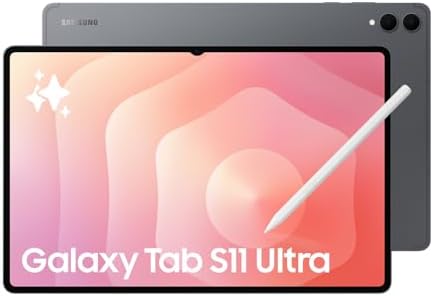
- Brilliant 14.6″ Dynamic AMOLED 2X Display – Features ultra-smooth 120Hz refresh rate, HDR10+ support, and crisp 1848×296…
- Premium Performance & Storage – Backed by 256GB storage, 12GB RAM, and expandable microSD slot (dedicated). Runs on the …
- Advanced Camera & Connectivity – Rear: 13MP (f/2.0 wide) + 8MP (f/2.2 ultrawide); Front: Dual 12MP (wide & ultrawide). A…
Key Features
- Dynamic AMOLED 2X display
- MediaTek Dimensity 9400+ processor
- S Pen included
- Samsung DeX
- microSD expansion
- Excellent multitasking
- Long battery life
- Premium metal construction
- IP68 water and dust resistance
Samsung DeX can provide a more desktop-like interface, making the tablet useful for students who want to work without carrying a traditional laptop.
Best for: Android users, note-taking, multitasking, media consumption, and productivity.
Our Rating: 9.4/10
👉 Compare Galaxy Tab S11 prices and student bundles.
5. Microsoft Surface Pro 12: Best Tablets That Can Replace a Laptop
Students who need Windows software should consider the Microsoft Surface Pro 12.
Unlike traditional Android and iPad tablets, Surface Pro runs Windows, giving students access to a much broader desktop software ecosystem.
With a detachable keyboard, it can function as both a tablet and laptop.
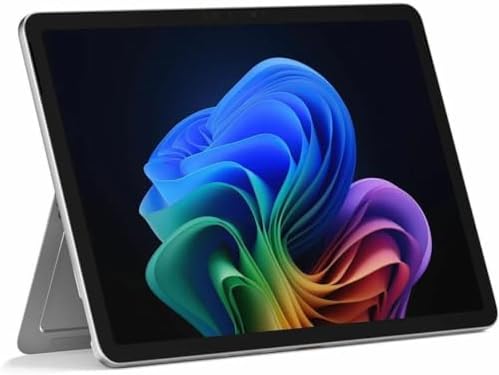
- The 1.51 lb light weight saves you from the physical strain of carrying this tablet
- The lavish 3.20 GHz processing speed and 16 GB memory lets you easily juggle between social, professional and gaming app…
- 12″ screen allows a great view of movies and TV shows and yet is small enough to easily carry
Key Features
- Windows 11
- Snapdragon X Plus processor
- 12-inch PixelSense Flow display
- Detachable keyboard
- Touchscreen
- Windows application compatibility
- Lightweight design
- USB-C connectivity
- Long battery life
This makes the Surface Pro particularly interesting for students who need Microsoft Office, desktop productivity applications, programming tools, or specialized Windows software.
Best for: University students, business students, programmers, and laptop replacement buyers.
Our Rating: 9.1/10
👉Check Surface Pro 12 prices, keyboard bundles, and student offers.
6. OnePlus Pad 3: Best Android Performance Value
The OnePlus Pad 3 offers a strong combination of performance, display size, battery capacity, and price.
Its large screen is useful for reading PDFs, multitasking, watching educational videos, and working on documents. The high refresh rate also makes scrolling and general navigation feel smooth.
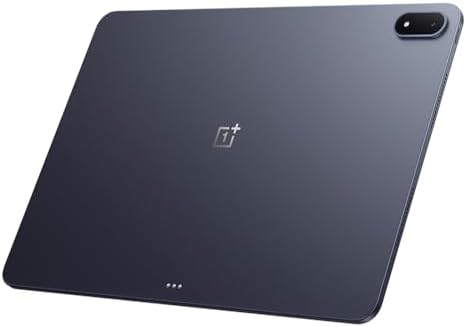
- 13.2 inches, IPS LCD, 68B colors, 2400 x 3392 pixels
- 512GB Storage, 16GB RAM
- Android 15, ColorOS 15, Qualcomm SM8750-AB Snapdragon 8 Elite (3 nm), Octa-core (2×4.32 GHz Oryon V2 Phoenix L + 6×3.53 …
Key Features
- Snapdragon 8 Elite processor
- Large 13.2-inch display
- 3.4K resolution
- 144Hz refresh rate
- Large battery
- Fast charging
- OnePlus ecosystem integration
- Optional keyboard and stylus accessories
It is an appealing alternative for students who want a large Android tablet without paying premium iPad Pro prices.
Best for: Android users, media consumption, multitasking, gaming, and performance-focused students.
Our Rating: 9.0/10
👉 Compare OnePlus Pad 3 prices and available accessories.
7. Amazon Fire HD 10: Best Budget Tablet for Students
For students who need an inexpensive tablet for basic tasks, the Amazon Fire HD 10 remains an attractive option.
It is suitable for reading, streaming educational videos, browsing the web, accessing online learning resources, and using basic applications.
However, it isn’t designed to replace a premium iPad or Windows laptop.

- Do what you love, uninterrupted — 25% faster performance than the previous generation and is ideal for seamless streamin…
- High-def entertainment — A 10.1″ 1080p Full HD display brings brilliant color to all your shows and games. Binge watch l…
- Thin, light, durable — Tap into entertainment from anywhere with a lightweight, durable design and strengthened glass ma…
Key Features
- 10.1-inch Full HD display
- Affordable pricing
- Fire OS
- Long battery life
- microSD storage expansion
- Lightweight design
- Amazon ecosystem
Its low price makes it especially useful as a secondary study device.
Best for: Budget-conscious students, younger students, reading, streaming, and basic schoolwork.
Our Rating: 8.3/10
👉 Check Amazon Fire HD 10 pricing and current discounts.
What Should Students Look for in a Tablet?
Choosing the right tablets requires more than comparing screen sizes and processor names. Consider how you will actually use the device.
1. Display Size
An 11-inch tablet is a great balance between portability and productivity.
Larger 12- to 13-inch displays are better for multitasking, PDFs, spreadsheets, and creative applications but may be less comfortable to carry.
2. Stylus Support
If you plan to take handwritten notes, choose a tablet with good stylus support.
The Apple Pencil, Samsung S Pen, and compatible Windows pens can turn a tablet into a digital notebook.
3. Keyboard Support
A keyboard can significantly improve productivity.
If you plan to write long assignments or research papers, consider the total cost of the tablet plus keyboard rather than comparing tablet prices alone.
4. Battery Life
Students often spend hours in classrooms, libraries, cafes, and study halls. A tablet with strong battery endurance can reduce the need to carry a charger.
5. Storage
For students, 128GB is a reasonable starting point. If you store lots of videos, games, design files, or downloaded textbooks, consider 256GB or more.
Some Android tablets also offer microSD expansion, which can be useful for additional storage.
6. Operating System
Choose based on your software requirements:
- iPadOS: Excellent apps, note-taking, creative tools, and ecosystem integration.
- Android: Flexible multitasking, customization, and hardware variety.
- Windows: Best for desktop applications and laptop replacement.
- Fire OS: Affordable and suitable for basic tasks.
Best Tablets for Different Types of Students
| Student Type | Recommended Tablet |
|---|---|
| Best overall student tablet | iPad Air M3 |
| Budget student | iPad 11th Gen / Fire HD 10 |
| Android student | Galaxy Tab S11 |
| Note-taking | Galaxy Tab S11 |
| Creative student | iPad Pro M5 |
| Engineering student | Surface Pro 12 / iPad Pro |
| Business student | Surface Pro 12 |
| Media student | OnePlus Pad 3 |
| Reading & PDFs | iPad Air / Galaxy Tab S11 |
| Laptop replacement | Surface Pro 12 |
Tablet vs. Laptop for Students
A tablets can be an excellent laptop alternative, but it isn’t perfect for everyone.
Choose a tablet if you:
- Take lots of handwritten notes
- Read PDFs and textbooks
- Watch online lectures
- Prefer touchscreen controls
- Want something lightweight
- Use cloud-based applications
- Draw or create digital artwork
Choose a laptop if you:
- Write long documents frequently
- Need specialized desktop software
- Use programming environments
- Work with large spreadsheets
- Need extensive multitasking
- Require traditional keyboard and mouse controls
For many students, the best solution may actually be a tablets plus keyboard, giving them the flexibility of both formats.
Recommended Accessories for Students
To get more from your tablets, consider adding:
- Stylus or digital pen
- Bluetooth keyboard
- Protective case
- Screen protector
- USB-C hub
- Wireless mouse
- External SSD
- Tablet stand
- Noise-canceling headphones
- Portable charger
A quality keyboard and stylus can substantially improve the productivity of a tablet.
Final Verdict
The iPad Air M3 is our top overall choice for students because it combines excellent performance, portability, battery life, app support, and accessories.
For Android users, the Samsung Galaxy Tab S11 stands out because of its AMOLED display, S Pen, multitasking features, and DeX mode. Students who need desktop Windows software should consider the Microsoft Surface Pro 12.
If you’re looking for a premium creative device, the iPad Pro M5 provides exceptional performance and display technology. Budget-conscious students can consider the iPad 11th generation or Amazon Fire HD 10, depending on their software needs.
Before buying, consider the complete setup cost—including keyboard, stylus, storage, case, and accessories. The cheapest tablet isn’t always the best value if you need to purchase expensive accessories afterward.
Frequently Asked Questions
What is the best tablets for students in 2026?
The iPad Air M3 is our best overall recommendation because it offers an excellent balance of performance, portability, software, battery life, and accessories.
Is an iPad good for college students?
Yes. iPads are excellent for note-taking, reading textbooks, research, video lectures, presentations, creative work, and many productivity tasks.
Is Samsung Galaxy Tab good for students?
Yes. Galaxy Tab models are particularly useful for students who want Android flexibility, S Pen note-taking, multitasking, and Samsung DeX.
How much storage should a student tablets have?
128GB is a good starting point for most students. Choose 256GB or more if you store large files, videos, games, or creative projects.
Do students need a keyboard for a tablet?
Not necessarily. However, a keyboard is highly recommended if you regularly write essays, reports, emails, or other long documents.
Is a tablets better than a laptop for studying?
A tablet is better for portability, handwriting, reading, and touchscreen interaction. A laptop is generally better for extensive typing, desktop applications, programming, and complex multitasking.
What is the best tablet for taking handwritten notes?
The iPad Air with Apple Pencil and Samsung Galaxy Tab S11 with S Pen are two excellent choices for handwritten notes.
Can a tablet replace a laptop for college?
It can for many students, especially when paired with a keyboard. However, students who require specialized Windows or macOS applications may still need a traditional laptop.
Are cheap tablets good for students?
Cheap tablets can be good for basic reading, browsing, streaming, and online learning. However, premium tablets generally provide better performance, software support, displays, and accessories.
Should I buy Wi-Fi or cellular tablet?
Wi-Fi is usually sufficient if you have reliable access to campus or home internet. Cellular models are useful if you frequently study away from Wi-Fi and want mobile connectivity.
Is an Apple Pencil worth buying for students?
If you take handwritten notes, annotate PDFs, draw diagrams, or create artwork, an Apple Pencil can significantly improve the iPad experience.
What is the best tablet for a laptop replacement?
The Microsoft Surface Pro 12 is one of the strongest choices because it runs Windows and can be configured with a detachable keyboard, providing a more traditional PC experience.