If you click on the links and make a purchase, we may earn a commission.
The best Ethernet switches make it easy to connect multiple wired devices to your network while improving reliability, reducing wireless congestion, and enabling faster local data transfers. Whether you’re building a home office, gaming setup, smart home, NAS network, or small business infrastructure, the right Ethernet switch can provide the extra ports and speed you need.
Table of Contents
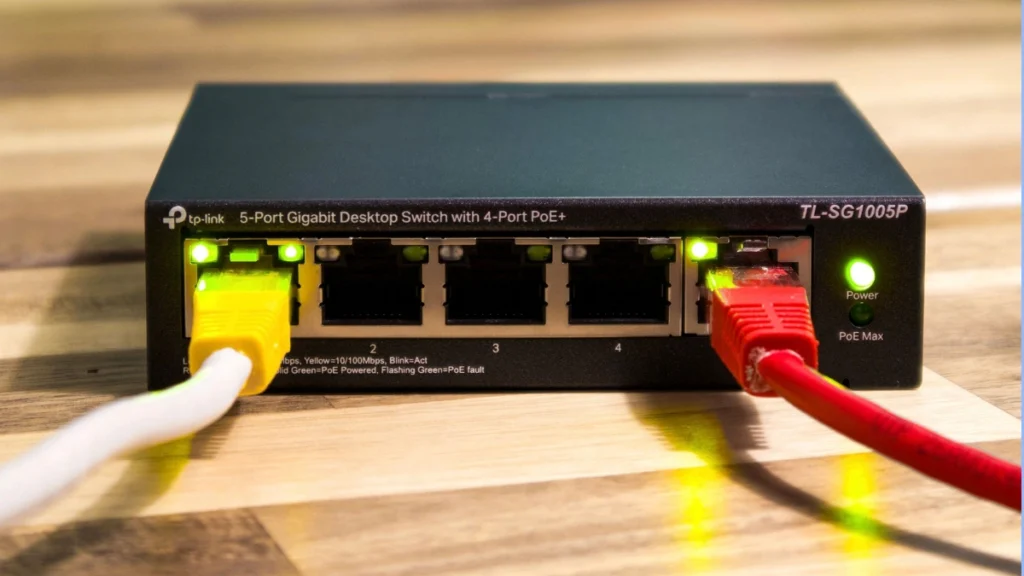
Image Credit: canva
Ethernet switches are available in different sizes and speeds, from affordable Gigabit switches for everyday networking to 2.5GbE, 5GbE, and 10GbE switches designed for high-performance networks.
In this guide, we’ve compared the best Ethernet switches in 2026 for home users, gamers, offices, NAS storage, Power over Ethernet, and high-speed networking.
Quick Comparison: Best Ethernet Switches
| Ethernet Switch | Best For | Key Feature | Ports | Speed | Rating |
|---|---|---|---|---|---|
| TP-Link TL-SG108 | Best Overall Budget | Reliable Gigabit networking | 8 | 1GbE | 9.4/10 |
| TP-Link TL-SG108S | Best Compact | Plug-and-play setup | 8 | 1GbE | 9.2/10 |
| NETGEAR GS308 | Best Home Use | Simple unmanaged switching | 8 | 1GbE | 9.3/10 |
| TP-Link TL-SG105 | Best 5-Port | Compact Gigabit switch | 5 | 1GbE | 9.1/10 |
| TP-Link TL-SG108-M2 | Best 2.5GbE | Affordable multi-gig networking | 8 | 2.5GbE | 9.6/10 |
| NETGEAR MS308 | Best 2.5GbE | Multi-gig home networking | 8 | 2.5GbE | 9.5/10 |
| TP-Link TL-SX1008 | Best 10GbE | High-speed wired networking | 8 | 10GbE | 9.5/10 |
| NETGEAR GS110MX | Best Mixed Speed | Gigabit + multi-gig | 10 | Up to 10GbE | 9.4/10 |
| TP-Link TL-SG2210MP | Best PoE | Managed PoE networking | 10 | Gigabit | 9.3/10 |
Specifications and port configurations may vary by exact model and market.
1. TP-Link TL-SG108 — Best Ethernet Switch for Most Homes
The TP-Link TL-SG108 is one of the simplest ways to add more wired Ethernet ports to a home or small office network.
This unmanaged switch requires virtually no configuration. Connect your router, computers, TVs, consoles, printers, or NAS devices, and the switch automatically handles network traffic.

- 𝗘𝗶𝗴𝗵𝘁 𝟮.𝟱 𝗚𝗯𝗽𝘀 𝗣𝗼𝗿𝘁𝘀 𝗳𝗼𝗿 𝗦𝘂𝗽𝗲𝗿-𝗙𝗮𝘀𝘁 𝗖𝗼𝗻𝗻𝗲𝗰𝘁𝗶𝗼𝗻𝘀: 8× 2.5-Gigabit ports unlock the highest performance of your Multi-Gig b…
- 𝗔𝘂𝘁𝗼-𝗡𝗲𝗴𝗼𝘁𝗶𝗮𝘁𝗶𝗼𝗻: Auto-negotiation intelligently senses the link speeds and adjusts between 3-speeds (100Mb/1G/2.5G) for…
- 𝗜𝗱𝗲𝗮𝗹 𝗳𝗼𝗿 𝗩𝗮𝗿𝗶𝗼𝘂𝘀 𝗦𝗰𝗲𝗻𝗮𝗿𝗶𝗼𝘀: Built for LAN parties, home entertainment, small and home offices, and instant transfer for…
Key Features
- 8 Gigabit Ethernet ports
- Unmanaged design
- Plug-and-play setup
- Auto-negotiation
- Auto MDI/MDIX
- Compact metal housing
- Energy-efficient operation
Best For
Home networking, gaming, smart TVs, printers, and small offices.
Our Rating: 9.4/10
2. TP-Link TL-SG108S — Best Compact Ethernet Switch
The TP-Link TL-SG108S is another excellent choice for users who need additional Gigabit ports without advanced management features.
- 𝗘𝗶𝗴𝗵𝘁 𝟮.𝟱 𝗚𝗯𝗽𝘀 𝗣𝗼𝗿𝘁𝘀 𝗳𝗼𝗿 𝗦𝘂𝗽𝗲𝗿-𝗙𝗮𝘀𝘁 𝗖𝗼𝗻𝗻𝗲𝗰𝘁𝗶𝗼𝗻𝘀: 8× 2.5-Gigabit ports unlock the highest performance of your Multi-Gig b…
- 𝗔𝘂𝘁𝗼-𝗡𝗲𝗴𝗼𝘁𝗶𝗮𝘁𝗶𝗼𝗻: Auto-negotiation intelligently senses the link speeds and adjusts between 3-speeds (100Mb/1G/2.5G) for…
- 𝗜𝗱𝗲𝗮𝗹 𝗳𝗼𝗿 𝗩𝗮𝗿𝗶𝗼𝘂𝘀 𝗦𝗰𝗲𝗻𝗮𝗿𝗶𝗼𝘀: Built for LAN parties, home entertainment, small and home offices, and instant transfer for…
Key Features
- 8 Gigabit ports
- Plug-and-play
- Unmanaged operation
- Compact design
- Automatic speed negotiation
- Energy-efficient technology
- Easy installation
It is ideal for users who don’t want to configure VLANs or other advanced networking functions.
Best For
Apartments, home offices, gaming setups, and everyday wired networking.
Our Rating: 9.2/10
3. NETGEAR GS308 — Best Ethernet Switch for Home Use
The NETGEAR GS308 is a straightforward 8-port Gigabit Ethernet switch designed for home and small-office networking.
Key Features
- 8 Gigabit ports
- Unmanaged
- Plug-and-play
- Fanless operation
- Compact design
- Metal housing
- Automatic network configuration
Because there is no complicated configuration, it is a good choice for beginners.
Best For
Home users, smart TVs, gaming consoles, PCs, and home offices.
Our Rating: 9.3/10
Affiliate CTA:
👉 Check NETGEAR GS308 pricing and current deals.
4. TP-Link TL-SG105 — Best 5-Port Ethernet Switch
If you only need a few additional ports, the TP-Link TL-SG105 is a compact and affordable option.
Key Features
- 5 Gigabit ports
- Unmanaged operation
- Plug-and-play
- Compact metal enclosure
- Automatic negotiation
- Energy-efficient design
It’s especially useful when your router has run out of available Ethernet ports.
Best For
Small apartments, gaming consoles, smart TVs, PCs, and small offices.
Our Rating: 9.1/10
Affiliate CTA:
👉 Compare TP-Link TL-SG105 prices and deals.
5. TP-Link TL-SG108-M2 — Best 2.5GbE Ethernet Switch
If you want faster wired networking than traditional Gigabit Ethernet, the TP-Link TL-SG108-M2 is an excellent choice.
Its 2.5GbE ports can be useful for high-speed internet connections, modern computers, Wi-Fi 7 routers, and NAS devices.
Key Features
- 8 × 2.5GbE ports
- Multi-gigabit networking
- Plug-and-play
- Unmanaged
- Compact metal housing
- Fanless design
- Automatic speed negotiation
Best For
NAS users, gaming PCs, Wi-Fi 6E/Wi-Fi 7 networks, content creators, and multi-gigabit internet.
Our Rating: 9.6/10
Affiliate CTA:
👉 Check TP-Link TL-SG108-M2 prices and availability.
6. NETGEAR MS308 — Best Multi-Gig Ethernet Switch
The NETGEAR MS308 is designed for users who want to move beyond traditional Gigabit networking.
Key Features
- 2.5GbE connectivity
- Multi-gig support
- Plug-and-play setup
- Unmanaged design
- Compact form factor
- Silent operation
- Automatic speed detection
A multi-gigabit switch can be especially useful when connecting a high-performance router, NAS, desktop computer, and other modern devices.
Best For
Home labs, NAS systems, gaming, creators, and multi-gigabit internet.
Our Rating: 9.5/10
Affiliate CTA:
👉 Compare NETGEAR MS308 prices and current offers.
7. TP-Link TL-SX1008 — Best 10GbE Ethernet Switch
The TP-Link TL-SX1008 targets demanding users who need extremely fast wired networking.
Key Features
- 8 × 10GbE ports
- Multi-gig compatibility
- High-speed local transfers
- Unmanaged setup
- Plug-and-play
- Metal housing
- Automatic negotiation
A 10GbE switch is particularly useful for users working with large files, high-performance NAS systems, video production, and professional workloads.
Best For
Content creators, NAS users, video editors, home labs, and professional networks.
Our Rating: 9.5/10
Affiliate CTA:
👉 Check TP-Link TL-SX1008 prices and availability.
8. NETGEAR GS110MX — Best Mixed-Speed Ethernet Switch
The NETGEAR GS110MX combines standard Gigabit ports with higher-speed connectivity, making it useful for networks containing devices with different Ethernet capabilities.
Key Features
- 10 Ethernet ports
- Multi-gig connectivity
- Gigabit ports
- Unmanaged design
- Plug-and-play
- Compact design
- Automatic speed negotiation
Best For
Home labs, offices, NAS systems, gaming PCs, and mixed-speed networks.
Our Rating: 9.4/10
Affiliate CTA:
👉 Compare NETGEAR GS110MX prices and deals.
9. TP-Link TL-SG2210MP — Best PoE Ethernet Switch
For users who need to power network devices through Ethernet, a PoE switch can simplify installation.
The TP-Link TL-SG2210MP provides managed networking and Power over Ethernet capabilities.
Key Features
- Managed switching
- PoE support
- Gigabit Ethernet
- VLAN support
- Network management
- Security features
- Multiple Ethernet ports
It can be useful for connecting compatible security cameras, access points, VoIP phones, and other PoE devices.
Best For
Small businesses, security systems, access points, offices, and advanced home networks.
Our Rating: 9.3/10
Affiliate CTA:
👉 Check TP-Link TL-SG2210MP pricing and specifications.
What Is an Ethernet Switch?
An Ethernet switch is a networking device that connects multiple wired devices to the same local network.
For example:
Internet → Router → Ethernet Switch → PCs / NAS / TV / Console / Printer
A router manages your connection to the internet and typically provides basic switching functionality. A dedicated Ethernet switch adds more ports and can provide advanced networking capabilities depending on the model.
Ethernet Switch vs. Router
| Feature | Router | Ethernet Switch |
|---|---|---|
| Connects to internet | Yes | Usually through router |
| Provides Ethernet ports | Yes | Yes |
| Wi-Fi | Often | Usually no |
| DHCP/NAT | Yes | Usually no |
| Adds wired ports | Limited | Yes |
| VLAN support | Some | Managed models |
| Best use | Internet gateway | Wired device expansion |
If your router has only four Ethernet ports but you need eight wired connections, an Ethernet switch is an easy solution.
Unmanaged vs. Managed Ethernet Switches
Unmanaged Switch
An unmanaged switch is designed for simplicity.
Advantages
- Plug-and-play
- Affordable
- No configuration
- Easy installation
- Ideal for homes
Best For
Most consumers, gaming setups, smart TVs, and basic home offices.
Managed Switch
A managed switch provides advanced configuration options.
Features may include:
- VLANs
- Quality of Service
- Port monitoring
- Link aggregation
- Traffic management
- Security controls
- SNMP
- Advanced diagnostics
Best For
Businesses, IT professionals, home labs, advanced users, and complex networks.
Gigabit vs. 2.5GbE vs. 10GbE
| Ethernet Type | Maximum Theoretical Speed | Best For |
|---|---|---|
| 100Mbps | 100Mbps | Legacy devices |
| Gigabit | 1Gbps | Most homes |
| 2.5GbE | 2.5Gbps | Modern home networks |
| 5GbE | 5Gbps | High-performance systems |
| 10GbE | 10Gbps | NAS, creators, professionals |
Gigabit Ethernet remains sufficient for many users.
However, 2.5GbE is increasingly attractive for modern Wi-Fi 7 routers, NAS devices, gaming PCs, and multi-gigabit broadband.
How Many Ethernet Ports Do You Need?
Choosing the right port count can prevent unnecessary upgrades.
| Number of Ports | Best For |
|---|---|
| 5 | Small setups |
| 8 | Most homes |
| 10–16 | Home offices |
| 16–24 | Small businesses |
| 24–48 | Larger offices |
Remember to count the connection from the switch to your router when calculating available ports.
Ethernet Switches for Gaming
A wired Ethernet connection can provide lower latency and greater stability than Wi-Fi.
A switch is useful when you need to connect:
- Gaming PC
- PlayStation
- Xbox
- Smart TV
- Streaming device
- Desktop PC
For gaming, a Gigabit switch is normally sufficient.
If you have a modern Wi-Fi 7 router and high-speed broadband, a 2.5GbE switch can provide more bandwidth for compatible devices.
Ethernet Switches for NAS
A network-attached storage system can benefit significantly from faster Ethernet.
For basic backups and file sharing, Gigabit Ethernet is often sufficient.
For large media libraries, video editing, or frequent large file transfers, consider:
- 2.5GbE
- 5GbE
- 10GbE
Remember that both the NAS and computer must support the same high-speed networking standard to achieve the full benefit.
What Is PoE?
Power over Ethernet (PoE) allows compatible devices to receive both network connectivity and electrical power through a single Ethernet cable.
PoE can be useful for:
- Security cameras
- Wireless access points
- VoIP phones
- Smart devices
- Network intercoms
A PoE switch can simplify installations because separate power cables aren’t always required for compatible devices.
Ethernet Switch Buying Guide
Before purchasing a switch, consider these factors:
1. Port Count
Choose enough ports for your current devices plus room for expansion.
2. Ethernet Speed
Gigabit is enough for most basic networks, while 2.5GbE and 10GbE are better for high-speed environments.
3. Managed or Unmanaged
Choose unmanaged for simplicity and managed for advanced networking.
4. PoE
Choose PoE if you need to power compatible cameras, access points, or VoIP devices.
5. Fanless Design
A fanless switch can be preferable for bedrooms, offices, and quiet home environments.
6. VLAN Support
If you want separate networks for guests, IoT devices, or business systems, choose a managed switch with VLAN capabilities.
7. Link Aggregation
Link aggregation can combine multiple network links in supported environments, potentially increasing aggregate bandwidth or redundancy.
Best Ethernet Switch by Use Case
| Use Case | Recommended Switch |
|---|---|
| Best overall | TP-Link TL-SG108 |
| Best 5-port | TP-Link TL-SG105 |
| Best home | NETGEAR GS308 |
| Best budget | TP-Link TL-SG108 |
| Best 2.5GbE | TP-Link TL-SG108-M2 |
| Best multi-gig | NETGEAR MS308 |
| Best 10GbE | TP-Link TL-SX1008 |
| Best mixed-speed | NETGEAR GS110MX |
| Best PoE | TP-Link TL-SG2210MP |
| Best for gaming | TP-Link TL-SG108-M2 |
| Best for NAS | TP-Link TL-SG108-M2 |
| Best for professionals | TP-Link TL-SX1008 |
| Best for small offices | NETGEAR GS110MX |
Final Verdict
The TP-Link TL-SG108 is our best overall Ethernet switch for most homes because it offers eight Gigabit ports, simple plug-and-play operation, and excellent value.
For users who need faster networking, the TP-Link TL-SG108-M2 is an excellent 2.5GbE option for modern PCs, NAS devices, Wi-Fi 7 routers, and multi-gigabit internet.
If you’re building a high-performance network, the TP-Link TL-SX1008 provides 10GbE connectivity for demanding workloads such as video editing, large file transfers, professional storage, and home labs.
The NETGEAR GS308 is another excellent choice for basic home networking, while the TP-Link TL-SG2210MP is better suited to users who need managed features and PoE.
Before buying, consider port count, Ethernet speed, managed versus unmanaged operation, PoE support, VLAN capabilities, noise level, and future expansion.
For most households, an 8-port Gigabit switch is still enough. But if you’re upgrading to Wi-Fi 7, multi-gigabit internet, or a high-speed NAS, investing in a 2.5GbE or 10GbE switch can make your wired network much more future-ready.
Frequently Asked Questions
What is the best Ethernet switch in 2026?
The TP-Link TL-SG108 is an excellent overall choice for basic home and office networking, while the TP-Link TL-SG108-M2 is better for users who need 2.5GbE.
Do Ethernet switches increase internet speed?
A switch doesn’t increase the speed provided by your ISP. However, a faster switch can prevent the wired network from becoming a bottleneck when transferring data between compatible devices.
Is a Gigabit Ethernet switch still worth buying?
Yes. Gigabit Ethernet remains sufficient for many homes, offices, gaming systems, smart TVs, and everyday networking devices.
Should I buy a 2.5GbE switch?
A 2.5GbE switch is worth considering if you have multi-gigabit internet, a modern Wi-Fi 7 router, a compatible NAS, or computers with 2.5GbE ports.
What is the best Ethernet switch for gaming?
A reliable Gigabit switch is sufficient for most gaming setups. The TP-Link TL-SG108-M2 is a stronger choice if your gaming PC and network support 2.5GbE.
What is the best Ethernet switch for NAS?
For basic NAS use, Gigabit Ethernet works well. For large file transfers and media production, a 2.5GbE or 10GbE switch can provide significantly more bandwidth.
What is the difference between managed and unmanaged switches?
Unmanaged switches are plug-and-play, while managed switches provide advanced features such as VLANs, QoS, monitoring, traffic management, and network configuration.
How many Ethernet ports do I need?
An 8-port switch is a good choice for many homes. Consider 5 ports for small setups and 10–16 or more ports for home offices and larger networks.
What is PoE on an Ethernet switch?
Power over Ethernet allows compatible network devices to receive power and data through a single Ethernet cable.
Does an Ethernet switch reduce latency?
A quality wired switch can provide a stable, low-latency connection compared with Wi-Fi. However, internet latency also depends on your ISP and the remote server.
Can I connect a switch to another switch?
Yes. Ethernet switches can generally be connected together to expand the number of available wired network ports.
Do Ethernet switches work with Wi-Fi routers?
Yes. Connect the Ethernet switch to a LAN port on your router, then connect wired devices to the switch.
Is 10GbE worth it for home users?
10GbE can be worthwhile for video editors, NAS users, professionals, home-lab enthusiasts, and users transferring very large files. For ordinary browsing and streaming, Gigabit or 2.5GbE is usually sufficient.
What should I look for when buying an Ethernet switch?
Focus on port count, Ethernet speed, managed or unmanaged design, PoE support, VLAN capabilities, 2.5GbE/10GbE support, power consumption, fan noise, and price.
Best Products
Best Smartphones for Everyday Use in 2026
Best Laptops for Students in 2026