If you click on the links and make a purchase, we may earn a commission.
Finding the best laptops for students means balancing performance, battery life, portability, durability, display quality, and price. Students need a computer that can handle everyday assignments, research, presentations, video calls, web browsing, note-taking, and entertainment without becoming a burden to carry between classes.
Image Credit: Pixabay
Table of Contents
In 2026, students have more choices than ever, including Windows laptops, MacBooks, Chromebooks, and powerful 2-in-1 devices. The best option depends on your course, budget, software requirements, and whether you prioritize portability, battery life, performance, or versatility.
This guide compares the best laptops for students in 2026, highlights their key features, and explains which type of student each model is best suited for.
Quick Comparison: Best Student Laptops
| Laptop | Best For | Key Feature | Display | Battery Focus | Overall Rating |
|---|---|---|---|---|---|
| MacBook Air M4 | Best Overall | Excellent balance of performance and portability | Liquid Retina | Excellent | 9.6/10 |
| Dell XPS 13 | Windows Students | Premium design and portability | High-resolution | Excellent | 9.2/10 |
| Microsoft Surface Laptop 7 | Productivity | Snapdragon performance and battery life | PixelSense | Excellent | 9.2/10 |
| Lenovo Yoga 7i | 2-in-1 Students | Flexible touchscreen design | OLED option | Very Good | 9.0/10 |
| ASUS Zenbook 14 OLED | Display & Value | OLED screen and portability | 2.8K OLED | Excellent | 9.1/10 |
| Acer Chromebook Plus 514 | Budget Students | Affordable ChromeOS experience | Full HD | Very Good | 8.5/10 |
| HP Pavilion Plus 14 | Everyday Study | Strong value and versatile hardware | 2.8K OLED option | Very Good | 8.8/10 |
Specifications, configurations, prices, and availability can vary by market and retailer.
1. MacBook Air M4 — Best Laptop for Students Overall
The MacBook Air M4 is one of the best choices for students who want a lightweight laptops with strong performance, excellent battery life, and a premium user experience.
The M4 chip provides more than enough performance for common student workloads such as Microsoft Office, Google Workspace, web research, programming, photo editing, video calls, and multitasking.
Its fanless design is another advantage because the laptop operates quietly during normal academic work. The lightweight chassis also makes it easy to carry between classrooms, libraries, and home.
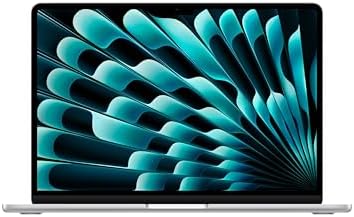
- BUILT FOR COLLEGE. AND BEYOND — MacBook Air with the M5 chip packs blazing speed and powerful AI capabilities into an in…
- TEAR THROUGH TOUGH ASSIGNMENTS — With its faster CPU and unified memory, the M5 chip delivers even more performance and …
- MAKE QUICK WORK OF YOUR TO-DO LIST — Apple Intelligence helps you write, express yourself, and get things done effortles…
Key Features
- Apple M4 chip
- Lightweight and portable design
- High-quality Liquid Retina display
- Excellent battery endurance
- MagSafe charging
- Multiple storage and memory configurations
- macOS ecosystem
- High-quality webcam and speakers
The MacBook Air is particularly attractive for students who already use an iPhone or iPad because Apple’s ecosystem makes moving between devices convenient.
Best for: College students, university students, writers, business students, and general academic work.
Our Rating: 9.6/10
👉 Check the latest MacBook Air M4 price and student deals.
2. Dell XPS 13 — Best Windows Laptop for Students
The Dell XPS 13 is an excellent Windows alternative to the MacBook Air. Its compact design makes it particularly useful for students who carry their laptop around campus every day.
The XPS 13 focuses on portability while still offering enough performance for productivity applications, browsing, research, presentations, coding, and video conferencing.
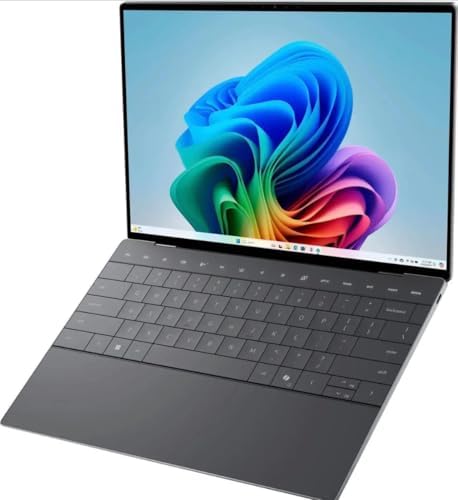
- 13.4 inch FHD+ (1920 x 1200) Anti-Glare 30-120Hz 500-nits InfinityEdge Eye Safe Non-Touch Display
- Snapdragon X Elite, X1E-80-100 (12 cores up to 3.4 GHz Dual-Core Boost up to 4.0 GHz, NPU Upto 45 TOPS)
- 16GB RAM | 512GB SSD
Key Features
- Compact premium design
- High-quality display options
- Windows 11
- Modern Intel or Snapdragon configurations
- Lightweight construction
- Strong battery performance
- Comfortable keyboard
- Fast SSD storage
The XPS 13 is a particularly good option for students who prefer Windows software but don’t want a bulky laptop.
Best for: University students, business students, programmers, and Windows users.
Our Rating: 9.2/10
👉 Compare Dell XPS 13 configurations and current prices.
3. Microsoft Surface Laptop 7 — Best for Productivity
The Microsoft Surface Laptop 7 combines a premium design with strong productivity performance and excellent portability.
Its clean Windows experience makes it suitable for students who spend much of their time writing papers, browsing research, attending online classes, creating presentations, and using Microsoft 365.
The Snapdragon-powered configurations are especially appealing to students who prioritize battery life and quiet operation.

- ULTRA-PORTABLE LAPTOP — Boost your productivity and creativity with the Microsoft Multi-Touch Surface Laptop 6 for Busin…
- POWERFUL PERFORMANCE — Features Intel 16-Core Ultra 7 165H processor and Intel Graphics for superior efficiency and spee…
- EXCELLENT VISUAL — Enjoy stunning visuals on the 13.5-inch 2K+ (2256 x 1504) touchscreen with 400-nit brightness. USB4 p…
Key Features
- Snapdragon X-series processor options
- Windows 11
- High-resolution PixelSense touchscreen
- Premium aluminum design
- Excellent battery life
- Comfortable keyboard
- Compact and portable
- Copilot+ PC capabilities
Best for: Microsoft 365 users, business students, writers, and productivity-focused students.
Our Rating: 9.2/10
👉 See the latest Surface Laptop 7 deals and configurations.
4. Lenovo Yoga 7i — Best 2-in-1 Laptops for Students
Students who want a laptop and tablet in one device should consider the Lenovo Yoga 7i.
Its 2-in-1 hinge allows the display to rotate into different positions, making it useful for typing assignments, watching lectures, presenting projects, or taking notes with a compatible stylus.
The touchscreen can also be useful for students who prefer interactive applications.
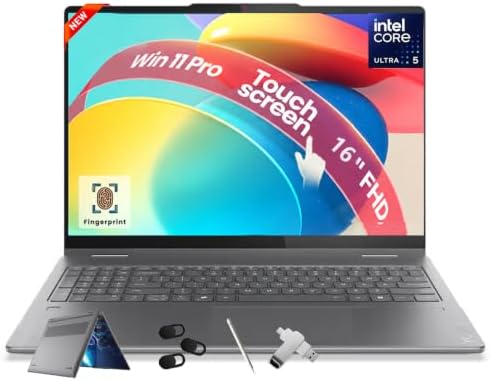
- [NEXT-GEN INTEL ULTRA PERFORMANCE] Powered by the Intel Ultra 5 226V processor featuring an 8-core architecture and a de…
- [HIGH-SPEED LPDDR5X MEMORY] Equipped with 16GB LPDDR5X system memory operating at a rapid 8533MHz for seamless applicati…
- [CONVERTIBLE TOUCHSCREEN DISPLAY] Features a 16-inch WUXGA (1920 x 1200) IPS touchscreen display with 300 nits brightnes…
Key Features
- 360-degree hinge
- Touchscreen display
- Intel Core processor options
- Windows 11
- Convertible laptop/tablet design
- OLED display options
- Strong connectivity
- Portable design
The Yoga 7i is particularly useful for students who want flexibility without purchasing a separate tablet.
Best for: College students, creative students, note-takers, and presentation-heavy courses.
Our Rating: 9.0/10
👉 Check Lenovo Yoga 7i prices and available configurations.
5. ASUS Zenbook 14 OLED — Best Student Laptops for Display Quality
The ASUS Zenbook 14 OLED is a strong choice for students who want a beautiful display without moving into expensive workstation territory.
Its OLED panel provides excellent contrast and vibrant colors, making it useful for studying, watching videos, photo editing, and general entertainment.
The compact design also makes it convenient for students who regularly move between classrooms and study spaces.
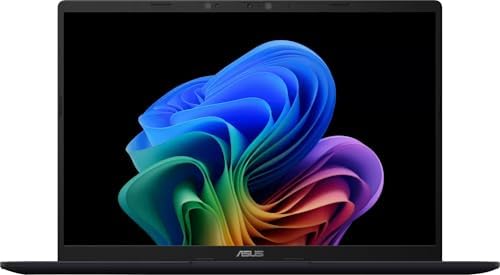
- DISPLAY: 14-inch FHD+ screen with 1920 x 1200 (WUXGA) resolution delivers crisp, clear visuals for work and entertainmen…
- POWERFUL PERFORMANCE: Snapdragon X processor with Qualcomm Adreno GPU and 16GB RAM ensures smooth multitasking and effic…
- AMPLE STORAGE: 512GB SSD provides fast boot times, quick file access, and generous space for documents, media, and appli…
Key Features
- 14-inch OLED display options
- High-resolution screen
- Modern Intel or AMD processors
- Lightweight design
- Fast SSD storage
- Strong battery life
- Premium construction
- Wi-Fi connectivity
Best for: Students who value display quality, media consumption, portability, and productivity.
Our Rating: 9.1/10
👉 Compare Zenbook 14 OLED models and current student discounts.
6. Acer Chromebook Plus 514 — Best Budget Laptop for Students
For students who primarily use Google Docs, Google Classroom, Gmail, YouTube, web applications, and cloud-based productivity tools, a Chromebook Plus can be a smart budget choice.
The Acer Chromebook Plus 514 provides a straightforward ChromeOS experience and avoids many of the costs associated with premium Windows and Mac laptops.

- 【Outstanding 15.6″ Display】1920 x 1080 high resolution IPS screen provides you with a sharp and clear text and images. T…
- 【High Performance and Configuration】Chrome OS laptop. Numeric Keypad. Intel Celeron N4500 processor (frequency up to 2.8…
- 【Exceptional Storage Space】Equipped with 4GB LPDDR4X RAM and up to 576GB storage capacity, runs smoothly, responds quick…
Key Features
- ChromeOS
- Full HD display
- Chromebook Plus performance
- Long battery life
- Lightweight design
- Google Workspace integration
- Cloud-focused workflow
- Affordable pricing
Chromebooks are particularly useful for students who don’t need specialized Windows or macOS software.
Best for: School students, basic college work, web-based learning, and budget-conscious buyers.
Our Rating: 8.5/10
👉 Check Acer Chromebook Plus 514 prices and current offers.
7. HP Pavilion Plus 14 — Best Value Student Laptop
The HP Pavilion Plus 14 offers a good balance between performance, portability, and display quality.
Depending on configuration, students can choose hardware suitable for everyday academic workloads, programming, creative applications, and multitasking.

- [8-Core AMD Ryzen 7 5825U Processor] Up to 4.5 GHz Max Boost Clock, 16 MB L3 Cache, 8 cores, 16 threads. Experience a wh…
- [16GB RAM + 1TB Storage (512GB SSD + 500GB Ext)] Substantial high-bandwidth 16GB DDR4 Memory to smoothly run your games …
- [15.6″ FHD IPS Display] Always see your content at its best—displayed in stunning Full HD resolution with 178-degree wid…
Key Features
- 14-inch display
- Modern Intel processor options
- OLED display configurations
- Windows 11
- Fast SSD storage
- Compact design
- Good keyboard
- Multiple connectivity options
It is a versatile choice for students who want a traditional Windows laptop without paying flagship prices.
Best for: General students, office work, research, programming, and multimedia.
Our Rating: 8.8/10
👉 Compare HP Pavilion Plus 14 configurations before buying.
How to Choose the Best Laptop for Students
The best student laptop depends heavily on your academic requirements. Before buying, consider these factors.
1. Processor
For everyday schoolwork, a modern Intel Core, AMD Ryzen, Apple Silicon, or Snapdragon processor should provide sufficient performance.
Students studying engineering, computer science, architecture, video production, or other demanding subjects may need a more powerful processor.
2. RAM
For most students, 8GB of RAM is a basic starting point, but 16GB is preferable for multitasking and long-term use.
If you regularly run programming environments, virtual machines, editing software, or multiple demanding applications, consider 16GB or more.
3. Storage
A 256GB SSD can work for basic academic use, but 512GB is generally a better target for students who store documents, applications, photos, videos, and projects locally.
An SSD also makes the laptops feel much faster than older mechanical hard drives.
4. Battery Life
Students frequently spend several hours away from power outlets. Good battery life is therefore one of the most important features.
Look for laptops that can comfortably handle a full study day under realistic usage.
5. Portability
A 13- or 14-inch laptop is often an excellent compromise between screen size and portability.
If you frequently carry your laptops around campus, choosing a lighter model can make a significant difference.
6. Operating System
Choose the operating system based on your course requirements.
- macOS: Excellent for general productivity and creative work.
- Windows: Broadest compatibility with software and peripherals.
- ChromeOS: Excellent for web-based education and budget buyers.
Always check whether your university requires Windows-only applications before choosing a Mac or Chromebook.
Which Laptop Is Best for Different Students?
| Student Type | Recommended Laptop |
|---|---|
| General college student | MacBook Air M4 |
| Windows student | Dell XPS 13 |
| Business student | Surface Laptop 7 |
| Creative student | MacBook Air M4 / ASUS Zenbook 14 OLED |
| Programming student | Dell XPS 13 / MacBook Air M4 |
| Note-taking student | Lenovo Yoga 7i |
| Budget student | Acer Chromebook Plus 514 |
| Media-focused student | ASUS Zenbook 14 OLED |
| Heavy multitasker | Surface Laptop 7 / MacBook Air M4 |
Laptop Accessories Students Should Consider
A laptops is only part of a useful study setup. Depending on your needs, consider adding:
- Wireless mouse
- Laptop sleeve or backpack
- USB-C hub
- External monitor
- Noise-canceling headphones
- External SSD
- Laptop stand
- Wireless keyboard
- Webcam
- Portable charger or power bank
These accessories can make studying, attending online classes, and completing projects more comfortable.
Final Verdict
The MacBook Air M4 is our top overall recommendation for students because it combines excellent performance, portability, battery life, build quality, and a simple everyday experience.
For Windows users, the Dell XPS 13 is an excellent premium choice, while the Microsoft Surface Laptop 7 is particularly attractive for productivity-focused students. If you want a convertible touchscreen device, the Lenovo Yoga 7i is worth considering.
Students who prioritize display quality should look at the ASUS Zenbook 14 OLED, while budget-conscious buyers can save considerably with the Acer Chromebook Plus 514.
Before buying, compare processor, RAM, storage, battery expectations, software compatibility, warranty, and current retailer pricing. A slightly more expensive laptops can be better value if it lasts throughout your entire degree.
Frequently Asked Questions
What is the best laptops for students in 2026?
The MacBook Air M4 is one of the best overall student laptops because of its performance, portability, battery life, and premium build.
Is 8GB RAM enough for students?
8GB can handle basic browsing, documents, presentations, and online classes, but 16GB is a better choice for multitasking and long-term use.
Is a MacBook good for college students?
Yes. MacBooks are excellent for writing, research, productivity, programming, creative work, and everyday college tasks. However, students should verify that their required course software supports macOS.
Is a Chromebook good for students?
A Chromebook is excellent for students who primarily use browser-based applications such as Google Docs, Google Classroom, Gmail, and web research.
How much storage does a student laptop need?
For most students, 256GB is a reasonable minimum, while 512GB provides more flexibility for applications, projects, photos, and videos.
What screen size is best for students?
A 13- or 14-inch laptop is usually ideal for students who prioritize portability. A 15- or 16-inch model can be better for students who want more workspace.
Should students buy a gaming laptop?
Only if gaming or demanding applications are important. Gaming laptops can provide excellent performance but are typically heavier, less portable, and sometimes have shorter battery life.
Are 2-in-1 laptops good for students?
Yes. 2-in-1 laptops such as the Lenovo Yoga series are useful for students who want touchscreen functionality, flexible viewing modes, and tablet-style note-taking.
Should I buy 16GB RAM for college?
If your budget allows, 16GB is recommended. It provides more headroom for multitasking and demanding applications and can make the laptop more suitable for several years of use.
When is the best time to buy a student laptop?
Major sales periods, back-to-school promotions, holiday sales, and the launch of new processor generations can provide opportunities to find better prices. Always compare the final price and specifications rather than focusing only on the advertised discount.
- Best TVs for Gaming in 2026: Top Picks for PS5, Xbox & PC
- Best Smart Light Bulbs in 2026: Top Picks for Smarter Homes
- Best Bluetooth Headphones in 2026: Top Picks for Music, Travel
- Best Smartphones for Photography in 2026: Top Camera Phones for Photos
- Best 65-Inch TVs in 2026: Top Picks for Movies, Gaming & Streaming