If you click on the links and make a purchase, we may earn a commission.
The best USB-C hubs can transform a laptop with only a few ports into a versatile workstation. A good USB-C hub can add HDMI, USB-A, Ethernet, SD card slots, USB-C charging, and other connections without requiring a bulky desktop dock.
Table of Contents
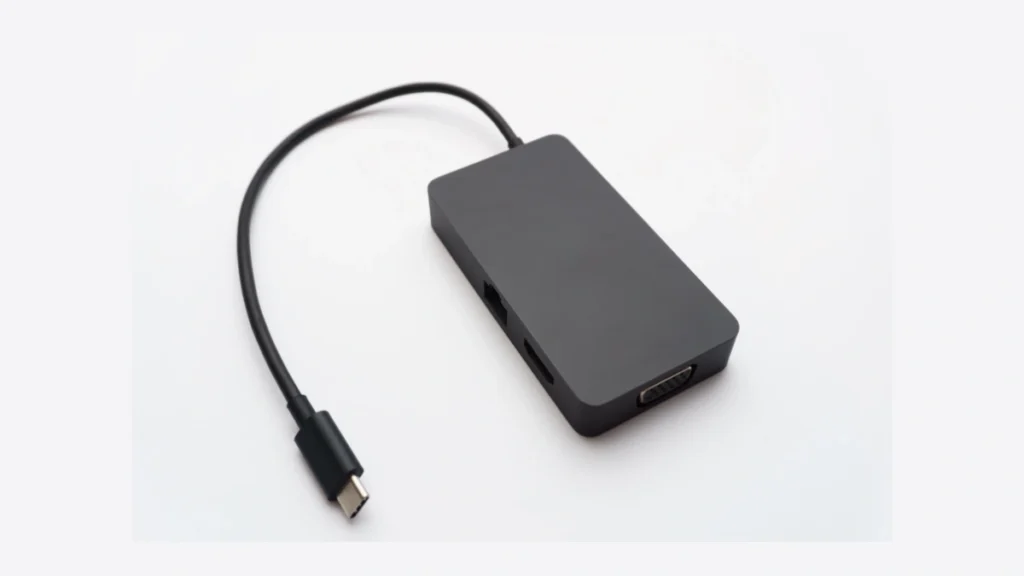
Image Credit: Pexels
USB-C hubs are especially useful for modern laptops, MacBooks, tablets, and other devices that have replaced older ports with USB-C. They can make it easier to connect monitors, keyboards, mice, external SSDs, cameras, projectors, Ethernet networks, and other accessories.
However, not every USB-C hub offers the same performance. Some are designed for basic connectivity, while premium models can support multiple displays, high-speed data transfers, fast charging, and advanced standards such as USB4 or Thunderbolt.
Below, we’ve compared some of the best USB-C hubs in 2026 based on connectivity, performance, portability, compatibility, and overall value.
Quick Comparison: Best USB-C Hubs
| USB-C Hub | Best For | Key Feature | Ports | Charging | Rating |
|---|---|---|---|---|---|
| Anker 565 USB-C Hub | Best Overall | Versatile all-in-one connectivity | 11-in-1 | Up to 85W PD | 9.5/10 |
| Anker 555 USB-C Hub | Best for MacBook | Excellent everyday connectivity | 8-in-1 | Up to 100W PD | 9.4/10 |
| UGREEN Revodok Pro 2101 | Best High-Speed | USB 3.2 performance | Multiple | Up to 100W PD | 9.2/10 |
| Satechi USB-C Multiport Adapter 8K | Best Premium | 8K display support | Multiport | High-speed PD | 9.3/10 |
| Belkin USB-C 7-in-1 Hub | Best Compact | Reliable everyday ports | 7-in-1 | Up to 100W PD | 9.1/10 |
| Anker 332 USB-C Hub | Best Budget | Affordable basic expansion | 5-in-1 | Up to 85W PD | 8.8/10 |
| UGREEN 6-in-1 USB-C Hub | Best Portable | Compact travel design | 6-in-1 | PD charging | 8.9/10 |
Port configuration, charging limits, display support, and compatibility vary by specific model and host device.
1. Anker 565 USB-C Hub: Best USB-C Hubs Overall
The Anker 565 USB-C Hub is our top overall choice for users who want a versatile combination of ports without moving to a full desktop docking station.
Its multiport design can provide HDMI, USB-A, USB-C, Ethernet, SD card, and microSD connectivity, making it particularly useful for laptop users.

- Ultra-Fast Data Transfers: Experience the power of 5Gbps transfer speeds with this USB hub and sync data in seconds, mak…
- Long Cable, Endless Convenience: Say goodbye to short and restrictive cables. This USB hub comes with a 2 ft long cable,…
- Sleek and Compact: Measuring just 4.2 × 1.2 × 0.4 inches, carry the USB hub in your pocket or laptop bag and connect eff…
Key Features
- 11-in-1 connectivity
- HDMI output
- USB-A ports
- USB-C data connectivity
- Ethernet
- SD and microSD card readers
- USB-C Power Delivery
- Compact aluminum-style design
- Plug-and-play operation on supported systems
The hub is particularly useful for photographers who regularly transfer files from SD cards, professionals connecting Ethernet networks, and laptop users who need additional USB ports.
It is also convenient for people who work from home and want to connect multiple accessories without carrying several adapters.
Best for: Home offices, professionals, photographers, students, and general laptop users.
Our Rating: 9.5/10
👉 Check the latest Anker 565 prices and available deals.
2. Anker 555 USB-C Hub: Best USB-C Hub for MacBook
The Anker 555 USB-C Hubs is a strong choice for MacBook and laptop users who want a compact hub with a broad selection of everyday ports.
Its 8-in-1 design offers a useful combination of display, USB, networking, and memory-card connectivity.

- CREATE A HIGH-SPEED USB-C WORKSTATION WITH ONE HUB: This compact USB-C hub adds four connections for high-speed accessor…
- OPTIMIZED PORT LAYOUT FOR DATA AND POWER: Features 3 dedicated 10Gbps USB-C data ports plus 1 shared-use port that suppo…
- SIMPLIFY ROLLOUTS WITH DRIVERLESS, TRAVEL-READY DESIGN: Plug-and-play operation requires no drivers, reducing deployment…
Key Features
- 8-in-1 connectivity
- HDMI
- USB-A
- USB-C
- Ethernet
- SD card reader
- microSD card reader
- Power Delivery charging
- Compact portable design
It is especially useful for MacBook users who need to connect older USB accessories, external displays, memory cards, and wired networks.
Best for: MacBook users, students, office workers, and creators.
Our Rating: 9.4/10
👉 Compare Anker 555 prices and MacBook-compatible deals.
3. UGREEN Revodok Pro: Best High-Speed USB-C Hub
The UGREEN Revodok Pro series is designed for users who want strong connectivity and fast data transfers.
Depending on the exact configuration, Revodok Pro hubs can provide multiple high-speed USB ports, display output, Ethernet, and USB-C Power Delivery.

- 9 in 1 USB-C Hub: This USB C ethernent hub turns a single USB-C port into 9 ports with a 4K@60Hz HDMI, gigabit ethernet,…
- Stable Gigabit Ethernet Connection: USB C hub comes with Gigabit RJ45 ethernet port that supports 1000Mbps with faster, …
- 4K HD Visuals: USB C Dock is equipped with a 4K@60Hz HDMI port. Enjoy visually stunning movies, high-definition online m…
Key Features
- High-speed USB connectivity
- USB-C Power Delivery
- HDMI display output
- USB-A ports
- Ethernet
- SD/microSD options on selected models
- Aluminum construction
- Portable design
These hubs are particularly attractive to content creators who regularly transfer large files between laptops and external storage.
Best for: Creators, professionals, photographers, video editors, and power users.
Our Rating: 9.2/10
👉 Check UGREEN Revodok Pro prices and available configurations.
4. Satechi USB-C Multiport Adapter 8K: Best Premium USB-C Hub
Satechi’s USB-C multiport adapters are designed for users who want premium construction and modern connectivity.
Selected models offer support for high-resolution displays, fast USB connectivity, and USB-C Power Delivery.

- Crystal-Clear 4K Connectivity – Unlock stunning 4K @ 60Hz video output by seamlessly connecting an HDMI 2.0 or higher ca…
- Powerful & Efficient Charging – Keep your devices powered with fast, uninterrupted charging. This USB C dongle supports …
- Versatile All-in-One Hub – Experience lightning-fast data transfer with a 10Gbps USB-A 3.2 port and an additional USB-A …
Key Features
- Multiport USB-C expansion
- Up to 8K display support on compatible models
- HDMI
- USB-A
- USB-C
- Ethernet on selected versions
- SD/microSD support on selected models
- Power Delivery
- Premium compact design
The main advantage is versatility combined with a polished design that works particularly well with modern laptops.
Best for: MacBook users, professionals, premium workstations, and creators.
Our Rating: 9.3/10
👉 Compare Satechi USB-C hub prices and current offers.
5. Belkin USB-C 7-in-1 Hub: Best Compact USB-C Hub
Belkin is a well-known accessory brand, and its USB-C 7-in-1 Hub is a practical choice for users who want reliable everyday expansion without an oversized dock.
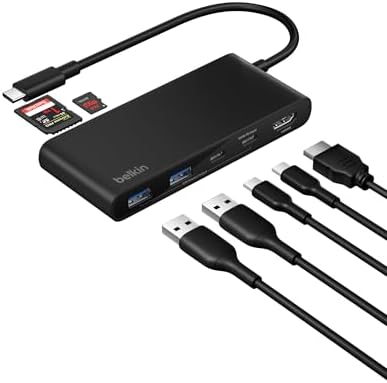
- MULTIPORT USB C HUB: Expand your laptop’s capabilities with a single USB C connection. With 7 ports, you can connect an …
- 100W POWER DELIVERY FOR YOUR DEVICES: Keep your laptop powered while staying connected to all your peripherals.* Deliver…
- 4K HDMI SUPPORT: This 7-port USB C hub lets you enjoy crystal clear visuals with HDMI 2.0, supporting resolutions up to …
Key Features
- 7-in-1 connectivity
- HDMI
- USB-A
- USB-C
- SD card reader
- microSD support
- USB-C Power Delivery
- Compact design
It is a good option for users who travel frequently and need a simple way to connect common peripherals.
Best for: Travelers, students, office workers, and laptop users.
Our Rating: 9.1/10
👉 Check Belkin USB-C hub prices and available configurations.
6. Anker 332 USB-C Hubs: Best Budget USB-C Hub
The Anker 332 USB-C Hub is a straightforward option for people who only need basic port expansion.
Its 5-in-1 design provides common connections without the additional features or higher price of premium hubs.

- 5-in-1 USB-C Hub: Experience comprehensive connectivity featuring a Power Delivery input, two USB-A 2.0 ports, a USB-A 3…
- 90W Pass-Through Charging: Achieve optimal charging with 90W pass-through power to your laptop, supported by a total inp…
- Quick Data Transfers: Accelerate your productivity with rapid data transfers using a high-speed 5Gbps USB 3.0 port and t…
Key Features
- 5-in-1 design
- HDMI
- USB-A ports
- USB-C data port
- Power Delivery
- Compact design
- Lightweight construction
It’s particularly suitable for students and laptop users who need a few extra ports for a keyboard, mouse, monitor, or external storage.
Best for: Students, basic home offices, and budget buyers.
Our Rating: 8.8/10
👉 Check Anker 332 prices and current discounts.
7. UGREEN 6-in-1 USB-C Hubs: Best Portable USB-C Hub
A compact UGREEN 6-in-1 hub is a practical travel accessory for people who want to carry additional ports without adding much weight to their laptop bag.

- 6 in 1 USB-C Hub: This USB C ethernent hub turns a single USB-C port into 6 ports with a 4K@30Hz HDMI, gigabit ethernet,…
- Stable Gigabit Ethernet Connection: USB C hub comes with Gigabit RJ45 ethernet port that supports 1000Mbps with faster, …
- 4K HD Visuals: USB C Dock is equipped with a 4K@30Hz HDMI port. Enjoy visually stunning movies, high-definition online m…
Key Features
- 6-in-1 connectivity
- USB-C input
- USB-A
- HDMI
- USB-C Power Delivery
- Compact construction
- Plug-and-play design
- Travel-friendly size
Its compact size makes it particularly useful for students, business travelers, and remote workers.
Best for: Travel, students, remote workers, and lightweight laptop setups.
Our Rating: 8.9/10
👉 Compare UGREEN 6-in-1 hub prices and deals.
What Should You Look for in a USB-C Hub?
Buying the right USB-C hub requires checking more than the number of ports.
1. Number and Type of Ports
Think about the devices you use every day.
Common ports include:
- USB-A
- USB-C
- HDMI
- DisplayPort
- Ethernet
- SD card
- microSD card
- 3.5mm audio
- USB-C Power Delivery
A photographer may prioritize SD and microSD slots, while an office worker may care more about HDMI and Ethernet.
2. USB Data Speeds
USB-C is a connector type, not a specific speed standard.
A USB-C port can support different protocols and speeds depending on the hub and computer.
Look for specifications such as:
- USB 3.2 Gen 1
- USB 3.2 Gen 2
- USB 3.2 Gen 2×2
- USB4
- Thunderbolt
If you’re transferring large video files or using an external SSD, faster connectivity can significantly reduce transfer times.
3. HDMI and Display Support
If you plan to connect an external monitor, check the hub’s display specifications carefully.
Important factors include:
- Maximum resolution
- Maximum refresh rate
- Number of displays
- HDMI version
- DisplayPort compatibility
- Host-device limitations
For example, a hub advertising 4K output doesn’t necessarily mean it can provide 4K at 120Hz.
4. Power Delivery
Power Delivery, commonly called USB-C PD, allows compatible hubs to pass charging power to your laptop.
A hub might advertise 100W Power Delivery, but the laptop may receive less because the hub itself consumes some power.
For demanding laptops, check the actual power-delivery specifications before purchasing.
5. Ethernet
A wired Ethernet connection can be useful when Wi-Fi isn’t fast or reliable enough.
If you work with large files, participate in video conferences, or manage network storage, Ethernet can provide a stable wired connection.
Gigabit Ethernet is sufficient for many home and office users.
6. SD Card Readers
Photographers and videographers should consider a hub with built-in SD and microSD readers.
This can eliminate the need for a separate card reader and make transferring camera footage much easier.
If you frequently move large RAW photos or video files, also check the card-reader speed.
Best USB-C Hub by Use Case
| Use Case | Recommended Hub |
|---|---|
| Best overall | Anker 565 |
| MacBook | Anker 555 |
| High-speed transfers | UGREEN Revodok Pro |
| Premium setup | Satechi Multiport Adapter |
| Compact | Belkin 7-in-1 |
| Budget | Anker 332 |
| Travel | UGREEN 6-in-1 |
| Photography | Anker 565 |
| Home office | Anker 555 |
| Multiple peripherals | Anker 565 |
| External monitor | Satechi / Anker |
| Ethernet | Anker 565 |
USB-C Hub vs. Docking Station
A USB-C hub and docking station aren’t exactly the same.
USB-C Hub
A hub is usually:
- Smaller
- More portable
- Less expensive
- Bus-powered
- Designed for everyday connectivity
Docking Station
A docking station generally provides:
- More ports
- More display options
- Greater power delivery
- Multiple-monitor support
- Ethernet
- Audio
- More permanent desktop connectivity
If you travel frequently, a USB-C hub is usually more convenient.
If you’re building a permanent home-office workstation, a docking station may be a better investment.
Can a USB-C Hub Charge a Laptop?
Yes, if the hub supports USB-C Power Delivery and your laptop supports charging through USB-C.
However, don’t assume a 100W-rated hub will deliver the full 100W to the computer. Power can be shared between the connected laptop and hub.
For power-hungry laptops, check the manufacturer’s recommended charging requirements.
Can a USB-C Hub Connect Two Monitors?
Some hubs and docks can connect multiple monitors, but compatibility depends heavily on the laptop, operating system, graphics hardware, and display technology.
Some systems support multiple displays natively through USB-C, Thunderbolt, or USB4, while others may require DisplayLink-based solutions.
Before buying, verify:
- Number of supported displays.
- Maximum resolution.
- Maximum refresh rate.
- Your laptop’s display-output capabilities.
- Operating-system compatibility.
Are USB-C Hubs Safe?
Quality USB-C hubs from reputable manufacturers are generally designed with protection against issues such as overcurrent and overheating.
However, cheap, poorly designed adapters can create compatibility and reliability problems.
Look for:
- Established manufacturers
- Clear technical specifications
- Appropriate certifications
- Good warranty coverage
- Reliable customer support
Avoid choosing a hub solely because it has the largest number of ports at the lowest price.
Final Verdict
The Anker 565 USB-C Hub is our top overall choice because it offers a versatile combination of display, USB, Ethernet, memory-card, and charging connectivity.
The Anker 555 is an excellent choice for MacBook and everyday laptop users, while the UGREEN Revodok Pro is worth considering for users who prioritize high-speed transfers.
For premium setups, Satechi offers attractive multiport solutions, while the Belkin 7-in-1 provides a compact option for everyday connectivity.
Budget buyers should consider the Anker 332, while frequent travelers may prefer a compact UGREEN 6-in-1 hub.
Before purchasing, check your laptop’s USB-C capabilities, display requirements, charging needs, required ports, and supported transfer speeds. The best USB-C hub is not necessarily the one with the most ports—it is the one that supports the devices and workflows you actually use.
Frequently Asked Questions
What is the best USB-C hub in 2026?
The Anker 565 is our top overall recommendation because it provides a broad selection of ports, display connectivity, Ethernet, card readers, and Power Delivery.
What is a USB-C hub used for?
A USB-C hub expands the number of ports available on a laptop or tablet, allowing you to connect monitors, USB devices, storage drives, Ethernet, memory cards, and other accessories.
Does USB-C mean fast data transfer?
No. USB-C describes the connector. Actual performance depends on the USB protocol supported by the hub, cable, and host device.
Can a USB-C hub charge a MacBook?
Yes. Compatible USB-C hubs with Power Delivery can pass charging power to supported MacBook models.
Can a USB-C hub connect an external monitor?
Yes. Many hubs include HDMI or DisplayPort outputs. However, maximum resolution, refresh rate, and number of displays depend on the hub and host device.
Can I connect two monitors through one USB-C hub?
Some hubs support multiple monitors, but support varies by computer and operating system. Check the hub and laptop specifications before purchasing.
Do USB-C hubs work with Windows laptops?
Many USB-C hubs work with Windows laptops, but compatibility depends on the laptop’s USB-C capabilities and the hub’s requirements.
Do USB-C hubs work with MacBooks?
Yes. Most major USB-C hubs support MacBooks, although display and port functionality can vary between Mac models.
Is a USB-C hub better than a docking station?
A hub is generally better for portability and basic connectivity. A docking station is better for a permanent workstation with multiple monitors and peripherals.
Do USB-C hubs reduce internet speed?
A hub with Ethernet can provide wired networking, but actual network performance depends on the hub’s Ethernet standard, computer, network equipment, and USB bandwidth.
What ports should a USB-C hub have?
For general use, HDMI, USB-A, USB-C, and Power Delivery are useful. Photographers should consider SD/microSD, while office users may benefit from Ethernet.
Are expensive USB-C hubs worth it?
Premium hubs can be worthwhile if you need higher data speeds, multiple displays, better build quality, Ethernet, high-power charging, or advanced connectivity.
How do I choose the right USB-C hub?
Start by listing the devices you need to connect. Then check the required ports, data speeds, display resolution, charging power, operating-system compatibility, and your laptop’s USB-C capabilities before buying.
Best Products
Best Smartphones for Everyday Use in 2026
Best Laptops for Students in 2026