If you click on the links and make a purchase, we may earn a commission.
The best laptop docking stations can turn a laptop into a powerful desktop workstation by adding multiple monitors, USB ports, Ethernet, audio connections, memory-card readers, and laptop charging through a single connection.
Table of Contents
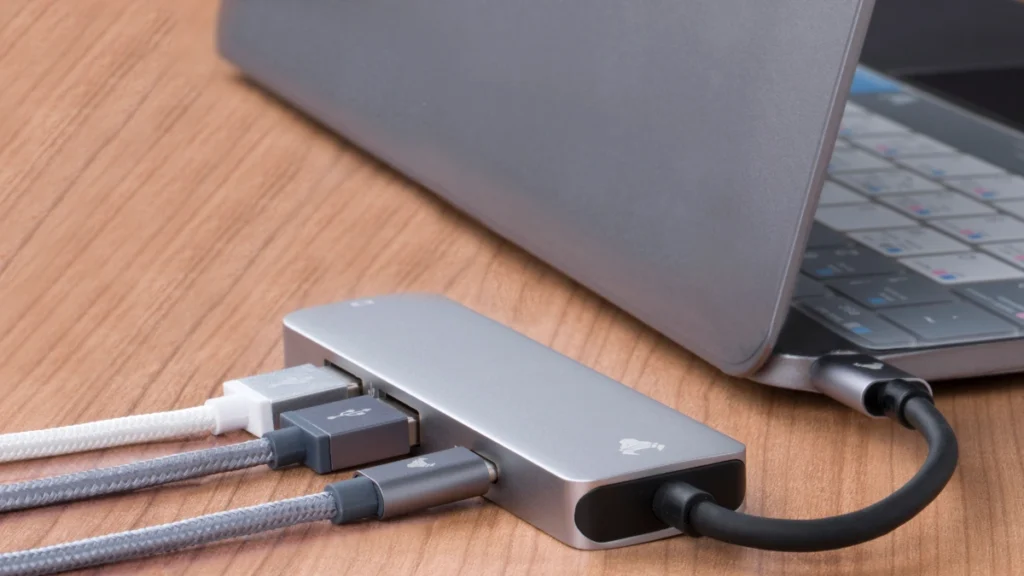
Image Credit: Canva
A docking station is especially useful for professionals, remote workers, students, creators, and anyone who regularly switches between a laptop and a desktop-style setup. Instead of connecting several cables individually, you can connect your laptop to one dock and instantly access your monitor, keyboard, mouse, external storage, network, and other accessories.
However, docking stations vary considerably in connectivity and compatibility. Some are designed specifically for Thunderbolt laptops, while others use USB-C or USB4. Some support multiple 4K displays, whereas others are better suited to a single external monitor.
Below, we’ve compared some of the best laptop docking stations in 2026 based on connectivity, display support, charging, performance, compatibility, and overall value.
Quick Comparison: Best Laptop Docking Stations
| Docking Station | Best For | Key Feature | Display Support | Charging | Rating |
|---|---|---|---|---|---|
| CalDigit TS4 | Best Overall | Extensive port selection | Up to multiple displays* | Up to 98W | 9.7/10 |
| Plugable TBT4-UDZ | Best for Multiple Monitors | Flexible display connectivity | Up to 2× 4K/60Hz* | Up to 96W | 9.5/10 |
| Anker 778 Thunderbolt Docking Station | Best Premium | Thunderbolt 4 connectivity | Up to 3 displays* | Up to 100W | 9.4/10 |
| CalDigit Element Hub | Best Compact | Thunderbolt 4 expansion | Display-dependent | Up to 60W | 9.2/10 |
| Dell WD22TB4 | Best for Dell Laptops | Modular Thunderbolt 4 design | Multiple displays* | Up to 130W* | 9.2/10 |
| Lenovo ThinkPad Universal USB-C Dock | Best Office Dock | Business-focused compatibility | Multiple displays* | Up to 100W* | 9.1/10 |
| Plugable UD-6950PDZ | Best USB-C Value | DisplayLink multi-monitor support | Up to 3 displays* | Up to 100W | 8.9/10 |
Display support and maximum charging depend on the specific laptop, operating system, host port, and configuration.
1. CalDigit TS4 — Best Laptop Docking Station Overall
The CalDigit TS4 is our top overall recommendation for users who want an extensive selection of ports and premium connectivity in a single docking station.
It is particularly appealing to professionals and creators who connect multiple peripherals to a laptop every day.

- Extreme Performance – 40Gb/s for maximum Thunderbolt 4 / USB 4 throughput! Ideal for users who require a stable high ban…
- Powerful Charging – Up to 100W Power Delivery & Laptop charging @ 5 Amp 20V = 100W. Perfect for devices such as Thunderb…
- Maximum Compatibility – Can be used with any Type-C computer or device regardless of whether it is Thunderbolt 5, Thunde…
Key Features
- Thunderbolt 4 connectivity
- Up to 98W laptop charging
- Multiple USB-A and USB-C ports
- DisplayPort connectivity
- 2.5Gb Ethernet
- SD and microSD card readers
- 3.5mm audio connections
- UHS-II card support
- Compact desktop-friendly design
The large selection of ports makes the TS4 useful for photography, video editing, office productivity, and professional workflows.
Its fast Ethernet connection is also useful for users who transfer large files through network storage.
Best for: Professionals, creators, photographers, video editors, and demanding home offices.
Our Rating: 9.7/10
2. Plugable TBT4-UDZ — Best Docking Station for Multiple Monitors
The Plugable TBT4-UDZ is a versatile Thunderbolt 4 docking station designed for users who need extensive connectivity and multiple displays.
Its combination of USB ports, video outputs, networking, and laptop charging makes it particularly useful for productivity-focused workstations.

- Flexible Expandability: This versatile laptop docking station dual monitor setup includes dual HDMI and DisplayPort outp…
- Dual 4K Monitors with HDMI and DisplayPort: Enjoy ultra-clear visuals with support for two 4K monitors via DisplayLink d…
- Optimized for Work, Not Gaming: Best suited for web browsing, productivity, and office applications. This laptop dock do…
Key Features
- Thunderbolt 4
- Multiple display outputs
- USB-A and USB-C ports
- Gigabit or faster Ethernet depending on configuration
- SD card reader
- Audio connectivity
- High-power USB-C charging
- Wide laptop compatibility
The dock is particularly attractive to users who want to connect a laptop to two or more external monitors while maintaining access to other peripherals.
Best for: Multi-monitor workstations, remote workers, professionals, and office setups.
Our Rating: 9.5/10
3. Anker 778 Thunderbolt Docking Station — Best Premium Dock
The Anker 778 Thunderbolt Docking Station is aimed at users who want premium connectivity and high-speed Thunderbolt 4 performance.
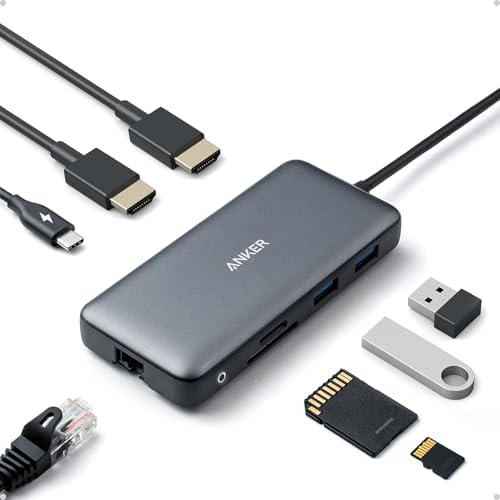
- The Anker Advantage: Join the 50 million+ powered by our leading technology.
- Massive Expansion: Equipped with a USB C PD-IN charging port, 2 USB-A data ports, 2 HDMI ports, an Ethernet port, and a …
- Dual HDMI Display: Stream or mirror content to a single device in stunning 4K@60Hz, or hook up two displays to both HDMI…
Key Features
- Thunderbolt 4
- Up to 100W Power Delivery
- Multiple display outputs
- HDMI support
- USB-A ports
- USB-C ports
- Ethernet
- SD card reader
- High-speed data transfer
Its strong connectivity makes it useful for users working with external SSDs, displays, wired networks, and multiple USB accessories.
Best for: Professionals, creators, premium home offices, and multi-device workstations.
Our Rating: 9.4/10
4. CalDigit Element Hub — Best Compact Docking Station
The CalDigit Element Hub is a smaller Thunderbolt 4 hub designed for users who want high-speed expansion without a large desktop dock.
Its compact design makes it particularly convenient for users who travel between home, office, and other workspaces.

- 18 Ports of Extreme Connectivity – Featuring an impressive 18 ports, the TS4 has enough connectivity for even the most d…
- Powerful 98W Charging – The TS4’s power delivery is ideal for any Thunderbolt or USB-C (with data, video, and power supp…
- Single 8K or Dual 6K 60Hz Displays – Windows users can connect a single monitor up to 8K resolution. macOS users can con…
Key Features
- Thunderbolt 4
- Multiple USB-C/Thunderbolt ports
- USB-A ports
- Up to 40Gbps Thunderbolt connectivity
- Compact design
- Laptop charging
- Multiple-device support
The Element Hub is ideal when you already have the specific display and networking adapters you need and primarily want additional high-speed USB and Thunderbolt ports.
Best for: Travelers, MacBook users, compact workstations, and Thunderbolt enthusiasts.
Our Rating: 9.2/10
5. Dell WD22TB4 — Best Docking Station for Dell Laptops
The Dell WD22TB4 is a Thunderbolt 4 docking station designed particularly for Dell’s business and professional laptop ecosystem.
One of its notable features is its modular approach, which allows certain components to be replaced or upgraded.

Key Features
- Thunderbolt 4
- Multiple display outputs
- USB-A and USB-C
- Ethernet
- DisplayPort
- HDMI support depending on configuration
- High-power laptop charging
- Modular design
For businesses using Dell laptops across an organization, standardized docking stations can simplify workstation deployment.
Best for: Dell users, business environments, IT departments, and office workstations.
Our Rating: 9.2/10
6. Lenovo ThinkPad Universal USB-C Dock — Best Office Dock
The Lenovo ThinkPad Universal USB-C Dock is designed for business users who need reliable connectivity across compatible laptops.
It provides a practical collection of display, USB, Ethernet, and charging options.

- Dual 4K display support: Connect up to two UHD 4K monitors simultaneously via two HDMI and two DisplayPort 1.2 ports for…
- High-speed USB connectivity: Features three USB 3.2 Gen 2 Type-A ports with up to 10 Gbps data transfer, two USB 2.0 por…
- Universal laptop compatibility: Works with most USB-C and USB-A Windows laptops; includes USB Type-A adapter for non-USB…
Key Features
- USB-C connectivity
- Multiple display outputs
- USB-A ports
- USB-C ports
- Ethernet
- Audio connectivity
- Laptop charging
- Business-oriented design
It can be a practical choice for offices that use multiple compatible laptop models.
Best for: Businesses, remote workers, office professionals, and ThinkPad users.
Our Rating: 9.1/10
7. Plugable UD-6950PDZ — Best USB-C Docking Station for Value
The Plugable UD-6950PDZ is an attractive option for users who want multi-monitor functionality without necessarily requiring a Thunderbolt 4 setup.
DisplayLink technology can provide additional display connectivity on supported systems.

- 15-Port Triple Display USB-C Docking Station: Transform a compatible Windows or ChromeOS laptop into a complete workstat…
- Triple HDMI Extended Displays: This driverless USB C dock utilizes Multi-Stream Transport (MST) to drive a native dual 4…
- 15-Port Expansion and 100W Charging: Power your workday with 100W host charging, plus a dedicated 30W PD USB-C Charge-On…
Key Features
- USB-C connectivity
- DisplayLink technology
- Multiple display outputs
- USB-A and USB-C
- Ethernet
- Audio
- Power Delivery
- Multi-monitor support
It is particularly useful for office productivity and users who need additional monitors rather than maximum Thunderbolt performance.
Best for: Office users, remote workers, productivity setups, and value-focused buyers.
Our Rating: 8.9/10
What Should You Look for in a Laptop Docking Station?
Choosing a docking station requires looking beyond the number of ports.
1. Thunderbolt, USB-C or USB4?
The connection technology determines what your dock can do.
Thunderbolt 4
Thunderbolt 4 offers high bandwidth and excellent support for fast storage, displays, and peripherals.
It is particularly useful for professional workstations.
USB-C
USB-C docks are generally more affordable and widely compatible, but capabilities vary significantly between models.
USB4
USB4 can provide high-speed connectivity and is increasingly appearing on newer laptops.
Always check the actual capabilities of your laptop rather than relying only on the connector shape.
2. Number of Monitors
If you’re purchasing a dock specifically for multiple displays, check:
- Maximum number of monitors
- Maximum resolution
- Refresh rate
- HDMI version
- DisplayPort version
- Operating-system limitations
A dock might support multiple 4K displays on one platform but have different limitations on another.
3. Power Delivery
Power Delivery allows the dock to charge your laptop while connected.
Many premium docks offer 90W, 96W, 98W, or 100W-class charging, while some business docks can provide even more to specific compatible laptops.
Remember that advertised dock charging isn’t universal. Some laptops limit charging through USB-C or require proprietary power adapters for maximum performance.
4. Ethernet
For a home office or professional workstation, Ethernet can be extremely useful.
A wired network connection can provide:
- Stable internet
- Lower latency
- Faster file transfers
- Reliable video conferencing
- Network storage access
For demanding network workflows, look for 2.5Gb Ethernet if your network equipment supports it.
5. USB Ports
Count the accessories you use before choosing a dock.
You may need ports for:
- Keyboard
- Mouse
- Webcam
- External SSD
- Printer
- Microphone
- USB flash drive
- Card reader
USB-A remains useful for older peripherals, while USB-C is increasingly important for newer devices.
6. SD Card Readers
Photographers and videographers should strongly consider a dock with an integrated SD card reader.
A fast UHS-II reader can significantly improve transfers from compatible high-speed memory cards.
This can eliminate the need for a separate card reader on your desk.
Best Laptop Docking Station by Use Case
| Use Case | Recommended Dock |
|---|---|
| Best overall | CalDigit TS4 |
| Multiple monitors | Plugable TBT4-UDZ |
| Premium workstation | Anker 778 |
| Compact setup | CalDigit Element Hub |
| Dell laptops | Dell WD22TB4 |
| Lenovo/office use | ThinkPad Universal USB-C Dock |
| USB-C value | Plugable UD-6950PDZ |
| Video editing | CalDigit TS4 |
| Photography | CalDigit TS4 |
| Home office | Plugable TBT4-UDZ |
| MacBook workstation | CalDigit TS4 |
| Business deployment | Dell / Lenovo docks |
Docking Station vs. USB-C Hub
A USB-C hub is generally smaller and designed for portable connectivity.
A docking station is designed more for a permanent workstation.
USB-C Hub
- Smaller
- Portable
- Less expensive
- Fewer ports
- Often bus-powered
Docking Station
- More ports
- More display options
- Higher charging capability
- Better desktop connectivity
- Ethernet
- Multiple monitors
- Designed for permanent setups
If you work from coffee shops or travel frequently, a hub may be enough. If you have a dedicated desk with two monitors and several peripherals, a docking station is usually the better option.
Can One Dock Connect Two Monitors?
Yes, many docking stations support two external monitors.
However, the exact configuration depends on the laptop and dock.
Thunderbolt 4 docks generally provide strong multi-monitor capabilities, while USB-C docks may use DisplayLink to support additional displays.
Before buying, check your laptop’s:
- Thunderbolt support
- USB4 support
- DisplayPort Alt Mode
- Graphics capabilities
- Operating system
Mac and Windows systems can also have different multi-monitor limitations.
Are Docking Stations Good for Gaming?
Docking stations can be useful for gaming laptops, but they aren’t always the ideal solution for high-performance gaming.
For productivity, a dock can connect monitors, Ethernet, keyboard, mouse, headset, and other accessories through one cable.
However, gamers should check:
- Display resolution
- Refresh rate
- GPU bandwidth
- Ethernet speed
- USB polling requirements
- Thunderbolt/USB4 limitations
Competitive gamers may prefer connecting a high-refresh-rate gaming monitor directly to the laptop’s GPU-supported video output.
Are Laptop Docking Stations Worth It?
For many professionals, yes.
A good docking station can make a laptop much more convenient as a desktop replacement.
Instead of plugging in five or six individual cables, you can connect one Thunderbolt or USB-C cable to your laptop.
This can provide:
- External monitors
- Keyboard and mouse
- Ethernet
- External storage
- Audio
- Webcam
- Charging
- Memory-card access
The biggest benefit isn’t simply additional ports—it’s workflow convenience.
Final Verdict
The CalDigit TS4 is our top overall laptop docking station because it combines extensive connectivity, fast networking, high-speed ports, memory-card readers, and strong laptop charging in one premium workstation solution.
The Plugable TBT4-UDZ is an excellent option for multi-monitor users, while the Anker 778 is a strong premium alternative for professionals and creators.
For a compact Thunderbolt setup, the CalDigit Element Hub is worth considering. Dell users may prefer the WD22TB4, while businesses using Lenovo laptops can benefit from the ThinkPad Universal USB-C Dock.
For users who don’t need Thunderbolt, the Plugable UD-6950PDZ provides a flexible USB-C alternative with multi-monitor capabilities.
Before purchasing, verify your laptop’s USB-C, USB4, or Thunderbolt capabilities, the number of monitors you need, charging requirements, Ethernet speed, and operating-system compatibility. A docking station should be selected around your complete workstation—not simply the number of ports listed on the box.
Frequently Asked Questions
What is the best laptop docking station in 2026?
The CalDigit TS4 is our top overall choice because of its extensive ports, high-speed connectivity, fast Ethernet, SD card readers, and powerful laptop charging.
What does a laptop docking station do?
A docking station expands a laptop’s connectivity and can connect monitors, keyboards, mice, Ethernet, external storage, audio devices, and other peripherals through one primary connection.
Is Thunderbolt better than USB-C?
Thunderbolt generally provides greater bandwidth and more advanced display and peripheral capabilities, but a USB-C dock can be sufficient for basic office and productivity needs.
Can a docking station charge a laptop?
Yes. Compatible docking stations can provide USB-C Power Delivery to charge supported laptops while connected.
Can I connect two monitors to a docking station?
Yes. Many docking stations support two monitors, although maximum resolution and refresh rates depend on the dock, laptop, graphics hardware, and operating system.
Is Thunderbolt 4 good for multiple monitors?
Yes. Thunderbolt 4 provides high bandwidth and is well suited to multi-monitor workstations when the laptop and dock support the required display configuration.
Do docking stations work with MacBooks?
Many docks work with MacBooks, but display support can differ between Mac models. Always verify the exact dock and Mac compatibility before purchasing.
Do docking stations work with Windows laptops?
Yes. USB-C and Thunderbolt docking stations are widely supported by Windows laptops, although available features depend on the laptop’s hardware.
Can I use a docking station with a gaming laptop?
Yes. A dock can connect peripherals and displays, but high-refresh-rate gaming monitors may perform better when connected directly to a compatible GPU output.
What is DisplayLink?
DisplayLink is a technology that can allow compatible USB-connected docking stations to provide additional display outputs. It can be useful for multi-monitor productivity setups.
How many ports should a docking station have?
There is no universal number. Consider your specific setup. A professional workstation may need multiple USB ports, Ethernet, several display outputs, audio, card readers, and high-power charging.
Is a docking station better than a USB-C hub?
A docking station is generally better for a permanent desk setup with multiple monitors and peripherals. A USB-C hub is better when portability and basic connectivity are the priorities.
What is the best docking station for a home office?
The CalDigit TS4 and Plugable TBT4-UDZ are strong options for home offices because they provide extensive connectivity and support sophisticated workstation setups.
Should I buy a Thunderbolt 4 docking station?
If your laptop supports Thunderbolt 4 and you need fast storage, multiple displays, high-speed networking, or extensive peripheral connectivity, a Thunderbolt 4 dock can be an excellent long-term investment.
Best Products
Best Smartphones for Everyday Use in 2026
Best Laptops for Students in 2026