If you click on the links and make a purchase, we may earn a commission.
The best gaming laptops in 2026 offer desktop-class performance in increasingly portable designs. Modern gaming laptops combine powerful processors, dedicated NVIDIA GeForce RTX graphics, fast SSD storage, high-refresh-rate displays, and advanced cooling systems to deliver smooth gameplay without requiring a traditional desktop PC.
Table of Contents

Image Credit: Pexels
Whether you want a budget gaming laptop for esports, a premium machine for AAA games, or a powerful workstation for gaming and content creation, choosing the right specifications is essential.
In this guide, we compare the best gaming laptops for different budgets and use cases, including their key features, display technology, graphics performance, portability, and overall value.
Quick Comparison: Best Gaming Laptops
| Gaming Laptop | Best For | Key Feature | Display | GPU Class | Rating |
|---|---|---|---|---|---|
| ASUS ROG Zephyrus G14 | Best Overall | Powerful + portable | 14″ | GeForce RTX | 9.7/10 |
| Lenovo Legion Pro 5i | Best Performance | Excellent cooling | 16″ | GeForce RTX | 9.6/10 |
| Razer Blade 16 | Best Premium | Premium design | 16″ | GeForce RTX | 9.6/10 |
| Alienware m16 R2 | Best Alienware | Performance + design | 16″ | GeForce RTX | 9.4/10 |
| ASUS ROG Strix G16 | Best Gaming Value | High-refresh display | 16″ | GeForce RTX | 9.5/10 |
| Lenovo LOQ 15 | Best Budget | Strong value | 15.6″ | GeForce RTX | 9.2/10 |
| Acer Nitro V 15 | Best Affordable | Entry-level RTX graphics | 15.6″ | GeForce RTX | 9.0/10 |
| HP OMEN 16 | Best Mid-Range | Balanced performance | 16.1″ | GeForce RTX | 9.2/10 |
| MSI Raider 18 HX | Best Large Screen | Desktop-class performance | 18″ | GeForce RTX | 9.5/10 |
| ASUS ROG Strix SCAR 18 | Best Enthusiast | Extreme performance | 18″ | GeForce RTX | 9.7/10 |
Specifications vary by configuration, generation, and market. Always verify the exact CPU, GPU, RAM, display, and storage configuration before purchasing.
1. ASUS ROG Zephyrus G14: Best Gaming Laptop Overall
The ASUS ROG Zephyrus G14 is one of the best choices for gamers who don’t want to sacrifice portability.
Its compact design combines powerful processors and dedicated NVIDIA GeForce RTX graphics with a high-quality display, making it suitable for both gaming and demanding creative workloads.

- [Display Features] 14.0″ OLED 2.8K 120Hz DISPLAY: Features a 14.0-inch OLED display (2880 × 1800) with a 120Hz refresh r…
- [Powerful Performance] RYZEN AI 9 HX 370 PROCESSOR: Powered by a Zen 5 Gen AMD Ryzen AI 9 HX 370 processor (2.00GHz base…
- [Graphics Performance] GEFORCE RTX 5080 16GB GDDR7 GRAPHICS: Equipped with GeForce RTX 5080 graphics featuring 16GB GDDR…
Key Features
- 14-inch display
- High-refresh-rate options
- AMD Ryzen processor options
- NVIDIA GeForce RTX graphics
- Premium compact design
- Fast SSD storage
- USB-C
- HDMI
- Wi-Fi
- Advanced cooling
Why Buy?
The G14 stands out because it balances performance and portability better than many larger gaming laptops.
It’s suitable for:
- AAA gaming
- Esports
- Video editing
- 3D applications
- Programming
- College
- Travel
Best for: Gamers who want a powerful but portable gaming laptop.
Rating: 9.7/10
2. Lenovo Legion Pro 5i: Best Gaming Laptop for Performance
The Lenovo Legion Pro 5i is designed for gamers who prioritize sustained performance over ultra-portability.

- ✔ Processor: Intel Core Ultra 9-275HX delivers elite-level performance with blazing-fast speeds, perfect for high-end ga…
- ✔ Graphics: NVIDIA GeForce RTX 5070 8GB GPU with advanced ray tracing and AI-enhanced performance ensures ultra-realisti…
- ✔ Display: 16” 2.5K WQXGA (2560×1600) OLED display offers stunning color accuracy, deep blacks, high brightness, and ult…
Key Features
- 16-inch display
- High-refresh-rate panel
- Intel Core performance processors
- NVIDIA GeForce RTX graphics
- Advanced cooling
- Large keyboard
- RGB lighting on select configurations
- HDMI
- USB-C
- Ethernet
Why Buy?
The larger chassis gives Lenovo more room for cooling hardware and powerful components.
That makes it particularly attractive for gamers who regularly play demanding AAA games.
It’s also useful for:
- Video editing
- 3D rendering
- Game development
- Streaming
- AI workloads
Best for: Serious gamers and power users.
Rating: 9.6/10
3. Razer Blade 16: Best Premium Gaming Laptop
The Razer Blade 16 is aimed at buyers who want premium materials, powerful hardware, and a sophisticated design.
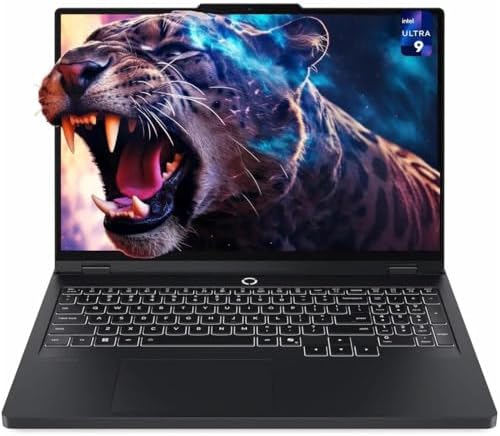
- Unopened retail packaging, sold as configured by Lenovo. 3Y Lenovo Courier/Carry-in Included. Add up to 5 years of cover…
- Unleash peak performance with the Intel Core Ultra 9 275HX processor for unparalleled gaming, productivity, and AI-power…
- AI-powered neural rendering, including DLSS 4 with Multi Frame Generation and Super Resolution, boosts FPS, reduces late…
Key Features
- 16-inch display
- High-end NVIDIA GeForce RTX graphics
- High-performance processor
- Premium aluminum chassis
- High-refresh-rate display options
- RGB keyboard
- Thunderbolt/USB-C
- HDMI
- Advanced cooling
Why Buy?
Many gaming laptops prioritize performance at the expense of aesthetics. The Razer Blade takes a different approach.
Its minimalist design makes it suitable for both gaming and professional environments.
Best for: Premium gaming, creators, professionals, and enthusiasts.
Rating: 9.6/10
4. Alienware m16 R2: Best Alienware Gaming Laptop
The Alienware m16 R2 offers a strong combination of gaming performance, distinctive design, and a relatively portable form factor.
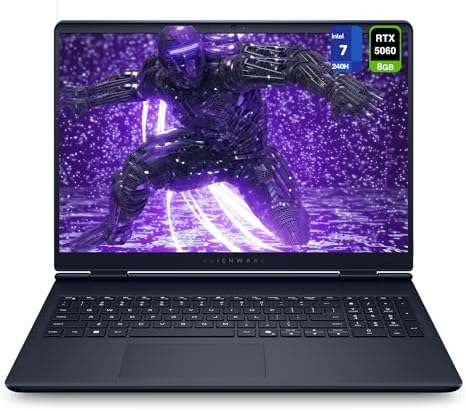
- 【Instant Gratification】Alienware 16 Aurora Gaming Laptop. Pure performance. No distractions. Optimized performance in a …
- 【Processor & Operating System】Intel Core 7 Processor (Series 2) 240H (24MB cache, 10 cores, 1.80 to 5.20 GHz P-Core) & W…
- 【Display】16″ WQXGA (2560 x 1600) 120Hz, 300 nits, ComfortView Plus, 100% sRGB color gamut
Key Features
- 16-inch display
- NVIDIA GeForce RTX graphics
- Intel Core Ultra processor options
- High-refresh-rate display
- Advanced cooling
- RGB keyboard
- USB-C
- HDMI
- Premium gaming design
Why Buy?
Alienware laptops are known for their distinctive gaming-focused designs.
The m16 R2 is a good choice for gamers who want a recognizable gaming machine with strong performance.
Best for: PC gamers who want premium design and performance.
Rating: 9.4/10
5. ASUS ROG Strix G16: Best Gaming Value
The ASUS ROG Strix G16 offers a compelling combination of performance, cooling, display quality, and gaming features.

- CUTTING-EDGE PERFORMANCE – Experience next-level performance with Windows 11, an Intel Core i5-13450HX processor, and an…
- HIGH-PERFORMANCE MEMORY AND STORAGE – Multitask seamlessly with 16GB of DDR5-5600MHz memory and store all your game libr…
- DYNAMIC DISPLAY – Immerse yourself in stunning visuals with the smooth FHD+ 165Hz display for gaming. Featuring a new AC…
Key Features
- 16-inch display
- High refresh rate
- NVIDIA GeForce RTX graphics
- Intel processor options
- Advanced cooling
- RGB lighting
- Fast SSD
- USB-C
- HDMI
- Ethernet
Why Buy?
The Strix G16 is particularly attractive if you want high gaming performance without paying the premium associated with ultra-luxury gaming laptops.
Best for: Mainstream and competitive gamers.
Rating: 9.5/10
6. Lenovo LOQ 15: Best Budget Gaming Laptop
The Lenovo LOQ 15 is a strong option for gamers working with a more limited budget.

- 16GB RAM | 1TB SSD.
- Equipped With The Powerful and Fast AMD Quad-core Ryzen 5 7235HS Processor
- 15.6″ FHD (1920×1080) IPS 144Hz Anti-glare (100% sRGB, G-SYNC), Dedicated NVIDIA GeForce RTX 4050 6GB Graphic
Key Features
- 15.6-inch display
- Full HD/high-refresh-rate options
- NVIDIA GeForce RTX graphics
- AMD or Intel processor options
- Upgradeable memory on select configurations
- SSD storage
- HDMI
- USB-C
- Ethernet
Why Buy?
The LOQ series focuses on providing gaming performance without the premium price of Lenovo’s higher-end Legion lineup.
It’s particularly suitable for:
- Esports
- Fortnite
- Minecraft
- Valorant
- Counter-Strike
- Casual AAA gaming
Best for: Budget-conscious gamers.
Rating: 9.2/10
7. Acer Nitro V 15: Best Affordable Gaming Laptop
The Acer Nitro V 15 is another strong entry-level gaming option.

- 16GB DDR4 | 512GB SSD
- Equipped With The Most Powerful and Fast 13th Gen Intel 8-core i5-13420H
- 15.6″ FHD (1920×1080) IPS 165Hz, Dedicated NVIDIA GeForce RTX 5050 8GB GDDR7 Graphics
Key Features
- 15.6-inch display
- High-refresh-rate options
- NVIDIA GeForce RTX graphics
- Intel or AMD processor options
- SSD storage
- Wi-Fi
- USB-C
- HDMI
- Gaming keyboard
Why Buy?
The Nitro V is designed for gamers who want dedicated graphics without spending several thousand dollars.
It’s a particularly good choice for first-time gaming laptop buyers.
Best for: Students and entry-level gamers.
Rating: 9.0/10
8. HP OMEN 16: Best Mid-Range Gaming Laptop
The HP OMEN 16 sits between affordable gaming laptops and premium performance machines.

- EXTREME GAMING PERFORMANCE: Powered by Intel Ultra 9 285H processor with 16 cores delivering desktop-class performance f…
- IMMERSIVE GAMING VISUALS: NVIDIA GeForce RTX 5070 8GB graphics card delivers stunning performance for AAA titles, VR gam…
- MASSIVE CAPACITY: 16GB DDR5 RAM ensures seamless multitasking with multiple applications, browser tabs, virtual machines…
Key Features
- 16.1-inch display
- High-refresh-rate options
- NVIDIA GeForce RTX graphics
- Intel or AMD processor options
- Advanced cooling
- RGB keyboard
- USB-C
- HDMI
- Ethernet
Why Buy?
The 16-inch format gives you a good balance between screen size and portability.
It’s suitable for gaming, streaming, video editing, and general productivity.
Best for: Mainstream gamers and creators.
Rating: 9.2/10
9. MSI Raider 18 HX: Best Large-Screen Gaming Laptop
The MSI Raider 18 HX is built for users who want a huge display and desktop-replacement performance.
![EXCaliberPC [2025] MSI Raider A18 HX A9WIG-082US (AMD Ryzen 9 995...](https://m.media-amazon.com/images/I/31NznkpvipL._AC_.jpg)
- Display: 18″ UHD+ (3840×2400) 120Hz Mini LED HDR 1000 100% DCI-P3
- Graphics Card: NVIDIA GeForce RTX 5080 16GB GDDR7
- Processor: AMD Ryzen 9 9955HX3D 16 Cores (2.5GHz-5.4GHz, 128MB Smart Cache)
Key Features
- 18-inch display
- High-refresh-rate options
- High-end Intel processors
- NVIDIA GeForce RTX graphics
- Advanced cooling
- RGB keyboard
- Multiple USB ports
- HDMI
- Ethernet
Why Buy?
An 18-inch screen can make gaming feel significantly more immersive.
The trade-off is portability. This is not the laptop you want if you’re frequently traveling.
Best for: Desktop replacement gaming and enthusiasts.
Rating: 9.5/10
10. ASUS ROG Strix SCAR 18: Best Enthusiast Gaming Laptop
The ASUS ROG Strix SCAR 18 targets gamers who want maximum performance.

- HIGH-LEVEL PERFORMANCE – Unleash power with Windows 11 Home, an Intel Core i9 Processor 14900HX, and an NVIDIA GeForce R…
- FAST MEMORY AND STORAGE – Multitask seamlessly with 32GB of DDR5-5600MHz memory and store all your game library on 1TB o…
- DYNAMIC DISPLAY – Immerse yourself in stunning visuals with the smooth 144Hz/3ms display for gaming and entertainment. F…
Key Features
- 18-inch display
- High-end NVIDIA GeForce RTX graphics
- High-performance processor
- High-refresh-rate display
- Advanced cooling
- RGB lighting
- Large keyboard
- Multiple connectivity options
- Fast SSD
Why Buy?
This class of gaming laptop is designed to deliver extremely high performance without requiring a desktop tower.
It’s also suitable for demanding creative workloads.
Best for: Enthusiast gamers, streamers, creators, and power users.
Rating: 9.7/10
What Makes a Good Gaming Laptop?
A gaming laptop needs more than a powerful processor.
The GPU is usually the most important component for gaming performance, particularly at higher resolutions and graphics settings.
You should also consider:
- CPU
- GPU
- RAM
- SSD
- Display
- Cooling
- Battery
- Keyboard
- Ports
- Upgradeability
- Weight
Gaming Laptop GPU Guide
The GPU determines how well your laptop can render games.
Entry-Level RTX
Suitable for:
- 1080p gaming
- Esports
- Older AAA titles
- Medium-to-high settings
Mid-Range RTX
Excellent for:
- 1080p high settings
- 1440p gaming
- High-refresh-rate gaming
- Ray tracing with appropriate settings
High-End RTX
Designed for:
- High-resolution gaming
- Advanced ray tracing
- High graphics settings
- AAA games
- Content creation
When comparing laptops, don’t assume two GPUs with similar names will perform identically. Laptop GPU power limits and cooling can significantly affect performance.
How Much RAM Does a Gaming Laptop Need?
16GB
The recommended starting point for modern gaming.
It’s enough for most games and general multitasking.
32GB
Ideal for:
- Streaming
- Video editing
- Game development
- Heavy multitasking
64GB+
Usually unnecessary for gaming alone but useful for specialized professional workloads.
How Much Storage Should a Gaming Laptop Have?
Modern games can occupy significant amounts of storage.
512GB SSD
Acceptable for casual gamers.
1TB SSD
The sweet spot for most gaming laptops.
2TB+
Recommended for large game libraries and content creators.
Always choose an SSD rather than a traditional hard drive for the primary gaming drive.
Best Gaming Laptop Display
The display is one of the biggest differences between gaming laptops.
1080p
Excellent for budget gaming and high frame rates.
1440p
A strong balance between image quality and performance.
4K
Provides exceptional detail but requires considerably more GPU power.
Refresh Rate
Look for:
- 120Hz
- 144Hz
- 165Hz
- 240Hz
- 360Hz
Competitive gamers can benefit from higher refresh rates, while casual players may be perfectly happy with 144Hz or 165Hz.
OLED vs IPS for Gaming Laptops


| Feature | OLED | IPS |
|---|---|---|
| Contrast | Excellent | Good |
| Blacks | Excellent | Good |
| Response time | Excellent | Very good |
| Color | Excellent | Very good |
| Burn-in concern | Possible | Very low |
| Price | Usually higher | Usually lower |
| Gaming | Excellent | Excellent |
OLED is particularly attractive for cinematic games and content consumption.
IPS remains an excellent all-around option.
Best Gaming Laptop for Esports
Competitive games such as:
- Valorant
- Counter-Strike
- Overwatch
- Fortnite
- Apex Legends
benefit from high refresh rates and fast response times.
You don’t necessarily need the most powerful GPU.
A strong mid-range GPU paired with a 165Hz or higher display can be an excellent setup.
Best Gaming Laptop for AAA Games
For demanding games such as modern open-world titles, prioritize:
- Strong GPU
- Powerful CPU
- 16GB+ RAM
- 1TB SSD
- Good cooling
- High-refresh-rate display
A higher-end RTX configuration is worthwhile if you want to use ray tracing and advanced graphical effects.
Best Gaming Laptop for Students
Students may want something that can handle both schoolwork and gaming.
The ASUS ROG Zephyrus G14 is attractive because it is relatively portable.
For a lower budget, the Lenovo LOQ 15 and Acer Nitro V 15 offer strong value.
Best Gaming Laptop for Content Creation
Gaming laptops can double as video-editing workstations.
Creators should look for:
- Powerful CPU
- Dedicated RTX GPU
- 32GB RAM if affordable
- 1TB SSD or more
- Color-accurate display
- Good cooling
The ROG Zephyrus, Legion Pro, and high-end ROG Strix models can be excellent choices.
Cooling Matters
Gaming laptops generate significant heat.
A good cooling system helps maintain performance during long gaming sessions.
Look for:
- Multiple heat pipes
- Large fans
- Efficient vents
- Advanced thermal compounds
- Multiple performance modes
A laptop that briefly reaches high benchmark scores but throttles under sustained load may not be the best real-world choice.
Battery Life
Gaming laptops generally have shorter battery life during gaming because dedicated GPUs consume substantial power.
For the best battery life:
- Use integrated graphics when possible
- Lower display brightness
- Use battery-saving modes
- Reduce refresh rate
- Avoid gaming away from the charger
For serious gaming, you’ll generally want to use the included power adapter.
Gaming Laptop vs Desktop PC
| Feature | Gaming Laptop | Gaming Desktop |
|---|---|---|
| Portability | Excellent | Poor |
| Upgradeability | Limited | Excellent |
| Performance | Excellent | Excellent |
| Space required | Low | Higher |
| Display included | Yes | Usually no |
| Repairability | Varies | Usually easier |
| Battery | Yes | No |
| Long-term upgrades | Limited | Excellent |
Choose a laptop if portability matters.
Choose a desktop if maximum performance and upgradeability are your priorities.
Best Gaming Laptops by Use Case
| Use Case | Best Laptop | Key Feature |
|---|---|---|
| Best overall | ASUS ROG Zephyrus G14 | Performance + portability |
| Best performance | Lenovo Legion Pro 5i | Strong cooling |
| Best premium | Razer Blade 16 | Premium design |
| Best Alienware | Alienware m16 R2 | Gaming design |
| Best value | ASUS ROG Strix G16 | Strong performance |
| Best budget | Lenovo LOQ 15 | Excellent value |
| Best affordable | Acer Nitro V 15 | Entry-level RTX |
| Best mid-range | HP OMEN 16 | Balanced hardware |
| Best large screen | MSI Raider 18 HX | 18-inch display |
| Best enthusiast | ASUS ROG Strix SCAR 18 | Extreme performance |
Pros and Cons of Gaming Laptops
Pros
- Excellent gaming performance
- Portable
- Built-in display
- Built-in keyboard
- Dedicated graphics
- High-refresh-rate screens
- Can handle creative workloads
- Useful for school and work
- No desktop assembly required
Cons
- More expensive than comparable desktops
- Limited upgradeability
- Can become hot
- Fans can be loud
- Battery life is limited during gaming
- Heavy high-performance models
- Some components aren’t replaceable
How to Choose the Best Gaming Laptop
Before buying, focus on these specifications:
GPU: The most important component for gaming performance.
CPU: Choose a modern processor capable of keeping up with the GPU.
RAM: 16GB should be the starting point for modern gaming.
Storage: 1TB SSD is ideal for most gamers.
Display: Consider resolution, refresh rate, response time, brightness, and color.
Cooling: Important for sustained performance.
Build quality: Especially important if you travel.
Ports: Look for USB-C, USB-A, HDMI, Ethernet, and audio connectivity.
Upgradeability: Check whether RAM and storage can be upgraded.
Weight: A major factor if you carry the laptop frequently.
Final Verdict: Best Gaming Laptop in 2026
The ASUS ROG Zephyrus G14 is our top overall choice for the best gaming laptop in 2026 because it offers an excellent combination of gaming performance, portability, display quality, and versatility.
For maximum performance, the Lenovo Legion Pro 5i is an outstanding option. If premium materials and minimalist styling matter, the Razer Blade 16 is one of the most attractive choices.
Budget gamers should consider the Lenovo LOQ 15 or Acer Nitro V 15, while mainstream gamers can get an excellent balance of features with the ASUS ROG Strix G16.
For gamers who want a desktop-replacement experience, the MSI Raider 18 HX and ASUS ROG Strix SCAR 18 provide huge displays and powerful hardware.
Ultimately, don’t choose a gaming laptop based only on its processor or GPU name. Check the exact GPU power configuration, cooling system, display refresh rate, RAM, SSD capacity, and upgrade options.
For most gamers, the ideal configuration is a modern high-performance CPU, NVIDIA GeForce RTX graphics, 16GB RAM, a 1TB SSD, and a 144Hz–240Hz display.
Frequently Asked Questions
What is the best gaming laptop in 2026?
The ASUS ROG Zephyrus G14 is our overall pick because it combines powerful hardware with a relatively compact and portable design.
Which gaming laptop is best for AAA games?
The Lenovo Legion Pro 5i, ASUS ROG Strix G16, and higher-end ROG Strix SCAR models are excellent choices for demanding AAA games.
How much RAM does a gaming laptop need?
16GB is the recommended minimum for modern gaming. Consider 32GB if you also stream, edit videos, develop games, or multitask heavily.
Is 512GB enough for a gaming laptop?
It can be enough for a smaller game library, but 1TB is a better target because modern games can require substantial storage.
Is 144Hz enough for gaming?
Yes. A 144Hz display provides a major improvement over 60Hz and is excellent for most gamers. Competitive players may prefer 240Hz or higher.
Are OLED gaming laptops worth buying?
OLED gaming laptops can deliver outstanding contrast, deep blacks, fast response times, and excellent image quality. They can be especially impressive for cinematic games.
Which gaming laptop is best for students?
The ASUS ROG Zephyrus G14 is an excellent student choice if the budget allows. The Lenovo LOQ 15 is a more affordable alternative.
Are gaming laptops good for video editing?
Yes. Gaming laptops with powerful CPUs, dedicated RTX GPUs, sufficient RAM, and fast SSDs can be excellent video-editing machines.
Is a gaming laptop better than a gaming desktop?
A desktop generally provides better upgradeability and performance per dollar, while a gaming laptop offers portability and an integrated screen.
What GPU should I get for gaming?
Choose the strongest GPU that fits your budget and desired resolution. Mid-range RTX graphics are suitable for many 1080p and 1440p gaming setups, while higher-end GPUs are better for demanding games and advanced ray tracing.
Do gaming laptops overheat?
Gaming laptops can become hot under heavy workloads. A good cooling system helps maintain sustained performance and prevents excessive thermal throttling.
What should I look for in a gaming laptop?
Prioritize GPU performance, CPU capability, 16GB+ RAM, SSD storage, display refresh rate, cooling, battery capacity, build quality, ports, and upgradeability.