If you click on the links and make a purchase, we may earn a commission.
The best gaming controllers can make a major difference in comfort, precision, and overall gameplay. While keyboard and mouse remain popular for PC gaming, a quality controller is often preferable for racing games, sports titles, platformers, fighting games, action games, and many third-person adventures.
Table of Contents
Image Credit: Canva
Today’s controllers offer far more than basic buttons and analog sticks. Depending on the model, you can get hall-effect sticks, adjustable triggers, back buttons, programmable controls, motion sensors, wireless connectivity, wired low-latency modes, vibration feedback, interchangeable components, and premium ergonomic designs.
The right controller depends on your platform and gaming style. Xbox and PC players have different requirements from PlayStation and Nintendo Switch users, while competitive gamers may prioritize customization and stick precision over convenience.
In this guide, we’ve compared the best gaming controllers in 2026 for PC, Xbox, PlayStation, Nintendo Switch, competitive gaming, wireless play, and budget-conscious buyers.
Quick Comparison: Best Gaming Controllers
| Gaming Controller | Best For | Key Feature | Connectivity | Platform Support* | Rating |
|---|---|---|---|---|---|
| Xbox Wireless Controller | Best Overall | Excellent ergonomics | Wireless / USB | Xbox, PC | 9.6/10 |
| Sony DualSense | Best PlayStation | Haptic feedback & adaptive triggers | Wireless / USB | PS5, PC | 9.7/10 |
| Xbox Elite Wireless Controller Series 2 | Best Premium Xbox | Custom controls | Wireless / USB | Xbox, PC | 9.5/10 |
| Sony DualSense Edge | Best Premium PlayStation | Adjustable controls | Wireless / USB | PS5, PC | 9.4/10 |
| Nintendo Switch Pro Controller | Best for Switch | Comfortable battery-powered design | Wireless / USB | Switch, PC* | 9.4/10 |
| 8BitDo Ultimate Controller | Best Value | Customization & versatility | Wireless / USB | PC, Switch* | 9.3/10 |
| GameSir Controller Series | Best Hall Effect | Hall-effect sticks | Wired/Wireless* | PC, mobile, console* | 9.2/10 |
| Razer Wolverine Series | Best Competitive | Fast controls & extra buttons | Wired/Wireless* | Xbox, PC* | 9.2/10 |
Compatibility varies by exact model, operating system, and connection method.
1. Xbox Wireless Controller: Best Gaming Controller Overall
The Xbox Wireless Controller is our best overall choice for most gamers because it provides a familiar layout, excellent ergonomics, broad PC compatibility, and reliable wireless connectivity.
Its button arrangement has become a standard reference point for modern controllers, making it comfortable for a wide variety of games.
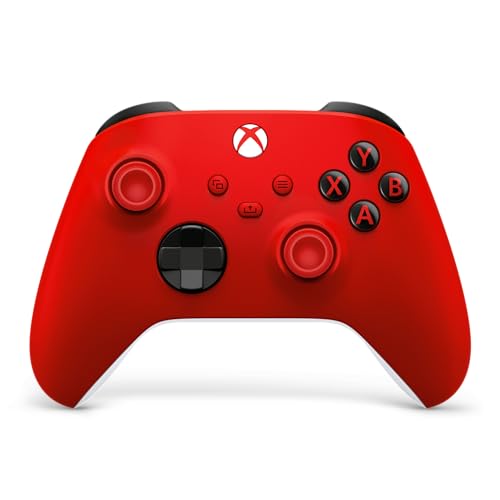
- MODERNIZED DESIGN — Experience the modernized design of the XBOX Wireless Controller with sculpted surfaces and updated …
- PRECISION PERFORMANCE — Stay on target with a hybrid D-pad and textured grips on triggers, bumpers, and back case for im…
- SHARE BUTTON: Seamlessly capture and share content such as screenshots, recordings, and more with the new Share button.
Key Features
- Ergonomic design
- Xbox wireless connectivity
- Bluetooth support on compatible devices
- Textured grips
- Precise analog sticks
- Responsive buttons
- USB-C connectivity
- Share button
- Multiple color options
- PC compatibility
The controller works particularly well for players who switch between Xbox and PC gaming.
Best For
Xbox gamers, PC gamers, casual players, and anyone looking for an excellent all-purpose controller.
Our Rating: 9.6/10
2. Sony DualSense: Best Controller for PlayStation
The Sony DualSense is our top recommendation for PS5 users.
Its biggest advantage is its immersive feedback system, which includes haptic feedback and adaptive triggers in supported games.

- Immersive Gaming: Experience haptic feedback and adaptive triggers for realistic gameplay
- Wireless Freedom: Enjoy untethered gaming with a sleek, ergonomic design
- Sony Quality: Trusted brand delivering high-performance controllers
Key Features
- Advanced haptic feedback
- Adaptive triggers
- Built-in microphone
- Motion sensors
- Touchpad
- USB-C
- Wireless connectivity
- Comfortable ergonomics
- Headset support
Supported games can use the controller’s adaptive triggers to simulate different resistance levels.
Haptic feedback can also provide more detailed sensations than traditional vibration motors.
Best For
PS5 owners, immersive gaming, action games, racing games, and PC players who want DualSense features where supported.
Our Rating: 9.7/10
3. Xbox Elite Wireless Controller Series 2: Best Premium Xbox Controller
The Xbox Elite Wireless Controller Series 2 is designed for gamers who want greater customization than the standard Xbox controller.

- PLAY LIKE A PRO — The XBOX Elite Wireless Controller Series 2 features over 30 ways to play like a pro. Designed in coll…
- ADJUSTABLE-TENSION THUMBSTICKS — Fine-tune your aim with thumbsticks that let you adjust resistance for improved accurac…
- SHORTER HAIR TRIGGER LOCKS — Fire faster and react quicker with three-step hair trigger locks that reduce pull distance …
Key Features
- Adjustable trigger stops
- Interchangeable components
- Rear paddles
- Adjustable stick tension
- Custom profiles
- Wireless connectivity
- USB-C charging
- Premium construction
- Textured grips
The additional controls can be useful in competitive shooters and games where quickly accessing multiple commands matters.
Best For
Competitive Xbox and PC gamers, FPS players, and enthusiasts who want extensive customization.
Our Rating: 9.5/10
4. Sony DualSense Edge: Best Premium PlayStation Controller
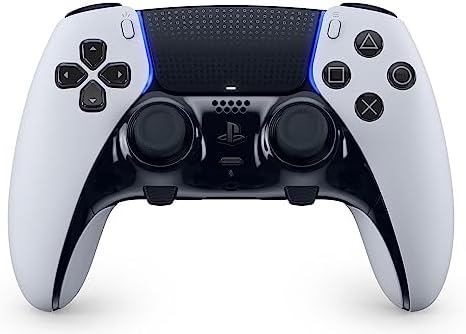
The DualSense Edge takes the standard DualSense experience and adds customization options for serious players.
Key Features
- Customizable controls
- Replaceable stick modules
- Back buttons
- Adjustable triggers
- Custom control profiles
- Haptic feedback
- Adaptive triggers
- Built-in microphone
- Wireless connectivity
The ability to customize controls can be especially useful for competitive gaming.
Best For
PS5 competitive gamers, FPS players, enthusiasts, and users who want premium customization.
Our Rating: 9.4/10
5. Nintendo Switch Pro Controller: Best Controller for Nintendo Switch
The Nintendo Switch Pro Controller is an excellent choice for gamers who prefer a traditional controller instead of the Switch’s Joy-Con configuration.

Key Features
- Comfortable ergonomic design
- Wireless connectivity
- Motion controls
- HD rumble
- USB-C charging
- Long battery life
- Nintendo Switch compatibility
- Traditional button layout
Its larger ergonomic design is particularly comfortable during longer gaming sessions.
Best For
Nintendo Switch owners, action games, RPGs, racing games, and long gaming sessions.
Our Rating: 9.4/10
6. 8BitDo Ultimate Controller: Best Value Gaming Controller
The 8BitDo Ultimate family offers a strong combination of customization, wireless connectivity, and multi-platform functionality at competitive prices.

- 【Flagship】Fully upgraded for next-level performance. Compatible with Switch/Switch 2 and Windows – Bluetooth, 2.4G, or W…
- 【TMR Joysticks】Featuring market-leading TMR joysticks, offering higher sensitivity, greater precision, and enhanced dura…
- 【Switchable Triggers】Easily switch between linear Hall Effect triggers and non-linear tactile triggers for optimal contr…
Key Features
- Customizable controls
- Wireless connectivity
- USB connectivity
- Programmable buttons
- Charging dock on selected models
- Multiple platform compatibility
- Custom software
- Ergonomic design
Some versions also feature hall-effect technology, making them particularly attractive to gamers concerned about traditional analog stick wear.
Best For
PC gamers, Nintendo Switch users, budget-conscious enthusiasts, and players who want customization.
Our Rating: 9.3/10
7. GameSir Controllers: Best for Hall-Effect Technology
GameSir offers a range of gaming controllers featuring Hall-effect or TMR-based components on selected models.
Traditional analog sticks can eventually develop drift due to mechanical wear. Hall-effect designs use magnetic sensing technology to reduce certain forms of mechanical wear.
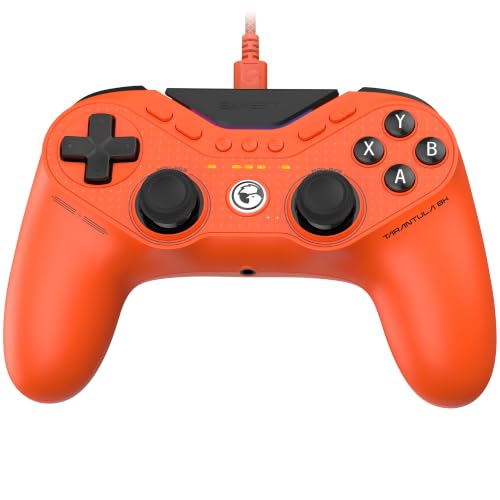
- Designed for pro-level performance, the Gen-2 TMR sticks still use magnetic technology to eliminate physical contact, de…
- The Tarantula 8K PC features dual-mode trigger stops, letting you switch effortlessly between Hall Effect analog trigger…
- With an 8000Hz polling rate over wired connection, the Tarantula 8K PC delivers smoother control and instant response, e…
Key Features
- Hall-effect or TMR sticks on selected models
- Customizable controls
- Wired and wireless models
- Adjustable triggers on selected controllers
- Programmable buttons
- PC and console compatibility depending on model
Best For
Competitive gamers, PC players, and users prioritizing stick durability.
Our Rating: 9.2/10
8. Razer Wolverine Series: Best Competitive Controller
The Razer Wolverine family is designed with competitive gaming in mind.
Depending on the model, Razer includes additional buttons, customizable controls, and responsive input systems.

- Bundle Includes: Two Razer Wolverine Ultimate Wired Gaming Controllers, Goby Labs Cleaning Spray, and Microfiber Cleanin…
- With the interchangeable thumb sticks and two interchangeable D Pads, you can swap between optimized thumb stick heights…
- The Razer Wolverine Ultimate comes loaded with a slew of extra buttons for advanced gaming: 2 remappable multi-Function …
Key Features
- Extra programmable buttons
- Responsive controls
- Textured grips
- Customizable buttons
- Wired or wireless options depending on model
- Headset support
- PC and console compatibility on selected versions
Best For
Competitive FPS players, esports enthusiasts, and gamers who want additional programmable controls.
Our Rating: 9.2/10
What Is a Gaming Controller?
A gaming controller is a handheld input device designed to control video games.
Typical controls include:
- Analog sticks
- Directional pad
- Face buttons
- Shoulder buttons
- Triggers
- Menu buttons
Advanced controllers can add:
- Back paddles
- Programmable buttons
- Motion sensors
- Adjustable triggers
- Interchangeable sticks
- Custom profiles
- Advanced vibration
- Haptic feedback
What Should You Look for in a Gaming Controller?
1. Platform Compatibility
Always check compatibility before buying.
PC
PC supports a wide variety of controllers, including Xbox, PlayStation, Nintendo-compatible, and third-party models.
Xbox
Look for controllers specifically licensed or designed for Xbox compatibility.
PlayStation
PS5 games generally require compatible PS5 controllers for native console gameplay.
Nintendo Switch
The Switch supports Nintendo controllers and numerous third-party options.
2. Wired vs. Wireless
Both have advantages.
| Feature | Wired | Wireless |
|---|---|---|
| Latency | Very low | Very low on modern models |
| Battery | No charging | Requires charging/batteries |
| Portability | Lower | Higher |
| Cable clutter | More | Less |
| Convenience | Good | Excellent |
| Best for | Competitive PC | Living-room gaming |
Modern wireless controllers can provide excellent performance, but competitive gamers may still prefer wired connections for simplicity and consistent latency.
3. Hall-Effect Sticks
Hall-effect analog sticks use magnetic sensing rather than traditional physical contact mechanisms for position detection.
Potential advantages include:
- Reduced mechanical wear
- Improved durability
- Lower risk of traditional potentiometer-related drift
However, Hall-effect technology doesn’t automatically make every controller better. Stick tuning, firmware, ergonomics, buttons, triggers, and overall build quality still matter.
4. Ergonomics
Comfort becomes increasingly important during long gaming sessions.
Look for:
- Textured grips
- Comfortable stick placement
- Appropriate controller weight
- Accessible buttons
- Good trigger design
- Balanced shape
The best controller is one that feels comfortable in your hands.
5. Back Buttons and Paddles
Premium controllers often include rear buttons or paddles.
These allow you to perform actions without moving your thumbs away from the analog sticks.
They’re particularly useful in:
- FPS games
- Racing games
- Fighting games
- Competitive shooters
For example, a rear button can be assigned to jump, reload, crouch, or another frequently used action.
6. Trigger Stops
Trigger stops reduce the physical travel distance of triggers.
They’re useful for competitive games where fast trigger activation matters.
For racing games, however, longer trigger travel can sometimes provide better control over acceleration and braking.
Best Gaming Controller by Use Case
| Use Case | Recommended |
|---|---|
| Best overall | Xbox Wireless Controller |
| Best PS5 | DualSense |
| Best Xbox premium | Elite Series 2 |
| Best PS5 premium | DualSense Edge |
| Best Switch | Nintendo Switch Pro Controller |
| Best value | 8BitDo Ultimate |
| Best Hall Effect | GameSir |
| Best competitive | Razer Wolverine |
| Best PC | Xbox Wireless Controller |
| Best FPS | Elite Series 2 / DualSense Edge |
| Best racing | Xbox Wireless / DualSense |
| Best casual gaming | Xbox Wireless Controller |
| Best customization | Elite Series 2 |
| Best for long sessions | Switch Pro / Xbox Wireless |
Controller vs. Keyboard and Mouse
| Feature | Controller | Keyboard & Mouse |
|---|---|---|
| FPS aiming | Good | Excellent |
| Racing games | Excellent | Moderate |
| Sports games | Excellent | Moderate |
| Platformers | Excellent | Good |
| Strategy games | Moderate | Excellent |
| Comfort | Excellent | Good |
| Analog movement | Excellent | Limited |
| Precision aiming | Moderate | Excellent |
| Living-room gaming | Excellent | Less convenient |
For first-person shooters, keyboard and mouse generally provide more precise aiming.
For racing, sports, platformers, and many action games, controllers often provide a better experience.
How Much Should You Spend on a Gaming Controller?
Under $50
Good for:
- Casual gaming
- Budget PC setups
- Secondary controllers
$50–$100
Best for:
- Most gamers
- Wireless connectivity
- Better build quality
- Everyday gaming
$100–$180
Best for:
- Competitive gaming
- Custom controls
- Premium materials
- Advanced features
$180+
Best for:
- Enthusiasts
- Professional-level customization
- Specialized competitive setups
For most players, a good controller in the $50–$100 range offers an excellent balance between features and price.
How to Avoid Controller Stick Drift
Stick drift occurs when an analog stick registers movement even when you’re not touching it.
To reduce the risk:
- Choose quality controllers
- Consider Hall-effect or TMR sticks
- Keep the controller clean
- Avoid excessive force
- Store it safely
- Update firmware when appropriate
No controller technology completely eliminates every potential hardware failure.
Are Premium Gaming Controllers Worth It?
Premium controllers can be worth the money for competitive gamers.
Features such as:
- Rear paddles
- Adjustable triggers
- Interchangeable sticks
- Custom profiles
- Adjustable stick tension
can provide meaningful advantages.
For casual gamers, however, these features may not justify the additional cost.
Final Verdict
The Xbox Wireless Controller is our best overall gaming controller because of its comfortable design, reliable controls, broad PC compatibility, and familiar layout.
For PS5 gamers, the Sony DualSense stands out because of its haptic feedback and adaptive triggers. Competitive Xbox players should consider the Xbox Elite Wireless Controller Series 2, while PS5 enthusiasts who want customization can choose the DualSense Edge.
Nintendo Switch owners can choose the Switch Pro Controller for a traditional ergonomic design, while the 8BitDo Ultimate is an excellent value-focused alternative.
If stick durability is your priority, look at controllers using Hall-effect or TMR technology, including selected GameSir and 8BitDo models. Competitive players should also consider controllers with programmable rear buttons and adjustable triggers.
Before purchasing, check platform compatibility, wired versus wireless connectivity, battery life, ergonomics, stick technology, trigger design, programmable controls, software support, and price.
The best gaming controller isn’t necessarily the most expensive one. Choose the model that matches your platform and the games you play most often.
Frequently Asked Questions
What is the best gaming controller in 2026?
The Xbox Wireless Controller is our best overall choice because it offers excellent ergonomics, reliable connectivity, and broad compatibility with Xbox and PC.
What is the best PS5 controller?
The Sony DualSense is the best standard PS5 controller for most players because of its haptic feedback, adaptive triggers, and comfortable design.
What is the best Xbox controller?
The standard Xbox Wireless Controller is excellent for most gamers, while the Elite Series 2 is better for users who want premium customization.
What is the best PC gaming controller?
The Xbox Wireless Controller is one of the easiest choices for PC gaming because of its familiar layout and broad Windows compatibility.
What is the best Nintendo Switch controller?
The Nintendo Switch Pro Controller is an excellent choice for Switch players who prefer a traditional ergonomic controller.
Are Hall-effect controllers better?
Hall-effect controllers can reduce certain types of analog-stick wear and drift, but overall controller quality also depends on ergonomics, firmware, buttons, triggers, and stick tuning.
Are wireless controllers good for competitive gaming?
Modern wireless controllers can provide excellent performance. Competitive players who want maximum consistency may still prefer wired connections.
Do gaming controllers work with PC?
Many controllers work with PCs, but compatibility varies. Xbox controllers generally provide particularly straightforward Windows support, while PlayStation and third-party controllers may require specific configuration.
What causes controller stick drift?
Stick drift can result from sensor wear, contamination, calibration issues, or other hardware problems that cause the analog stick to register movement when it is not being touched.
Are premium controllers worth it?
Premium controllers can be worthwhile for competitive players who benefit from rear buttons, adjustable triggers, interchangeable components, and custom profiles. Casual players may not need these extras.
How long do gaming controllers last?
Lifespan varies based on build quality, usage, care, and components. A high-quality controller can last for years, but buttons, triggers, batteries, and analog sticks can eventually wear.
Should I buy a wired or wireless controller?
Choose wireless for convenience and a cleaner setup. Choose wired if you prioritize not having to charge the controller or want a simple connection with minimal potential wireless variables.
What features should I look for in a gaming controller?
Focus on platform compatibility, ergonomics, stick technology, wireless connectivity, battery life, trigger design, programmable buttons, haptic feedback, software support, build quality, and price.
Best Products
Best Smartphones for Everyday Use in 2026
Best Laptops for Students in 2026