If you click on the links and make a purchase, we may earn a commission.
Finding the best budget laptops under $500 doesn’t mean settling for a slow or outdated computer. In 2026, shoppers can find capable laptops for school, office work, web browsing, streaming, video calls, and everyday productivity without spending a fortune.
Table of Contents

Image Credit: canva
The key is knowing which specifications matter. At this price point, prioritize 16GB RAM when available, SSD storage, modern processors, Full HD displays, good battery life, Wi-Fi 6, and USB-C connectivity. You may need to compromise on premium materials, gaming performance, display quality, or storage capacity.
This guide covers the best laptops under $500 for students, remote workers, families, and everyday users.
Quick Comparison: Best Laptops Under $500
| Laptop | Best For | Key Feature | Display | Processor Class | RAM | Rating |
|---|---|---|---|---|---|---|
| Acer Aspire 5 | Best Overall | Balanced performance | 15.6″ FHD | Intel Core / AMD Ryzen | Up to 16GB | 9.5/10 |
| Lenovo IdeaPad Slim 3 | Best Value | Affordable productivity | 15.6″ FHD | Intel Core / Ryzen | Up to 16GB | 9.4/10 |
| ASUS Vivobook 15 | Best Everyday | OLED options on select models | 15.6″ | Intel Core / Ryzen | Up to 16GB | 9.3/10 |
| HP 15 | Best for Students | Simple productivity | 15.6″ FHD | Intel Core / AMD | Up to 16GB | 9.2/10 |
| Acer Chromebook Plus 515 | Best Chromebook | ChromeOS productivity | 15.6″ FHD | Intel Core | 8GB+ | 9.3/10 |
| Lenovo IdeaPad Flex 5 | Best 2-in-1 | Convertible design | 14″ | AMD Ryzen / Intel | 8GB+ | 9.2/10 |
| Dell Inspiron 15 | Best Business Value | Familiar Windows setup | 15.6″ | Intel Core / AMD | 8GB+ | 9.1/10 |
| Samsung Galaxy Chromebook / Chromebook Plus | Best Lightweight | Portable ChromeOS | 14–15.6″ | Intel | 8GB+ | 9.0/10 |
Specifications and prices vary by configuration and retailer. A specific configuration may occasionally fall above or below $500 during promotions.
1. Acer Aspire 5 — Best Budget Laptop Under $500 Overall
The Acer Aspire 5 has long been one of the most popular choices for shoppers looking for a capable Windows laptop without spending too much.
Depending on the configuration, it can offer modern Intel Core or AMD Ryzen processors, Full HD displays, SSD storage, and upgradeable memory.

- 【Unleash Powerful Performance】Elevate your experience with the Acer Aspire 5 Laptop featuring an Intel Core i5-13420H pr…
- 【15.6″ Touchscreen FHD IPS Display】 15.6″ FHD IPS (1920×1080) Anti Glare Display with 85% screen-to-body ratio, 16:9 asp…
- 【8GB LPDDR5 RAM + 512GB PCIe SSD Storage】16GB high-bandwidth LPDDR5 RAM to smoothly run multiple applications and browse…
Key Features
- 15.6-inch display
- Full HD options
- Modern Intel or AMD processors
- SSD storage
- USB-C
- HDMI
- Wi-Fi connectivity
- Multiple USB ports
- Comfortable keyboard
- Upgrade-friendly design on select models
Why Buy?
The Aspire 5 is appealing because it balances performance and affordability.
It’s suitable for:
- Microsoft Office
- Google Docs
- Web browsing
- Zoom meetings
- Online classes
- Streaming
- Light photo editing
- General productivity
It isn’t a gaming powerhouse, but that’s not its purpose.
Best for: Students, home users, office workers, and everyday computing.
Rating: 9.5/10
2. Lenovo IdeaPad Slim 3 — Best Value Laptop Under $500
The Lenovo IdeaPad Slim 3 is another strong budget option, especially for students and people who want a straightforward Windows laptop.
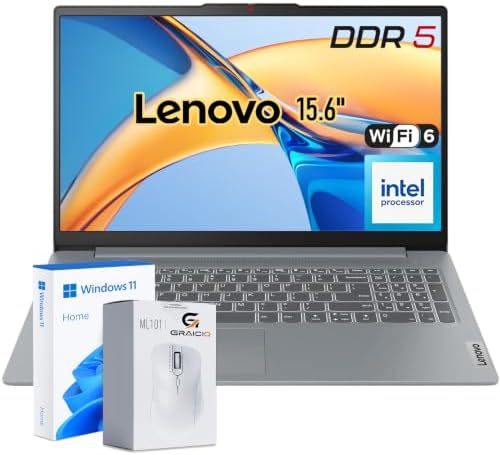
- 【EVERYDAY PERFORMANCE WITH INTEL POWER】 Powered by Intel Processor N150 with 4 Cores, 4 Threads, and speeds up to 3.6 GH…
- 【15.6″ FHD ANTI-GLARE DISPLAY】 Enjoy a spacious 15.6″ Full HD (1920 x 1080) TN display with 250-nit brightness, 45% NTSC…
- 【SMOOTH EVERYDAY MULTITASKING】 8GB DDR5 memory provides responsive performance for everyday productivity, letting you br…
Key Features
- 15.6-inch display options
- Full HD resolution on select configurations
- Intel or AMD processors
- SSD storage
- USB-C
- HDMI
- Wi-Fi
- Numeric keypad on some models
- Lightweight design
Why Buy?
The IdeaPad Slim 3 is designed for everyday productivity rather than demanding workloads.
It can handle:
- Word processing
- Presentations
- Spreadsheets
- Browsing
- Video calls
- Streaming
- Schoolwork
For users who don’t need professional video editing or high-end gaming, it can provide excellent value.
Best for: Students, families, remote workers, and budget-conscious buyers.
Rating: 9.4/10
3. ASUS Vivobook 15 — Best Everyday Budget Laptop
The ASUS Vivobook 15 offers a practical combination of screen size, portability, and everyday performance.

- Reliable Performance for Everyday Life Experience smooth, effortless productivity on Windows 11 Home with the power of t…
- Clearly Superior Display Enjoy bright, sharp visuals on a 15.6‑inch FHD 1920 × 1080 screen with a 16:9 aspect ratio and …
- Sleek by design ASUS Vivobook 15 in Cool Silver delivers a clean, modern look in an ultra‑portable frame, just 3.75 lbs …
Key Features
- 15.6-inch display
- Full HD options
- Intel Core or AMD Ryzen configurations
- SSD storage
- USB-C
- HDMI
- Wi-Fi
- Comfortable keyboard
- Large touchpad
Why Buy?
The Vivobook series is particularly attractive for users who want a laptop that feels more versatile than an entry-level machine.
Select configurations may offer better displays, while standard models focus on affordability.
It’s a good option for work, study, entertainment, and everyday browsing.
Best for: General users, students, remote workers, and home offices.
Rating: 9.3/10
4. HP 15 — Best Budget Laptop for Students
The HP 15 is a practical Windows laptop aimed at everyday computing.

- 【Intel Multi-Core Performance That Packs a Punch】 Power through your daily tasks with the Intel N200 Pentium processor (…
- 【15.6″ HD+ Display with a Privacy-First Webcam】 Enjoy a crisp, anti-glare HD (1366 x 768) screen with an ultra-thin micr…
- 【Snappy 128GB Fast Storage + 16GB RAM for Everyday Efficiency】 This hp 15.6 laptop boots up quickly and launches apps fa…
Key Features
- 15.6-inch display
- Full HD configurations
- Intel or AMD processors
- SSD storage
- USB-C
- HDMI
- Wi-Fi
- Numeric keypad on some versions
Why Buy?
Students don’t necessarily need expensive laptops.
For assignments, online research, Microsoft Office, presentations, email, and video conferencing, an HP 15 configuration with a modern processor and SSD can be sufficient.
Look for models with 8GB or 16GB RAM rather than very limited-memory configurations.
Best for: Students, teachers, families, and basic office work.
Rating: 9.2/10
5. Acer Chromebook Plus 515 — Best Chromebook Under $500
If you don’t specifically need Windows applications, a Chromebook Plus can be an excellent budget alternative.
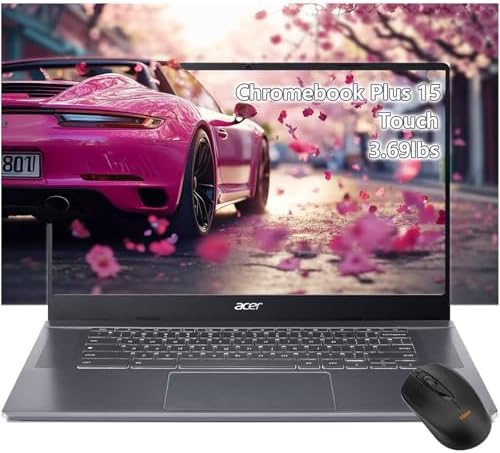
- acer Chromebook Plus 515 Laptop Touchscreen: acer Chromebook touchscreen laptop 15inch FHD IPS Display with narrow-bezel…
- Gaming Chromebook 2025: acer Chromebook Plus 2025 powered by the new Intel Core i3-1305U Processor will boot quickly and…
- Fast Boot Loader: Google Chromebook 8GB RAM, 256GB PCIe SSD + Google Cloud 2TB Storage for powerful processing for multi…
Key Features
- 15.6-inch display
- Full HD
- ChromeOS
- Intel Core processors
- SSD storage
- 8GB or more RAM on many configurations
- Wi-Fi
- USB-C
- Long battery life
Why Buy?
ChromeOS is lightweight and designed around web applications.
It’s particularly good for:
- Google Docs
- Google Sheets
- Gmail
- Google Meet
- YouTube
- Web applications
- Online learning
The Chromebook Plus platform also provides more capable hardware than many older entry-level Chromebooks.
Best for: Students, cloud-based workers, and users who primarily use web applications.
Rating: 9.3/10
6. Lenovo IdeaPad Flex 5 — Best 2-in-1 Budget Laptop
The Lenovo IdeaPad Flex 5 is attractive if you want a laptop that can also function as a tablet.

Key Features
- 2-in-1 convertible design
- Touchscreen
- 360-degree hinge
- 14-inch display options
- AMD Ryzen or Intel processors
- SSD storage
- USB-C
- Wi-Fi
Why Buy?
The convertible design is useful for:
- Taking notes
- Watching videos
- Presenting information
- Drawing
- Reading
- Casual browsing
Some configurations may exceed $500, but sales can bring certain models into the budget range.
Best for: Students, travelers, note-takers, and flexible home users.
Rating: 9.2/10
7. Dell Inspiron 15 — Best Business Value
The Dell Inspiron 15 is a practical choice for people who want a familiar Windows laptop for business and home productivity.

- TOUCHSCREEN PRODUCTIVITY: Navigate documents, spreadsheets, and web pages with intuitive touch controls on the 15.6 inch…
- FAST AND RESPONSIVE PERFORMANCE: The AMD Ryzen 5 7530U processor with 6 cores and 12 threads handles multitasking smooth…
- AMPLE STORAGE FOR YOUR FILES: The 512GB solid state drive provides plenty of space for your documents, photos, videos, a…
Key Features
- 15.6-inch display
- Intel or AMD processors
- SSD storage
- USB-C
- HDMI
- Wi-Fi
- Full-size keyboard options
- Windows
Why Buy?
It provides the basic features most office users need without unnecessary premium features.
It’s suitable for:
- Word
- Excel
- PowerPoint
- Web research
- Video conferencing
- Remote work
Best for: Small businesses, remote workers, students, and home offices.
Rating: 9.1/10
8. Samsung Chromebook Plus — Best Lightweight Budget Option
Samsung’s Chromebook lineup can be appealing to users who value portability and simplicity.

- Compact, light design with 11. 6” display
- Military-grade durability
- Ultra-fast connectivity with Gigabit Wi-Fi
Key Features
- Lightweight design
- ChromeOS
- Full HD display options
- Intel processors
- SSD storage
- USB-C
- Wi-Fi
- Long battery life
Why Buy?
ChromeOS generally requires fewer system resources than Windows, making it suitable for affordable hardware.
If most of your work happens in a browser, a Chromebook can be a very practical solution.
Best for: Students, travelers, casual users, and cloud-based productivity.
Rating: 9.0/10
What Should You Expect From a $500 Laptop?
A laptop under $500 can handle many everyday tasks, but expectations should be realistic.
Excellent for:
- Web browsing
- Microsoft Office
- Google Workspace
- Online classes
- Video calls
- Streaming
- Social media
- Light photo editing
- Basic programming
Less Suitable for:
- Professional 4K video editing
- High-end gaming
- 3D rendering
- Professional CAD
- Large machine-learning workloads
- Advanced animation
If you need those capabilities, you will generally need to increase your budget.
Best Processor for a Laptop Under $500
Processor selection is important at this price point.
Look for relatively recent:
- Intel Core 3/5-class processors
- AMD Ryzen 3/5 processors
- Intel Core i3/i5 configurations
- Snapdragon processors where software compatibility meets your needs
Avoid choosing purely based on the “i5” or “Ryzen 5” label. Processor generations and specific models matter.
A newer lower-tier processor can sometimes provide a better overall experience than an older high-tier processor.
How Much RAM Do You Need?
RAM affects multitasking.
4GB RAM
Avoid if possible on a Windows laptop.
It can become restrictive quickly.
8GB RAM
The minimum I recommend for most budget Windows laptops.
Suitable for:
- Browsing
- Office work
- Video calls
- Schoolwork
- Streaming
16GB RAM
The preferred option if available under $500.
It provides more headroom for multitasking and longer-term usability.
How Much Storage Do You Need?
128GB
Usable for basic cloud-focused users, but limited.
256GB
A good minimum for many budget Windows laptops.
512GB
Excellent if you store lots of documents, photos, applications, or offline media.
An SSD is strongly recommended because it provides much faster startup and application loading than traditional hard drives.
Windows vs Chromebook Under $500
| Feature | Windows Laptop | Chromebook |
|---|---|---|
| Microsoft Office | Excellent | Web/Android versions |
| Google Workspace | Excellent | Excellent |
| Gaming | Better | Limited |
| Software compatibility | Excellent | More limited |
| Ease of use | Familiar | Very simple |
| Offline applications | Excellent | More limited |
| Battery life | Varies | Often excellent |
| Security | Good | Strong |
| Best for | Versatility | Cloud computing |
Choose Windows if you need traditional desktop applications.
Choose a Chromebook if most of your work takes place online.
Best Budget Laptop for Students
Students should prioritize:
- 8GB+ RAM
- SSD storage
- Full HD display
- Good battery life
- Comfortable keyboard
- Webcam
- Wi-Fi
- USB-C
- Lightweight design
The Acer Aspire 5, Lenovo IdeaPad Slim 3, and HP 15 are strong choices for general schoolwork.
Best Budget Laptop for Remote Work
Remote workers should prioritize:
- Webcam
- Microphone
- Wi-Fi 6
- USB-C
- HDMI
- Good battery life
- Comfortable keyboard
- 8GB+ RAM
A 15.6-inch Full HD display can be particularly useful for spreadsheets and video conferencing.
Best Budget Laptop for Office Work
For Microsoft Word, Excel, PowerPoint, email, and web applications, you don’t need a premium processor.
A laptop with:
Modern processor + 8GB/16GB RAM + 256GB/512GB SSD + Full HD display
is a strong configuration.
Best Budget Laptop for Programming
Programming requirements vary significantly.
For basic:
- HTML
- CSS
- JavaScript
- Python
- SQL
- Web development
a modern 8GB laptop can work.
However, 16GB RAM is preferable if you plan to use Docker, virtual machines, Android Studio, local databases, or multiple development environments.
The Acer Aspire 5 and Lenovo IdeaPad Slim 3 are worth considering when configured with stronger processors and 16GB RAM.
Best Budget Laptop for Light Gaming
Most laptops under $500 aren’t designed for demanding AAA gaming.
However, integrated graphics can handle:
- Older games
- Indie games
- Casual games
- Esports titles at modest settings
If gaming is your primary goal, saving for a laptop with a dedicated GPU is generally a better strategy.
Features to Look For Under $500
Must-Have
- SSD
- 8GB RAM minimum
- Full HD display
- Modern processor
- Wi-Fi
- Webcam
- USB-C
Nice to Have
- 16GB RAM
- 512GB SSD
- Backlit keyboard
- Fingerprint reader
- Touchscreen
- Wi-Fi 6
- Aluminum chassis
What to Avoid in a Budget Laptop
Be cautious with laptops offering:
- 4GB RAM
- 64GB eMMC storage
- Very old processors
- 1366×768 displays
- Extremely low-quality displays
- Non-upgradable memory
- Very small storage
- Poor-quality webcams
A cheap laptop isn’t a good deal if it becomes frustrating to use after a few months.
Best Budget Laptops Under $500 by Use Case
| Use Case | Recommended Laptop | Key Reason |
|---|---|---|
| Best overall | Acer Aspire 5 | Balanced performance |
| Best value | Lenovo IdeaPad Slim 3 | Affordable productivity |
| Best everyday | ASUS Vivobook 15 | Versatile design |
| Best student | HP 15 | Simple productivity |
| Best Chromebook | Acer Chromebook Plus 515 | Strong ChromeOS hardware |
| Best 2-in-1 | Lenovo IdeaPad Flex 5 | Convertible touchscreen |
| Best business | Dell Inspiron 15 | Practical Windows setup |
| Best lightweight | Samsung Chromebook Plus | Portable design |
| Best remote work | Acer Aspire 5 | Ports + productivity |
| Best programming | Acer Aspire 5 | Configurable performance |
Pros and Cons of Budget Laptops Under $500
Pros
- Affordable
- Good for school
- Suitable for office work
- SSD storage available
- Full HD screens available
- Many Windows choices
- Strong Chromebook options
- Portable
- Good for everyday browsing
- Excellent value during sales
Cons
- Limited gaming performance
- Basic displays on some models
- Plastic construction is common
- RAM may be limited
- Battery life varies
- Premium features are uncommon
- High-end editing isn’t practical
How to Choose the Best Laptop Under $500
Before buying, check the exact configuration, not just the laptop family name.
For example, one laptop series may be sold with several different processors, displays, RAM capacities, and storage options.
Prioritize:
Processor: Choose a recent Intel Core or AMD Ryzen model.
RAM: Aim for 8GB minimum; 16GB is better.
Storage: Choose an SSD, preferably 256GB or larger.
Display: Full HD should be the minimum target for most users.
Battery: Look for realistic battery-life testing rather than marketing claims alone.
Ports: USB-C, USB-A, HDMI, and headphone connectivity are useful.
Keyboard: Important if you’ll type for several hours each day.
Weight: Consider portability if you travel frequently.
Operating system: Choose Windows for traditional software compatibility or ChromeOS for cloud-focused work.
Final Verdict
The Acer Aspire 5 is our overall choice for the best budget laptop under $500 because it offers a strong balance of performance, features, connectivity, and value across different configurations.
The Lenovo IdeaPad Slim 3 is another excellent value option, while the ASUS Vivobook 15 provides a versatile everyday experience. Students should consider the HP 15, while users who primarily work online may get excellent value from the Acer Chromebook Plus 515.
If you want a touchscreen and flexible design, look for a sale on the Lenovo IdeaPad Flex 5.
The most important advice is to compare the exact specifications before purchasing. Under $500, a laptop with 16GB RAM and a 512GB SSD can be dramatically more useful than a similarly priced model with 4GB RAM and minimal storage.
For most buyers, the ideal budget configuration is:
Modern processor + 8GB or 16GB RAM + 256GB/512GB SSD + Full HD display + USB-C + Wi-Fi 6.
That’s enough performance for school, office work, remote work, browsing, streaming, video calls, and everyday computing without unnecessarily increasing your budget.
Frequently Asked Questions
What is the best laptop under $500 in 2026?
The Acer Aspire 5 is our overall pick because it offers a strong combination of performance, storage, display options, connectivity, and value.
Is $500 enough for a good laptop?
Yes. A $500 budget can buy a capable laptop for school, office work, browsing, streaming, and everyday productivity.
Is 8GB RAM enough for a budget laptop?
Yes, 8GB is sufficient for most everyday tasks. However, 16GB is preferable if you regularly multitask or use demanding applications.
Is 4GB RAM enough?
For modern Windows laptops, 4GB is generally too restrictive. We recommend choosing at least 8GB when possible.
Is a Chromebook better than a Windows laptop under $500?
It depends on your software needs. Chromebooks are excellent for web-based work, while Windows provides broader compatibility with traditional desktop applications.
What processor should I look for under $500?
Look for a recent Intel Core or AMD Ryzen processor rather than relying only on the processor family name. Generation and specific model matter.
How much storage should a $500 laptop have?
We recommend at least 256GB SSD storage, with 512GB being preferable if your budget allows.
Can a $500 laptop run Microsoft Office?
Yes. Windows laptops can run Microsoft Office, while Chromebooks can use Microsoft 365 web applications and other compatible solutions.
Can budget laptops run games?
Some can run lightweight and esports games, but most laptops under $500 aren’t designed for demanding AAA gaming.
Is a 15.6-inch laptop too big for students?
Not necessarily. A 15.6-inch laptop provides a comfortable workspace for documents and multitasking. A 13- or 14-inch model may be preferable if portability is the priority.
What laptop is best for remote work under $500?
The Acer Aspire 5, Lenovo IdeaPad Slim 3, and HP 15 are good options when configured with 8GB or more RAM and SSD storage.
What should I avoid when buying a laptop under $500?
Avoid 4GB RAM, very small storage, outdated processors, low-resolution displays, and slow eMMC storage when better alternatives are available within your budget.