If you click on the links and make a purchase, we may earn a commission.
The best Wi-Fi 7 routers are designed for users who want the latest generation of wireless networking, higher throughput, lower latency, better efficiency, and strong performance across multiple connected devices. Wi-Fi 7, officially known as IEEE 802.11be, builds on Wi-Fi 6 and Wi-Fi 6E with technologies such as Multi-Link Operation (MLO), 320MHz channels, and 4096-QAM.
Table of Contents
Image Credit: Canva
Wi-Fi 7 is especially attractive for households with multi-gigabit internet, gaming PCs, 4K and 8K streaming, VR headsets, NAS storage, smart-home devices, and many simultaneously connected devices.
However, the most expensive router isn’t automatically the best choice. Your internet speed, home size, device compatibility, Ethernet requirements, and budget should determine which Wi-Fi 7 router you buy.
In this guide, we’ve compared the best Wi-Fi 7 routers in 2026 for gaming, large homes, apartments, multi-gigabit internet, streaming, home offices, and advanced networking.
Quick Comparison: Best Wi-Fi 7 Routers
| Wi-Fi 7 Router | Best For | Key Feature | Ethernet | Bands | Rating |
|---|---|---|---|---|---|
| TP-Link Archer BE800 | Best Overall | Excellent Wi-Fi 7 performance | Multi-Gig | Tri-band | 9.8/10 |
| ASUS ROG Rapture GT-BE98 Pro | Best Gaming | High-end gaming & networking | Multi-Gig | Quad-band | 9.8/10 |
| TP-Link Archer BE550 | Best Value | Affordable Wi-Fi 7 | 2.5GbE | Tri-band | 9.5/10 |
| NETGEAR Nighthawk RS700S | Best Premium | High-speed wireless performance | Multi-Gig | Tri-band | 9.7/10 |
| ASUS RT-BE96U | Best ASUS Router | Powerful wireless & wired networking | Multi-Gig | Tri-band | 9.6/10 |
| TP-Link Deco BE65 | Best Mesh | Whole-home Wi-Fi 7 | 2.5GbE | Tri-band | 9.5/10 |
| Amazon eero Max 7 | Best Easy Mesh | Simple Wi-Fi 7 setup | Multi-Gig | Tri-band | 9.4/10 |
| ASUS ZenWiFi BQ16 Pro | Best Premium Mesh | High-performance whole-home Wi-Fi | Multi-Gig | Quad-band | 9.7/10 |
Specifications can vary by market, hardware revision, and configuration.
1. TP-Link Archer BE800 — Best Wi-Fi 7 Router Overall
The TP-Link Archer BE800 is our top overall Wi-Fi 7 router because it balances next-generation wireless technology, high-speed Ethernet, strong coverage, and useful networking features.
It is designed for users who want a router capable of handling demanding modern networks without necessarily moving to an enterprise-level system.

- Next-Gen Gigabit Wi-Fi 6 Speeds: 2402 Mbps on 5 GHz and 574 Mbps on 2.4 GHz bands ensure smoother streaming and faster d…
- A More Responsive Experience: Enjoy smooth gaming, video streaming, and live feeds simultaneously. OFDMA makes your Wi-F…
- Expanded Wi-Fi Coverage: 4 high-gain external antennas and Beamforming technology combine to extend strong, reliable, Wi…
Key Features
- Wi-Fi 7
- Tri-band connectivity
- 6GHz support
- Multi-Link Operation
- 320MHz channels where supported
- Multi-gigabit Ethernet
- WPA3 security
- Mesh compatibility
- Advanced network management
- Mobile app
Its combination of wireless and wired connectivity makes it suitable for high-speed broadband and demanding local networks.
Best For
Families, gamers, home offices, 4K streaming, smart homes, and multi-gigabit internet.
Our Rating: 9.8/10
2. ASUS ROG Rapture GT-BE98 Pro — Best Wi-Fi 7 Router for Gaming
The ASUS ROG Rapture GT-BE98 Pro is aimed at serious gamers and enthusiasts who want a powerful Wi-Fi 7 networking platform.
Its high-end hardware and extensive configuration options make it particularly attractive for gaming PCs, consoles, VR devices, streaming, and high-bandwidth home networks.

- Triple-level game acceleration – accelerate game traffic With device, game packet and game server prioritization.Power S…
- Cutting edge hardware offers the best performance – 1.8GHz Quad-Core cpu and 2.5G gaming port for ultimate performance.
- Your own gaming mesh network – Compatible with Asus AiMesh Wi-Fi system for seamless whole-home coverage.
Key Features
- Wi-Fi 7
- Quad-band design
- Multi-gigabit Ethernet
- Multi-Link Operation
- Gaming QoS
- VPN functionality
- AiProtection security
- Parental controls
- Multiple high-speed Ethernet ports
- Advanced network monitoring
Best For
Competitive gaming, streamers, enthusiasts, VR, and multi-gigabit internet.
Our Rating: 9.8/10
3. TP-Link Archer BE550 — Best Value Wi-Fi 7 Router
The TP-Link Archer BE550 is one of the more accessible ways to upgrade to Wi-Fi 7.
It provides modern Wi-Fi 7 technologies and 2.5GbE connectivity without the price of some flagship models.
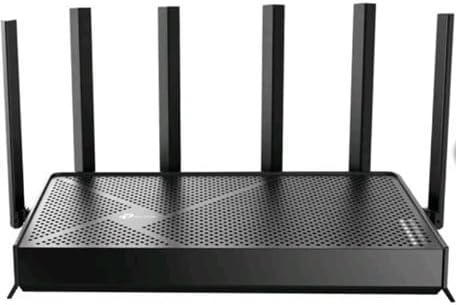
- Band Technology Tri-Band
- Model BE9500
- Blazing-Fast Wi-Fi 7 Speeds Up To 9.5 Gbps for Smooth Streaming, Lag-free Gaming, and Crystal-clear Video Calls
Key Features
- Wi-Fi 7
- Tri-band
- 2.5GbE Ethernet
- Multi-Link Operation
- 320MHz channels where supported
- WPA3
- Mesh compatibility
- HomeShield security
- Mobile app
Best For
Families, gamers, home offices, apartments, and users upgrading from Wi-Fi 5 or Wi-Fi 6.
Our Rating: 9.5/10
4. NETGEAR Nighthawk RS700S — Best Premium Wi-Fi 7 Router
The NETGEAR Nighthawk RS700S is designed for users who want premium Wi-Fi 7 performance and advanced high-speed networking.

- FASTER, FARTHER, MORE RELIABLE WIFI: A dedicated tri-band WiFi 7 router with a third high-speed band for demanding devic…
- WORKS WITH YOUR EXISTING INTERNET SERVICE: Pairs with your existing modem or gateway via ethernet. Compatible with most …
- SET UP AND MANAGE YOUR NETWORK WITH THE NIGHTHAWK APP: Download the free Nighthawk app on iOS or Android for guided setu…
Key Features
- Wi-Fi 7
- Tri-band
- Multi-gigabit networking
- Multi-Link Operation
- High wireless throughput
- Advanced security
- Nighthawk mobile app
- Strong wireless coverage
- Modern hardware design
It is particularly suited to homes where several devices need high-speed wireless connections simultaneously.
Best For
Premium home networks, multi-gigabit internet, gaming, streaming, and advanced users.
Our Rating: 9.7/10
5. ASUS RT-BE96U — Best ASUS Wi-Fi 7 Router
The ASUS RT-BE96U combines Wi-Fi 7 technology with advanced networking controls and strong wired connectivity.

- Blazing-fast WiFi 7 tech boosts throughput up to 7200Mbps with Multi-Link Operation and 4096-QAM.
- Bolster your wired network capacity up to 34G with one cutting-edge 10G SFP+ port and one standard 10G WAN/LAN port.
- Establish always-on internet through AI WAN detection, versatile WAN configuration options, and a convenient USB port re…
Key Features
- Wi-Fi 7
- Tri-band wireless
- Multi-gigabit Ethernet
- AiMesh
- Multi-Link Operation
- Advanced QoS
- VPN support
- WPA3
- AiProtection
- Parental controls
It is a strong choice for users who want detailed control over their home network.
Best For
Power users, gamers, home offices, smart homes, and high-speed broadband.
Our Rating: 9.6/10
6. TP-Link Deco BE65 — Best Wi-Fi 7 Mesh System
A single router isn’t always enough for large homes. The TP-Link Deco BE65 is designed to provide whole-home Wi-Fi 7 coverage through a mesh configuration.

- Wi-Fi 6 Mesh Wi-Fi – Next-gen Wi-Fi 6 AX1800 whole home mesh system to eliminate weak Wi-Fi for good
- Whole Home Wi-Fi Coverage – Cover up to 5800 square feet with seamless high-performance Wi-Fi 6 and eliminate dead zones…
- Connect More Devices – With Mesh Wi-Fi 6 Deco X20 (3-pack) is strong enough to connect up to 150 devices with strong and…
Key Features
- Wi-Fi 7
- Tri-band
- Mesh networking
- 2.5GbE
- Multi-Link Operation
- 320MHz channels where supported
- Easy mobile setup
- HomeShield security
- Expandable network
Mesh systems can be particularly useful in multi-story homes or properties with thick walls.
Best For
Large homes, families, smart homes, and whole-home Wi-Fi.
Our Rating: 9.5/10
7. Amazon eero Max 7 — Best Easy Wi-Fi 7 Mesh
The eero Max 7 focuses on ease of installation and automated network management while offering Wi-Fi 7 and multi-gigabit connectivity.

- THIS WIFI BRINGS ALL THE TOYS TO THE YARD – eero Outdoor 7 provides up to 15,000 sq. ft. of mesh wifi coverage outdoors …
- WEATHERPROOF IP66 – Tested to operate between -40°F and 131°F. With an IP66 rating for protection from dust, rain, and s…
- BUILT FOR SPEED – Wi-Fi 7 technology delivers wireless speeds up to 2.1 Gbps so you can scroll, surf, swipe, and stream …
Key Features
- Wi-Fi 7
- Tri-band
- Multi-gigabit Ethernet
- Mesh networking
- Simple app setup
- Automatic updates
- Smart-home integration
- Whole-home coverage
It’s an excellent choice for people who want modern wireless technology without spending significant time configuring their network.
Best For
Families, smart homes, large properties, and users who prioritize simplicity.
Our Rating: 9.4/10
8. ASUS ZenWiFi BQ16 Pro — Best Premium Wi-Fi 7 Mesh
The ASUS ZenWiFi BQ16 Pro targets users who want premium whole-home wireless performance and extensive networking capabilities.

- Banish WiFi Dead Zone — Mesh WiFi system with unique antenna placement delivers strong WiFi to every corner of your hous…
- Hassle-free Control — 3-step setup and easy management with ASUS Router App.
- Always Up-to-date Security — The subscription-free cloud-based security powered by Trend Micro makes sure your privacy o…
Key Features
- Wi-Fi 7
- Quad-band design
- Mesh networking
- Multi-gigabit Ethernet
- Multi-Link Operation
- AiMesh
- Advanced security
- VPN support
- Parental controls
- High-capacity wireless networking
Best For
Large homes, enthusiasts, high-speed broadband, gaming, and demanding smart homes.
Our Rating: 9.7/10
What Is Wi-Fi 7?
Wi-Fi 7 is the latest major generation of Wi-Fi technology, officially associated with the 802.11be standard.
It builds upon Wi-Fi 6 and Wi-Fi 6E with improvements designed to deliver:
- Higher throughput
- Lower latency
- Better spectrum utilization
- Improved multi-device performance
- Greater network flexibility
Three important Wi-Fi 7 technologies are Multi-Link Operation, 320MHz channels, and 4096-QAM.
Wi-Fi 7 Key Features Explained
Multi-Link Operation
Multi-Link Operation (MLO) allows compatible devices to use multiple wireless links more intelligently.
Depending on the implementation, this can improve throughput, reliability, or latency.
This is one of the major differences between Wi-Fi 7 and previous generations.
320MHz Channels
Wi-Fi 7 supports channels up to 320MHz in compatible spectrum.
Wider channels can provide substantially more bandwidth, but the real-world benefit depends on:
- Available spectrum
- Regulatory environment
- Router capabilities
- Client device support
- Interference
Not every device will achieve the maximum advertised speed.
4096-QAM
Wi-Fi 7 introduces 4096-QAM, which can transmit more data per symbol than earlier modulation schemes under suitable signal conditions.
This contributes to higher theoretical throughput.
Wi-Fi 7 vs. Wi-Fi 6
| Feature | Wi-Fi 6 | Wi-Fi 7 |
|---|---|---|
| Standard | 802.11ax | 802.11be |
| 2.4GHz | Yes | Yes |
| 5GHz | Yes | Yes |
| 6GHz | Wi-Fi 6E | Yes |
| 160MHz channels | Yes | Yes |
| 320MHz channels | No | Yes |
| Multi-Link Operation | No | Yes |
| 4096-QAM | No | Yes |
| Maximum potential | High | Higher |
| Best for | Most users | High-performance networks |
Wi-Fi 6 remains perfectly adequate for many households, while Wi-Fi 7 is aimed more toward users seeking higher performance and future-proofing.
Do You Need a Wi-Fi 7 Router?
Not everyone needs Wi-Fi 7.
A Wi-Fi 7 router makes the most sense if you have:
- Multi-gigabit internet
- Wi-Fi 7 smartphones or laptops
- High-performance gaming systems
- VR devices
- Large file transfers
- NAS storage
- Multiple high-bandwidth users
- A desire for long-term networking hardware
If most of your devices are Wi-Fi 5 or Wi-Fi 6, a good Wi-Fi 6 router may offer better value.
What Should You Look for in a Wi-Fi 7 Router?
1. Ethernet Speed
One of the most important considerations is wired connectivity.
Look for:
- 1GbE
- 2.5GbE
- 5GbE
- 10GbE
If you have multi-gigabit internet, buying a Wi-Fi 7 router with only basic Gigabit Ethernet may limit your network.
2. Number of Bands
Wi-Fi 7 routers can have different band configurations.
Tri-band systems generally include:
- 2.4GHz
- 5GHz
- 6GHz
Some premium routers use four-band configurations.
More bands can provide additional flexibility, especially in mesh networks.
3. 6GHz Support
The 6GHz band can provide cleaner spectrum and high-speed connections for compatible devices.
However, 6GHz generally has shorter effective range than lower-frequency bands, particularly through walls.
4. Coverage
Don’t choose a router solely because its manufacturer advertises a large coverage area.
Real-world coverage depends on:
- Home construction
- Walls
- Floors
- Interference
- Router placement
- Device location
For large properties, consider a Wi-Fi 7 mesh system.
Wi-Fi 7 Router vs. Wi-Fi 7 Mesh
| Feature | Wi-Fi 7 Router | Wi-Fi 7 Mesh |
|---|---|---|
| Small home | Excellent | Good |
| Large home | May need additional equipment | Excellent |
| Coverage | Good–Excellent | Excellent |
| Cost | Lower | Higher |
| Setup | Simple | Simple |
| Expansion | Limited | Easy |
| Dead zones | May remain | Better solution |
| Best for | Apartments & medium homes | Large homes |
If your current router provides strong coverage throughout your home, a single Wi-Fi 7 router is usually the simpler and more economical solution.
Best Wi-Fi 7 Router by Use Case
| Use Case | Recommended |
|---|---|
| Best overall | TP-Link Archer BE800 |
| Best gaming | ASUS ROG Rapture GT-BE98 Pro |
| Best value | TP-Link Archer BE550 |
| Best premium | NETGEAR Nighthawk RS700S |
| Best ASUS | ASUS RT-BE96U |
| Best mesh | TP-Link Deco BE65 |
| Best simple mesh | Amazon eero Max 7 |
| Best premium mesh | ASUS ZenWiFi BQ16 Pro |
| Best for multi-gig internet | TP-Link Archer BE800 |
| Best for gaming | ASUS ROG Rapture GT-BE98 Pro |
| Best for large homes | ASUS ZenWiFi BQ16 Pro |
| Best for apartments | TP-Link Archer BE550 |
| Best for home office | TP-Link Archer BE800 |
Wi-Fi 7 for Gaming
Wi-Fi 7 is particularly interesting for gamers because technologies such as MLO are designed to improve connection efficiency and potentially reduce latency.
Look for:
- Gaming QoS
- Multi-gig Ethernet
- Strong 5GHz and 6GHz performance
- Stable firmware
- Low-latency networking
- Multiple wired ports
However, wired Ethernet remains the preferred choice for competitive gaming whenever practical.
A Wi-Fi 7 router cannot eliminate latency caused by your ISP, game server distance, or internet congestion outside your home.
Wi-Fi 7 for Streaming
Wi-Fi 7 provides plenty of capacity for demanding streaming environments.
It is particularly useful for homes with:
- Multiple 4K streams
- 8K media
- Streaming PCs
- Smart TVs
- Wireless speakers
- Gaming consoles
- Several simultaneous users
For most households, however, Wi-Fi 6 is already sufficient for normal 4K streaming.
Wi-Fi 7 for NAS and Large File Transfers
Wi-Fi 7 can be particularly useful when combined with a fast NAS and multi-gigabit wired network.
For example, users transferring large:
- Video projects
- RAW photographs
- Game files
- Backups
- CAD files
- Media libraries
may benefit from faster wireless connectivity.
To achieve meaningful improvements, the NAS, router, computer, and network infrastructure must all support appropriate speeds.
How to Improve Wi-Fi 7 Performance
Even an expensive Wi-Fi 7 router needs proper installation.
Follow these tips:
- Place the router centrally.
- Keep it elevated.
- Avoid cabinets and enclosed spaces.
- Keep it away from large metal objects.
- Use Ethernet for stationary high-bandwidth devices.
- Update firmware regularly.
- Place mesh nodes strategically.
- Use compatible Wi-Fi 7 client devices.
- Avoid unnecessary wireless interference.
- Use the 6GHz band when appropriate.
Is Wi-Fi 7 Worth It in 2026?
For users buying a premium router today, Wi-Fi 7 can be a worthwhile long-term investment.
The biggest reasons to upgrade include compatible Wi-Fi 7 devices, multi-gigabit internet, high-bandwidth local networking, and the desire to keep the same router for several years.
However, users with slower broadband and older devices may get better value from Wi-Fi 6.
Don’t buy Wi-Fi 7 simply because it has a larger advertised speed number. Your devices and internet connection need to support the technology to benefit from it.
Final Verdict
The TP-Link Archer BE800 is our best Wi-Fi 7 router overall, combining excellent wireless capabilities, multi-gigabit networking, modern Wi-Fi 7 technologies, and features suitable for demanding home networks.
For serious gamers and enthusiasts, the ASUS ROG Rapture GT-BE98 Pro is a premium option with extensive gaming and networking controls. The TP-Link Archer BE550 is a strong value choice for shoppers who want Wi-Fi 7 without paying flagship prices.
For premium performance, the NETGEAR Nighthawk RS700S is worth considering, while the ASUS RT-BE96U is a compelling option for users who prefer ASUS’s networking ecosystem.
Large homes should consider a mesh system such as the TP-Link Deco BE65 or ASUS ZenWiFi BQ16 Pro.
Ultimately, the best Wi-Fi 7 router depends on your internet speed, home size, compatible devices, Ethernet requirements, number of users, gaming needs, and budget.
If you’re upgrading from an older Wi-Fi 5 router and want a future-ready setup, Wi-Fi 7 can be an excellent investment. If you already have a quality Wi-Fi 6 router and don’t own Wi-Fi 7 devices, upgrading immediately may not be necessary.
Frequently Asked Questions
What is the best Wi-Fi 7 router in 2026?
The TP-Link Archer BE800 is our overall pick because it combines strong Wi-Fi 7 performance, multi-gigabit Ethernet, modern wireless technologies, and useful home networking features.
Is Wi-Fi 7 worth buying in 2026?
Yes, particularly for users with multi-gigabit internet, compatible Wi-Fi 7 devices, demanding local networks, or those wanting a future-ready router.
Is Wi-Fi 7 faster than Wi-Fi 6?
Yes. Wi-Fi 7 introduces technologies such as 320MHz channels, Multi-Link Operation, and 4096-QAM that can provide higher theoretical throughput and improved efficiency.
What is the best Wi-Fi 7 router for gaming?
The ASUS ROG Rapture GT-BE98 Pro is an excellent premium gaming choice because of its high-end hardware, gaming optimization, multi-gigabit networking, and advanced controls.
Do I need Wi-Fi 7 for gaming?
No. Wi-Fi 6 can provide excellent gaming performance. Wi-Fi 7 becomes more attractive if you have compatible devices and a high-speed internet or local network.
What is the best budget Wi-Fi 7 router?
The TP-Link Archer BE550 is a strong value option, offering Wi-Fi 7 technology and 2.5GbE connectivity at a lower price than many flagship routers.
Is Wi-Fi 7 compatible with older devices?
Yes. Wi-Fi 7 routers are designed to work with compatible previous-generation Wi-Fi devices, although older devices won’t benefit from all Wi-Fi 7 features.
What is Multi-Link Operation?
Multi-Link Operation, or MLO, allows compatible Wi-Fi 7 devices to use multiple wireless links more intelligently. Depending on the network, this can improve throughput, reliability, or latency.
Do I need a 6GHz device for Wi-Fi 7?
You don’t need a 6GHz-capable device to connect to a Wi-Fi 7 router, but compatible devices are required to take advantage of the 6GHz band.
Is Wi-Fi 7 good for 4K streaming?
Yes. Wi-Fi 7 provides more than enough capacity for multiple high-resolution streams when the internet connection and devices support the required performance.
Is Wi-Fi 7 good for a large home?
Yes, but a single router may not provide sufficient coverage. A Wi-Fi 7 mesh system can be a better option for large or multi-story homes.
Does Wi-Fi 7 increase my internet speed?
A router cannot increase the bandwidth supplied by your ISP. It can, however, improve wireless performance and allow compatible devices to make better use of a fast connection.
Should I buy Wi-Fi 6 or Wi-Fi 7?
Choose Wi-Fi 6 if you want excellent value and don’t have many Wi-Fi 7 devices. Choose Wi-Fi 7 if you’re building a new high-performance network or have multi-gigabit internet and compatible devices.
What should I look for when buying a Wi-Fi 7 router?
Focus on Wi-Fi 7 support, 6GHz capability, 320MHz channels, MLO, Ethernet speed, coverage, number of bands, security features, mesh compatibility, firmware support, and price.
Best Products
Best Smartphones for Everyday Use in 2026
Best Laptops for Students in 2026