If you click on the links and make a purchase, we may earn a commission.
Finding the best portable monitor can make a laptop setup significantly more productive. A second screen gives you extra space for documents, spreadsheets, coding, video editing, presentations, and multitasking without requiring a permanent desk setup.
Table of Contents
Image Credit: canva
The best portable monitors are lightweight, easy to carry, powered through USB-C, and compatible with laptops, tablets, smartphones, and gaming devices. Some models also offer high refresh rates, OLED panels, touchscreen functionality, built-in stands, and excellent color accuracy.
In this guide, we compare the best portable monitors in 2026 for business, remote work, gaming, creative work, travel, and everyday productivity.
Quick Comparison: Best Portable Monitors
| Portable Monitor | Best For | Key Feature | Size | Resolution | Refresh Rate | Rating |
|---|---|---|---|---|---|---|
| ASUS ZenScreen OLED MQ16AH | Best Overall | OLED + excellent colors | 15.6″ | 1920×1080 | 60Hz | 9.7/10 |
| ASUS ROG Strix XG16AHPE | Best Gaming | High refresh rate | 15.6″ | 1920×1080 | 144Hz | 9.6/10 |
| Lenovo ThinkVision M14t Gen 2 | Best Touchscreen | Touch + pen support | 14″ | 2240×1400 | 60Hz | 9.4/10 |
| ViewSonic VG1656N | Best Wireless | Wireless connectivity | 15.6″ | 1920×1080 | 60Hz | 9.3/10 |
| ARZOPA Z1FC | Best Budget | 144Hz Full HD | 16.1″ | 1920×1080 | 144Hz | 9.1/10 |
| ASUS ZenScreen MB16ACV | Best Business | USB-C productivity | 15.6″ | 1920×1080 | 60Hz | 9.2/10 |
| Innocn 15A1F | Best OLED Value | OLED display | 15.6″ | 1920×1080 | 60Hz | 9.1/10 |
| ViewSonic VX1755 | Best Large Gaming | 17.2″ + 144Hz | 17.2″ | 1920×1080 | 144Hz | 9.2/10 |
Specifications can vary by region and configuration. Check the manufacturer’s current specifications before purchasing.
1. ASUS ZenScreen OLED MQ16AH — Best Portable Monitor Overall
The ASUS ZenScreen OLED MQ16AH is an excellent premium portable monitor for professionals, creators, photographers, and anyone who wants a high-quality display while traveling.
Its OLED panel provides strong contrast, deep blacks, and vibrant colors while maintaining the portability expected from a mobile monitor.

- High-Resolution Display: 16-inch 16:10 WQXGA panel featuring 155 Hz Smooth Motion experience for impressive visuals
- Expansive Screen Real Estate: 2560×1600 resolution and an impressive 84% screen-to-body ratio brings you expansive and v…
- Power Pass Through Technology: The MB16NCG portable monitor can be powered by a laptop, or deliver power to a laptop via…
Key Features
- 15.6-inch OLED display
- Full HD resolution
- Excellent contrast
- Wide color coverage
- USB-C connectivity
- Mini HDMI
- Built-in kickstand
- Lightweight portable design
- Eye-care features
- Protective sleeve
Why Buy?
The biggest advantage is display quality. OLED technology gives you substantially deeper blacks than typical portable IPS displays.
For photo editing, video review, presentations, and general productivity, the ZenScreen OLED is an impressive travel companion.
Best for: Professionals, content creators, photographers, and premium users.
Rating: 9.7/10
2. ASUS ROG Strix XG16AHPE — Best Portable Monitor for Gaming
The ASUS ROG Strix XG16AHPE is designed for gamers who want a portable display without sacrificing refresh rate.
Its 144Hz refresh rate makes it considerably smoother than traditional 60Hz portable monitors.
- High-Resolution Display: 16-inch 16:10 WQXGA panel featuring 155 Hz Smooth Motion experience for impressive visuals
- Expansive Screen Real Estate: 2560×1600 resolution and an impressive 84% screen-to-body ratio brings you expansive and v…
- Power Pass Through Technology: The MB16NCG portable monitor can be powered by a laptop, or deliver power to a laptop via…
Key Features
- 15.6-inch display
- Full HD resolution
- 144Hz refresh rate
- Adaptive-Sync
- Built-in battery
- USB-C
- Micro HDMI
- Built-in kickstand
- Integrated speakers
- Gaming-oriented design
Why Buy?
The high refresh rate makes fast-moving games appear smoother and more responsive.
The integrated battery also makes it more practical for gaming away from a wall outlet.
Best for: PC gaming, console gaming, competitive games, and travelers.
Rating: 9.6/10
3. Lenovo ThinkVision M14t Gen 2 — Best Touchscreen Portable Monitor
The Lenovo ThinkVision M14t Gen 2 is an excellent choice for professionals who want touch functionality.
A touchscreen can be especially useful for presentations, creative applications, document editing, and tablet-style workflows.

- Screen Size Class: 14″
- Viewable Screen Size: 14″
- Screen Mode: Full HD
Key Features
- 14-inch touchscreen
- 2240×1400 resolution
- USB-C connectivity
- Touch support
- Pen support
- Slim design
- Lightweight construction
- Built-in stand
Why Buy?
The higher-than-Full-HD resolution provides a sharp workspace while the touchscreen adds another interaction method.
For professionals who frequently travel between meetings, offices, and client locations, this can be a useful second display.
Best for: Business professionals, designers, presenters, and mobile workers.
Rating: 9.4/10
4. ViewSonic VG1656N — Best Wireless Portable Monitor
The ViewSonic VG1656N is a compelling option for users who want more flexible connectivity.

- Premium 16 Inch Full HD Portable Monitor: Elevate your mobile workspace with this 1080p (1920 x 1080) IPS screen extende…
- Ultra-Slim and Lightweight Portability: Weighing only 1.8 lbs and measuring 0.6 inches thick, this compact monitor is bu…
- Two-Way Powered USB-C Charging: Simplify your remote setup with a single-cable USB-C connection; enjoy 60W two-way power…
Key Features
- 15.6-inch Full HD display
- Wireless connectivity
- USB-C
- HDMI
- Built-in stand
- Portable design
- Integrated speakers
- Business-friendly features
Why Buy?
Wireless functionality can reduce cable clutter and make temporary setups easier.
It’s particularly useful when you need a second screen in different locations without constantly managing multiple cables.
Best for: Business users, presentations, remote work, and flexible setups.
Rating: 9.3/10
5. ARZOPA Z1FC — Best Budget Portable Monitor
If you’re looking for an affordable portable monitor with gaming-friendly specifications, the ARZOPA Z1FC is worth considering.

- [Superior 17.3 inch Large Display] ARZOPA Z1C PLUS portable laptop monitor, larger screen offers a more perfect 16:9 pro…
- [103% sRGB Gamut IPS Monitor] An IPS panel with 178° wide viewing angles, 1080P resolution, and 103% sRGB gamut that flo…
- [Sturdy Metal Stand] Crafted with metal for unbeatable durability and wear resistance. It keeps the monitor stable durin…
Key Features
- 16.1-inch display
- Full HD resolution
- 144Hz refresh rate
- USB-C
- HDMI
- Built-in speakers
- Lightweight design
- Integrated stand
Why Buy?
The combination of a large screen, Full HD resolution, and 144Hz refresh rate makes it particularly attractive to budget-conscious gamers.
It’s also useful as an inexpensive second monitor for productivity.
Best for: Budget buyers, students, gamers, and casual users.
Rating: 9.1/10
6. ASUS ZenScreen MB16ACV — Best Portable Monitor for Business
The ASUS ZenScreen MB16ACV is designed around productivity and portability.
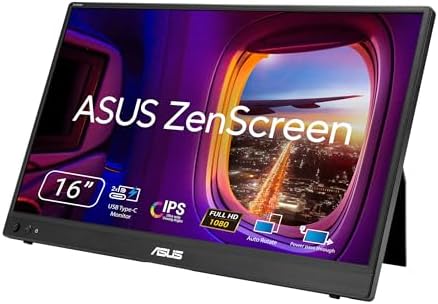
- 16-Inch Full HD Portable Display: Features an anti-glare IPS panel with 1920×1080 resolution in an ultraslim and thin de…
- Power Pass Through Technology: Can be powered by a laptop or deliver power to a laptop via pass-through charging, offeri…
- Auto Rotation Feature: Automatically senses its orientation and switches the monitor between landscape and portrait mode…
Key Features
- 15.6-inch Full HD display
- USB-C
- Anti-glare coating
- Built-in kickstand
- Slim profile
- Lightweight construction
- Eye-care technology
- Business-friendly design
Why Buy?
The Full HD resolution is sufficient for documents, spreadsheets, email, presentations, and web browsing.
Its simple USB-C setup makes it particularly convenient for laptop users.
Best for: Office work, remote workers, students, and business travelers.
Rating: 9.2/10
7. Innocn 15A1F — Best OLED Portable Monitor for Value
The Innocn 15A1F provides OLED technology at a price point that can be attractive compared with premium OLED portable displays.

- 【27 Inch 4K Computer Monitor & Stunning Color Performance】Real 4K UHD 3840*2160p monitor provide you top picture/video q…
- 【Powerful USB C, DP and HDMI Ports】27C1U-D USB computer monitor have richful interfaces: 1 x DP, 1 x USB C, 1 x HDMI, 1 …
- 【HDR 400 】INNOCN computer monitor adopt high dynamic range (HDR) technology with professional color gamut delivers contr…
Key Features
- 15.6-inch OLED
- Full HD resolution
- Excellent contrast
- USB-C
- HDMI
- Built-in stand
- Slim profile
- Wide color coverage
Why Buy?
OLED is particularly attractive for movies, photos, video editing, and general entertainment because of its deep blacks and high contrast.
Best for: Creators, movie watchers, photographers, and value-focused buyers.
Rating: 9.1/10
8. ViewSonic VX1755 — Best Large Portable Gaming Monitor
If 15.6 inches isn’t enough, the ViewSonic VX1755 provides a much larger portable display.

- Immersive 1500R Curved Gaming Monitor: Experience deeper immersion with this 27 Inch FHD (1920 x 1080) 1500R curved disp…
- Smooth FreeSync Premium Performance: Achieve tear-free and fluid gameplay with AMD FreeSync Premium; this technology syn…
- Customizable Game Mode Presets: Dominate the competition with an arsenal of pre-set visual modes tailored for FPS, RTS, …
Key Features
- 17.2-inch display
- Full HD resolution
- 144Hz refresh rate
- Adaptive Sync
- USB-C
- HDMI
- Built-in speakers
- Integrated stand
Why Buy?
The larger screen makes gaming and multitasking more comfortable while still offering portability.
The 144Hz refresh rate is also useful for fast-paced gaming.
Best for: Gamers, content consumption, and users who want more screen space.
Rating: 9.2/10
What Is a Portable Monitor?
A portable monitor is a lightweight external display designed to be carried between locations.
Unlike conventional desktop monitors, portable monitors are typically:
- Thin
- Lightweight
- USB-C powered
- Easy to connect
- Equipped with folding or integrated stands
- Designed for laptops and mobile devices
They can transform a laptop into a dual-screen workstation without requiring a permanent desk setup.
Why Buy a Portable Monitor?
A portable monitor can be useful in many situations.
1. More Productivity
A second display allows you to keep email, research, spreadsheets, or communication tools open while working on another screen.
2. Remote Work
Remote workers can create a dual-monitor setup from a hotel, café, coworking space, or temporary office.
3. Travel
A thin portable display takes up much less space than a traditional monitor.
4. Gaming
High-refresh-rate models can provide a larger gaming screen for laptops and consoles.
5. Presentations
A portable monitor can be useful for client presentations and demonstrations.
6. Creative Work
High-quality OLED models can provide better contrast and color reproduction for photo and video work.
Portable Monitor Buying Guide
Before purchasing a portable monitor, consider the following factors.
Screen Size
Most portable monitors are between 13 and 18 inches.
13–14 inches
Best for maximum portability.
15–16 inches
The sweet spot for most users.
17–18 inches
Better for gaming and productivity but less convenient to carry.
For most laptop users, 15.6 inches provides a good balance between portability and workspace.
Resolution
Resolution determines image sharpness and available workspace.
Full HD — 1920×1080
Good for:
- Office work
- Gaming
- Streaming
- Everyday use
2K / 1440p
Better for:
- Creative work
- Productivity
- Detailed applications
4K
Excellent for:
- Photography
- Video editing
- Professional design
However, higher resolution generally increases price and can require more power.
Refresh Rate
Refresh rate is especially important for gaming.
60Hz
Ideal for office work, browsing, and general productivity.
120Hz
Provides noticeably smoother movement.
144Hz+
Excellent for gaming and fast-moving content.
If gaming is your priority, consider a portable monitor with at least 120Hz or 144Hz.
OLED vs IPS Portable Monitors
| Feature | OLED | IPS |
|---|---|---|
| Contrast | Excellent | Very good |
| Black levels | Excellent | Good |
| Color | Excellent | Very good |
| Response time | Excellent | Good |
| Price | Usually higher | Usually lower |
| Productivity | Excellent | Excellent |
| Gaming | Excellent | Excellent |
| Burn-in concern | Possible | Very low |
OLED is ideal if image quality is a priority.
IPS is generally better for buyers who want excellent performance at a lower price and don’t need OLED-level contrast.
USB-C Connectivity
USB-C is one of the most important features to check.
A compatible USB-C connection can potentially provide:
- Video
- Power
- Data
This can allow you to connect a laptop to the monitor with a single cable.
However, not every USB-C port supports video output. Always verify that your laptop, phone, tablet, or gaming device supports the required USB-C DisplayPort Alt Mode or equivalent functionality.
HDMI Connectivity
Mini HDMI or micro HDMI can be useful when your device doesn’t support video over USB-C.
It’s particularly useful for:
- Gaming consoles
- Older laptops
- Desktop PCs
- Cameras
- Other HDMI devices
A monitor with both USB-C and HDMI provides more flexibility.
Touchscreen Portable Monitors
Touchscreen functionality can be valuable for:
- Designers
- Artists
- Presenters
- Students
- Productivity
- Interactive applications
However, touch support depends on both the monitor and connected device.
Some touchscreen monitors also support styluses, making them useful for sketching and annotation.
Portable Monitor for Gaming
If gaming is your primary use case, look for:
- 120Hz or 144Hz refresh rate
- Low response time
- Adaptive Sync
- HDMI input
- USB-C
- Good brightness
- Built-in speakers
- Stable stand
The ASUS ROG Strix XG16AHPE and ViewSonic VX1755 are particularly attractive choices.
Portable Monitor for Work
For business users, prioritize:
- 14–16-inch size
- Full HD or higher resolution
- USB-C
- Lightweight design
- Anti-glare coating
- Built-in stand
- Good brightness
- Reliable compatibility
The ASUS ZenScreen MB16ACV is an excellent example of a business-focused portable monitor.
Portable Monitor for MacBook
Most modern MacBooks work well with USB-C portable monitors.
Before buying, check:
- USB-C video support
- MacBook model
- Number of external displays supported
- Monitor resolution
- Required cables
- Power requirements
For MacBook users, a USB-C monitor can provide an especially clean setup because the same cable can potentially carry video and power.
Portable Monitor for iPad
Some iPad models support external displays, but capabilities vary by model and software.
Before buying, confirm:
- Your iPad model
- USB-C or Lightning connectivity
- External display support
- Required adapter
- Power requirements
A portable monitor can be useful for users who want a larger workspace when using compatible iPad applications.
Best Portable Monitors by Use Case
| Use Case | Best Choice | Why |
|---|---|---|
| Best overall | ASUS ZenScreen OLED MQ16AH | Premium OLED |
| Best gaming | ASUS ROG Strix XG16AHPE | 144Hz |
| Best touchscreen | Lenovo ThinkVision M14t Gen 2 | Touch + pen |
| Best wireless | ViewSonic VG1656N | Wireless connectivity |
| Best budget | ARZOPA Z1FC | Affordable 144Hz |
| Best business | ASUS ZenScreen MB16ACV | Productivity-focused |
| Best OLED value | Innocn 15A1F | OLED image quality |
| Best large display | ViewSonic VX1755 | 17.2-inch screen |
| Best for travel | ASUS ZenScreen | Slim and portable |
| Best for creators | OLED models | Contrast and color |
Pros and Cons of Portable Monitors
Pros
- Easy to carry
- Adds a second screen
- Excellent for remote work
- USB-C connectivity
- Useful for travel
- Gaming options available
- Some models support touch
- OLED options provide excellent image quality
Cons
- Smaller than desktop monitors
- Some require external power
- Limited built-in speakers on some models
- Stands can vary in quality
- Brightness may be lower than desktop monitors
- USB-C compatibility can be confusing
- Premium OLED models can be expensive
Final Verdict
The ASUS ZenScreen OLED MQ16AH is our top overall choice for the best portable monitor in 2026 because it combines a premium OLED display, excellent image quality, portability, and flexible connectivity.
For gamers, the ASUS ROG Strix XG16AHPE is a standout choice thanks to its high refresh rate and gaming-focused features. The Lenovo ThinkVision M14t Gen 2 is ideal for professionals who want touchscreen functionality, while the ASUS ZenScreen MB16ACV is a strong business-focused option.
Budget buyers should consider the ARZOPA Z1FC, particularly if a high refresh rate is important. If image quality is the priority, OLED models such as the ASUS ZenScreen OLED or Innocn 15A1F are worth considering.
Before buying, compare screen size, resolution, refresh rate, panel technology, brightness, color coverage, USB-C functionality, HDMI support, weight, stand design, touchscreen support, battery requirements, and price.
A portable monitor can be one of the most useful accessories for a laptop. For remote workers, students, creators, travelers, and gamers, adding a second display can provide significantly more workspace without the size and weight of a traditional desktop monitor.
Frequently Asked Questions
What is the best portable monitor in 2026?
The ASUS ZenScreen OLED MQ16AH is our overall pick for users who prioritize premium display quality and portability.
Are portable monitors worth buying?
Yes. A portable monitor can significantly improve productivity by providing a second screen for multitasking, remote work, studying, gaming, and travel.
What size portable monitor is best?
A 15.6-inch portable monitor is generally the best balance between screen space and portability.
Are portable monitors good for gaming?
Yes. Models with 120Hz or 144Hz refresh rates can provide a much smoother gaming experience than standard 60Hz displays.
Can I connect a portable monitor with USB-C?
Yes, if the computer or device supports video output through USB-C. Always check the specifications of both devices before purchasing.
Do portable monitors need power?
Some portable monitors can receive power through USB-C, while others may require an external power source. Power requirements vary by model.
Are OLED portable monitors better?
OLED portable monitors offer excellent contrast, deep blacks, and vibrant colors. However, IPS models can provide better value for general productivity.
Can I use a portable monitor with a MacBook?
Yes. Many USB-C portable monitors work with compatible MacBook models. Check the MacBook’s external-display capabilities before purchasing.
Can I use a portable monitor with a gaming console?
Yes, provided the portable monitor supports the console’s output connection, usually HDMI or compatible USB-C video output.
What resolution should I choose?
Full HD is sufficient for most users. Choose 1440p or 4K if you need greater detail for creative work or professional applications.
What refresh rate is best for gaming?
A 120Hz or 144Hz portable monitor is a good choice for gaming, particularly for fast-paced titles.
What should I check before buying a portable monitor?
Check compatibility, USB-C video support, HDMI inputs, resolution, refresh rate, brightness, weight, screen size, power requirements, stand quality, and price before purchasing.