If you click on the links and make a purchase, we may earn a commission.
Choosing the best monitor for office work can make a major difference to productivity, comfort, and multitasking. A good office monitor should provide sharp text, comfortable viewing, useful screen space, ergonomic adjustment, reliable connectivity, and enough resolution for documents, spreadsheets, email, research, and video calls.
Table of Contents

Image Credit: canva
The ideal monitor isn’t necessarily the most expensive or the one with the highest refresh rate. For most professionals, features such as IPS or OLED image quality, 4K resolution, USB-C connectivity, built-in speakers, height adjustment, low blue-light technology, and a large screen are more valuable.
Whether you’re building a home office, upgrading a business workstation, working remotely, or using a laptop as your primary computer, this guide covers the best monitors for office work in 2026.
Quick Comparison: Best Monitors for Office Work
| Monitor | Best For | Key Feature | Size | Resolution | Refresh Rate | Rating |
|---|---|---|---|---|---|---|
| Dell UltraSharp U2723QE | Best Overall | 4K + USB-C hub | 27″ | 3840×2160 | 60Hz | 9.8/10 |
| Dell UltraSharp U3223QE | Best Large 4K | 32″ 4K workspace | 31.5″ | 3840×2160 | 60Hz | 9.7/10 |
| LG 27UP850-W | Best Value 4K | 4K IPS + USB-C | 27″ | 3840×2160 | 60Hz | 9.4/10 |
| BenQ PD2705U | Best for Creators | 4K + factory calibration | 27″ | 3840×2160 | 60Hz | 9.4/10 |
| ASUS ProArt PA279CRV | Best for Design | Professional color | 27″ | 3840×2160 | 60Hz | 9.5/10 |
| HP E27u G5 | Best Business | USB-C docking | 27″ | 2560×1440 | 75Hz | 9.3/10 |
| LG DualUp 28MQ780-B | Best Multitasking | 16:18 vertical workspace | 27.6″ | 2560×2880 | 60Hz | 9.5/10 |
| Samsung ViewFinity S9 | Best Premium | 5K resolution | 27″ | 5120×2880 | 60Hz | 9.5/10 |
Specifications and prices can vary by region and configuration. Check the manufacturer’s current specifications before purchasing.
1. Dell UltraSharp U2723QE — Best Monitor for Office Work Overall
The Dell UltraSharp U2723QE is an excellent all-around monitor for professionals who want a combination of sharp 4K resolution, productivity-focused features, and flexible connectivity.
Its 27-inch display provides enough workspace for spreadsheets, documents, browser windows, and communication applications without taking up the desk space of a larger 32-inch monitor.

Key Features
- 27-inch display
- 4K UHD resolution
- IPS Black panel
- USB-C connectivity
- USB hub
- DisplayPort
- HDMI
- Height adjustment
- Tilt and swivel
- Pivot support
- Built-in KVM functionality
- Professional design
Why Buy?
The biggest advantage is its productivity-focused connectivity. A compatible USB-C connection can simplify a laptop workstation by handling display, data, and power through one cable.
The built-in hub can also reduce desk clutter by allowing peripherals to connect directly to the monitor.
Best for: Office professionals, remote workers, business users, programmers, and laptop users.
Rating: 9.8/10
2. Dell UltraSharp U3223QE — Best Large Monitor for Office Work
If you frequently work with large spreadsheets, multiple applications, or detailed documents, the Dell UltraSharp U3223QE provides substantially more screen real estate.

- Seamless Productivity: Maximize your workflow with the Dell UltraSharp 43 4K USB-C Hub Monitor. This 43-inch UHD monitor…
- Spectacular Detail: Admire your work in stunning detail with invigorating colors and deep blacks. Experience vibrant col…
- Enhanced Connectivity: Streamline your workflow with a single cable USB-C that transmits data and video signals while de…
Key Features
- 31.5-inch display
- 4K UHD resolution
- IPS Black technology
- USB-C connectivity
- USB hub
- KVM functionality
- Height adjustment
- Tilt and swivel
- Professional ergonomic stand
Why Buy?
A 32-inch 4K monitor provides plenty of space for side-by-side windows.
You can place a spreadsheet beside a browser, email client beside a document, or a video conference beside your work without constantly switching windows.
Best for: Financial analysts, programmers, managers, spreadsheet-heavy work, and multitasking.
Rating: 9.7/10
3. LG 27UP850-W — Best Value 4K Office Monitor
The LG 27UP850-W offers many of the features professionals want without moving into the most expensive business-monitor category.

- Stunning Image Quality in 4K Display – The 27-inch UHD 4K (3840 x 2160) IPS display reproduces clear images and vibrant …
- 4K UHD HDR – To more fully realize content creators vision, this monitor is compatible with VESA DisplayHDR 400 high dyn…
- Color Your World – Explore HDR content the way it was meant to be seen with up to 95% DCI-P3 color gamut expression—an e…
Key Features
- 27-inch IPS display
- 4K UHD resolution
- USB-C
- DisplayPort
- HDMI
- Height-adjustable stand
- AMD FreeSync
- HDR support
- OnScreen Control software
Why Buy?
The combination of 4K resolution and USB-C makes it particularly useful for modern laptop-based offices.
Text appears sharp, while the IPS panel provides good viewing angles.
Best for: Home offices, remote work, students, and professionals seeking strong value.
Rating: 9.4/10
4. BenQ PD2705U — Best Office Monitor for Creatives
The BenQ PD2705U is designed primarily for designers and creative professionals, but its 4K resolution and ergonomic features also make it an excellent office monitor.
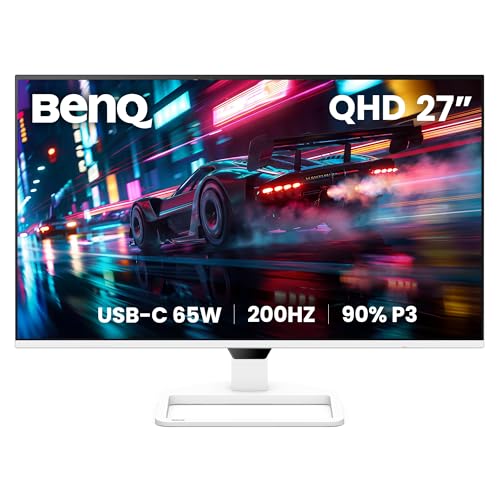
- 【GREAT VISUAL & AUDIO】90% P3 color coverage at 2K resolution, 200Hz refresh rate, and a pair of extraordinary 5W built-i…
- 【USB-C with 65W PD】One cable for all connection through USB-C while charging your gaming laptop or other devices.
- 【200Hz REFRESH RATE】Quickly adapts to on-screen changes, enhancing visual experience for movie watching, binge chasing, …
Key Features
- 27-inch IPS display
- 4K UHD resolution
- Factory-calibrated color
- 100% sRGB coverage
- USB-C
- DisplayPort
- HDMI
- DualView mode
- Ergonomic stand
- Eye-care technology
Why Buy?
If your office work includes Photoshop, graphic design, video editing, web design, or other visual applications, color accuracy becomes more important.
The 4K resolution also provides a sharp workspace for text-heavy productivity.
Best for: Designers, content creators, photographers, and creative professionals.
Rating: 9.4/10
5. ASUS ProArt PA279CRV — Best for Professional Design Work
The ASUS ProArt PA279CRV combines high resolution with professional color-oriented features.

- Display Specifications: 23.8-inch Full HD display with 178 wide-view IPS panel
- Wide Color Gamut: 95% DCI-P3 and 100% sRGB gamut to meet international color standards
- Factory Calibrated Accuracy: Calman Verified with factory calibration for excellent Delta E < 2 color accuracy
Key Features
- 27-inch 4K display
- IPS technology
- Professional color accuracy
- USB-C connectivity
- DisplayPort
- HDMI
- USB hub
- Ergonomic stand
- Factory calibration
Why Buy?
It’s an excellent option if your definition of office work includes professional graphics, photography, video, or content creation.
For ordinary office applications, the color capabilities may be more than necessary, but creative professionals can benefit significantly.
Best for: Designers, photographers, video editors, and content creators.
Rating: 9.5/10
6. HP E27u G5 — Best Business Monitor
The HP E27u G5 is built around modern business productivity.

- Number of Screens: 1
- Screen Size Class: 27″
- Viewable Screen Size: 27″
Key Features
- 27-inch display
- QHD resolution
- USB-C
- USB hub
- DisplayPort
- HDMI
- Ergonomic adjustment
- Height adjustment
- Tilt
- Pivot
- Business-focused design
Why Buy?
USB-C connectivity is particularly useful for laptop-based employees.
Instead of connecting several individual cables, you can potentially connect your laptop to the monitor with one cable while using the monitor’s ports for peripherals.
Best for: Corporate offices, remote workers, laptop users, and business environments.
Rating: 9.3/10
7. LG DualUp 28MQ780-B — Best Monitor for Multitasking
The LG DualUp 28MQ780-B takes a completely different approach to productivity.
Instead of a traditional widescreen format, it uses a 16:18 aspect ratio, providing a tall workspace that resembles two stacked screens.
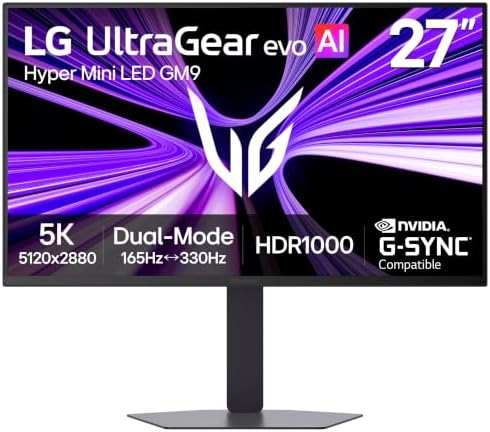
- New firmware update available for improved performance, please review the Troubleshooting Guide below for more informati…
- 1250 Nits Peak Brightness for Bold HDR Gaming – Powered by UltraGear evo’s next-generation Hyper Mini LED technology, th…
- HDR1000 Delivers Explosive Highlights and Precise Shadow Detail – VESA Certified DisplayHDR 1000 brings games to life wi…
Key Features
- 27.6-inch Nano IPS
- 2560×2880 resolution
- 16:18 aspect ratio
- USB-C
- HDR10
- Ergo stand
- Picture-by-Picture
- Multiple connectivity options
Why Buy?
The vertical workspace is excellent for:
- Coding
- Long documents
- Web research
- Social media management
- Content creation
It can also reduce the need for two separate monitors.
Best for: Multitaskers, programmers, writers, researchers, and content managers.
Rating: 9.5/10
8. Samsung ViewFinity S9 — Best Premium Office Monitor
The Samsung ViewFinity S9 is aimed at professionals who want a premium high-resolution display.

- 4K UHD Resolution
- 1.07 Billion Colors with HDR10
- Eye Saver Mode
Key Features
- 27-inch display
- 5K resolution
- USB-C
- Thunderbolt connectivity
- Smart features
- High-resolution image
- Professional design
- Built-in camera on supported configurations
Why Buy?
The 5K resolution is especially attractive to professionals who want exceptionally sharp text and detailed visuals.
It’s particularly compelling for high-resolution workflows and users who value premium image quality.
Best for: Mac users, designers, photographers, developers, and premium workstations.
Rating: 9.5/10
What Size Monitor Is Best for Office Work?
The best monitor size depends on your workspace and workload.
24-inch
Best for:
- Small desks
- Basic office work
- Reception areas
- Budget setups
27-inch
The 27-inch size is the sweet spot for most office users.
It’s large enough for multitasking while remaining comfortable on most desks.
32-inch
Best for:
- Large spreadsheets
- Financial work
- Programming
- Multitasking
- Large documents
Ultrawide
Excellent for users who want to replace two monitors with one large screen.
What Resolution Should an Office Monitor Have?
Full HD
1920×1080 is adequate for basic office work, but it isn’t necessarily the best choice for a new premium workstation.
QHD
2560×1440 provides a useful improvement in workspace and text sharpness.
It’s an excellent balance between performance and image quality.
4K
3840×2160 provides very sharp text and a large amount of desktop space.
For a 27-inch premium office monitor, 4K is an excellent choice.
5K
5K is useful for professionals who want extremely sharp text and detailed visuals, particularly on high-resolution creative workstations.
IPS vs VA vs OLED for Office Work
| Panel Type | Best Feature | Office Suitability |
|---|---|---|
| IPS | Viewing angles + color | Excellent |
| IPS Black | Higher contrast | Excellent |
| VA | Strong contrast | Very Good |
| OLED | Perfect blacks | Excellent but premium |
| TN | Fast response | Less ideal for office |
For most office users, IPS is the safest choice because it provides excellent viewing angles, good colors, and consistent image quality.
OLED provides outstanding contrast but can be more expensive and may require additional consideration for static content.
Why USB-C Matters for Office Monitors
USB-C is one of the most useful features for modern office monitors.
A compatible USB-C connection can potentially provide:
- Display signal
- Laptop charging
- USB data
- Peripheral connectivity
This can turn your monitor into the center of a laptop workstation.
For example, you can connect your laptop to the monitor using one USB-C cable, then connect your keyboard, mouse, webcam, and other peripherals to the monitor.
Always check the monitor’s USB-C power-delivery wattage because different models provide different charging capabilities.
Best Monitor Features for Office Productivity
When choosing a monitor, prioritize features that you’ll use every day.
1. Ergonomic Stand
Look for:
- Height adjustment
- Tilt
- Swivel
- Pivot
A good stand allows you to position the display at a comfortable height.
2. Anti-Glare Screen
An anti-glare coating can reduce reflections from windows and office lighting.
3. Flicker-Free Technology
Some monitors include flicker-reduction technology designed to make extended viewing more comfortable.
4. Low Blue Light
Low-blue-light modes can adjust the display’s color characteristics for more comfortable evening use.
5. USB Hub
A built-in USB hub can reduce cable clutter.
6. KVM Switch
A KVM lets you use one keyboard and mouse with multiple computers through a compatible monitor.
This is especially useful if you have both a work laptop and personal computer.
Best Monitor for Remote Work
For remote work, prioritize:
- 27-inch display
- QHD or 4K resolution
- USB-C
- Webcam compatibility
- Built-in speakers or headphone output
- Ergonomic adjustment
- USB hub
The Dell UltraSharp U2723QE is particularly well suited to a premium home-office setup.
Best Monitor for Programming
Programmers should prioritize screen space and sharp text.
Good choices include:
- Dell U2723QE — excellent 4K workspace
- Dell U3223QE — larger screen
- LG DualUp — vertical workspace
- Samsung ViewFinity S9 — high-resolution premium option
The LG DualUp is especially interesting for code because its tall display can show more lines vertically.
Best Monitor for Excel and Spreadsheets
For spreadsheet-heavy work, screen size matters.
A 27-inch 4K display provides a good combination of density and workspace, while a 32-inch model offers even more room.
The Dell UltraSharp U3223QE is an excellent option if you frequently work with large spreadsheets.
An ultrawide monitor can also be useful if you prefer a horizontal workspace.
Best Monitor for MacBook
If you’re using a MacBook, look for:
- USB-C or Thunderbolt
- High pixel density
- 4K or 5K resolution
- Reliable macOS compatibility
- USB-C power delivery
- High-quality color
The Samsung ViewFinity S9 is an attractive premium option, while the Dell UltraSharp U2723QE offers strong productivity features.
Single Monitor vs Dual Monitors
| Setup | Advantages | Disadvantages |
|---|---|---|
| One 24″ | Affordable | Limited workspace |
| One 27″ 4K | Sharp + versatile | Less workspace than dual |
| One 32″ 4K | Large workspace | Takes more desk space |
| Ultrawide | Seamless workspace | More expensive |
| Dual 27″ | Excellent multitasking | More cables and desk space |
| LG DualUp | Tall productivity area | Unusual aspect ratio |
For most office users, a 27-inch 4K monitor is an excellent starting point.
Best Monitors for Office Work by Use Case
| Use Case | Best Monitor | Key Reason |
|---|---|---|
| Best overall | Dell U2723QE | 4K + USB-C hub |
| Best large screen | Dell U3223QE | 32-inch 4K |
| Best value | LG 27UP850-W | 4K + USB-C |
| Best for designers | ASUS ProArt PA279CRV | Color accuracy |
| Best for creatives | BenQ PD2705U | Factory calibration |
| Best business | HP E27u G5 | USB-C docking |
| Best multitasking | LG DualUp | Vertical workspace |
| Best premium | Samsung ViewFinity S9 | 5K resolution |
| Best for MacBook | Samsung ViewFinity S9 | High pixel density |
| Best for spreadsheets | Dell U3223QE | Large 4K workspace |
Pros and Cons of Office Monitors
Pros
- More workspace
- Better multitasking
- Sharper text
- Improved ergonomics
- USB-C connectivity
- Built-in USB hubs
- Better productivity
- Large-screen options
- Excellent 4K models available
Cons
- Premium models can be expensive
- Larger displays need more desk space
- 4K may require scaling
- USB-C features vary between models
- OLED models can cost more
- Some business monitors prioritize features over gaming performance
How to Choose the Best Office Monitor
Before buying, consider these factors:
Screen size: 27 inches is ideal for most users.
Resolution: QHD is good; 4K is better for sharp text and multitasking.
Panel: IPS is the safest choice for general office work.
USB-C: Important if you use a modern laptop.
Ergonomics: Height adjustment should be a priority.
Connectivity: Look for HDMI, DisplayPort, USB-C, and USB hubs.
Refresh rate: 60–75Hz is sufficient for office work.
Color: Important for creative professionals.
Brightness: Choose a display bright enough for your office environment.
Warranty: Business users should consider long-term support.
Final Verdict
The Dell UltraSharp U2723QE is our overall pick for the best monitor for office work in 2026. Its 27-inch 4K display, productivity-focused connectivity, USB-C support, ergonomic stand, and integrated hub make it an excellent choice for modern workstations.
If you need a larger screen, the Dell UltraSharp U3223QE provides an expansive 32-inch 4K workspace that’s particularly useful for spreadsheets, programming, financial analysis, and multitasking.
For value, the LG 27UP850-W is a strong choice, while creative professionals should consider the BenQ PD2705U or ASUS ProArt PA279CRV.
The LG DualUp stands out for people who need a vertical workspace, while the Samsung ViewFinity S9 is an excellent premium choice for users who want 5K resolution and extremely sharp visuals.
For most office workers, however, you don’t need to spend a fortune. A 27-inch QHD or 4K IPS monitor with USB-C, an ergonomic stand, and a USB hub provides an excellent balance of productivity, comfort, and value.
Frequently Asked Questions
What is the best monitor for office work in 2026?
The Dell UltraSharp U2723QE is our overall choice because it combines 4K resolution, USB-C connectivity, a USB hub, ergonomic adjustment, and excellent productivity features.
Is a 27-inch monitor good for office work?
Yes. A 27-inch monitor provides a strong balance between screen space, image quality, and desk size. It’s one of the best sizes for general office productivity.
Is 4K worth it for office work?
Yes. 4K can provide sharper text and more desktop space, especially on 27- and 32-inch monitors.
Is 60Hz enough for office work?
Yes. A 60Hz refresh rate is sufficient for documents, spreadsheets, browsing, email, programming, and most business applications.
What monitor size is best for Excel?
A 27-inch or 32-inch monitor is excellent for spreadsheets. A 32-inch 4K monitor provides particularly generous workspace.
Is USB-C important for office monitors?
USB-C is highly useful for laptop users because a compatible connection can carry video, data, and power through a single cable.
Are curved monitors good for office work?
Yes. Curved monitors can be useful for ultrawide productivity setups, although a traditional flat monitor may be preferable for users working with precise graphics or documents.
What is the best resolution for an office monitor?
QHD is a good balance, while 4K is ideal for users who want sharper text and more workspace.
Which panel is best for office work?
IPS is generally the best all-around panel type because it offers good color reproduction and wide viewing angles.
Are OLED monitors good for office work?
Yes. OLED monitors provide excellent contrast and image quality, but they can be more expensive and may require consideration of static-content usage.
Should I buy one large monitor or two monitors?
It depends on your workflow. A single 32-inch or ultrawide monitor provides a clean setup, while dual monitors can provide excellent multitasking flexibility.
What should I look for in the best office monitor?
Prioritize screen size, resolution, IPS or OLED panel quality, USB-C, ergonomic adjustment, brightness, viewing comfort, USB connectivity, warranty, and price.