If you click on the links and make a purchase, we may earn a commission.
The best smart plugs are one of the easiest and most affordable ways to add smart-home functionality to ordinary appliances. Instead of replacing lamps, fans, coffee makers, chargers, or other compatible devices with expensive smart versions, you can connect them to a smart plug and control power through a smartphone, voice assistant, or automated schedule.
Table of Contents
Image Credit: Canva
Smart plugs can also help create routines, monitor energy consumption on supported models, and automatically turn appliances on or off. However, not every smart plug is suitable for every appliance. Maximum electrical load, connectivity, smart-home compatibility, physical size, and energy-monitoring capabilities are important factors to consider.
In this guide, we’ve compared the best smart plugs in 2026 for everyday home automation, energy monitoring, Alexa and Google Home users, Apple Home users, and budget-conscious shoppers.
Quick Comparison: Best Smart Plugs
| Smart Plug | Best For | Key Feature | Connectivity | Energy Monitoring | Rating |
|---|---|---|---|---|---|
| TP-Link Kasa KP125M | Best Overall | Matter support | Wi-Fi/Matter | Yes | 9.7/10 |
| TP-Link Tapo P125M | Best Compact | Small design | Wi-Fi/Matter | No* | 9.5/10 |
| Kasa Smart Plug Mini | Best Budget | Simple automation | Wi-Fi | Model dependent | 9.3/10 |
| Amazon Smart Plug | Best Alexa | Easy Alexa setup | Wi-Fi | No | 9.2/10 |
| Eve Energy | Best Apple Home | Privacy-focused | Thread/Matter | Yes | 9.6/10 |
| Meross Smart Plug | Best Multi-Platform | Broad compatibility | Wi-Fi/Matter* | Model dependent | 9.3/10 |
| Govee Smart Plug | Best Value | Automation | Wi-Fi/Bluetooth* | Model dependent | 9.1/10 |
| Wyze Plug | Best Affordable | Scheduling | Wi-Fi | No | 9.0/10 |
*Features vary by specific model and region. Always verify current specifications, electrical ratings, and supported platforms before purchasing.
1. TP-Link Kasa KP125M: Best Smart Plug Overall
The TP-Link Kasa KP125M is our overall pick because it combines smart-home compatibility, compact construction, remote control, scheduling, and energy monitoring.
It is particularly useful for homeowners who want to monitor how much electricity connected devices consume.

- App-guided install: The Kasa or Tapo app guides you through step-by-step setup. Requires neutral wiring and 2.4 GHz Wi-F…
- 3-way or single pole: Using it as 3-way or single pole switch to control the light from 1 or 2 locations to replace your…
- Control from anywhere & voice control: Use the Tapo or Kasa app to turn lights on/off from anywhere, whether you are at …
Key Features
- Energy monitoring
- Smartphone control
- Scheduling
- Timers
- Away mode
- Matter support
- Voice control
- Compact design
- Smart-home automation
Energy monitoring makes it particularly useful for appliances such as lamps, fans, entertainment equipment, and other compatible household devices.
Best For
Most homes, energy-conscious users, smart-home beginners, and Matter users.
Our Rating: 9.7/10
👉 Check TP-Link Kasa KP125M prices and availability.
2. TP-Link Tapo P125M: Best Compact Smart Plug
The TP-Link Tapo P125M is designed for users who want smart functionality without taking up too much space around an outlet.

- 【*REQUIRES Tapo Hub】To utilize Tapo motion sensor T315, a Tapo hub H100 (sold separately) and a secured 2.4 GHz Wi-Fi ne…
- 【2.7″ E-ink Display】Displays temperature & humidity, comfort level, battery status, and signal strength. Features low-po…
- 【Real-Time & Accurate Monitoring】Featuring the Swiss-made sensor chip, Tapo T315 provides high accuracy and real-time da…
Key Features
- Compact design
- Matter support
- Smartphone control
- Voice control
- Scheduling
- Timers
- Remote access
- Smart-home integration
Its compact form factor can make it easier to use in areas where large smart plugs could block neighboring outlets.
Best For
Small spaces, bedrooms, offices, apartments, and users building a Matter-based smart home.
Our Rating: 9.5/10
👉 Compare Tapo P125M prices and multipacks.
3. Kasa Smart Plug Mini: Best Budget Smart Plug
Kasa’s Smart Plug Mini range provides a simple way to automate everyday appliances.
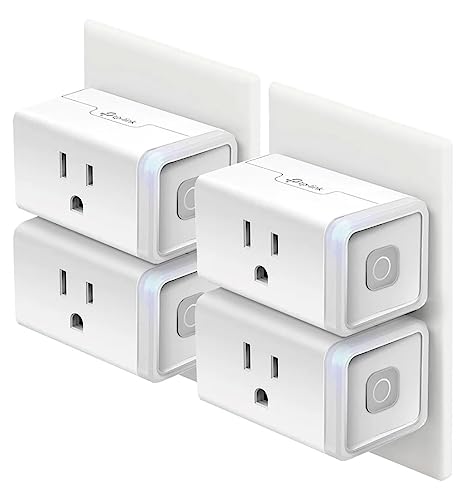
- Voice control: Kasa smart plugs that work with Alexa and Google Home Assistant. Enjoy the hands free convenience of cont…
- Smart Outlet Control from anywhere: Turn electronics on and off your smart home devices from anywhere with your smartpho…
- Scheduling: Use timer or countdown schedules to set your wifi smart plug to automatically turn on and off any home elect…
Key Features
- Wi-Fi connectivity
- Smartphone control
- Scheduling
- Timers
- Away mode
- Voice assistant support
- Compact construction
- Kasa app integration
It’s a good starting point if you’ve never used smart plugs before.
Best For
Budget buyers, lamps, fans, bedrooms, offices, and first-time smart-home users.
Our Rating: 9.3/10
👉 Check Kasa Smart Plug Mini prices and multipacks.
4. Amazon Smart Plug: Best Smart Plug for Alexa
The Amazon Smart Plug is a straightforward option for households already using Alexa devices.

- The information below is per-pack only.
- Amazon Smart Plug works with the Alexa app and compatible Alexa devices to add voice control to any electrical outlet.
- Simple setup – No smart home hub required. Just plug it in, open the Alexa app and follow the stress-free directions to …
Key Features
- Alexa integration
- Smartphone control
- Voice commands
- Scheduling
- Timers
- Compact design
- Easy setup
- Remote control
Its main advantage is simplicity. If your home already revolves around Alexa and Echo devices, adding an Amazon Smart Plug can be straightforward.
Best For
Alexa users, beginners, lamps, fans, and basic appliance automation.
Our Rating: 9.2/10
👉 Compare Amazon Smart Plug prices and availability.
5. Eve Energy: Best Smart Plug for Apple Home
The Eve Energy is a strong option for Apple Home users who prioritize privacy, automation, and energy monitoring.

- Eve Energy requires iOS/iPadOS 16.4 (or later) or Android 8.1 (or later) plus a hub of your chosen platform:
- Apple: Apple TV 4K (2nd gen), Apple TV 4K (3rd gen, 128 GB), HomePod (2nd gen), HomePod mini / Samsung: SmartThings Hub …
- Switch your lights and appliances on and off using your voice or an app, and control your appliances on the go or based …
Key Features
- Energy monitoring
- Matter support on compatible models
- Thread connectivity
- Apple Home integration
- Smartphone control
- Scheduling
- Automation
- Compact design
Energy monitoring can help users understand how much electricity individual devices consume.
Best For
Apple Home users, privacy-conscious smart-home owners, and energy monitoring.
Our Rating: 9.6/10
👉 Check Eve Energy prices and compatibility.
6. Meross Smart Plug: Best Multi-Platform Option
Meross offers smart plugs compatible with multiple smart-home ecosystems, depending on the model.

- Voice Control: You can control your devices hands free, just give simple voice commands to turn on/off the connected dev…
- Remote Control: To enable HomeKit remote control, you need an Apple TV 4K, or Apple TV HD, and so on. Set any of these A…
- Schedule and Timer Setting: You can schedule connected home devices to turn on and off automatically by smart plugs. Sav…
Key Features
- Smartphone control
- Scheduling
- Remote access
- Voice assistant support
- Smart-home automation
- Compact designs
- Matter options on selected models
Meross can be attractive to households that use multiple smart-home platforms.
Best For
Multi-platform smart homes, Apple users, Alexa users, and Google Home households.
Our Rating: 9.3/10
👉 Compare Meross smart plug prices and available models.
7. Govee Smart Plug: Best Value
Govee smart plugs are designed for shoppers looking for affordable automation and integration with other Govee products.

- Stability Upgrade: Supports Bluetooth or WiFi connection, which is more stable and faster than plugs that can only be co…
- Smart Voice Control: WiFi Plugs Work with Amazon Alexa and Google Assistant, so you can control the smart home devices u…
- Scheduling & Group Controller: Create customized schedules to power your electronic appliances on/off automatically for …
Key Features
- Wi-Fi connectivity
- Smartphone control
- Scheduling
- Timers
- Voice control
- Group control
- Govee app integration
- Bluetooth support on compatible models
They are particularly useful for lighting, gaming rooms, entertainment systems, and other everyday devices.
Best For
Gamers, bedrooms, entertainment setups, and budget-conscious users.
Our Rating: 9.1/10
👉 Check Govee Smart Plug prices and multipacks.
8. Wyze Plug: Best Affordable Smart Plug
The Wyze Plug is a simple option for homeowners who want basic remote control and scheduling.

- Command your home with your voice: Works with Alexa and the Google Assistant so it’s easier said and done.
- Certified for Humans: Struggle-free, tinker-free, stress-free. No patience needed—it’s actually simple.
- Control your home from anywhere: Turn them on or off remotely with the Wyze app.
Key Features
- Wi-Fi connectivity
- Smartphone control
- Scheduling
- Vacation/Away mode
- Voice assistant support
- Remote control
- Compact design
It doesn’t try to do everything, but it can provide the core functionality most smart-plug buyers need.
Best For
Budget buyers, lamps, fans, bedrooms, and basic automation.
Our Rating: 9.0/10
👉 Compare Wyze Plug prices and bundles.
What Is a Smart Plug?
A smart plug is an electrical adapter that sits between a wall outlet and a compatible appliance.
Instead of manually switching the appliance on and off, the smart plug lets you control its electrical power using:
- Smartphone apps
- Voice assistants
- Timers
- Schedules
- Smart-home routines
- Motion or occupancy automation on compatible systems
For example, you could connect a lamp to a smart plug and schedule it to turn on automatically every evening.
What Makes a Good Smart Plug?
Not all smart plugs provide the same experience. Before purchasing, consider the following factors.
1. Electrical Load
The most important consideration is the plug’s electrical rating.
Different appliances consume different amounts of power. Always check the smart plug’s maximum supported load before connecting an appliance.
Avoid using a standard smart plug with appliances that exceed its rated capacity.
For high-power appliances, choose a product specifically designed and rated for the intended load—or consult a qualified electrician.
2. Connectivity
Smart plugs commonly use:
- Wi-Fi
- Bluetooth
- Thread
- Zigbee
- Matter-compatible networking
Wi-Fi plugs are convenient because they often connect directly to your router without requiring a separate hub.
Thread and Matter can be attractive for newer smart-home installations where interoperability is important.
3. Energy Monitoring
Energy monitoring can show how much electricity a connected appliance uses.
This feature can help you identify:
- High-energy devices
- Standby consumption
- Usage patterns
- Potential opportunities to reduce electricity consumption
If energy tracking is important to you, make sure the specific smart plug supports it.
4. Smart-Home Compatibility
Before buying, make sure the smart plug works with your preferred platform.
Common platforms include:
- Amazon Alexa
- Google Home
- Apple Home
- Samsung SmartThings
- Matter-compatible platforms
Matter can simplify compatibility between supported devices, but not every feature is necessarily available across every platform.
Wi-Fi vs. Matter Smart Plugs
| Feature | Wi-Fi Smart Plug | Matter Smart Plug |
|---|---|---|
| Setup | Usually simple | Ecosystem dependent |
| Remote control | Usually available | Usually available |
| Cross-platform support | Model dependent | Designed for interoperability |
| Hub required | Usually no | May require compatible controller |
| Best For | Existing Wi-Fi homes | New smart-home setups |
If you already use a particular ecosystem, check compatibility rather than choosing based solely on the presence of Matter.
Smart Plug Energy Monitoring
Smart plugs with energy monitoring can be useful for understanding household electricity consumption.
For example, you could monitor:
- Television
- Computer
- Gaming console
- Desk equipment
- Fan
- Lamp
- Coffee machine
- Small appliances
However, a smart plug should only be used with equipment that falls within its electrical specifications.
Best Smart Plugs by Use Case
| Use Case | Recommended Smart Plug |
|---|---|
| Best overall | TP-Link Kasa KP125M |
| Best compact | TP-Link Tapo P125M |
| Best budget | Kasa Smart Plug Mini |
| Best for Alexa | Amazon Smart Plug |
| Best for Apple Home | Eve Energy |
| Best multi-platform | Meross Smart Plug |
| Best value | Govee Smart Plug |
| Best affordable | Wyze Plug |
| Best for energy monitoring | TP-Link Kasa KP125M |
| Best for Matter | TP-Link Kasa KP125M |
Best Smart Plugs for Lamps
Lamps are among the easiest devices to automate with a smart plug.
You can create schedules such as:
Morning: Turn on a bedroom lamp.
Evening: Turn on living-room lighting.
Night: Automatically switch lamps off.
Smart plugs are particularly useful when you want automation without replacing existing lamps or bulbs.
Best Smart Plugs for Fans
A compatible fan can often be automated using a smart plug, but you should verify how the appliance’s physical controls work.
A smart plug can only control electrical power. It doesn’t necessarily provide control over fan speed or other settings.
Smart Plugs for Coffee Makers
Coffee makers can be a popular smart-plug use case.
However, the coffee maker must be designed so that it can safely operate when power is restored. Some modern appliances require you to press a button after receiving power, making them unsuitable for simple smart-plug automation.
Always follow the appliance manufacturer’s instructions.
Are Smart Plugs Safe?
Smart plugs can be safe when used correctly and within their electrical ratings.
Follow these guidelines:
- Don’t exceed the rated load.
- Don’t use damaged plugs.
- Avoid using indoor-rated plugs outdoors.
- Don’t cover ventilation openings.
- Keep plugs away from water unless specifically designed for outdoor use.
- Follow manufacturer instructions.
- Avoid connecting inappropriate high-power appliances.
If you’re unsure whether an appliance is suitable, consult the manufacturer’s specifications or a qualified electrician.
Do Smart Plugs Work Without Wi-Fi?
It depends on the model.
Some smart plugs can continue offering basic local control through Bluetooth, Thread, Zigbee, or an established smart-home hub.
However, cloud-based remote control and some automation features may require an internet connection.
If reliable operation is important, check what happens when your internet connection is unavailable before purchasing.
How to Choose the Right Smart Plug
Before buying, consider:
1. Appliance Compatibility
Make sure the plug supports the electrical load of your appliance.
2. Smart-Home Platform
Choose a plug compatible with Alexa, Google Home, Apple Home, Matter, or your preferred ecosystem.
3. Energy Monitoring
Choose an energy-monitoring model if you want electricity usage information.
4. Size
A compact design is useful when you need to preserve access to neighboring outlets.
5. Automation
Look for schedules, timers, routines, away modes, and scene support.
6. App Quality
A reliable app makes setup and everyday control much easier.
Final Verdict
The TP-Link Kasa KP125M is our overall pick for the best smart plug in 2026 because it combines energy monitoring, smart-home compatibility, scheduling, remote control, and Matter support in a compact design.
The Eve Energy is a particularly strong option for Apple Home users and shoppers who want energy monitoring and modern smart-home connectivity. The TP-Link Tapo P125M is a good choice when compact size is important, while the Amazon Smart Plug is ideal for Alexa-focused homes.
For affordable automation, Kasa Smart Plug Mini, Govee Smart Plug, and Wyze Plug offer useful everyday features without requiring a major investment.
Before purchasing, check electrical load ratings, appliance compatibility, connectivity, Matter support, smart-home compatibility, energy monitoring, plug size, scheduling features, app quality, and safety certifications applicable to your region.
A smart plug is one of the simplest ways to upgrade an existing home, but the best model is the one that safely supports your appliance and works seamlessly with your smart-home ecosystem.
Frequently Asked Questions
What is the best smart plug in 2026?
The TP-Link Kasa KP125M is our overall pick because it combines energy monitoring, scheduling, remote control, compact construction, and Matter support.
Are smart plugs worth buying?
Yes. Smart plugs are an inexpensive way to add remote control, scheduling, timers, and automation to compatible appliances without replacing them.
Can a smart plug save electricity?
A smart plug can help reduce unnecessary electricity use by scheduling devices to turn off. Energy-monitoring models can also help identify devices that consume significant power.
Do smart plugs need Wi-Fi?
Many smart plugs use Wi-Fi, but some use Bluetooth, Thread, Zigbee, or other connectivity technologies. Features available without internet vary by model.
Can I use a smart plug with a heater?
Only use a smart plug with a heater if the plug is specifically rated for the heater’s electrical load and the appliance manufacturer permits this type of operation. High-power heating appliances require particular caution.
Can smart plugs work with Alexa?
Yes, many smart plugs support Amazon Alexa. Check the exact model’s compatibility before purchasing.
Can smart plugs work with Google Home?
Many smart plugs support Google Home, allowing compatible appliances to be controlled using voice commands and routines.
Can smart plugs work with Apple Home?
Some smart plugs support Apple Home, while others use Matter or compatible hubs. Check the specific product’s current compatibility.
What is Matter in a smart plug?
Matter is a smart-home connectivity standard designed to improve interoperability between compatible devices and supported smart-home platforms.
Do smart plugs monitor electricity usage?
Some models include energy monitoring, which can show information about the electricity consumed by a connected appliance.
Can a smart plug control a TV?
Yes, a compatible smart plug can control power to a television. However, the TV must be able to operate correctly when power is restored.
Can I use a smart plug outdoors?
Only use a smart plug outdoors if it is specifically designed and rated for outdoor use. Indoor smart plugs should not be exposed to rain or moisture.
What is the best smart plug for energy monitoring?
The TP-Link Kasa KP125M and Eve Energy are strong choices for users who want energy-monitoring functionality, subject to model and regional feature availability.
What should I consider before buying a smart plug?
Focus on maximum electrical load, appliance compatibility, Wi-Fi or Matter connectivity, smart-home compatibility, energy monitoring, plug size, scheduling, app quality, safety certifications, and overall reliability.