If you click on the links and make a purchase, we may earn a commission.
Smart locks are becoming a popular upgrade for homeowners who want convenient keyless entry without sacrificing security. The best smart locks can let you lock or unlock a door using a smartphone, fingerprint, keypad, voice assistant, or traditional key.
Table of Contents
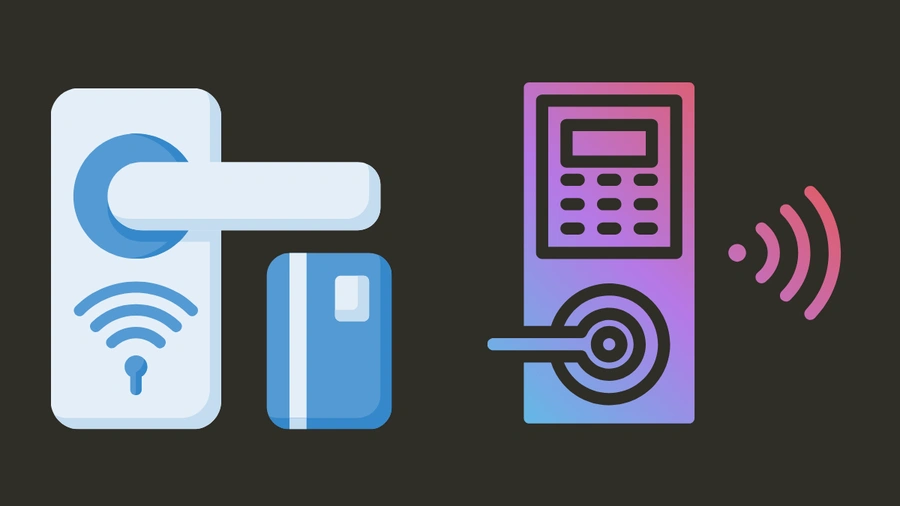
Image Credit: canva
Modern models can also provide temporary access codes, activity logs, auto-locking, remote control, biometric authentication, and smart-home integration. However, choosing the right lock requires more than comparing features. Compatibility with your existing door, battery life, connectivity, security features, and installation requirements are equally important.
In this guide, we’ve compared the best smart locks in 2026 for homeowners, renters, families, Airbnb hosts, and smart-home enthusiasts.
Quick Comparison: Best Smart Locks
| Smart Lock | Best For | Key Feature | Connectivity | Entry Method | Rating |
|---|---|---|---|---|---|
| Schlage Encode Plus | Best Overall | Apple Home Key | Wi-Fi | Keypad/Phone/Key | 9.7/10 |
| Yale Assure Lock 2 | Best Versatile | Modular connectivity | Wi-Fi/Bluetooth* | Keypad/Phone | 9.5/10 |
| August Wi-Fi Smart Lock | Best Retrofit | Existing deadbolt | Wi-Fi/Bluetooth | Phone/Key | 9.4/10 |
| Aqara Smart Lock U100 | Best Fingerprint | Biometric entry | Wi-Fi/Bluetooth* | Fingerprint/Keypad | 9.6/10 |
| Ultraloq U-Bolt Pro WiFi | Best Biometrics | Multiple entry methods | Wi-Fi | Fingerprint/Keypad/Phone | 9.5/10 |
| SwitchBot Lock Pro | Best Easy Installation | Retrofit design | Bluetooth/Wi-Fi* | Phone/Key/Keypad* | 9.3/10 |
| Level Lock+ | Best Minimalist | Hidden smart hardware | Bluetooth/Thread* | Phone/Key | 9.3/10 |
| Tapo Smart Wi-Fi Deadbolt | Best Budget | Affordable keyless entry | Wi-Fi | Keypad/Phone/Key | 9.1/10 |
Connectivity and access features vary by configuration, hub, and region. Verify current specifications before purchasing.
1. Schlage Encode Plus: Best Smart Lock Overall
The Schlage Encode Plus is our overall pick because it combines a familiar keypad design with smartphone access and broad smart-home functionality.
Its traditional-looking exterior makes it suitable for homeowners who want smart features without an overly futuristic appearance.

- IDEAL USE: Secure your front door with a smart lock and stylish matching handleset. Perfect for use on entry doors where…
- ANYWHERE ACCESS: With built-in WiFi compatibility, you can easily and securely connect your Schlage Encode Plus lock to …
- PEACE OF MIND: Lock and unlock from anywhere, manage up to 100 access codes, view lock history, receive customizable not…
Key Features
- Built-in Wi-Fi
- Keypad entry
- Smartphone control
- Apple Home integration
- Apple Home Key support on compatible configurations
- Physical key backup
- Built-in alarm functionality
- Remote locking and unlocking
- Temporary access codes
One of its biggest advantages is that homeowners can often manage the lock remotely without requiring a separate bridge.
Best For
Homeowners, Apple users, families, and people upgrading a primary entrance.
Our Rating: 9.7/10
2. Yale Assure Lock 2: Best Versatile Smart Lock
The Yale Assure Lock 2 is a flexible option for shoppers who want a modern keyless lock with multiple configuration choices.
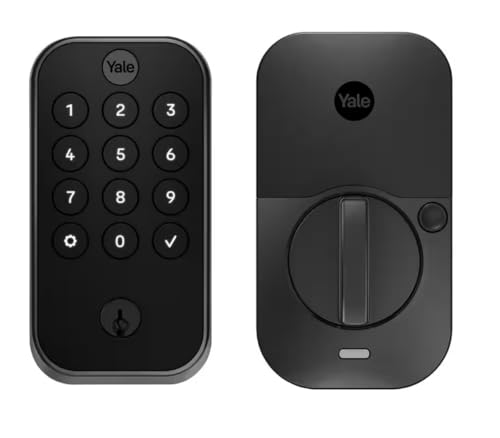
- Yale Assure Lock 2; Smart Door Lock with Bluetooth and Pushbutton Keypad; Black Suede YRD410-BLE-BSP
Key Features
- Key-free keypad options
- Smartphone access
- PIN codes
- Auto-lock
- Door activity monitoring
- Smart-home integration
- Optional connectivity modules
- Multiple finish options
The modular design makes the Yale ecosystem particularly appealing to users who want to choose their preferred connectivity platform.
Best For
Smart-home users, families, rental properties, and homeowners wanting flexible configurations.
Our Rating: 9.5/10
3. August Wi-Fi Smart Lock: Best Retrofit Smart Lock
The August Wi-Fi Smart Lock is different from many traditional smart locks because it is designed to work with your existing deadbolt hardware in compatible installations.
That means you can retain the exterior appearance and physical key system while adding smart functionality.

- [Apple MFi & HomeKey] – Built-in Apple authentication chip. Add key to Apple Wallet, tap iPhone or Apple Watch to unlock…
- [WiFi Smart Lock – Full Smart Home Integration] – Built-in WiFi enables direct remote control from anywhere via LNDU – n…
- [Security First – Your Privacy is Protected] – Fingerprint data is stored locally on the lock itself – never uploaded to…
Key Features
- Retrofit installation
- Built-in Wi-Fi
- Smartphone control
- Auto-lock and unlock
- Activity history
- Guest access
- Existing-key compatibility
- Smart-home integration
This design is particularly attractive for homeowners who don’t want to replace the entire exterior lock mechanism.
Best For
Renters where permitted, homeowners wanting simple retrofits, and people who want to retain existing keys.
Our Rating: 9.4/10
4. Aqara Smart Lock U100: Best Smart Lock for Fingerprint Entry
The Aqara Smart Lock U100 is an excellent option for users who want biometric access.

- [Convenient NFC Card Unlocking] Quickly and easily unlock the Aqara Smart Lock U200 using an NFC card. The Aqara Smart L…
- [Individual Pairing] An individual NFC card can only be paired with one Aqara Smart Door Lock U200, ensuring personalize…
- [Enhanced Security] The built-in EAL5+ financial-grade chip securely stores key information in the Aqara NFC card, provi…
Key Features
- Fingerprint recognition
- Keypad entry
- Smartphone access
- Physical key backup
- Apple Home compatibility
- Smart-home integration
- Door activity monitoring
- Multiple access methods
Fingerprint entry can be particularly convenient because you don’t need to carry a phone or remember a PIN.
Best For
Families, Apple Home users, smart-home enthusiasts, and users who want biometric access.
Our Rating: 9.6/10
5. Ultraloq U-Bolt Pro WiFi: Best Multi-Method Smart Lock
The Ultraloq U-Bolt Pro WiFi focuses on flexibility, offering several ways to enter the home.

- Control Your Ultraloq Smart Lock Anytime, Anywhere: Lock, unlock, share access and see a Log of who’s entered and exactl…
- The Most Versatile 8-in-1 Keyless Entry Door Lock: Touch and Go 360° Fingerprint ID + Anti-peep Keypad + Smartphone + Au…
- Smart Auto Lock and Auto Unlock: Smart Lock automatically locks if your door closes with a door sensor and unlocks when …
Key Features
- Fingerprint recognition
- Keypad
- Smartphone control
- Physical key
- Wi-Fi connectivity
- Temporary codes
- Auto-lock
- Activity monitoring
Having multiple entry methods can be especially useful for families with different preferences.
Best For
Families, rental properties, home offices, and users who want biometric access.
Our Rating: 9.5/10
6. SwitchBot Lock Pro: Best Easy-Installation Smart Lock
The SwitchBot Lock Pro is designed around retrofit installation, making it attractive for homeowners who want to add smart functionality without completely replacing their existing lock.
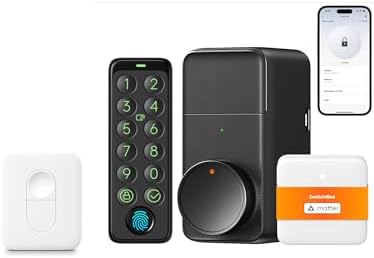
- Supports Up to 15 Unlocking Methods, Including Keypad Touch: Keypad Touch provides fingerprint recognition in under 0.3 …
- Upgraded Compatibility + No-Drill Retrofit Install: Aluminum alloy casing for a sturdier, durable build. Retrofits to yo…
- Unlock Using Your Voice, Supports Matter (Hub Mini Included): This Lock Pro kit includes Hub Mini Matter Enabled and sup…
Key Features
- Retrofit installation
- Smartphone control
- Automatic locking
- Existing-key compatibility
- Bluetooth connectivity
- Optional hub-based remote access
- Smart-home integration
- Keypad accessories on compatible setups
It’s particularly appealing for people who prioritize simple installation.
Best For
DIY users, renters where permitted, apartments, and retrofit installations.
Our Rating: 9.3/10
7. Level Lock+ Best Minimalist Smart Lock
The Level Lock+ is designed for homeowners who don’t want a large keypad or visibly electronic-looking lock on their door.
Much of the smart hardware is integrated into the lock itself.
- Always Level: Picture hanging hardware locks into place so frames hang straight with no guesswork
- Heavy-Duty Support: Hang up to 50 lbs for a secure display
- Quick & Easy Install: Prevents extra holes and crooked hangs for professional results
Key Features
- Minimalist exterior
- Smartphone access
- Physical key support
- Smart-home integration
- Apple Home compatibility
- Keyless entry options
- Compact design
Its biggest advantage is appearance. From outside, it can look much closer to a conventional lock.
Best For
Design-focused homeowners, Apple Home users, apartments, and minimalist smart homes.
Our Rating: 9.3/10
8. Tapo Smart Wi-Fi Deadbolt: Best Budget Smart Lock
The Tapo Smart Wi-Fi Deadbolt is aimed at shoppers who want smart keyless entry without paying premium prices.

- 6 Ways to Securely Access: Access in six different ways: by fingerprint recognition, using custom passcodes on the keypa…
- 1-Year Battery Life: Enjoy minimal maintenance and a full year of continuous operation with the removable and rechargeab…
- Rapid Fingerprint Recognition: Advanced fingerprint sensor accurately recognizes fingerprints and unlocks your door in j…
Key Features
- Keypad entry
- Smartphone control
- Wi-Fi connectivity
- Temporary PIN codes
- Auto-lock
- Activity monitoring
- Physical key backup
- Smart-home integration
It can be a practical choice for bedrooms, secondary entrances, rental properties, and budget-conscious homeowners.
Best For
Budget buyers, families, apartments, and secondary entrances.
Our Rating: 9.1/10
What Makes a Good Smart Lock?
A smart lock should make your door more convenient without creating unnecessary security or reliability concerns.
1. Multiple Entry Methods
The best smart locks often provide several ways to unlock a door:
- Smartphone
- PIN code
- Fingerprint
- Physical key
- NFC or smart key
- Voice assistant on compatible systems
Multiple options provide a backup if one method isn’t available.
2. Security Features
Smart locks should provide robust authentication and secure communication.
Look for:
- Encrypted connections
- Secure smartphone authentication
- Automatic locking
- Tamper alerts
- Activity logs
- Temporary access codes
- Two-factor authentication where available
A smart lock should complement, not replace, other home-security practices.
3. Battery Life
Most smart locks operate on batteries.
Battery life depends on:
- Number of daily lock/unlock cycles
- Wi-Fi usage
- Bluetooth activity
- Temperature
- Auto-lock frequency
- Smart-home integrations
Choose a model with reliable low-battery notifications.
Some smart locks also provide emergency power options if the batteries become depleted.
Smart Lock Connectivity Explained
| Connectivity | Main Advantage | Consideration |
|---|---|---|
| Bluetooth | Low power | Limited remote control |
| Wi-Fi | Remote access | Higher power usage |
| Thread | Efficient smart-home networking | Requires compatible ecosystem |
| Z-Wave | Smart-home integration | Usually requires hub |
| Zigbee | Low-power automation | Requires compatible hub |
Wi-Fi is convenient because it can provide direct remote access. Bluetooth is generally useful for local smartphone control.
Thread, Zigbee, and Z-Wave can be excellent choices for users building larger smart-home systems.
Keypad vs. Fingerprint vs. Smartphone
Keypad
Keypads are excellent for families and guests because you can share PIN codes without giving someone a physical key.
Fingerprint
Fingerprint recognition is fast and convenient. It’s particularly useful when your hands are full and you don’t want to reach for a phone.
Smartphone
Smartphone access is useful for remote control, activity monitoring, and temporary digital access.
Physical Key
A physical key provides an important backup method if batteries or electronics fail.
Smart Locks for Airbnb and Rental Properties
Smart locks can be useful for property managers because temporary access codes can eliminate the need to distribute physical keys.
Useful features include:
- Temporary PINs
- Scheduled access
- Activity logs
- Remote locking
- Multiple users
- Smartphone notifications
Before installing a smart lock in a rental property, check the property’s lease, building rules, and applicable regulations.
Smart Locks for Families
Families can benefit from smart locks because each household member can have their own access method.
For example:
- Parents can use smartphones.
- Children can use PIN codes.
- Guests can receive temporary codes.
- Trusted visitors can receive scheduled access.
This eliminates the need to make duplicate physical keys.
Retrofit vs. Full Replacement Smart Locks
| Type | Installation | Appearance | Best For |
|---|---|---|---|
| Retrofit | Easier | Existing exterior retained | Renters/homeowners |
| Full replacement | More involved | New lock design | New installations |
| Keypad deadbolt | Moderate | Modern | Families |
| Minimalist smart lock | Moderate | Traditional | Design-focused users |
Retrofit locks can be particularly attractive if you want to preserve your existing key.
How to Choose the Right Smart Lock
Before buying, check these factors:
1. Door Compatibility
Not every smart lock works with every door or deadbolt.
Check:
- Deadbolt type
- Door thickness
- Backset
- Existing hardware
- Door alignment
2. Connectivity
Choose Wi-Fi if remote access is important. Bluetooth may be sufficient for local smartphone unlocking.
3. Entry Methods
Think about whether you prefer a keypad, fingerprint sensor, smartphone, physical key, or combination.
4. Battery Life
Consider how often you’re willing to replace or recharge batteries.
5. Smart-Home Compatibility
Check compatibility with platforms such as Apple Home, Google Home, Alexa, SmartThings, or Matter where applicable.
Are Smart Locks Safe?
A reputable smart lock can provide strong security, but no electronic device is completely risk-free.
Use:
- Strong account passwords
- Two-factor authentication
- Updated firmware
- Secure Wi-Fi
- Unique access codes
- Regular activity-log reviews
Also keep a backup entry method available whenever possible.
Best Smart Locks by Use Case
| Use Case | Recommended Smart Lock |
|---|---|
| Best overall | Schlage Encode Plus |
| Best versatile | Yale Assure Lock 2 |
| Best retrofit | August Wi-Fi Smart Lock |
| Best fingerprint | Aqara Smart Lock U100 |
| Best multi-entry | Ultraloq U-Bolt Pro WiFi |
| Best easy installation | SwitchBot Lock Pro |
| Best minimalist | Level Lock+ |
| Best budget | Tapo Smart Wi-Fi Deadbolt |
| Best for families | Schlage Encode Plus |
| Best for smart homes | Aqara Smart Lock U100 |
Final Verdict
The Schlage Encode Plus is our overall choice for the best smart lock in 2026 because it combines convenient keypad access, smartphone control, strong smart-home integration, and useful remote-management features.
The Yale Assure Lock 2 is a versatile alternative, while the August Wi-Fi Smart Lock is particularly attractive for homeowners who want a retrofit design that works with compatible existing deadbolts.
If fingerprint access is your priority, the Aqara Smart Lock U100 and Ultraloq U-Bolt Pro WiFi are compelling options. The SwitchBot Lock Pro is worth considering for DIY retrofit installations, while the Level Lock+ is a strong choice for shoppers who want a minimalist appearance.
Budget-conscious buyers can look toward the Tapo Smart Wi-Fi Deadbolt, particularly for secondary entrances or straightforward keyless access.
Before purchasing, check door compatibility, installation requirements, battery life, connectivity, entry methods, remote access, smart-home compatibility, security features, physical backup options, and subscription costs.
The best smart lock is not necessarily the model with the most features. It is the one that fits your door, provides reliable access, supports your preferred smart-home ecosystem, and gives you convenient control without compromising sensible security practices.
Frequently Asked Questions
What is the best smart lock in 2026?
The Schlage Encode Plus is our overall pick because it combines keypad entry, smartphone control, smart-home compatibility, and convenient remote management.
Are smart locks secure?
Quality smart locks can provide strong security when properly installed and configured. Use strong account credentials, two-factor authentication where available, updated firmware, and secure access codes.
What happens if a smart lock battery dies?
Most smart locks provide some form of backup entry or emergency power feature, such as a physical key, external battery connection, or temporary power option. Check the specific model before purchasing.
Do smart locks work without Wi-Fi?
Many smart locks can still provide local access through a keypad, fingerprint sensor, physical key, or Bluetooth. However, remote access generally requires an internet connection.
Are smart locks worth buying?
For many homeowners, yes. They can provide keyless entry, temporary guest access, activity logs, auto-locking, and remote control.
What is the best smart lock for families?
A keypad-based smart lock such as the Schlage Encode Plus is a strong family choice because multiple users can receive individual access codes.
What is the best smart lock for fingerprints?
The Aqara Smart Lock U100 and Ultraloq U-Bolt Pro WiFi are strong choices for users who prefer biometric fingerprint access.
Can smart locks be hacked?
Like any connected device, smart locks can face cybersecurity risks. Using reputable brands, strong passwords, two-factor authentication, updated firmware, and secure Wi-Fi can reduce those risks.
Can I install a smart lock myself?
Many smart locks are designed for DIY installation, especially retrofit models. However, compatibility and door alignment should be checked carefully before installation.
Do smart locks work with Apple Home?
Some smart locks support Apple Home and Home Key. Compatibility varies by model, so verify the manufacturer’s current specifications before buying.
Do smart locks work with Alexa and Google Home?
Many smart locks support Alexa, Google Home, or both. The available commands and features can vary between models and platforms.
What is better: a keypad or fingerprint smart lock?
Keypads are convenient for families and guests, while fingerprints can provide faster personal access. A lock supporting both gives you greater flexibility.
Do smart locks require a subscription?
Many smart locks provide basic keyless access without a subscription. However, some advanced cloud, monitoring, or integration features may require a paid service.
What should I consider before buying a smart lock?
Check door compatibility, installation type, battery life, connectivity, keypad or biometric access, smartphone support, physical-key backup, smart-home compatibility, security features, remote access, and ongoing subscription costs.