If you click on the links and make a purchase, we may earn a commission.
The best Android tablets offer a flexible combination of large displays, powerful processors, long battery life, multitasking features, and access to the Google Play ecosystem. They can be used for streaming movies, browsing the web, studying, taking notes, gaming, drawing, reading, and even replacing a laptop for some everyday tasks.
Image Credit: canva
Android tablets range from affordable models for basic entertainment to premium devices designed for productivity and creative work. Samsung remains a major player in the premium category, while Lenovo, OnePlus, Xiaomi, and other manufacturers offer alternatives at different price points.
Choosing the right tablet depends on your priorities. Students may want an affordable tablet with stylus support, gamers may prioritize a high-refresh-rate display, while professionals may prefer a large screen, keyboard support, and desktop-style multitasking.
Below, we’ve compared the best Android tablets in 2026 based on display quality, performance, battery life, software, accessories, portability, productivity features, and overall value.
Quick Comparison: Best Android Tablets
| Android Tablet | Best For | Key Feature | Display | Storage* | Rating |
|---|---|---|---|---|---|
| Samsung Galaxy Tab S11 Ultra | Best Overall | Huge AMOLED display & premium performance | 14.6-inch AMOLED | Up to 1TB | 9.7/10 |
| Samsung Galaxy Tab S11 | Best Premium Compact | Powerful performance in a smaller design | 11-inch AMOLED | Up to 512GB | 9.5/10 |
| OnePlus Pad 3 | Best Value Premium | Powerful performance & large display | 13.2-inch LCD | Up to 512GB | 9.4/10 |
| Lenovo Tab Extreme | Best for Productivity | Large OLED display | 14.5-inch OLED | Up to 256GB | 9.2/10 |
| Xiaomi Pad 7 Pro | Best Mid-Range | High-resolution display & strong performance | 11.2-inch LCD | Up to 512GB | 9.2/10 |
| Lenovo Tab P12 | Best for Students | Large screen & optional stylus | 12.7-inch LCD | Up to 256GB | 8.9/10 |
| Samsung Galaxy Tab A9+ | Best Budget | Affordable everyday Android tablet | 11-inch LCD | Up to 128GB* | 8.7/10 |
Storage configurations vary by region and model.
1. Samsung Galaxy Tab S11 Ultra: Best Android Tablet Overall
The Samsung Galaxy Tab S11 Ultra is our top Android tablet for users who want a premium device that can handle entertainment, productivity, gaming, and creative workloads.
Its enormous AMOLED display makes it particularly impressive for watching movies, editing photos, multitasking, and using productivity applications.

- SLIM & LIGHTWEIGHT With its slim and lighter design and powerful AI features, the Galaxy Tab S11 Ultra delivers a produc…
- DRAWING ASSIST: Instantly turn your ideas into drawing with artificial intelligence and save them in notes. Draw your dr…
- WRITING ASSIST: Writing Assist helps you correct and change your text in seconds. Easily design the meaning you want to …
Key Features
- 14.6-inch AMOLED display
- High refresh rate
- Premium Android performance
- S Pen support
- Large battery
- Multi-window multitasking
- DeX desktop-style interface
- Wi-Fi connectivity
- Optional keyboard accessories
- Premium metal construction
The large screen provides plenty of room for multiple applications at once.
Samsung’s DeX interface can also make the tablet feel more like a traditional computer when paired with a keyboard and mouse.
Best for: Professionals, creatives, multitasking, entertainment, and premium Android users.
Our Rating: 9.7/10
2. Samsung Galaxy Tab S11: Best Premium Android Tablet
If the Ultra is too large, the Galaxy Tab S11 provides many premium features in a more portable form factor.
Its AMOLED display provides excellent contrast and vibrant colors, making it suitable for both productivity and entertainment.
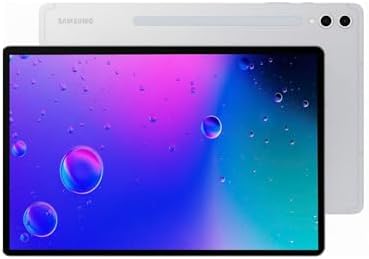
- Latin American Model, NO Warranty in the USA. Tablets are only WIFI, no Calls or Data.
- Mediatek Dimensity 9400+ (3 nm) Octa-core (1×3.63 GHz Cortex-X925 & 3×3.3 GHz Cortex-X4 & 4×2.4 GHz Cortex-A720) Li-Po 8…
- 11″ Screen 278.1mm (11.0″ full rectangle) / 276.2mm (10.9″ rounded corners) Dynamic AMOLED 2X 16M Accelerometer, Fingerp…
Key Features
- 11-inch AMOLED display
- High refresh rate
- S Pen support
- Premium processor
- Samsung DeX
- Multi-window multitasking
- Long battery life
- Lightweight design
- Keyboard accessory support
The smaller size makes it easier to hold and carry than the Ultra.
It is a particularly good choice for students, professionals, travelers, and users who want a premium Android tablet without a huge screen.
Best for: Students, professionals, travel, entertainment, and everyday productivity.
Our Rating: 9.5/10
3. OnePlus Pad 3: Best Value Premium Android Tablet
The OnePlus Pad 3 offers a strong combination of performance, display quality, and premium design without necessarily reaching the price of the most expensive Samsung models.
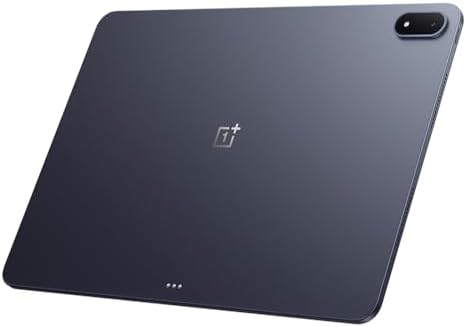
- 13.2 inches, IPS LCD, 68B colors, 2400 x 3392 pixels
- 512GB Storage, 16GB RAM
- Android 15, ColorOS 15, Qualcomm SM8750-AB Snapdragon 8 Elite (3 nm), Octa-core (2×4.32 GHz Oryon V2 Phoenix L + 6×3.53 …
Key Features
- Large high-resolution display
- High refresh rate
- Powerful processor
- Large battery
- Fast charging
- Android-based OxygenOS
- Keyboard accessory support
- Stylus compatibility
- Premium metal design
Its large display is particularly useful for split-screen multitasking.
The high refresh rate also makes scrolling and compatible games feel smooth.
Best for: Value-focused premium buyers, gaming, entertainment, and productivity.
Our Rating: 9.4/10
4. Lenovo Tab Extreme: Best Android Tablet for Productivity
The Lenovo Tab Extreme is designed for users who want a large-screen Android tablet that can handle productivity tasks.
Its 14.5-inch OLED display provides plenty of space for multitasking, documents, presentations, and entertainment.

- MULTITASKING MASTER: The Lenovo Tab M11 combines robust performance with portability in a sleek design and easily switch…
- POWER-PACKED PERFORMANCE: Streamline your day with the ability to work or study at home and on the go—the MediaTek Helio…
- EXPERIENCE VIVID CLARITY: Immerse yourself in vibrant visuals—a 11″ 1920×1200 WUXGA display brings your graphics and pho…
Key Features
- 14.5-inch OLED display
- High refresh rate
- Large battery
- Multi-window support
- Stylus compatibility
- Keyboard accessory support
- Premium construction
- Large-screen multitasking
The combination of a large display and keyboard support makes it an attractive laptop alternative for some users.
Best for: Productivity, multitasking, entertainment, and large-screen tablet users.
Our Rating: 9.2/10
5. Xiaomi Pad 7 Pro: Best Mid-Range Android Tablet
The Xiaomi Pad 7 Pro offers a strong balance between price and performance.
Its high-resolution display and capable processor make it suitable for gaming, streaming, productivity, and everyday use.
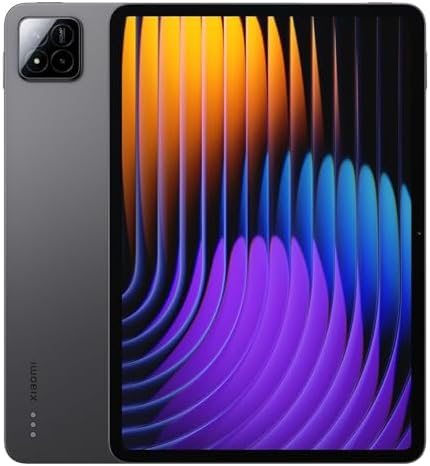
- WIFI Version No Calls or Text, NO SIM CARD OR SD SLOT . FCC ID: 2AFZZCRP4CG
- 3.2K 144Hz crystal-clear display11.2″3:23200 x 2136, 345 ppiUp to 144HzUp to 360Hz 240Hz (with pen)800 nits peak brightn…
- Snapdragon 7+ Gen 3 Mobile Platform4nm manufacturing processOcta-core, up to 2.8GHzAdreno GPUQualcomm AI engine
Key Features
- 11.2-inch high-resolution display
- High refresh rate
- Powerful processor
- Large battery
- Fast charging
- Xiaomi HyperOS
- Multi-window functionality
- Stylus support
- Keyboard accessory support
It’s a particularly attractive choice for users who want premium specifications without paying flagship tablet prices.
Best for: Mid-range buyers, gaming, entertainment, and productivity.
Our Rating: 9.2/10
6. Lenovo Tab P12: Best Android Tablet for Students
The Lenovo Tab P12 is a strong choice for students who want a large screen for studying, note-taking, reading, and video lessons.
Its large display gives students plenty of room for documents and split-screen applications.

- Large Display: Features a spacious 12.1 inch screen providing ample viewing area for reading, studying, and multimedia c…
- AI-Enhanced Performance: Equipped with artificial intelligence capabilities to optimize performance and enhance the lear…
- Student-Focused Design: Purpose-built tablet designed specifically for educational needs including note-taking, research…
Key Features
- 12.7-inch display
- Large screen for study
- Stylus support
- Keyboard accessory compatibility
- Multi-window multitasking
- Large battery
- Android software
- Good entertainment features
A compatible stylus can be particularly useful for handwritten notes and annotations.
Best for: Students, note-taking, online learning, reading, and entertainment.
Our Rating: 8.9/10
7. Samsung Galaxy Tab A9+ Best Budget Android Tablet
The Samsung Galaxy Tab A9+ is designed for users who want an affordable Android tablet for everyday tasks.
It may not provide the performance of Samsung’s flagship Tab S series, but it offers a practical combination of screen size, battery life, software, and price.

Key Features
- 11-inch display
- Android software
- Expandable storage on supported configurations
- Multi-window functionality
- Good battery life
- Samsung ecosystem integration
- Lightweight design
- Affordable pricing
It’s a good choice for streaming, web browsing, social media, reading, and basic productivity.
Best for: Budget buyers, families, children, streaming, and everyday browsing.
Our Rating: 8.7/10
What Should You Look for in an Android Tablet?
1. Display Quality
The display is one of the most important tablet features because you’ll spend most of your time looking at it.
Consider:
- Screen size
- Resolution
- Brightness
- Refresh rate
- Color accuracy
- Contrast
- Panel technology
AMOLED
AMOLED displays generally offer excellent blacks, contrast, and vibrant colors.
LCD
LCD tablets can provide excellent value and may be preferable for buyers looking to reduce costs.
For reading and productivity, resolution and brightness can be more important than simply choosing the most expensive panel technology.
2. Processor Performance
The processor determines how smoothly the tablet handles applications, games, multitasking, and demanding workloads.
For basic tasks, you don’t need a flagship processor.
For gaming and productivity, look for a more powerful chipset with enough RAM.
A tablet intended to last several years should ideally have enough performance headroom for future software updates and applications.
3. RAM and Storage
RAM affects how well a tablet can keep multiple applications active.
For basic use, lower-memory configurations can be sufficient.
For multitasking, gaming, and productivity, more RAM is preferable.
Storage is equally important.
Consider:
- 128GB for basic users
- 256GB for most power users
- 512GB+ for large media collections and professional workloads
If the tablet supports microSD expansion, you may be able to increase storage later.
4. Battery Life
A tablet should comfortably last through a typical day.
Battery life depends on:
- Screen brightness
- Processor efficiency
- Gaming
- Streaming
- Wi-Fi usage
- Background applications
- Refresh rate
Fast charging can also be valuable when you need to quickly recharge between classes or meetings.
5. Stylus Support
A stylus can transform an Android tablet into a useful note-taking and creative device.
Stylus support is useful for:
- Handwritten notes
- Drawing
- PDF annotation
- Signatures
- Photo editing
- Graphic design
- Education
Samsung’s S Pen ecosystem is particularly strong for users who regularly take handwritten notes.
6. Keyboard Support
If you plan to use your tablet as a laptop alternative, keyboard compatibility is important.
A keyboard can improve:
- Email writing
- Document editing
- Research
- Coding
- Spreadsheet work
- Messaging
Also check whether the keyboard has a trackpad and whether the tablet supports a desktop-style interface.
Best Android Tablet by Use Case
| Use Case | Recommended Android Tablet |
|---|---|
| Best overall | Galaxy Tab S11 Ultra |
| Premium compact | Galaxy Tab S11 |
| Best value premium | OnePlus Pad 3 |
| Productivity | Lenovo Tab Extreme |
| Mid-range | Xiaomi Pad 7 Pro |
| Students | Lenovo Tab P12 |
| Budget | Galaxy Tab A9+ |
| Note-taking | Galaxy Tab S11 |
| Gaming | OnePlus Pad 3 |
| Movies | Galaxy Tab S11 Ultra |
| Multitasking | Galaxy Tab S11 Ultra |
| Family use | Galaxy Tab A9+ |
Are Android Tablets Good for Students?
Yes. Android tablets can be excellent educational devices.
Students can use them for:
- Taking notes
- Reading textbooks
- Watching lectures
- Research
- PDF annotation
- Online classes
- Presentations
- Productivity applications
A stylus and keyboard can make a tablet significantly more useful for academic work.
For students, however, consider the total cost of the tablet plus accessories. A cheaper tablet with a keyboard and stylus may sometimes approach the cost of a more capable model.
Are Android Tablets Good for Gaming?
Modern Android tablets can be excellent gaming devices.
For gaming, prioritize:
- Powerful processor
- High refresh rate
- Large battery
- Good cooling
- Fast storage
- Large display
- Strong speakers
A high-refresh-rate display can make supported games feel smoother.
However, very demanding games can consume significant battery power, so battery capacity and thermal performance are also important.
Can an Android Tablet Replace a Laptop?
For some users, yes.
An Android tablet can handle:
- Web browsing
- Documents
- Video calls
- Streaming
- Social media
- Light photo editing
- Note-taking
With a keyboard, mouse, and desktop-style interface, premium models can become surprisingly capable productivity devices.
However, professionals who rely on specialized desktop software may still need a Windows or macOS laptop.
Android Tablet vs. iPad
Both platforms have advantages.
Android tablet advantages
- Wide range of prices
- Flexible hardware options
- Expandable storage on selected models
- Strong multitasking
- Google Play ecosystem
- Better variety of screen sizes
- More customization
iPad advantages
- Strong tablet-optimized applications
- Long software support on many models
- Excellent accessory ecosystem
- Strong performance
- Seamless integration with Apple products
Choose Android if you prefer Google’s ecosystem, customization, hardware variety, and flexible pricing.
Final Verdict
The Samsung Galaxy Tab S11 Ultra is our top overall Android tablet for 2026 thanks to its enormous AMOLED display, premium performance, S Pen support, multitasking capabilities, and DeX desktop-style experience.
The Galaxy Tab S11 is a better choice if you want premium features in a more portable form factor. The OnePlus Pad 3 provides excellent value for users who want high performance, while the Lenovo Tab Extreme is attractive for large-screen productivity.
For mid-range buyers, the Xiaomi Pad 7 Pro offers a strong balance between performance and price. Students may prefer the Lenovo Tab P12, particularly with a compatible stylus and keyboard.
If affordability is your priority, the Galaxy Tab A9+ is a practical option for streaming, browsing, reading, and everyday tasks.
Before buying, consider the display, processor, RAM, storage, battery life, stylus support, keyboard compatibility, software updates, and accessory costs. The best Android tablet isn’t necessarily the most expensive—it is the model that matches your daily workload and budget.
Frequently Asked Questions
What is the best Android tablet in 2026?
The Samsung Galaxy Tab S11 Ultra is our top overall recommendation for users who want premium performance, a large AMOLED display, multitasking, and productivity features.
What is the best Android tablet for students?
The Lenovo Tab P12 is a strong student option because of its large display, stylus support, keyboard compatibility, and multitasking capabilities.
What is the best budget Android tablet?
The Samsung Galaxy Tab A9+ is a good budget choice for web browsing, streaming, reading, social media, and basic productivity.
Are Android tablets worth buying?
Yes. Android tablets offer a wide range of hardware and prices, making them suitable for entertainment, education, gaming, productivity, and everyday use.
Which Android tablet is best for gaming?
The OnePlus Pad 3 and premium Samsung Galaxy Tab models are strong options for gaming because of their powerful processors, high-refresh-rate displays, and large screens.
Do Android tablets support keyboards?
Many Android tablets support dedicated keyboard accessories or Bluetooth keyboards. Premium Samsung, Lenovo, and OnePlus models offer particularly useful keyboard options.
Do Android tablets support styluses?
Yes. Many models support active styluses, although compatibility and included accessories vary. Samsung’s S Pen ecosystem is particularly useful for handwriting and drawing.
How much storage should an Android tablet have?
128GB is generally enough for basic use, while 256GB is preferable for power users. Choose 512GB or more if you store large games, videos, photos, or professional files.
Is 8GB RAM enough for an Android tablet?
8GB RAM can be sufficient for many users, including multitasking and gaming. Heavier workloads may benefit from configurations with more RAM.
Can an Android tablet replace a laptop?
It can replace a laptop for browsing, email, documents, streaming, video calls, and many everyday tasks. Users who need specialized desktop software may still require a traditional laptop.
Are Samsung tablets better than Lenovo tablets?
Samsung generally offers a stronger premium ecosystem, displays, software features, and stylus integration, while Lenovo often provides competitive value and large-screen options. The best choice depends on your needs and budget.
Can Android tablets connect to external monitors?
Some Android tablets support external-display connectivity through USB-C or wireless technologies. Check the exact model’s specifications before purchasing.
How long do Android tablets last?
A quality Android tablet can remain useful for several years, but longevity depends on hardware, software support, battery health, and how demanding your applications become.
Should I buy an Android tablet with 5G?
5G can be worthwhile if you frequently use your tablet away from Wi-Fi. If you primarily use it at home, school, or the office, a Wi-Fi model is usually more economical.
Best Products
Best Smartphones for Everyday Use in 2026
Best Laptops for Students in 2026