If you click on the links and make a purchase, we may earn a commission.
The best tablets for kids can provide a useful combination of education, entertainment, creativity, reading, and communication. Whether you’re looking for a first tablet for a young child, a learning device for schoolwork, or an entertainment tablet for older kids, choosing the right model requires more than comparing screen size and price.
Table of Contents

Image Credit: Canva
Parents should consider parental controls, durability, battery life, age-appropriate content, storage, performance, screen quality, warranty options, and overall value. A tablet with strong parental controls can help parents manage screen time and restrict inappropriate content, while a durable case can protect the device from everyday drops and bumps.
In this guide, we compare the best tablets for kids in 2026, covering options for younger children, school-age kids, teenagers, education, entertainment, travel, and family use.
Quick Comparison: Best Tablets for Kids
| Tablet | Best For | Key Feature | Display | Storage* | Rating |
|---|---|---|---|---|---|
| Amazon Fire HD 10 Kids Pro | Best Overall | Kid-friendly controls & large display | 10.1-inch | Up to 128GB* | 9.5/10 |
| Amazon Fire HD 10 Kids | Younger Kids | Protective case & parental controls | 10.1-inch | Up to 64GB* | 9.4/10 |
| Samsung Galaxy Tab A11+ | Best Android | Large screen & flexible software | 11-inch | Up to 128GB* | 9.2/10 |
| iPad 11-inch | Best Premium Family Tablet | Strong performance & app ecosystem | 11-inch | Up to 512GB* | 9.4/10 |
| Samsung Galaxy Tab A11 | Best Affordable Android | Compact design & Samsung software | 11-inch | Up to 128GB* | 9.0/10 |
| Lenovo Tab M11 | Best for Learning | Large display & stylus support | 11-inch | Up to 128GB* | 9.0/10 |
| Amazon Fire HD 8 Kids | Best Compact | Portable design | 8-inch | Up to 64GB* | 8.8/10 |
Storage, memory, connectivity, accessories, and availability vary by region.
1. Amazon Fire HD 10 Kids Pro: Best Tablet for Kids Overall
The Amazon Fire HD 10 Kids Pro is our top choice for school-age children who need a dedicated tablet for entertainment, reading, learning, and age-appropriate applications.
The Kids Pro range is designed for older children and provides a more independent experience than tablets designed for very young kids.
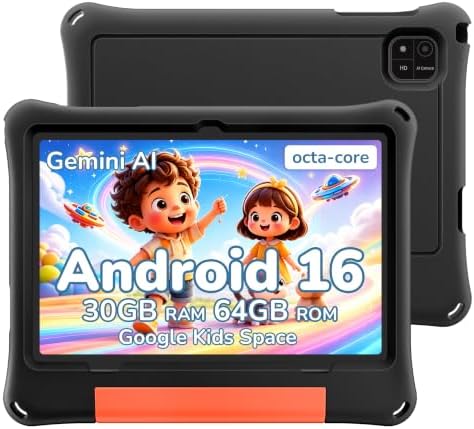
- Google Kids Space and Parental Controls: Children can explore age-appropriate apps, books, videos and games. Google Fami…
- Android 16 and Octa-Core Performance: Powered by Android 16 with 6GB physical RAM and up to 24GB memory expansion for up…
- 10.1-Inch HD Display and 6000mAh Battery: The spacious touchscreen provides clear, vivid viewing with eye-comfort settin…
Key Features
- 10.1-inch display
- Kid-friendly design
- Protective case
- Parental controls
- Child profiles
- Screen-time controls
- Content filtering
- Expandable storage
- USB-C charging
- Large battery
One of its biggest advantages is the parental-control ecosystem. Parents can manage content and screen time while children get access to age-appropriate entertainment and educational resources.
The included protective case is also useful because children are more likely to drop or mishandle electronic devices.
Best for: School-age children, entertainment, reading, learning, and travel.
Our Rating: 9.5/10
2. Amazon Fire HD 10 Kids: Best for Younger Children
The Amazon Fire HD 10 Kids is designed for younger children and focuses heavily on durability, parental controls, and simplified access to age-appropriate content.

- 【Stable Android 16 System & 8-Cores Powerful CPU 】This 2026 Stable Android 16 tablet is equipped with a high-performance…
- 【10.1 Anti-blue Eyes Friendly Screen 】 This 10.1-inch tablet not only bigger screen, also features specific eyes friendl…
- 【Google Kids Space + Parental Control】The Kids tablet comes pre-installed with Google Kids Space and educator-endorsed a…
Key Features
- 10.1-inch display
- Kid-friendly protective case
- Parental controls
- Child profiles
- Screen-time limits
- Content filters
- Expandable storage
- USB-C
- Long battery life
The rugged case is an important advantage for younger children who may accidentally drop the tablet.
Parents can also manage access to content and establish usage limits.
Best for: Younger children, preschoolers, elementary-age kids, learning, and entertainment.
Our Rating: 9.4/10
3. Samsung Galaxy Tab A11+ — Best Android Tablet for Kids
The Samsung Galaxy Tab A11+ is a versatile option for families that want a conventional Android tablet rather than a dedicated children’s tablet.
It can be configured with appropriate parental controls and a durable protective case.

- POWER FOR ALL YOU DO: Galaxy Tab A11+ gives your family the optimal performance they need for all their day-to-day activ…
- CHARGES UP FAST. LASTS FOR HOURS: Galaxy Tab A11+ keeps your family going with a long-lasting battery that’s perfect for…
- MEMORY AND STORAGE THAT KEEP UP: With up to 6GB of memory and 128GB⁶ of storage, Galaxy Tab A11+ gives your family the s…
Key Features
- Large display
- Smooth refresh rate
- Android software
- Samsung One UI
- Multi-window functionality
- Expandable storage on supported configurations
- USB-C
- Large battery
- Access to a broad Android app ecosystem
The large display makes it useful for educational applications, YouTube, reading, games, and schoolwork.
It’s also a good choice for families because parents can continue using the tablet themselves.
Best for: Older children, teenagers, schoolwork, gaming, and family sharing.
Our Rating: 9.2/10
4. iPad 11-inch — Best Premium Tablet for Kids
The 11-inch iPad is a strong option for families that want access to Apple’s extensive application ecosystem and excellent hardware.
Although it isn’t specifically designed as a children’s tablet, Apple’s built-in parental controls allow parents to manage usage.

- WHY IPAD — The 11-inch iPad is now more capable than ever with the superfast A16 chip, a stunning Liquid Retina display,…
- PERFORMANCE AND STORAGE — The superfast A16 chip delivers a boost in performance for your favorite activities. And with …
- 11-INCH LIQUID RETINA DISPLAY — The gorgeous Liquid Retina display is an amazing way to watch movies or draw your next m…
Key Features
- 11-inch display
- Powerful Apple processor
- USB-C
- Strong battery life
- Extensive app ecosystem
- Screen Time controls
- Family Sharing
- Large storage options
- High-quality cameras
The iPad is particularly useful for older children and teenagers who need a device for school, creative projects, communication, and entertainment.
It’s also more versatile than a dedicated children’s tablet because adults can use it.
Best for: Teenagers, schoolwork, creative projects, and families wanting one premium device.
Our Rating: 9.4/10
5. Samsung Galaxy Tab A11 — Best Affordable Android Tablet
The Galaxy Tab A11 provides a relatively affordable way for children to access Android applications, educational content, games, and entertainment.

- 64GB ROM, 4GB RAM, Mediatek Helio G99 (6nm), Octa-core, Mali-G57 MC2 GPU, MicroSD card slot for upto 2TB of expanded mem…
- 8.7″ 90Hz Display (220.5mm), 1340 x 800 (WXGA+), TFT, 16M colors, Android 15, One UI 7, with Updates coming
- Rear Camera: 8MP, AF, Front Camera: 5MP, 5100 mAh battery, Bluetooth 5.3, USB Type-C 2.0
Key Features
- Compact design
- Large display
- Android software
- Samsung One UI
- Long battery potential
- USB-C
- Expandable storage on supported models
- Parental-control compatibility
Its conventional Android interface gives older children more flexibility as their needs develop.
Parents should configure appropriate restrictions before giving younger children unrestricted access.
Best for: Older kids, teenagers, schoolwork, and general entertainment.
Our Rating: 9.0/10
6. Lenovo Tab M11 — Best Tablet for Learning
The Lenovo Tab M11 is particularly useful for children who need a tablet for schoolwork and creative activities.
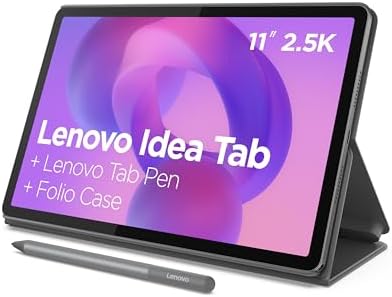
- POWER YOUR STUDY, FUEL YOUR PLAY – Discover smarter learning with the Lenovo Idea Tab. Stay campus-ready with all-day ba…
- SMOOTH, POWERFUL, IMMERSIVE – The MediaTek Dimensity 6300 processor is more powerful than ever, with the AI-enhanced mul…
- CIRCLE IT, SEARCH IT – Use your Lenovo Tab Pen or fingertip to circle items for instant search results or to translate o…
Key Features
- 11-inch display
- Stylus support
- Large battery
- Quad speakers
- Expandable storage
- Android software
- Large workspace
- Multi-window functionality
Stylus compatibility can make it useful for handwritten notes, drawing, PDF annotation, and creative projects.
The large display is also useful for online classes and educational videos.
Best for: Students, online learning, drawing, note-taking, and homework.
Our Rating: 9.0/10
7. Amazon Fire HD 8 Kids — Best Compact Kids Tablet
The Fire HD 8 Kids is a smaller option for children who need a portable entertainment and learning device.

- SAVE UP TO $70 — Bundle includes a full-featured tablet (not a toy) for kids ages 3-7, includes 6 months of Amazon Kids+…
- 2 YEAR WORRY-FREE GUARANTEE INCLUDED – If the tablet breaks, return it and we’ll replace it for free. Screen made with s…
- AMAZON KIDS+ INCLUDED – Includes 1 year of Amazon Kids+, an award-winning digital subscription offering thousands of ad-…
Key Features
- 8-inch display
- Compact design
- Protective case
- Parental controls
- Child profiles
- Expandable storage
- USB-C
- Long battery potential
The smaller size makes it easier for young children to hold and for parents to carry while traveling.
Best for: Younger children, travel, reading, and portable entertainment.
Our Rating: 8.8/10
What Should Parents Look for in a Kids’ Tablet?
1. Parental Controls
Parental controls should be one of the most important considerations.
Look for features that allow parents to:
- Set screen-time limits
- Approve applications
- Restrict websites
- Filter content
- Manage purchases
- Create child profiles
- Set bedtime restrictions
- Monitor usage
The exact controls differ between operating systems.
2. Durability
Children can be harder on electronics than adults.
A good kids’ tablet should ideally have:
- Rugged protective case
- Shock protection
- Scratch-resistant screen protection
- Reliable charging port
- Affordable replacement accessories
Even a premium tablet can become expensive if it isn’t properly protected.
A quality case is often one of the best accessories you can buy.
3. Screen Size
The right screen size depends on the child’s age and intended use.
8 inches
Good for:
- Younger children
- Reading
- Travel
- Portability
10–11 inches
Best for:
- Schoolwork
- Videos
- Games
- Drawing
- Online classes
12 inches+
Better for:
- Teenagers
- Creative projects
- Multitasking
- Detailed schoolwork
For most children, a 10- or 11-inch tablet offers a good balance.
4. Battery Life
Kids often use tablets for long periods while traveling, studying, or watching videos.
A large battery can reduce the need for frequent charging.
However, real-world battery life depends on:
- Screen brightness
- Gaming
- Video streaming
- Wi-Fi
- Applications
- Processor efficiency
5. Storage
Games, videos, photos, and educational applications can quickly consume storage.
64GB
Suitable for basic use if cloud storage or expandable storage is available.
128GB
A better choice for children who install many apps and games.
256GB+
Useful for teenagers and creative users who store lots of videos and projects.
Expandable storage can provide additional flexibility on supported Android and Fire tablets.
6. Performance
Children may use tablets for many different activities.
A capable processor helps with:
- Educational apps
- Games
- Video streaming
- Web browsing
- Video calls
- Drawing
- Schoolwork
You don’t necessarily need flagship performance for a child, but extremely slow hardware can make applications frustrating to use.
Best Kids’ Tablet by Age and Use
| Child/User | Recommended Tablet |
|---|---|
| Younger children | Fire HD 10 Kids |
| School-age children | Fire HD 10 Kids Pro |
| Teenagers | iPad 11-inch |
| Android families | Galaxy Tab A11+ |
| Students | Lenovo Tab M11 |
| Travel | Fire HD 8 Kids |
| Educational use | Lenovo Tab M11 |
| Gaming | Galaxy Tab A11+ |
| Family sharing | iPad 11-inch |
| Budget option | Fire HD 8 Kids |
Are Amazon Kids Tablets Better for Children?
Amazon’s dedicated Kids tablets have a major advantage: they are designed around children rather than simply being standard tablets with parental controls.
They typically emphasize:
- Protective cases
- Child profiles
- Parental controls
- Content filtering
- Age-based experiences
This can make them easier for parents who want a ready-to-use children’s device.
A standard Android tablet or iPad may be better for older children who need broader applications and greater flexibility.
Android vs. iPad for Kids
Android Advantages
Android tablets provide:
- Wide application selection
- More hardware choices
- Affordable models
- Expandable storage on selected devices
- Flexible customization
Samsung tablets are particularly attractive for families already using Galaxy devices.
iPad Advantages
iPads provide:
- Strong performance
- Large application ecosystem
- Excellent educational applications
- Family Sharing
- Screen Time controls
- Long-term usability
An iPad can remain useful as a child grows because it isn’t limited to a children’s interface.
What Tablet Is Best for Online Learning?
For online learning, look for:
- Large display
- Good speakers
- Front camera
- Microphone
- Reliable Wi-Fi
- Long battery life
- Keyboard support
- Stylus compatibility
The Lenovo Tab M11 is a useful budget-oriented option, while the iPad 11-inch is better suited to families seeking a more premium long-term device.
What Accessories Should You Buy?
A tablet for children should ideally be paired with appropriate accessories.
Protective Case
A rugged case can protect against drops.
Screen Protector
Adds another layer of scratch protection.
Headphones
Useful when children are watching videos or playing games around other family members.
Stylus
Helpful for drawing, handwriting, and schoolwork.
Keyboard
Useful for older children and teenagers who need to write assignments.
How Much Should You Spend on a Kids’ Tablet?
Under $150
Suitable for:
- Basic entertainment
- Reading
- Simple educational apps
$150–$300
Better for:
- Schoolwork
- Gaming
- Streaming
- More demanding apps
$300+
Best for:
- Teenagers
- Creative work
- Long-term use
- Premium performance
A dedicated kids’ tablet can be better value for younger children because it may include a protective case and child-focused software.
Final Verdict
The Amazon Fire HD 10 Kids Pro is our best overall tablet for kids because it combines a large display, protective design, parental controls, child-focused software, and a practical price.
For younger children, the Amazon Fire HD 10 Kids is particularly appealing because it is designed around durability and parental management.
The Samsung Galaxy Tab A11+ is a better choice for families wanting a conventional Android tablet, while the iPad 11-inch is ideal for older children and teenagers who need a device for school, creative projects, and entertainment.
For education and handwritten work, the Lenovo Tab M11 offers useful stylus support. If portability is the priority, the Fire HD 8 Kids is an attractive compact option.
Before buying, parents should prioritize parental controls, durability, screen quality, battery life, storage, age-appropriate applications, software support, and accessory availability. Don’t forget to factor in the cost of a protective case, screen protector, stylus, or keyboard when comparing tablets.
Most importantly, a tablet should complement a child’s education and entertainment—not replace sleep, physical activity, family interaction, or offline play. Use the device’s parental controls to establish boundaries that fit your family’s needs.
Frequently Asked Questions
What is the best tablet for kids in 2026?
The Amazon Fire HD 10 Kids Pro is our overall recommendation for school-age children because it combines parental controls, a protective case, a large display, and child-friendly features.
What is the best tablets for younger children?
The Amazon Fire HD 10 Kids is designed specifically for younger children and provides a protective case and parental-control features.
What is the best tablet for teenagers?
The iPad 11-inch is a strong choice for teenagers because it provides excellent performance, educational applications, creative tools, and long-term usefulness.
Are tablets safe for children?
Tablets can be used safely when parents configure appropriate parental controls, establish screen-time boundaries, supervise younger children, and choose age-appropriate content.
What age is appropriate for a tablet?
There isn’t one universal age. Parents should consider the child’s maturity, educational needs, family rules, and ability to follow screen-time boundaries.
How much screen time should kids have?
Screen-time needs vary by age and situation. Parents should follow guidance from trusted pediatric and child-development organizations and balance device use with sleep, exercise, schoolwork, and offline activities.
Should I buy a kids’ tablet or a regular tablets?
A dedicated kids’ tablet is generally easier for younger children because of its protective case and child-focused controls. Older children may benefit more from a regular tablet with properly configured parental restrictions.
How much storage does a kids’ tablet need?
64GB can be enough for basic use, while 128GB provides more room for games, applications, videos, and school materials.
Is an iPad good for children?
Yes. An iPad can be an excellent educational and entertainment device, particularly for older children and teenagers. Apple’s parental-control features can help parents manage usage.
Are Amazon Fire tablets good for kids?
Yes. Amazon’s dedicated Kids models are specifically designed for children and emphasize parental controls, protective cases, and age-appropriate content.
What is the best tablets for kids’ learning?
The Lenovo Tab M11 is a good choice for learning because of its large display and stylus compatibility. The iPad also provides access to a broad range of educational applications.
Do kids need a protective case?
Yes. A protective case is strongly recommended because accidental drops are common with children’s devices.
Can kids use tablets for school?
Yes. Tablets can support online classes, educational apps, reading, research, note-taking, video calls, and document work.
What should parents check before buying a kids’ tablets?
Check parental controls, durability, display quality, battery life, storage, performance, app availability, software support, warranty, and the cost of accessories.
Best Products
Best Smartphones for Everyday Use in 2026
Best Laptops for Students in 2026