If you click on the links and make a purchase, we may earn a commission.
The best gaming monitors can make a significant difference to your gaming experience. A good gaming monitor combines a fast refresh rate, low response time, adaptive sync, high resolution, strong HDR performance, and excellent image quality.
Table of Contents
Image Credit: Pexels
Whether you’re playing competitive FPS games, open-world RPGs, racing titles, or console games, choosing the right monitor depends on your hardware and the type of games you play.
A competitive PC gamer may prioritize 240Hz or higher refresh rates and extremely low response times, while a console gamer may benefit more from a 4K 120Hz display with HDMI 2.1. For cinematic single-player games, OLED monitors can provide exceptional contrast and HDR performance.
In this guide, we’ve compared the best gaming monitors in 2026 based on resolution, refresh rate, response time, panel technology, HDR, connectivity, gaming features, and overall value.
Quick Comparison: Best Gaming Monitors
| Gaming Monitor | Best For | Key Feature | Resolution | Refresh Rate* | Rating |
|---|---|---|---|---|---|
| ASUS ROG Swift OLED PG27UCDM | Best Overall | 4K QD-OLED gaming | 4K | Up to 240Hz | 9.7/10 |
| LG UltraGear OLED 27GS95QE | Best OLED | Fast OLED response | 1440p | Up to 240Hz | 9.5/10 |
| Samsung Odyssey OLED G8 | Best Premium | OLED ultrawide experience | 3440×1440 | Up to 175Hz | 9.3/10 |
| Alienware AW2725DF | Best 1440p OLED | QD-OLED & high refresh | 1440p | Up to 360Hz | 9.5/10 |
| ASUS ROG Swift PG248QP | Best Competitive | Extremely high refresh rate | 1080p | Up to 540Hz | 9.3/10 |
| Gigabyte M27Q | Best Value | Strong 1440p gaming | 1440p | Up to 170Hz | 9.1/10 |
| AOC Q27G3XMN | Best Budget HDR | Mini-LED local dimming | 1440p | Up to 180Hz | 9.0/10 |
*Refresh rates vary by input, resolution, connection, and model configuration.
1. ASUS ROG Swift OLED PG27UCDM: Best Gaming Monitor Overall
The ASUS ROG Swift OLED PG27UCDM is our top overall gaming monitor for players who want an exceptional combination of resolution, refresh rate, OLED image quality, and modern connectivity.
Its 4K QD-OLED panel provides extremely sharp images while maintaining the deep blacks and rapid response associated with OLED technology.

- Immersive 4K QD-OLED Display: 32-inch 4K (3840 x 2160) QD-OLED gaming monitor with 240 Hz refresh rate and 0.03 ms (GTG)…
- Advanced Heat Management System: Highly efficient custom heatsink, advanced airflow design, and graphene film for better…
- Exceptional HDR Performance: VESA DisplayHDR 400 True Black compliance, 99% DCI-P3 gamut, true 10-bit, and Delta E < 2 c...
Key Features
- 27-inch 4K OLED display
- Up to 240Hz refresh rate
- Extremely fast response time
- QD-OLED technology
- HDR support
- HDMI 2.1
- DisplayPort
- Adaptive Sync
- Excellent color reproduction
- Gaming-focused features
The combination of 4K resolution and 240Hz makes it particularly appealing to high-end PC gamers with powerful graphics cards.
It’s also suitable for productivity because the high pixel density provides plenty of workspace.
Best for: High-end PC gaming, competitive gaming, 4K gaming, and enthusiasts.
Our Rating: 9.7/10
2. LG UltraGear OLED 27GS95QE: Best OLED Gaming Monitor
The LG UltraGear OLED 27GS95QE is an excellent choice for gamers who prioritize fast response times and OLED image quality.
OLED pixels can change states extremely quickly, which makes the display particularly attractive for fast-paced games.
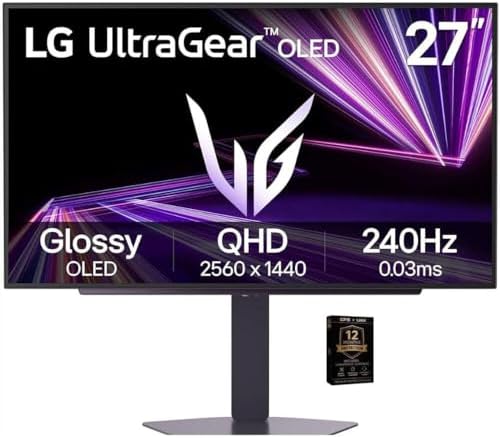
- Premium OLED Gaming Experience – Enjoy perfect blacks, infinite contrast, and incredible color accuracy for lifelike, ci…
- Smooth 240Hz Refresh Rate – Ultra-fast motion clarity ideal for competitive gaming and fast-moving action.
- 0.03ms Response Time – Eliminates motion blur and ghosting, improving accuracy during rapid gameplay.
Key Features
- 27-inch OLED
- 1440p resolution
- Up to 240Hz refresh rate
- Extremely fast response
- HDR support
- AMD FreeSync
- NVIDIA G-SYNC compatibility on supported configurations
- HDMI 2.1-class features depending on model
- Gaming-oriented design
At 1440p, the monitor requires less GPU power than a 4K display while still delivering sharp images.
That makes it an excellent pairing for high-end gaming PCs where frame rates are more important than maximum resolution.
Best for: Competitive gamers, FPS games, esports, and OLED enthusiasts.
Our Rating: 9.5/10
3. Samsung Odyssey OLED G8: Best Premium Ultrawide Gaming Monitor
The Samsung Odyssey OLED G8 provides an immersive ultrawide gaming experience.
Its wider aspect ratio can provide a larger field of view in supported games and gives you more horizontal desktop space.

- Samsung USA AUTHORIZED – Includes 26 Months Extended Protection in ADDITION to the Included FULL Manufacturer Protection…
- Samsung’s 34″ Odyssey OLED G8 Ultra-WQHD Gaming Monitor features OLED technology for a wider color spectrum and vibrant …
- 175Hz refresh rate, 0.03ms response time (GtG), and AMD FreeSync Premium Pro allows for faster, exhilarating gameplay wi…
Key Features
- Ultrawide OLED panel
- 3440×1440 resolution
- High refresh rate
- HDR
- Deep OLED blacks
- Fast response
- Adaptive Sync
- Premium curved design
- Gaming-focused features
The ultrawide format is particularly attractive for racing games, simulation titles, RPGs, and productivity.
Best for: Ultrawide gaming, racing games, immersive RPGs, and multitasking.
Our Rating: 9.3/10
4. Alienware AW2725DF: Best 1440p OLED Gaming Monitor
The Alienware AW2725DF combines a 1440p QD-OLED panel with a very high refresh rate.
It’s an excellent option for gamers who want OLED image quality without moving to 4K.

- Essential QHD performance for any game: Explore detailed worlds in high definition with QHD resolution, fluid visuals, a…
- Dive into vibrant visuals: Whether you’re exploring open worlds or facing off in battle, you’ll never miss a detail with…
- Fluid performance: Get in the game with a smooth 180Hz refresh rate and 1ms gray to gray response time.
Key Features
- 27-inch QD-OLED
- 2560×1440 resolution
- Up to 360Hz
- Very fast response
- HDR
- Excellent color performance
- Adaptive Sync
- Gaming-focused design
- Premium build quality
The 360Hz refresh rate is particularly useful for competitive gamers with hardware capable of generating very high frame rates.
Best for: Esports, FPS games, competitive PC gaming, and high-refresh gaming.
Our Rating: 9.5/10
5. ASUS ROG Swift PG248QP: Best Monitor for Competitive Gaming
The ASUS ROG Swift PG248QP is designed for competitive gamers who prioritize maximum refresh rate and motion clarity.
Its extremely high refresh rate is aimed at esports players who compete in fast-paced titles.

- Dual Mode Display Technology: 32-inch 4K (3840 x 2160) WOLED gaming monitor with versatile dual mode (4K @ 240 Hz or FHD…
- ROG-Exclusive OLED Anti-Flicker Technology: Helps reduce the flicker during refresh-rate fluctuations for more comfortab…
- Advanced AI Assistant Features: Provides dynamic AI Crosshair, AI Sniper, and AI Visual functions for improved gaming ex…
Key Features
- High-refresh gaming display
- Up to 540Hz
- Full HD resolution
- Very low response time
- G-SYNC technology
- Competitive gaming features
- Ergonomic stand
- Motion-focused design
A 540Hz display is unlikely to provide significant benefits for casual gaming, but competitive players with powerful hardware can take advantage of its responsiveness.
Best for: Esports, competitive FPS gaming, professional-level players.
Our Rating: 9.3/10
6. Gigabyte M27Q: Best Value Gaming Monitor
The Gigabyte M27Q is a strong choice for gamers who want a capable 1440p monitor without paying premium OLED prices.
Its resolution and refresh rate provide a good balance for mainstream PC gaming.

- PIXEL PERFECT IN QD-OLED PANEL – The MO27Q2A features a stunning 27-inch QD-OLED display, delivering uncompromising imag…
- EXCLUSIVE AI-BASED PROTECTION WITH GIGABYTE OLED CARE – GIGABYTE uses an AI-based algorithm to minimize the risks of bur…
- COMPETITIVE EDGE WITH 280HZ REFRESH RATE AND 0.03MS RESPONSE TIME – Achieve lightning-fast responsiveness and ultra-smoo…
Key Features
- 27-inch display
- 1440p resolution
- Up to 170Hz
- Adaptive Sync
- Low response time
- USB connectivity
- KVM functionality on supported models
- Ergonomic stand
- Strong value
For many PC gamers, 1440p provides a better balance between image quality and GPU performance than 4K.
Best for: Mainstream PC gamers, productivity, value buyers, and 1440p gaming.
Our Rating: 9.1/10
7. AOC Q27G3XMN: Best Budget HDR Gaming Monitor
The AOC Q27G3XMN is an attractive option for gamers who want strong contrast and HDR performance at a lower price.
Its Mini-LED backlighting helps provide better local contrast than many conventional edge-lit LCD monitors.
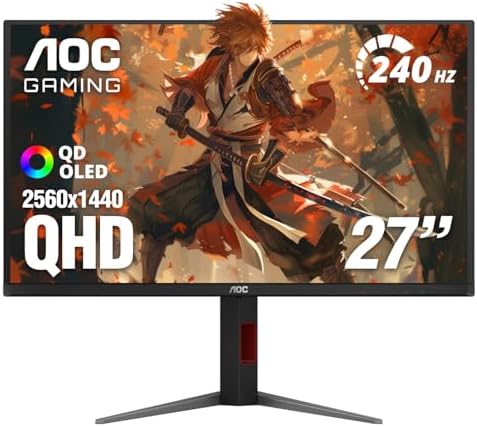
- 27 Inch OLED Gaming Monitor with QD-OLED Technology – Experience true blacks and infinite contrast with advanced QD-OLED…
- 240Hz 1440p Gaming Monitor for Ultra-Smooth Performance – Play at peak performance with 240Hz refresh rate and ultra-fas…
- QHD 1440p Resolution with HDMI 2.1 Connectivity – Crisp 2560×1440 resolution with HDMI 2.1 and DisplayPort 1.4 supports …
Key Features
- 27-inch display
- 1440p resolution
- High refresh rate
- Mini-LED backlighting
- Local dimming
- HDR support
- Adaptive Sync
- Fast response
- Competitive pricing
It is particularly appealing if you want better HDR performance without paying OLED prices.
Best for: Budget buyers, HDR gaming, 1440p gaming, and general PC use.
Our Rating: 9.0/10
What Should You Look for in a Gaming Monitor?
1. Resolution
Gaming monitors commonly come in:
1080p
Best for:
- Competitive esports
- Budget gaming PCs
- Very high refresh rates
- Entry-level graphics cards
1440p
Often considered the sweet spot for PC gaming.
It offers substantially sharper images than 1080p without requiring as much GPU power as 4K.
4K
Best for:
- High-end gaming PCs
- Single-player games
- Detailed visuals
- Large screens
- Console gaming
The best resolution depends heavily on your graphics card.
2. Refresh Rate
Refresh rate measures how many times the monitor can refresh the image each second.
Common gaming refresh rates include:
- 60Hz
- 120Hz
- 144Hz
- 165Hz
- 240Hz
- 360Hz
- 500Hz+
For most PC gamers, 144Hz to 180Hz provides a significant improvement over 60Hz.
Competitive players may benefit from 240Hz or higher.
3. Response Time
Response time measures how quickly pixels can change between colors.
Lower response times can reduce:
- Ghosting
- Motion blur
- Smearing
OLED monitors generally have exceptionally fast pixel response.
However, manufacturers’ response-time specifications can be measured under different conditions, so don’t judge a monitor by the advertised number alone.
4. Adaptive Sync
Adaptive sync technologies synchronize the monitor’s refresh rate with the GPU’s frame output.
Popular technologies include:
- AMD FreeSync
- NVIDIA G-SYNC
- VESA Adaptive-Sync
Adaptive sync can reduce screen tearing and make variable frame rates look smoother.
5. HDMI 2.1
HDMI 2.1 is particularly important for modern consoles and high-resolution gaming.
If you’re buying a monitor for PS5, Xbox Series X, or a high-end PC, check whether the monitor supports the exact resolution and refresh rate you want through HDMI.
Don’t assume that every HDMI port on a monitor supports the same bandwidth.
OLED vs. IPS vs. VA vs. Mini-LED
Choosing panel technology is one of the biggest decisions when buying a gaming monitor.
OLED
Advantages:
- Perfect blacks
- Excellent contrast
- Extremely fast response
- Excellent HDR potential
- Wide viewing angles
Best for: Premium gaming and cinematic experiences.
IPS
Advantages:
- Good color accuracy
- Wide viewing angles
- Strong general-purpose performance
- Large selection of affordable models
Best for: Gaming and productivity.
VA
Advantages:
- Strong native contrast
- Good black levels
- Often available at competitive prices
Best for: General gaming and contrast-focused users.
Mini-LED
Mini-LED uses many small LEDs behind an LCD panel to provide more precise local dimming.
Best for: High brightness and strong HDR without OLED.
Best Gaming Monitors by Use Case


| Use Case | Recommended Monitor |
|---|---|
| Best overall | ASUS ROG Swift PG27UCDM |
| Best OLED | LG UltraGear OLED 27GS95QE |
| Best ultrawide | Samsung Odyssey OLED G8 |
| Best 1440p OLED | Alienware AW2725DF |
| Best competitive | ASUS ROG Swift PG248QP |
| Best value | Gigabyte M27Q |
| Best budget HDR | AOC Q27G3XMN |
| PS5 gaming | 4K 120Hz HDMI 2.1 monitor |
| Xbox Series X | 4K 120Hz HDMI 2.1 monitor |
| Esports | 360Hz–540Hz monitor |
| RPG gaming | OLED 4K monitor |
| Racing games | Ultrawide OLED monitor |
| Budget PC gaming | 1440p 144Hz+ monitor |
Best Gaming Monitors for PS5 and Xbox
Console gamers have different requirements from PC gamers.
For PS5 or Xbox Series X, look for:
- 4K resolution
- 120Hz support
- HDMI 2.1
- VRR
- HDR
- Low input lag
A 500Hz monitors doesn’t provide much benefit if your console is designed around lower maximum frame rates.
For consoles, 4K 120Hz with HDMI 2.1 is generally more useful than an extremely high refresh rate.
Best Gaming Monitor for PC
PC gamers have more flexibility.
Your graphics card should influence your monitor choice.
Entry-level GPU
Consider:
1080p / 144Hz–180Hz
Mid-range GPU
Consider:
1440p / 144Hz–240Hz
High-end GPU
Consider:
1440p / 240Hz+ or 4K / 144Hz–240Hz
Buying a monitor with specifications far beyond your GPU’s capabilities may not provide meaningful benefits.
Is an OLED Gaming Monitor Worth It?
OLED gaming monitors can provide an exceptional visual experience.
Advantages include:
- Perfect blacks
- Excellent contrast
- Very fast response
- Strong HDR potential
- Vibrant colors
However, buyers should consider potential long-term concerns associated with static content and OLED panel technology.
If your monitors will display the same desktop interface, taskbars, or static productivity applications for many hours every day, review the manufacturer’s panel-care features and warranty before purchasing.
What Size Gaming Monitor Should You Buy?
24 inches
Great for competitive 1080p gaming.
27 inches
A popular all-around size for 1440p gaming.
32 inches
Excellent for 4K gaming and immersive single-player games.
34 inches+
Ideal for ultrawide gaming and multitasking.
For many PC gamers, 27 inches at 1440p remains an excellent balance between size, sharpness, and performance.
Final Verdict
The ASUS ROG Swift OLED PG27UCDM is our top overall gaming monitors for 2026 thanks to its combination of 4K resolution, OLED image quality, high refresh rate, fast response, and modern gaming connectivity.
The LG UltraGear OLED 27GS95QE is an excellent choice for 1440p OLED gaming, while the Alienware AW2725DF is ideal for competitive players who want 360Hz performance.
If you want an immersive ultrawide experience, the Samsung Odyssey OLED G8 is worth considering. For mainstream gamers, the Gigabyte M27Q offers excellent value, while the AOC Q27G3XMN is an attractive budget choice for HDR gaming.
Before buying, match the monitors to your GPU or console. Consider resolution, refresh rate, response time, adaptive sync, HDMI 2.1, HDR, panel technology, and screen size. The most expensive monitor isn’t necessarily the best choice—the right monitor is the one whose specifications match your hardware and gaming style.
Frequently Asked Questions
What is the best gaming monitors in 2026?
The ASUS ROG Swift OLED PG27UCDM is our top overall choice because it combines 4K resolution, QD-OLED technology, a high refresh rate, fast response, and modern gaming connectivity.
Is 144Hz enough for gaming?
Yes. A 144Hz or 165Hz monitors provides a major improvement over 60Hz and is more than sufficient for many gamers.
Is 240Hz worth it?
240Hz can be worthwhile for competitive gamers who play fast-paced titles and have a PC capable of producing high frame rates.
Is 360Hz better than 240Hz?
A 360Hz monitors can provide additional motion smoothness and lower frame intervals, but the benefit is most noticeable to competitive players. Most casual gamers won’t need 360Hz.
What is the best resolution for gaming?
1440p is an excellent balance for many PC gamers. 4K is ideal for high-end hardware and players who prioritize image detail.
What is the best gaming monitor for PS5?
A 4K monitors with HDMI 2.1, 120Hz support, VRR, and low input lag is an excellent choice for PS5 gaming.
What is the best gaming monitor for Xbox Series X?
Look for 4K resolution, 120Hz support, HDMI 2.1, VRR, and low input lag.
Is OLED better than IPS for gaming?
OLED generally provides better blacks, contrast, and pixel response. IPS monitors can offer excellent color quality, affordability, and a wider range of sizes and specifications.
Is 4K gaming worth it?
Yes, if your graphics card can drive games at 4K and you prioritize image detail. Otherwise, 1440p can provide a better balance between visual quality and frame rate.
What is VRR?
VRR stands for Variable Refresh Rate. It synchronizes the monitor’s refresh rate with the GPU or console frame rate to help reduce screen tearing and improve smoothness.
Do I need HDMI 2.1 for PC gaming?
Not always. HDMI 2.1 becomes especially useful for high-resolution, high-refresh gaming and modern consoles. DisplayPort may be preferable for some PC configurations.
What is the best gaming monitor size?
27 inches is a popular all-around choice, especially at 1440p. Larger 32-inch and ultrawide displays are better suited to immersive gaming and multitasking.
Are gaming monitors good for work?
Yes. High-resolution gaming monitors can be excellent productivity displays. Features such as USB hubs, KVM switches, ergonomic stands, and ultrawide formats can make them particularly useful for work.
Should I buy a 1080p, 1440p, or 4K gaming monitors?
Choose 1080p for budget or competitive high-refresh gaming, 1440p for a strong balance of quality and performance, and 4K if you have powerful hardware and prioritize image detail.
Best Products
Best Smartphones for Everyday Use in 2026
Best Laptops for Students in 2026