If you click on the links and make a purchase, we may earn a commission.
Choosing the best monitor for programming can significantly improve productivity, especially when you’re spending hours reading code, debugging applications, reviewing documentation, and managing multiple development tools.
Table of Contents
Image Credit: canva
Unlike gaming monitors, programmers don’t necessarily need extremely high refresh rates. The most important features are sharp text, high resolution, large screen space, comfortable viewing, ergonomic adjustment, USB-C connectivity, and reliable multitasking capabilities.
A good programming monitor should let you view more lines of code while keeping your terminal, browser, documentation, database tools, or communication applications accessible.
In this guide, we compare the best monitors for programming in 2026, including 4K displays, ultrawide monitors, vertical monitors, USB-C displays, and large-screen options for professional developers.
Quick Comparison: Best Monitors for Programming
| Monitor | Best For | Key Feature | Size | Resolution | Refresh Rate | Rating |
|---|---|---|---|---|---|---|
| Dell UltraSharp U2723QE | Best Overall | 4K + USB-C hub | 27″ | 3840×2160 | 60Hz | 9.8/10 |
| Dell UltraSharp U3223QE | Best Large | 32″ 4K workspace | 31.5″ | 3840×2160 | 60Hz | 9.7/10 |
| LG DualUp 28MQ780-B | Best for Coding | Tall 16:18 workspace | 27.6″ | 2560×2880 | 60Hz | 9.7/10 |
| Samsung ViewFinity S9 | Best Premium | 5K resolution | 27″ | 5120×2880 | 60Hz | 9.5/10 |
| LG 34WQ73A-B | Best Ultrawide | 21:9 workspace | 34″ | 3440×1440 | 60Hz | 9.4/10 |
| BenQ PD3420Q | Best Ultrawide 4K-Class | USB-C + color | 34″ | 3440×1440 | 60Hz | 9.4/10 |
| HP E27u G5 | Best Business | USB-C docking | 27″ | 2560×1440 | 75Hz | 9.2/10 |
| ASUS ProArt PA279CRV | Best for Developers + Design | 4K color accuracy | 27″ | 3840×2160 | 60Hz | 9.4/10 |
Specifications may vary by region and configuration. Always check current manufacturer specifications before purchasing.
1. Dell UltraSharp U2723QE — Best Monitor for Programming Overall
The Dell UltraSharp U2723QE is our top overall choice for programmers because it combines a sharp 4K display with excellent connectivity and a productivity-focused design.
The 27-inch screen provides enough workspace for coding without becoming excessively large for a typical desk.

- For Creators: Bring your ideas to life on a screen that shows your work exactly as you intended. With 98% Display P3 cov…
- For Developers: Spread out your code, terminal, and browser across a crisp QHD canvas, and switch between two machines, …
- For Designers: Deep blacks, rich contrast, and a smooth 120Hz refresh rate make every detail sharper and every transitio…
Key Features
- 27-inch display
- 4K UHD resolution
- IPS Black technology
- USB-C connectivity
- USB hub
- KVM functionality
- DisplayPort
- HDMI
- Height adjustment
- Tilt and swivel
- Pivot support
Why Buy?
Programming involves more than writing code. Developers frequently need to view a code editor alongside documentation, terminals, browsers, Git tools, databases, and communication applications.
The U2723QE’s 4K resolution provides excellent text clarity, while USB-C connectivity makes it convenient for laptop-based development environments.
The integrated KVM functionality can also be useful if you work with multiple computers.
Best for: Software developers, web developers, programmers, remote workers, and IT professionals.
Rating: 9.8/10
2. Dell UltraSharp U3223QE — Best Large Monitor for Developers
If you want a larger coding workspace, the Dell UltraSharp U3223QE is an excellent option.
Its 32-inch 4K screen gives you more physical space while maintaining a high pixel density.

- IMMERSIVE VISUALS – Experience stunning clarity on the 32″ 4K UHD (3840 x 2160) LED display, bringing your content to li…
- SEAMLESS CONNECTIVITY – Benefit from the integrated Thunderbolt hub, offering versatile connectivity options for periphe…
- ENHANCED PRODUCTIVITY – Maximize your workflow with the expansive 32-inch screen size, providing ample screen real estat…
Key Features
- 31.5-inch display
- 4K UHD resolution
- IPS Black technology
- USB-C
- USB hub
- KVM functionality
- DisplayPort
- HDMI
- Height adjustment
- Pivot and swivel
Why Buy?
The larger display is excellent for developers who frequently work with multiple windows.
You can place your IDE on one side, documentation on another, and a terminal or browser in a separate area.
It’s especially useful for backend development, data engineering, software architecture, and large codebases.
Best for: Professional developers, programmers, data engineers, and multitaskers.
Rating: 9.7/10
3. LG DualUp 28MQ780-B — Best Monitor for Coding
The LG DualUp 28MQ780-B is one of the most interesting monitors for programming because of its unusual 16:18 aspect ratio.
Instead of giving you a traditional wide workspace, it provides a tall screen that resembles two vertically stacked displays.

- 27” uhd (3840 x 2160) ips display
- Viewing Angle is 178º(R/L), 178º(U/D); Brightness(Typ) is 350cd/m² ; Aspect Ratio is 16:9
- ergo stand (extends/retracts/swivels/pivots/tilts and height adjusts)
Key Features
- 27.6-inch Nano IPS
- 2560×2880 resolution
- 16:18 aspect ratio
- USB-C
- HDR10
- Ergo stand
- Picture-by-Picture
- Multiple inputs
Why Buy?
Programming often benefits from vertical space.
A tall monitor allows you to see more lines of code without continuously scrolling.
It’s particularly useful for:
- Code editors
- Terminal windows
- Documentation
- Log files
- Web development
- Long configuration files
The DualUp can also reduce the footprint of a traditional dual-monitor setup.
Best for: Programmers, developers, writers, researchers, and multitaskers.
Rating: 9.7/10
4. Samsung ViewFinity S9 — Best Premium Monitor for Programming
The Samsung ViewFinity S9 is a premium 5K monitor designed for professionals who want extremely sharp visuals.

- Features: 32-inch 4K UHD VA (3840×2160), 1 x HDMI, 1 x Displayport, 2 x USB-A, 1 x USB-B, 1 x USB-C, 1 x RJ45, 1 x 3.5 m…
- Vivid Color – The 32″ VA panel is designed to deliver lifelike images with up to 1.07 billion colors and HDR10 support, …
- USB-C Connectivity – A USB-C port allows for 90W charging and data transfer at the same time, while a built-in RJ45 LAN …
Key Features
- 27-inch display
- 5K resolution
- USB-C
- Thunderbolt connectivity
- High pixel density
- Professional design
- Smart features
- Premium image quality
Why Buy?
High pixel density can make text and interface elements look exceptionally sharp.
This is particularly attractive for developers working with macOS and high-resolution development environments.
The display can also serve as a professional monitor for design, photography, video, and general productivity.
Best for: Mac developers, software engineers, designers, and premium workstations.
Rating: 9.5/10
5. LG 34WQ73A-B — Best Ultrawide Monitor for Programming
The LG 34WQ73A-B is a strong option for developers who prefer a wide workspace.
Its 21:9 aspect ratio provides significantly more horizontal space than a conventional 16:9 monitor.

- 21:9 UltraWide – The 21:9 UltraWide WQHD (3440 x 1440) monitor is great for work. The widescreen allows you to see every…
- Color Gamut – Immerse yourself in a world of brilliant color from HDR10 that helps enhance picture quality and up to 99%…
- OnScreen Control – You can customize the workspace by splitting the display or adjusting basic monitor options with just…
Key Features
- 34-inch ultrawide display
- 3440×1440 resolution
- USB-C
- HDMI
- DisplayPort
- USB hub
- HDR support
- Picture-by-Picture
- Ergonomic stand
Why Buy?
An ultrawide monitor is ideal for developers who like to place multiple windows side by side.
You could have:
IDE | Browser | Terminal
all visible simultaneously.
It’s also useful for developers who work with large databases, dashboards, design tools, and virtualization environments.
Best for: Full-stack developers, software engineers, programmers, and multitaskers.
Rating: 9.4/10
6. BenQ PD3420Q — Best Ultrawide for Coding and Design
The BenQ PD3420Q combines an ultrawide workspace with features aimed at creative professionals.

- DEEP BLACK IPS PANEL w 2000:1 CONTRAST RATIO: Enjoy unrivaled depth and contrast with the 2000:1 IPS Black Technology
- MADE for Mac DESIGNERS: 32″ 4K monitor features Pantone Validated and Calman verified color accurate technology. Built w…
- DISPLAY PILOT 2 & HOTKEY PUCK: Sleek display management and easy brightness control right from your Mac. Easy input swit…
Key Features
- 34-inch ultrawide display
- 3440×1440 resolution
- USB-C
- Professional color
- Factory calibration
- KVM functionality
- HDR support
- Ergonomic stand
Why Buy?
Developers who also work on UI/UX design, websites, graphics, or video can benefit from its color-focused features.
The wide screen is also useful for programming and multitasking.
Best for: Full-stack developers, UI designers, developers working with graphics, and creative professionals.
Rating: 9.4/10
7. HP E27u G5 — Best Business Monitor for Programming
The HP E27u G5 is a practical choice for developers working in corporate environments.

- FHD (1920 x 1080)
- 1000:1
- 5ms GtG (with overdrive)
Key Features
- 27-inch display
- QHD resolution
- USB-C
- USB hub
- DisplayPort
- HDMI
- 75Hz refresh rate
- Height adjustment
- Pivot
- Tilt
Why Buy?
QHD resolution provides a good balance between sharpness and system requirements.
Its USB-C connectivity also makes it convenient for developers using laptops.
Best for: Corporate developers, IT departments, remote workers, and business users.
Rating: 9.2/10
8. ASUS ProArt PA279CRV — Best Programming Monitor for Developers Who Design
The ASUS ProArt PA279CRV is designed for professionals who need accurate color as well as a high-resolution workspace.
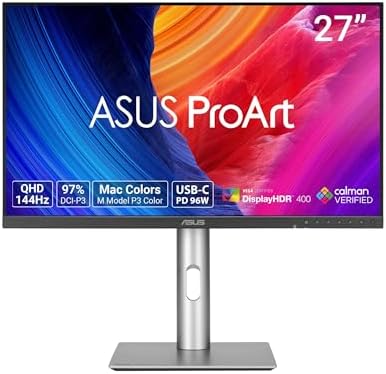
- Display Specifications: 27-inch QHD (2560 x 1440) display with 178 wide-view IPS panel
- Color Accuracy and Gamut: Wide 97% DCI-P3 and 100% sRGB gamut to meet international color standards, Calman Verified wit…
- High Refresh Rate Performance: 144Hz variable refresh rate (VRR) with AMD FreeSync, providing creators smooth fast-rende…
Key Features
- 27-inch display
- 4K resolution
- IPS technology
- Professional color accuracy
- USB-C
- DisplayPort
- HDMI
- USB hub
- Ergonomic stand
Why Buy?
For pure programming, some of its color capabilities may be unnecessary. But developers working on websites, applications, graphics, video, and UI design can benefit from the additional visual accuracy.
Best for: Front-end developers, UI/UX developers, designers, and content creators.
Rating: 9.4/10
What Makes a Monitor Good for Programming?
Programming has different requirements from gaming or entertainment.
The most important features are:
1. High Resolution
Higher resolution generally provides sharper text and more usable desktop space.
For most developers, 1440p or 4K is an excellent choice.
2. Large Workspace
More screen space allows you to view:
- IDE
- Terminal
- Browser
- Documentation
- Git tools
- Database tools
- Communication applications
without constantly switching windows.
3. Sharp Text
Text clarity is arguably the most important visual feature for programmers.
A high-resolution IPS or high-pixel-density display can make code easier to read.
4. Ergonomic Adjustment
A good monitor should ideally support:
- Height adjustment
- Tilt
- Swivel
- Pivot
Proper positioning becomes particularly important during long coding sessions.
5. USB-C
USB-C can simplify laptop development setups by providing display, power, and USB connectivity through one cable.
What Resolution Is Best for Programming?
1080p
Full HD can work for basic coding, but it provides less workspace and lower text density than higher-resolution alternatives.
It’s most appropriate for budget systems or secondary monitors.
1440p
2560×1440 is an excellent balance for programming.
It provides noticeably more workspace than 1080p without the GPU and scaling considerations associated with some 4K setups.
4K
3840×2160 is excellent for programming.
It provides very sharp text and plenty of desktop space.
A 27-inch 4K monitor is particularly popular among developers.
5K
5K offers exceptional pixel density and is especially attractive for premium Mac-based workstations.
27-Inch vs 32-Inch for Programming
| Feature | 27-Inch | 32-Inch |
|---|---|---|
| Desk space | Better | Requires more space |
| Text density | Excellent | Excellent |
| Multitasking | Very good | Excellent |
| 4K suitability | Excellent | Excellent |
| Viewing distance | Moderate | Greater |
| Best for | Most developers | Heavy multitasking |
A 27-inch 4K monitor is the safest recommendation for most programmers.
Choose 32 inches if you have enough desk space and frequently use several windows simultaneously.
Ultrawide vs 4K for Programming
Both can be excellent.
4K 16:9
Best for:
- Sharp text
- Vertical code space
- General productivity
- macOS
- Traditional workflows
Ultrawide 21:9
Best for:
- Side-by-side windows
- Multiple applications
- IDE + browser + terminal
- Horizontal dashboards
- Multitasking
If your workflow is primarily code plus documentation, 4K is excellent.
If you constantly need three applications visible simultaneously, an ultrawide can be better.
Vertical Monitors for Programming
A vertical monitor can be extremely useful for developers.
Programming involves scrolling through source code, logs, documentation, and configuration files.
Rotating a 27-inch monitor into portrait mode can provide a large amount of vertical space.
Vertical displays are especially useful for:
- Web development
- Long source files
- Documentation
- Terminal output
- Log monitoring
- Reading
The LG DualUp provides a similar benefit without requiring a traditional portrait orientation.
Best Refresh Rate for Programming
Unlike gaming, programming doesn’t require a 240Hz display.
60Hz
Perfectly adequate for coding.
75Hz
Provides slightly smoother movement.
120Hz+
Useful if you also use the monitor for:
- Gaming
- Scrolling
- Video
- General entertainment
For a programming-only workstation, prioritize resolution and text clarity over refresh rate.
Best Panel Type for Developers
| Panel | Advantages | Programming |
|---|---|---|
| IPS | Sharp + consistent colors | Excellent |
| IPS Black | Better contrast | Excellent |
| VA | Strong contrast | Very Good |
| OLED | Excellent contrast | Excellent, with considerations |
| TN | Fast response | Not ideal |
IPS is generally the best choice for programming.
IPS Black models can provide improved contrast while retaining the viewing-angle benefits of IPS.
Best Programming Monitor for MacBook
Developers using MacBooks should prioritize:
- USB-C or Thunderbolt
- High pixel density
- 4K or 5K resolution
- macOS compatibility
- USB-C power delivery
- High-quality text rendering
The Samsung ViewFinity S9 is an excellent premium option, while the Dell UltraSharp U2723QE provides a more productivity-focused alternative.
Best Programming Monitor for Windows
Windows developers have an enormous range of choices.
A 27-inch 4K monitor is an excellent starting point.
The Dell U2723QE and LG 27UP850-class displays provide a strong balance of resolution, connectivity, and ergonomics.
For multitasking, consider a 32-inch 4K or 34-inch ultrawide.
Best Monitor Setup for Programming
A productive development workstation could look like this:
Option 1: Single 27-Inch 4K
Best for minimalists.
Monitor → Laptop → Keyboard + Mouse
Option 2: Dual 27-Inch
Excellent for multitasking.
Monitor 1 → Code
Monitor 2 → Browser/Terminal
Option 3: 34-Inch Ultrawide
Excellent for a single-screen workflow.
IDE | Browser | Terminal
Option 4: 32-Inch 4K + Vertical Monitor
Ideal for professional developers.
Main Monitor → IDE
Vertical Monitor → Documentation/Terminal
Best Monitors for Programming by Use Case
| Use Case | Best Monitor | Key Reason |
|---|---|---|
| Best overall | Dell U2723QE | 4K + USB-C |
| Best large | Dell U3223QE | 32-inch 4K |
| Best coding | LG DualUp | Tall workspace |
| Best premium | Samsung ViewFinity S9 | 5K |
| Best ultrawide | LG 34WQ73A-B | 21:9 workspace |
| Best creative | ASUS ProArt PA279CRV | Color accuracy |
| Best business | HP E27u G5 | USB-C |
| Best design + coding | BenQ PD3420Q | Ultrawide + color |
| Best Mac setup | Samsung ViewFinity S9 | High pixel density |
| Best multitasking | LG DualUp | Vertical workspace |
Pros and Cons of Programming Monitors
Pros
- More coding space
- Sharper text
- Easier multitasking
- Better documentation visibility
- USB-C laptop connectivity
- Ergonomic adjustment
- 4K options
- Ultrawide options
- Vertical setups possible
Cons
- 4K monitors can cost more
- Large monitors require more desk space
- High-resolution scaling may require configuration
- USB-C specifications differ between models
- OLED models may be expensive
- Ultrawide displays aren’t ideal for every workflow
How to Choose the Best Monitor for Programming
Before buying, focus on these factors:
Resolution: Choose QHD or 4K for most programming.
Size: 27 inches is the sweet spot; 32 inches is better for heavy multitasking.
Panel: IPS is a reliable all-purpose choice.
USB-C: Particularly useful for laptop developers.
Ergonomics: Height, tilt, swivel, and pivot can improve comfort.
Text clarity: Prioritize pixel density and resolution.
Aspect ratio: 16:9 is versatile; 21:9 is excellent for side-by-side applications.
Refresh rate: 60–75Hz is enough for coding.
Connectivity: Look for HDMI, DisplayPort, USB-C, and USB hubs.
KVM: Useful if you switch between multiple computers.
Final Verdict: Best Monitor for Programming
The Dell UltraSharp U2723QE is our overall recommendation for the best monitor for programming in 2026. Its 27-inch 4K display delivers sharp text, while USB-C, the integrated hub, KVM functionality, and ergonomic adjustment make it highly practical for professional development environments.
For developers who want more physical screen space, the Dell UltraSharp U3223QE is an excellent 32-inch alternative. If vertical coding space is your priority, the LG DualUp 28MQ780-B is one of the most interesting choices available.
Developers who prefer ultrawide setups should consider the LG 34WQ73A-B, while premium Mac users may prefer the Samsung ViewFinity S9 for its 5K resolution and high pixel density.
For most programmers, however, the ideal formula is simple: 27-inch, 4K, IPS, USB-C, ergonomic stand, and excellent text clarity.
You don’t need a 240Hz gaming monitor to write better code. Spend your budget on resolution, screen space, ergonomics, connectivity, and text sharpness instead.
Frequently Asked Questions
What is the best monitor for programming in 2026?
The Dell UltraSharp U2723QE is our overall pick because it combines 4K resolution, excellent text clarity, USB-C, a USB hub, KVM functionality, and ergonomic adjustment.
Is 4K good for programming?
Yes. 4K provides sharp text and plenty of desktop space, making it an excellent choice for developers.
Is 27 inches enough for coding?
Yes. A 27-inch 4K monitor is one of the best combinations for programming because it provides excellent pixel density without taking up excessive desk space.
Is 32 inches too big for programming?
No. A 32-inch monitor can be excellent for developers who frequently use multiple windows. It simply requires a larger viewing distance and desk.
Is an ultrawide monitor good for programming?
Yes. Ultrawide monitors are excellent for viewing an IDE, browser, terminal, and documentation side by side.
Is 60Hz enough for programming?
Yes. A 60Hz monitor is completely adequate for coding. Higher refresh rates are useful mainly if you also use the monitor for gaming or entertainment.
Is IPS or VA better for programming?
IPS is generally preferable because of its viewing angles, color consistency, and excellent text presentation.
Are vertical monitors good for programmers?
Yes. Vertical monitors are particularly useful for viewing long source files, documentation, logs, and terminal output.
Is USB-C important for developers?
USB-C is especially useful for laptop developers because compatible monitors can provide video, charging, and USB connectivity through a single cable.
What is the best monitor resolution for coding?
1440p and 4K are excellent choices. 4K is preferable if you want maximum sharpness and desktop space.
Should programmers buy OLED monitors?
OLED monitors can provide excellent contrast and image quality, but IPS displays are often more practical and affordable for long coding sessions.
What should I look for in a programming monitor?
Prioritize resolution, text clarity, screen size, USB-C, ergonomics, panel quality, aspect ratio, connectivity, and multitasking capability rather than focusing primarily on gaming specifications.