If you click on the links and make a purchase, we may earn a commission.
Finding the best Windows laptop depends on what you need it to do. Windows laptops remain among the most versatile computers available, offering everything from affordable student machines to premium business notebooks and powerful gaming systems.

Image Credit: Pixabay
The best models combine a fast processor, high-quality display, long battery life, comfortable keyboard, reliable connectivity, and enough memory and storage for your workload.
In this guide, we’ve selected the best Windows laptops in 2026 for different users and budgets, including professionals, students, creators, gamers, and everyday users.
Quick Comparison: Best Windows Laptops
| Laptop | Best For | Key Feature | Display | Processor Class | Rating |
|---|---|---|---|---|---|
| Dell XPS 14 | Best Overall | Premium design + performance | 14.5″ | Intel Core Ultra | 9.7/10 |
| Lenovo Yoga 9i | Best 2-in-1 | Convertible design | 14″ OLED | Intel Core Ultra | 9.6/10 |
| Microsoft Surface Laptop | Best Battery Life | Efficient Snapdragon/Intel options | 13.8″/15″ | Snapdragon X / Intel | 9.5/10 |
| HP Spectre x360 | Best Premium 2-in-1 | OLED touchscreen | 14″ | Intel Core Ultra | 9.5/10 |
| Lenovo ThinkPad X1 Carbon | Best Business | Legendary keyboard | 14″ | Intel Core Ultra | 9.6/10 |
| ASUS Zenbook 14 OLED | Best Value Premium | OLED + portability | 14″ | Intel/AMD | 9.4/10 |
| Dell Inspiron 16 | Best Large Screen | 16-inch workspace | 16″ | Intel/AMD | 9.2/10 |
| ASUS ROG Zephyrus G14 | Best Gaming | Compact gaming performance | 14″ | AMD/RTX | 9.6/10 |
| Lenovo Legion Pro 5 | Best Gaming Value | High-performance hardware | 16″ | AMD/Intel + RTX | 9.5/10 |
| Acer Aspire 5 | Best Budget | Strong everyday value | 15.6″ | Intel/AMD | 9.1/10 |
Specifications and configurations vary. Prices can also change frequently, so check the current configuration before purchasing.
1. Dell XPS 14 — Best Windows Laptop Overall
The Dell XPS 14 is an excellent premium Windows laptop for professionals and everyday users who want a combination of performance, portability, and modern design.

- 【AI Powered Intel Core Ultra 7 255H 】Experience intelligent, high-performance computing with advanced AI acceleration, p…
- 【14.5″ WUXGA 120Hz Display】Enjoy sharp, detailed visuals with a smooth 120Hz refresh rate, delivering fluid motion and r…
- 【16GB LPDDR5X】Elevate your projects with a high-speed RAM, ensuring faster data processing, seamless multitasking, and i…
Key Features
- 14-inch-class display
- Intel Core Ultra processors
- Premium aluminum construction
- High-resolution display options
- Large touchpad
- Comfortable keyboard
- Thunderbolt/USB-C connectivity
- Wi-Fi
- Premium design
Why Buy?
The XPS line has traditionally focused on premium Windows computing, and the XPS 14 continues that approach.
It’s suitable for:
- Office work
- Programming
- Photo editing
- Content creation
- Browsing
- Video conferencing
- Productivity
Its compact design makes it easier to carry than a 16-inch workstation.
Best for: Professionals, students, developers, and premium everyday users.
Rating: 9.7/10
2. Lenovo Yoga 9i — Best Windows 2-in-1 Laptop
The Lenovo Yoga 9i combines traditional laptop performance with a flexible 2-in-1 design.

- UNOPENED RETAIL PACKAGING, sold as configured by Lenovo. Includes one year of Courier or Carry-in Lenovo Warranty. Add u…
- Featuring the high-performing Intel Core Ultra 7 255H Processor with P-cores boosting up to 5.10 GHz and E-cores up to 4…
- Ports: 3x Thunderbolt 4, with USB PD 45-65W and DisplayPort 2.1, Always On
Key Features
- 14-inch display
- OLED display options
- 360-degree hinge
- Touchscreen
- Intel Core Ultra processors
- Premium construction
- Stylus support on compatible configurations
- USB-C/Thunderbolt
- Excellent speakers
Why Buy?
The convertible design allows you to use it as a standard laptop, tablet, tent, or presentation device.
This is useful for:
- Note-taking
- Presentations
- Drawing
- Watching videos
- Travel
- Office work
Best for: Students, professionals, creators, and people who want a flexible laptop.
Rating: 9.6/10
3. Microsoft Surface Laptop — Best for Battery Life
The Microsoft Surface Laptop is designed around portability, simplicity, and integration with Windows.

- Brilliant Display – Immersive Brilliance or Incredible image quality – The 13″ PixelSense Flow touchscreen offers a vibr…
- All-day Energy – Up to 23 hours of battery life[1] for local video playback for uninterrupted streaming.
- Power up – Built with the latest Qualcomm Snapdragon X Plus (8 Core) processors, Surface Laptop delivers powerful perfor…
Key Features
- 13.8-inch or 15-inch options
- Snapdragon X or Intel configurations
- High-resolution PixelSense touchscreen
- Thin design
- Long battery-life potential
- USB-C
- USB-A
- Premium keyboard
- Windows integration
Why Buy?
The Surface Laptop is particularly appealing to users who want a clean Windows experience without a bulky chassis.
Snapdragon-based configurations can provide excellent efficiency, although software compatibility should be considered if you rely on specialized Windows applications.
Best for: Students, professionals, travelers, and mobile workers.
Rating: 9.5/10
4. HP Spectre x360 — Best Premium 2-in-1 Windows Laptop
The HP Spectre x360 is one of the strongest choices for users who want premium construction and convertible functionality.
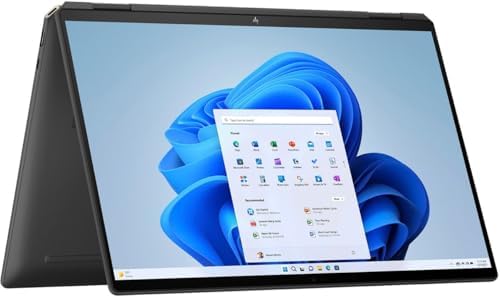
- Powerful Intel Evo Ultra 7 155H 16-Core (Base Clock 2.4GHz, Up to 4.8 GHz with Intel Turbo Boost Technology, 24 MB Intel…
- [[ Customization ]] Upgraded to 16GB DDR5 SDRAM 4800 MHz | 1TB NVMe M.2 Solid State Drive | Windows 11 Pro
- Brilliant 16″ WQXGA (2560 x 1600) IPS Touchscreen 400 nits, edge-toedge glass, micro-edge, Corning Gorilla Glass NBT, Lo…
Key Features
- 14-inch OLED options
- Touchscreen
- 360-degree hinge
- Intel Core Ultra
- Premium metal chassis
- USB-C/Thunderbolt
- High-quality speakers
- Webcam features
- Stylus support on select configurations
Why Buy?
The OLED display can deliver excellent contrast and vibrant colors, making the laptop useful for both productivity and entertainment.
Its convertible design also makes it versatile for presentations and creative work.
Best for: Professionals, creators, students, and premium laptop buyers.
Rating: 9.5/10
5. Lenovo ThinkPad X1 Carbon — Best Windows Business Laptop
The ThinkPad X1 Carbon remains one of the most recognizable business laptops.
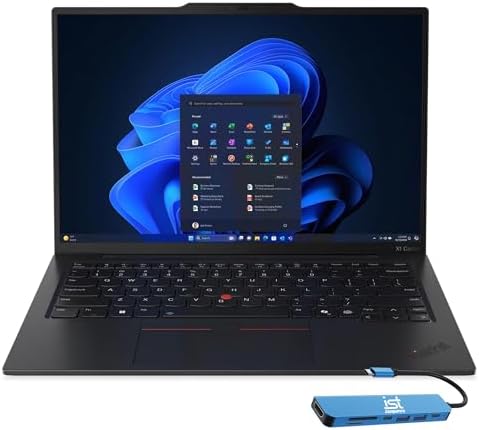
- ULTRA-PORTABLE DURABILITY – The ThinkPad X1 Carbon Gen 13 Aura Edition is Lenovo’s flagship ultra-premium AI business la…
- POWERFUL AI PROCESSING – Powered by Intel Core Ultra 7 258V processor (up to 4.8GHz, 8 cores) for fast, efficient comput…
- STUNNING VISUALS – 14″ 2.8K QHD+ (2880×1800) OLED display with 500 nits brightness, 120Hz VRR, and 100% DCI-P3 color del…
Key Features
- 14-inch display
- Intel Core Ultra processors
- Lightweight carbon-fiber construction
- Excellent keyboard
- TrackPoint
- Business security features
- Thunderbolt/USB-C
- Wi-Fi
- Enterprise-focused design
Why Buy?
The keyboard is one of its biggest advantages.
Professionals who type for hours every day can benefit from its comfortable keyboard design.
It is also lightweight enough for frequent business travel.
Best for: Business professionals, executives, programmers, consultants, and enterprise users.
Rating: 9.6/10
6. ASUS Zenbook 14 OLED — Best Value Premium Windows Laptop
The ASUS Zenbook 14 OLED offers many premium features without necessarily reaching the highest price tier.
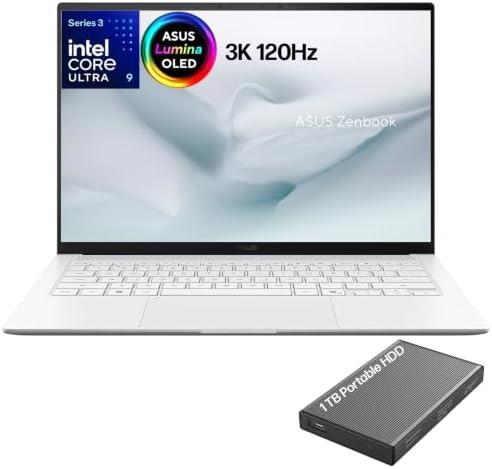
- What’s In The Box: ASUS Zenbook S14 OLED Laptop, 1TB Portable Hard Disk Drive.
- Next-Gen AI & Multitasking Power: Driven by the Intel Core Ultra 9 Series 3 processor (16-core, up to 4.9 GHz) with a de…
- Breathtaking 14″ 3K 120Hz OLED Touchscreen: Features a 16:10 2880 x 1800 Lumina OLED display with a ultra-smooth 120Hz r…
Key Features
- 14-inch OLED display
- Intel or AMD processor options
- High-resolution display
- Thin and lightweight design
- USB-C
- HDMI
- Wi-Fi
- Large touchpad
- Premium construction
Why Buy?
The OLED display is particularly attractive for users who care about image quality.
It is also compact enough for travel while providing sufficient performance for productivity and creative work.
Best for: Students, professionals, creators, and travelers.
Rating: 9.4/10
7. Dell Inspiron 16 — Best Large-Screen Windows Laptop
If portability isn’t your top priority, the Dell Inspiron 16 provides more screen space for productivity.
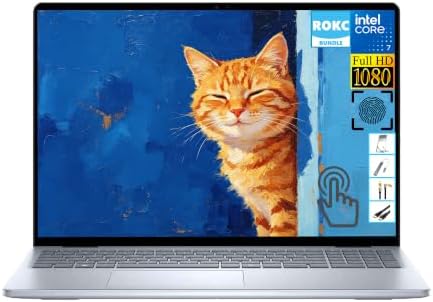
- Powerful 10-Core Processor: Equipped with Intel Core 7 50U 10-core CPU, delivering responsive and efficient performance …
- Smooth & Large Storage Combo: Features 16GB DDR5 high-speed RAM for fluent multi-program operation and 1TB SSD for ample…
- 16-inch FHD Touch Display: Adopts a 16-inch FHD high-definition touch screen with intuitive interactive experience, brin…
Key Features
- 16-inch display
- Intel or AMD processor options
- Large keyboard
- Number pad on select configurations
- USB-C
- HDMI
- Wi-Fi
- SSD storage
Why Buy?
A larger display is excellent for:
- Excel
- Programming
- Research
- Content creation
- Multitasking
- Online learning
It’s a practical alternative to carrying a separate external monitor.
Best for: Home offices, students, business users, and multitaskers.
Rating: 9.2/10
8. ASUS ROG Zephyrus G14 — Best Compact Gaming Windows Laptop
The ASUS ROG Zephyrus G14 is an excellent option if you want a portable Windows laptop that can also handle serious gaming.

- [Display Features] 14.0″ OLED 2.8K 120Hz DISPLAY: Features a 14.0-inch OLED display (2880 × 1800) with a 120Hz refresh r…
- [Powerful Performance] RYZEN AI 9 HX 370 PROCESSOR: Powered by a Zen 5 Gen AMD Ryzen AI 9 HX 370 processor (2.00GHz base…
- [Graphics Performance] GEFORCE RTX 5080 16GB GDDR7 GRAPHICS: Equipped with GeForce RTX 5080 graphics featuring 16GB GDDR…
Key Features
- 14-inch display
- AMD processors on select generations
- NVIDIA GeForce RTX graphics
- High-refresh-rate display
- Compact design
- USB-C
- HDMI
- Gaming keyboard
- Advanced cooling
Why Buy?
The G14 offers a rare combination of portability and dedicated graphics performance.
It’s suitable for:
- Gaming
- Video editing
- 3D work
- Programming
- Content creation
Best for: Gamers, creators, developers, and students who need graphics performance.
Rating: 9.6/10
9. Lenovo Legion Pro 5 — Best Windows Gaming Laptop Value
The Lenovo Legion Pro 5 is designed for users who want desktop-class gaming performance in a laptop format.

- Ultra Power and Performance – The Lenovo Legion Pro 5 Gen 10 is designed for gamers seeking high performance and immersi…
- Stunning Visuals – exceptional speed and display quality with vibrant 16.0″ IPS WQXGA (2560×1600) 240Hz Display; 500nits…
- Smooth Gameplay and Expanded Connectivity – 16GB DDR5 SODIMM RAM, 1TB 2242 PCIe NVMe SSD, 802.11be, Bluetooth 5.4, HDMI,…
Key Features
- 16-inch display
- High-refresh-rate options
- AMD or Intel processors
- NVIDIA GeForce RTX graphics
- Advanced cooling
- RGB keyboard on select models
- USB-C
- HDMI
- Ethernet
Why Buy?
The Legion Pro 5 is larger and heavier than premium ultraportables, but the trade-off is significantly stronger gaming and creative performance.
Best for: Gamers, video editors, 3D creators, and power users.
Rating: 9.5/10
10. Acer Aspire 5 — Best Budget Windows Laptop
The Acer Aspire 5 is a strong choice for buyers who don’t want to spend premium prices.

- 【Unleash Powerful Performance】Elevate your experience with the Acer Aspire 5 Laptop featuring an Intel Core i5-13420H pr…
- 【15.6″ Touchscreen FHD IPS Display】 15.6″ FHD IPS (1920×1080) Anti Glare Display with 85% screen-to-body ratio, 16:9 asp…
- 【8GB LPDDR5 RAM + 512GB PCIe SSD Storage】16GB high-bandwidth LPDDR5 RAM to smoothly run multiple applications and browse…
Key Features
- 15.6-inch display
- Full HD options
- Intel or AMD processors
- SSD storage
- USB-C
- HDMI
- Wi-Fi
- Multiple USB ports
Why Buy?
It handles everyday tasks such as:
- Web browsing
- Microsoft Office
- Online classes
- Video calls
- Streaming
- Basic productivity
Look for configurations with 8GB or 16GB RAM and at least a 256GB SSD.
Best for: Students, families, home users, and budget-conscious buyers.
Rating: 9.1/10
What Makes a Good Windows Laptop?
The best Windows laptop isn’t simply the one with the fastest processor.
Consider the entire package.
Processor
For everyday work, a modern Intel Core or AMD Ryzen processor is usually sufficient.
For demanding tasks, consider higher-performance Core Ultra, Ryzen, or workstation-class chips.
RAM
8GB
Good for basic productivity.
16GB
The recommended choice for most new Windows laptops.
32GB+
Best for:
- Video editing
- Virtual machines
- 3D work
- Advanced programming
- Professional applications
How Much Storage Do You Need?
An SSD is essential for a modern Windows laptop.
256GB
Good for basic use.
512GB
The sweet spot for most users.
1TB+
Ideal for:
- Games
- Video
- Photos
- Large software libraries
- Professional projects
Best Windows Laptop Display
A laptop’s display can dramatically affect the experience.
Full HD
Good for budget laptops and everyday work.
2.5K/3K
Excellent balance between sharpness and efficiency.
4K
Best for professional creative work, but it can affect battery life.
OLED
Excellent contrast and vibrant colors.
IPS
Reliable, versatile, and generally excellent for productivity.
What Screen Size Is Best?
| Size | Best For |
|---|---|
| 13–14″ | Travel and portability |
| 15–16″ | General productivity |
| 17″+ | Gaming and workstation use |
For most users, 14 to 16 inches is the ideal range.
Windows Laptop vs MacBook
| Feature | Windows Laptop | MacBook |
|---|---|---|
| Hardware variety | Excellent | Limited |
| Gaming | Better | Limited |
| Software compatibility | Excellent | Excellent |
| Price range | Very broad | Premium-focused |
| 2-in-1 options | Excellent | No traditional touchscreen MacBook |
| Business choices | Excellent | Good |
| Upgrade options | Varies | Limited |
| GPU choices | Excellent | Apple silicon |
Windows is particularly attractive if you want hardware choice, gaming, business systems, touchscreen laptops, or a wide range of prices.
Best Windows Laptop for Students
Students should prioritize:
- Good battery life
- 8GB+ RAM
- SSD storage
- Comfortable keyboard
- Webcam
- Wi-Fi
- Lightweight design
- Affordable price
The Microsoft Surface Laptop, ASUS Zenbook 14 OLED, and Acer Aspire 5 are strong choices depending on budget.
Best Windows Laptop for Business
For business users, prioritize:
- Security features
- Good keyboard
- Battery life
- Webcam
- USB-C/Thunderbolt
- Enterprise support
- Durability
The Lenovo ThinkPad X1 Carbon is an excellent business-focused choice.
Best Windows Laptop for Programming
Developers should prioritize:
- 16GB RAM
- Modern multi-core processor
- 512GB+ SSD
- High-resolution display
- Comfortable keyboard
- USB-C
- Good battery life
The ThinkPad X1 Carbon, Dell XPS 14, and ASUS Zenbook 14 are all strong choices.
Best Windows Laptop for Video Editing
Video editors should prioritize:
- Powerful CPU
- Dedicated GPU when needed
- 16GB+ RAM
- 1TB SSD
- Color-accurate display
- High-resolution screen
- Good cooling
For serious editing, gaming laptops such as the ASUS ROG Zephyrus G14 and Lenovo Legion Pro 5 can offer excellent performance.
Best Windows Laptop for Gaming
Gaming laptops should have:
- Dedicated NVIDIA or AMD graphics
- High-refresh-rate display
- Strong CPU
- 16GB RAM
- 512GB+ SSD
- Effective cooling
The ASUS ROG Zephyrus G14 is ideal if portability matters.
The Lenovo Legion Pro 5 is better if maximum performance is more important.
Windows Copilot+ PCs
AI-focused Windows laptops are becoming increasingly common.
Copilot+ PCs can include specialized NPUs designed for AI workloads.
Potential benefits include:
- AI-assisted productivity
- Image processing
- Video effects
- Background blur
- Voice features
- Local AI processing
However, don’t buy a laptop solely because it has an NPU. Processor performance, RAM, battery life, display quality, and software compatibility remain important.
Best Windows Laptops by Use Case
| Use Case | Best Laptop | Key Feature |
|---|---|---|
| Best overall | Dell XPS 14 | Premium balance |
| Best 2-in-1 | Lenovo Yoga 9i | Convertible OLED |
| Best battery | Microsoft Surface Laptop | Efficient platform |
| Best business | ThinkPad X1 Carbon | Keyboard + security |
| Best premium 2-in-1 | HP Spectre x360 | OLED touchscreen |
| Best value premium | ASUS Zenbook 14 OLED | OLED + portability |
| Best large screen | Dell Inspiron 16 | 16-inch display |
| Best compact gaming | ASUS ROG Zephyrus G14 | RTX graphics |
| Best gaming value | Lenovo Legion Pro 5 | Performance |
| Best budget | Acer Aspire 5 | Everyday value |
Pros and Cons of Windows Laptops
Pros
- Huge hardware selection
- Excellent software compatibility
- Strong gaming support
- Many price ranges
- Touchscreen options
- 2-in-1 designs
- Excellent business laptops
- Wide range of processors
- Dedicated GPU options
- Broad accessory compatibility
Cons
- Quality varies greatly between models
- Budget models can have poor displays
- Bloatware can be common
- Battery life varies significantly
- Premium configurations can become expensive
- ARM compatibility isn’t perfect for every application
How to Choose the Best Windows Laptop
Before buying, consider your primary workload.
For basic work: 8GB RAM + 256GB SSD.
For professional productivity: 16GB RAM + 512GB SSD.
For programming: 16GB RAM + modern multi-core processor.
For creative work: 16–32GB RAM + powerful CPU/GPU.
For gaming: Dedicated RTX/AMD GPU + 16GB RAM.
For travel: 13–14-inch lightweight laptop.
For multitasking: 15–16-inch display.
For flexible use: 2-in-1 touchscreen.
For premium entertainment: OLED display.
Final Verdict
The Dell XPS 14 is our overall choice for the best Windows laptop in 2026 because it provides an excellent combination of premium design, modern performance, portability, and productivity features.
For users who want a convertible touchscreen, the Lenovo Yoga 9i is an excellent option. The Microsoft Surface Laptop is appealing for users who prioritize portability and battery life, while the Lenovo ThinkPad X1 Carbon remains one of the strongest choices for business professionals.
Creative users should consider the ASUS Zenbook 14 OLED or more powerful dedicated-GPU laptops such as the ASUS ROG Zephyrus G14.
Gamers and power users will generally benefit from the stronger hardware found in the Lenovo Legion Pro 5, while budget shoppers can get excellent everyday performance from the Acer Aspire 5.
For most buyers, the ideal Windows laptop configuration is 16GB RAM, 512GB SSD storage, a modern processor, a high-quality 14–16-inch display, USB-C connectivity, and strong battery life.
The best laptop isn’t necessarily the one with the highest specifications. Choose the model that matches your workload, portability requirements, software needs, and budget.
Frequently Asked Questions
What is the best Windows laptop in 2026?
The Dell XPS 14 is our overall pick for its combination of performance, portability, premium design, and productivity features.
Which Windows laptop is best for students?
The Microsoft Surface Laptop, ASUS Zenbook 14 OLED, and Acer Aspire 5 are strong choices depending on budget and required software.
Is 16GB RAM enough for a Windows laptop?
Yes. 16GB is an excellent amount of RAM for most users and provides comfortable multitasking for productivity, programming, and many creative applications.
Is 512GB SSD enough?
For most users, 512GB is the sweet spot. Gamers and video editors may prefer 1TB or more.
Which Windows laptop is best for business?
The Lenovo ThinkPad X1 Carbon is an excellent business laptop because of its keyboard, portability, security features, and enterprise-oriented design.
Which Windows laptop is best for gaming?
The ASUS ROG Zephyrus G14 is excellent for portable gaming, while the Lenovo Legion Pro 5 is better suited to users who prioritize performance.
Are OLED laptop displays worth it?
OLED displays can provide excellent contrast, deep blacks, and vibrant colors. They’re particularly attractive for entertainment and creative work.
Is a 14-inch laptop better than a 16-inch laptop?
A 14-inch laptop is generally better for portability, while a 16-inch model provides more screen space for productivity, editing, and multitasking.
What processor should I choose?
Choose a recent Intel Core/Core Ultra, AMD Ryzen, or compatible Snapdragon processor based on your software requirements. Don’t judge performance by processor family name alone.
Are Windows laptops good for programming?
Yes. Windows provides excellent programming support, including development environments, IDEs, databases, containers, and virtualization tools.
What is the best Windows laptop for video editing?
For serious editing, consider a Windows laptop with a powerful processor, dedicated GPU, 16GB or more RAM, fast SSD storage, and a color-accurate display. The ASUS ROG Zephyrus G14 and Lenovo Legion Pro 5 are strong performance-focused choices.
What should I look for when buying a Windows laptop?
Prioritize processor performance, 16GB RAM, SSD storage, display quality, battery life, keyboard quality, ports, build quality, portability, warranty, and software compatibility.