If you click on the links and make a purchase, we may earn a commission.
Choosing the best laptop for video editing requires more than simply buying the laptop with the fastest processor. Video-editing software such as Adobe Premiere Pro, DaVinci Resolve, and Final Cut Pro can place heavy demands on the CPU, GPU, RAM, storage, and display.
Table of Contents
Image Credit: Pexels
The ideal editing laptops should combine a powerful processor, dedicated graphics when required, at least 16GB of RAM, fast SSD storage, a color-accurate display, effective cooling, and strong connectivity.
Whether you’re editing YouTube videos, short-form social content, documentaries, wedding footage, or professional 4K projects, this guide highlights the best laptops for video editing in 2026.
Quick Comparison: Best Laptops for Video Editing
| Laptop | Best For | Key Feature | Display | GPU Class | Rating |
|---|---|---|---|---|---|
| Apple MacBook Pro 16 | Best Overall | Powerful Apple silicon | 16.2″ Liquid Retina XDR | Apple GPU | 9.8/10 |
| Apple MacBook Pro 14 | Best Portable | Performance + portability | 14.2″ XDR | Apple GPU | 9.7/10 |
| ASUS ProArt P16 | Best Windows | Creator-focused design | 16″ OLED | NVIDIA GeForce RTX | 9.7/10 |
| Dell XPS 16 | Best Premium Windows | Powerful performance | 16.3″ | NVIDIA RTX options | 9.5/10 |
| Lenovo Legion Pro 5i | Best Performance | Strong cooling + GPU | 16″ | NVIDIA GeForce RTX | 9.5/10 |
| Razer Blade 16 | Best Premium | High-end hardware | 16″ | NVIDIA GeForce RTX | 9.6/10 |
| ASUS ROG Zephyrus G14 | Best Portable Windows | Compact RTX performance | 14″ | NVIDIA GeForce RTX | 9.4/10 |
| HP ZBook Studio | Best Workstation | Professional workstation | 16″ | NVIDIA RTX | 9.4/10 |
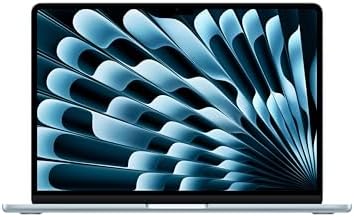
| MacBook Air 15 | Best Lightweight | Efficient performance | 15.3″ | Apple GPU | 9.1/10 |
| Acer Swift X | Best Value Creator | Dedicated GPU in portable design | 14–16″ | NVIDIA RTX | 9.0/10 |
Specifications and configurations vary by model, generation, and region. Always check the exact CPU, GPU, RAM, storage, and display configuration before purchasing.
1. Apple MacBook Pro 16: Best Laptops for Video Editing Overall
The MacBook Pro 16 is our top choice for serious video editors who want a powerful, portable editing workstation.
Apple’s high-end silicon provides strong CPU and GPU performance while maintaining excellent power efficiency. The large Liquid Retina XDR display is particularly valuable for video work because of its high brightness, contrast, and wide color capabilities.

- (CTO) Configure to Order Mac: Upgraded from base specifications.
- Preconfigured with 64GB memory and 1TB SSD Drive
- Liquid Retina XDR 16″ Display
Key Features
- 16.2-inch Liquid Retina XDR display
- Apple silicon processor options
- Integrated high-performance GPU
- 16GB+ memory configurations
- Large SSD options
- Thunderbolt connectivity
- HDMI
- SD card slot
- Excellent speakers
- Long battery life
Why Buy?
The MacBook Pro is especially attractive for editors using Final Cut Pro, but it also works well with Premiere Pro and DaVinci Resolve.
The combination of performance, display quality, battery life, and relatively quiet operation makes it an excellent mobile editing workstation.
Best for: Professional editors, YouTubers, filmmakers, photographers, and creators.
Rating: 9.8/10
2. Apple MacBook Pro 14: Best Portable Video Editing Laptop
If you want professional editing performance without carrying a large 16-inch laptops, the MacBook Pro 14 is an excellent alternative.

- (CTO) Configure to Order Mac: Upgraded from base specifications.
- Preconfigured with 48GB memory and 1TB SSD Drive
- Liquid Retina XDR 14″ Display
Key Features
- 14.2-inch Liquid Retina XDR display
- Apple silicon
- High-performance GPU
- 16GB+ memory options
- Fast SSD storage
- Thunderbolt
- HDMI
- SD card slot
- Excellent battery efficiency
Why Buy?
The 14-inch design makes it much easier to carry between home, office, studio, and travel locations.
Despite its smaller size, it can handle demanding editing workloads.
Best for: Mobile video editors, freelancers, students, and traveling creators.
Rating: 9.7/10
3. ASUS ProArt P16: Best Windows Laptop for Video Editing
The ASUS ProArt P16 is designed specifically with creative professionals in mind.

- High-Resolution Display: 15.6-inch 4K UHD (3840 x 2160) IPS panel with anti-glare and capacitive 10-point multitouch
- Professional Pen Technology: Bundled ProArt Pen with Wacom EMR technology for pen-on-paper-like writing and drawing expe…
- Exceptional Color Accuracy: 100% sRGB, Calman Verified, and factory pre-calibrated to Delta E < 2 for professional color...
Key Features
- 16-inch OLED display
- High-resolution screen
- AMD processor options
- NVIDIA GeForce RTX graphics
- Large RAM configurations
- Fast SSD
- USB-C
- HDMI
- SD card reader
- Creator-focused controls
Why Buy?
A dedicated RTX GPU gives this laptop an advantage for GPU-accelerated editing, rendering, effects, and AI-assisted creative workloads.
The OLED display also makes it attractive for editors who care about color and contrast.
Best for: Premiere Pro, DaVinci Resolve, professional creators, and Windows users.
Rating: 9.7/10
4. Dell XPS 16: Best Premium Windows Editing Laptop
The Dell XPS 16 combines a premium chassis with powerful hardware suitable for demanding creative workloads.
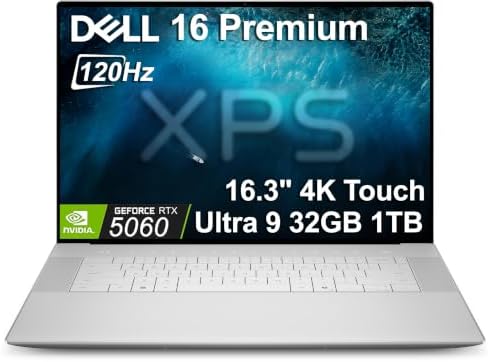
- PREMIUM ULTRA-PORTABLE DESIGN – Meet the Dell 16 Premium, the next-generation XPS 16 built for users who value performan…
- POWERFUL PERFORMANCE – Powered by Intel Ultra 9 285H Processor (16 cores, up to 5.4 GHz Turbo) and NVIDIA GeForce RTX 50…
- CREATIVE GRAPHICS – The NVIDIA GeForce RTX 5060 GPU provides strong graphics performance for creative work, gaming, and …
Key Features
- 16-inch-class display
- Intel Core Ultra processors
- NVIDIA GeForce RTX options
- High-resolution display options
- Premium construction
- USB-C/Thunderbolt
- Large trackpad
- Fast SSD
Why Buy?
The XPS 16 can serve as both a professional productivity laptop and a capable video-editing workstation.
It’s especially useful for creators who want a premium Windows laptops that doesn’t look like a traditional gaming machine.
Best for: Professional editors, designers, developers, and creators.
Rating: 9.5/10
5. Lenovo Legion Pro 5i: Best Performance for Video Editing
Although primarily marketed as a gaming laptop, the Lenovo Legion Pro 5i is also a powerful video-editing machine.

- ✔ Processor: Intel Core Ultra 9-275HX delivers elite-level performance with blazing-fast speeds, perfect for high-end ga…
- ✔ Graphics: NVIDIA GeForce RTX 5070 8GB GPU with advanced ray tracing and AI-enhanced performance ensures ultra-realisti…
- ✔ Display: 16” 2.5K WQXGA (2560×1600) OLED display offers stunning color accuracy, deep blacks, high brightness, and ult…
Key Features
- 16-inch display
- High-performance Intel processor
- NVIDIA GeForce RTX graphics
- High-refresh-rate display
- Advanced cooling
- Large SSD options
- 16GB+ RAM configurations
- HDMI
- USB-C
- Ethernet
Why Buy?
Video-editing applications can benefit substantially from dedicated GPU performance.
The Legion Pro 5i’s cooling system and high-performance hardware make it suitable for long rendering and export sessions.
Best for: 4K editing, Premiere Pro, DaVinci Resolve, creators, and gamers.
Rating: 9.5/10
6. Razer Blade 16: Best Premium Editing Laptops
The Razer Blade 16 is an excellent choice for creators who want premium design combined with powerful hardware.

- ULTRA-THIN GAMING POWER — Take flagship performance anywhere with a 14.9 mm CNC aluminum design, delivering high-end gam…
- NEXT-GEN INTEL PERFORMANCE — Run demanding AAA games and multitask effortlessly with Intel Core Ultra 9 386H (16 cores, …
- NVIDIA RTX 5070 TI GRAPHICS — Experience smooth high FPS and realistic visuals with NVIDIA GeForce RTX 5070 Ti (12GB GDD…
Key Features
- 16-inch display
- High-end Intel/AMD processor options
- NVIDIA GeForce RTX graphics
- OLED/display options
- Premium aluminum construction
- Large RAM configurations
- Fast SSD
- Thunderbolt/USB-C
- HDMI
Why Buy?
Its dedicated graphics hardware makes it well suited to demanding editing and rendering.
The minimalist chassis also makes it appropriate for professional environments.
Best for: Professional creators, filmmakers, editors, and gamers.
Rating: 9.6/10
7. ASUS ROG Zephyrus G14: Best Compact Windows Editing Laptop
The ASUS ROG Zephyrus G14 is an excellent choice for editors who need dedicated graphics but don’t want a huge laptop.

- [Display Features] 14.0″ OLED 2.8K 120Hz DISPLAY: Features a 14.0-inch OLED display (2880 × 1800) with a 120Hz refresh r…
- [Powerful Performance] RYZEN AI 9 HX 370 PROCESSOR: Powered by a Zen 5 Gen AMD Ryzen AI 9 HX 370 processor (2.00GHz base…
- [Graphics Performance] GEFORCE RTX 5080 16GB GDDR7 GRAPHICS: Equipped with GeForce RTX 5080 graphics featuring 16GB GDDR…
Key Features
- 14-inch display
- AMD processor options
- NVIDIA GeForce RTX graphics
- OLED/display options
- Fast SSD
- High-refresh-rate display
- USB-C
- HDMI
- Compact design
Why Buy?
The G14 provides an excellent balance between mobility and performance.
It’s especially useful for creators who travel frequently and still need GPU acceleration for editing.
Best for: Freelancers, travel creators, students, and mobile editors.
Rating: 9.4/10
8. HP ZBook Studio: Best Professional Windows Workstation
The HP ZBook Studio is designed for professional workloads rather than casual computing.

- BUILT FOR DEMANDING WORKFLOWS – The HP ZBook Studio G11 builds on the trusted ZBook Power series to deliver flagship AI-…
- POWERFUL PERFORMANCE & GRAPHICS – Equipped with the Intel Core Ultra 7 165H Processor (up to 5.0GHz, 16 cores, 22 thread…
- PROFESSIONAL DISPLAY – The laptop features a 16″ WUXGA (1920×1200) IPS screen with 400-nit brightness, 100% sRGB, and an…
Key Features
- 16-inch display
- Professional processor options
- NVIDIA RTX graphics
- High RAM capacity
- Fast SSD
- Premium construction
- Professional certification options
- USB-C/Thunderbolt
- HDMI
Why Buy?
Workstation-class laptops can be valuable when stability and professional application compatibility are priorities.
It’s particularly suitable for production studios and professionals who use multiple demanding applications.
Best for: Professional editors, production studios, designers, engineers, and 3D creators.
Rating: 9.4/10
9. MacBook Air 15: Best Lightweight Editing Laptop
The MacBook Air 15 is not designed as a workstation, but it can be an excellent choice for creators with moderate editing requirements.
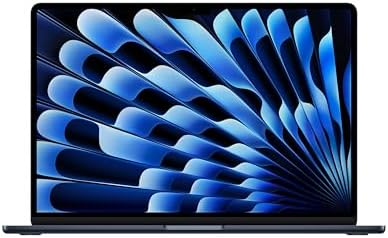
- BUILT FOR COLLEGE. AND BEYOND — MacBook Air with the M5 chip packs blazing speed and powerful AI capabilities into an in…
- TEAR THROUGH TOUGH ASSIGNMENTS — With its faster CPU and unified memory, the M5 chip delivers even more performance and …
- MAKE QUICK WORK OF YOUR TO-DO LIST — Apple Intelligence helps you write, express yourself, and get things done effortles…
Key Features
- 15.3-inch display
- Apple silicon
- Fanless design
- Long battery life
- High-resolution display
- MagSafe charging
- USB-C
- Lightweight chassis
Why Buy?
For YouTube editing, social media content, 1080p projects, and moderate 4K workflows, the MacBook Air can provide excellent portability.
However, professionals performing frequent long exports may benefit from a MacBook Pro with active cooling.
Best for: YouTubers, students, social-media creators, and casual editors.
Rating: 9.1/10
10. Acer Swift X: Best Value Video Editing Laptop
The Acer Swift X combines a relatively portable design with dedicated graphics on select configurations.

- 16GB RAM | 1TB SSD
- Equipped With The Most Powerful and Fast Intel 8-core Ultra 7 256V Processor.
- 16″ 3K (2880×1800) OLED 120Hz Touchscreen (100% DCI-P3), Integrated Intel Arc Graphics 140V
Key Features
- 14–16-inch display options
- AMD or Intel processors
- NVIDIA GeForce RTX graphics
- SSD storage
- USB-C
- HDMI
- Lightweight design
- Good battery efficiency
Why Buy?
It’s a compelling option for creators who need GPU acceleration but don’t want to spend premium workstation prices.
Best for: Students, beginner editors, freelancers, and budget-conscious creators.
Rating: 9.0/10
What Makes a Good Video Editing Laptop?
A video-editing laptops should be evaluated as a complete system.
The most important components are:
- CPU
- GPU
- RAM
- SSD
- Display
- Cooling
- Battery
- Ports
- Operating system
A powerful CPU is important for encoding and many editing tasks, while a dedicated GPU can accelerate effects, playback, rendering, and AI workloads.
How Much RAM Does Video Editing Need?
16GB RAM
16GB is a good starting point for most video editors.
It works well for:
- 1080p editing
- Basic 4K projects
- YouTube content
- Social media videos
- Short-form content
32GB RAM
Recommended for serious creators working with:
- 4K footage
- Multiple applications
- DaVinci Resolve
- Large projects
- Motion graphics
64GB+
Useful for:
- 6K/8K workflows
- Complex timelines
- Heavy effects
- 3D work
- Professional production
How Much Storage Do Video Editors Need?
Video files consume storage quickly.
512GB SSD
Suitable for light editing, but you’ll probably need external storage.
1TB SSD
The recommended starting point for serious editors.
2TB+
Excellent for professional projects and large media libraries.
An NVMe SSD provides fast file transfers and responsive application performance.
For large video libraries, combine internal SSD storage with an external SSD or NAS.
CPU vs GPU for Video Editing
Both matter, but their importance depends on the software and workflow.
CPU
Important for:
- Video encoding
- Timeline operations
- Compression
- General editing
- Certain effects
GPU
Important for:
- GPU-accelerated effects
- Color grading
- Rendering
- AI features
- Motion effects
- Certain codecs and workflows
For demanding Windows editing, a laptop with a dedicated NVIDIA GeForce RTX GPU can be particularly useful.
Best Laptops Display for Video Editing
A good editing display should have:
- High resolution
- Accurate colors
- Wide color gamut
- Good contrast
- High brightness
- Consistent viewing angles
OLED
Excellent contrast and deep blacks.
IPS
Reliable color reproduction and viewing angles.
Mini-LED
Can provide excellent brightness and contrast, particularly for HDR workflows.
For professional editing, don’t focus solely on resolution. Color accuracy can be more important than having the highest pixel count.
Is 4K Necessary for Video Editing?
Not always.
1080p Editing
A Full HD display can be sufficient.
4K Editing
A 4K or high-resolution display is highly recommended.
6K/8K Editing
A powerful CPU, GPU, large RAM capacity, and fast storage become increasingly important.
For most creators, 4K is the practical sweet spot.
Best Laptop for Premiere Pro
Adobe Premiere Pro benefits from:
- Strong CPU
- Dedicated GPU
- 16–32GB RAM
- Fast SSD
- Color-accurate display
The ASUS ProArt P16, Dell XPS 16, Lenovo Legion Pro 5i, and Razer Blade 16 are excellent Windows choices.
Mac users can consider the MacBook Pro.
Best Laptop for DaVinci Resolve
DaVinci Resolve can make extensive use of GPU acceleration.
For this reason, a Windows laptop with a strong dedicated NVIDIA RTX GPU can be an excellent choice.
Recommended options include:
- ASUS ProArt P16
- Lenovo Legion Pro 5i
- Razer Blade 16
- HP ZBook Studio
The MacBook Pro is also highly capable for Resolve workflows.
Best Laptop for Final Cut Pro
Final Cut Pro is exclusive to Apple’s platforms, making the MacBook Pro the obvious choice.
The 14-inch MacBook Pro is excellent for portability, while the 16-inch model provides a larger workspace.
Best Laptop for YouTube Video Editing
YouTubers don’t necessarily need a professional workstation.
For 1080p and moderate 4K projects, prioritize:
- 16GB RAM
- 512GB–1TB SSD
- Modern CPU
- Good display
- Strong battery
- Comfortable keyboard
The MacBook Air 15 can be an excellent lightweight option, while the ASUS ProArt series provides attractive Windows alternatives.
Best Laptops for 4K Video Editing
For 4K editing, look for:
- Modern multi-core CPU
- Dedicated GPU
- 32GB RAM when possible
- 1TB SSD
- Accurate 4K display
- Effective cooling
The MacBook Pro, ASUS ProArt P16, and Lenovo Legion Pro 5i are strong options.
Best Laptop for 8K Video Editing
8K workflows require considerably more processing power.
Look for:
- High-end CPU
- Powerful dedicated GPU
- 32–64GB RAM
- 2TB+ SSD
- Excellent cooling
- Fast external storage
Professional workstation laptops are often better suited to these workloads than thin-and-light machines.
Windows vs Mac for Video Editing
| Feature | Windows | Mac |
|---|---|---|
| Hardware choice | Excellent | Limited |
| GPU choices | Excellent | Integrated Apple GPU |
| Final Cut Pro | No | Yes |
| Premiere Pro | Yes | Yes |
| DaVinci Resolve | Yes | Yes |
| Gaming | Excellent | Limited |
| Battery efficiency | Varies | Excellent |
| Upgradeability | Varies | Limited |
| Professional options | Excellent | Excellent |
Choose Windows if you want broader hardware options, dedicated NVIDIA graphics, or gaming capability.
Choose Mac if you value battery efficiency, Final Cut Pro, and Apple’s optimized hardware-software ecosystem.
Best Laptops for Video Editing by Use Case
| Use Case | Best Laptop | Key Feature |
|---|---|---|
| Best overall | MacBook Pro 16 | Performance + XDR display |
| Best portable | MacBook Pro 14 | Compact professional performance |
| Best Windows | ASUS ProArt P16 | OLED + RTX |
| Best premium Windows | Dell XPS 16 | Premium design |
| Best performance | Lenovo Legion Pro 5i | Cooling + RTX |
| Best premium | Razer Blade 16 | High-end hardware |
| Best compact Windows | ASUS ROG Zephyrus G14 | Portable RTX performance |
| Best workstation | HP ZBook Studio | Professional hardware |
| Best lightweight | MacBook Air 15 | Battery + portability |
| Best value | Acer Swift X | Dedicated graphics |
Compare Best Laptops for Video Editing


Pros and Cons of Video Editing Laptops
Pros
- Portable editing workstation
- Powerful processors
- Dedicated graphics options
- High-resolution displays
- Fast SSD storage
- Can edit 4K footage
- Useful for gaming and creative work
- Built-in keyboard and display
- Easy to move between locations
Cons
- Expensive compared with basic laptops
- Powerful models can be heavy
- Fans can become noisy
- Battery life decreases during rendering
- Limited upgradeability on many models
- High-end configurations can become very expensive
How to Choose the Best Video Editing Laptops
Before buying, consider your editing resolution and software.
For 1080p: 16GB RAM + modern CPU + 512GB SSD.
For 4K: 16–32GB RAM + strong CPU/GPU + 1TB SSD.
For professional 4K: 32GB RAM + dedicated GPU + 1TB/2TB SSD.
For 8K: 32–64GB RAM + high-end CPU/GPU + fast storage.
For Premiere Pro: Prioritize CPU, GPU, RAM, and SSD.
For DaVinci Resolve: Pay particular attention to GPU performance.
For Final Cut Pro: MacBook Pro is the natural choice.
For travel: Choose a 14-inch laptop.
For workstation use: Consider a 16-inch model with stronger cooling.
Final Verdict: Best Laptops for Video Editing
The MacBook Pro 16 is our overall pick for the best laptop for video editing in 2026 because it combines powerful processing, excellent graphics performance, a high-quality Liquid Retina XDR display, long battery life, and strong professional software support.
For Windows users, the ASUS ProArt P16 is one of the most compelling creator-focused choices, particularly because of its OLED display and dedicated NVIDIA RTX graphics.
The MacBook Pro 14 is an excellent choice for editors who prioritize portability, while the Lenovo Legion Pro 5i delivers powerful performance and effective cooling for demanding workloads.
For premium Windows users, the Razer Blade 16 offers high-end hardware in an attractive chassis. Meanwhile, the ASUS ROG Zephyrus G14 is a great option for creators who need dedicated graphics in a compact package.
For most serious video editors, we recommend looking for at least 16GB RAM, 1TB SSD storage, a modern high-performance processor, a capable GPU, and a color-accurate high-resolution display.
If you’re editing 4K or more demanding footage, moving to 32GB RAM and a dedicated GPU can provide considerably more headroom.
Frequently Asked Questions
What is the best laptops for video editing in 2026?
The MacBook Pro 16 is our overall pick for professional video editing because of its performance, display, battery efficiency, and strong creative-software ecosystem.
How much RAM do I need for video editing?
16GB is a good starting point, while 32GB is recommended for serious 4K editing. Professional 6K/8K workflows can benefit from 64GB or more.
Is a dedicated GPU necessary for video editing?
Not always, but a dedicated GPU can significantly improve performance in GPU-accelerated applications and effects. It is particularly useful for demanding DaVinci Resolve and Premiere Pro workflows.
Is Mac or Windows better for video editing?
Both are excellent. Mac offers highly optimized Apple silicon and Final Cut Pro, while Windows provides more hardware choices and powerful NVIDIA GPU configurations.
Is 16GB RAM enough for 4K video editing?
It can be sufficient for many 4K projects, but 32GB provides a more comfortable experience, particularly when working with large timelines, effects, or multiple applications.
How much SSD storage should a video editor have?
We recommend at least 1TB for serious editing. Video files can consume hundreds of gigabytes quickly, so external SSD or NAS storage can also be useful.
What laptops is best for Premiere Pro?
The ASUS ProArt P16, Dell XPS 16, Lenovo Legion Pro 5i, and Razer Blade 16 are strong Windows options. The MacBook Pro is also excellent.
What laptops is best for DaVinci Resolve?
A laptop with a powerful dedicated GPU is particularly useful. The ASUS ProArt P16, Lenovo Legion Pro 5i, Razer Blade 16, and high-end MacBook Pro models are strong choices.
Is OLED good for video editing?
Yes. OLED displays offer excellent contrast, deep blacks, and strong color reproduction. They can be particularly attractive for HDR and cinematic video work.
Can a gaming laptop be used for video editing?
Absolutely. Gaming laptops often have powerful CPUs, dedicated GPUs, fast SSDs, and effective cooling, making them excellent editing machines.
What is the best laptops for YouTube video editing?
For many creators, the MacBook Air 15 offers a strong combination of portability and performance. For heavier workloads, the MacBook Pro or ASUS ProArt P16 is a better choice.
What specifications should I look for in a video-editing laptops?
Prioritize 16–32GB RAM, 1TB SSD storage, a modern multi-core processor, a capable GPU, high-resolution color-accurate display, effective cooling, and reliable USB-C/Thunderbolt connectivity.