If you click on the links and make a purchase, we may earn a commission.
The best 2-in-1 laptops combine the flexibility of a tablet with the productivity of a traditional notebook. With a touchscreen, 360-degree hinge, stylus support on many models, and full desktop operating systems, convertible laptops are useful for students, professionals, creators, travelers, and home users.
Table of Contents

Image Credit: Pixabay
Unlike a traditional laptop, a 2-in-1 can be used in multiple modes. You can type in Laptop Mode, fold the keyboard behind the screen for Tablet Mode, use Tent Mode for presentations or streaming, or use Stand Mode for video calls and entertainment.
In this guide, we compare the best 2-in-1 laptops in 2026, focusing on display quality, performance, battery life, portability, keyboard, stylus support, build quality, and overall value.
Quick Comparison: Best 2-in-1 Laptops
| 2-in-1 Laptop | Best For | Key Feature | Display | Platform | Rating |
|---|---|---|---|---|---|
| Lenovo Yoga 9i | Best Overall | OLED + 360° hinge | 14″ OLED | Windows | 9.8/10 |
| HP Spectre x360 14 | Best Premium | Premium convertible design | 14″ OLED | Windows | 9.7/10 |
| Microsoft Surface Pro | Best Tablet 2-in-1 | Detachable keyboard | 13″ | Windows | 9.5/10 |
| Lenovo Yoga 7i | Best Value | Flexible design | 14″ | Windows | 9.4/10 |
| HP Envy x360 | Best Mid-Range | Touchscreen + performance | 14″ | Windows | 9.3/10 |
| ASUS Zenbook 14 Flip OLED | Best OLED Value | High-quality OLED | 14″ OLED | Windows | 9.4/10 |
| Dell Inspiron 14 2-in-1 | Best Budget | Affordable versatility | 14″ | Windows | 9.1/10 |
| Lenovo IdeaPad Flex 5 | Best Budget 2-in-1 | Strong everyday value | 14″ | Windows | 9.0/10 |
| Acer Spin 5 | Best for Students | Touch + stylus support | 14″ | Windows | 9.1/10 |
| ASUS ROG Flow Z13 | Best Performance | Gaming + tablet design | 13″ | Windows | 9.3/10 |
Specifications and configurations can vary by generation, region, and retailer. Always verify the exact processor, RAM, storage, display, and included accessories before purchasing.
1. Lenovo Yoga 9i: Best 2-in-1 Laptop Overall
The Lenovo Yoga 9i is our top overall choice because it combines premium design, strong performance, an excellent OLED display, and a flexible 360-degree hinge.
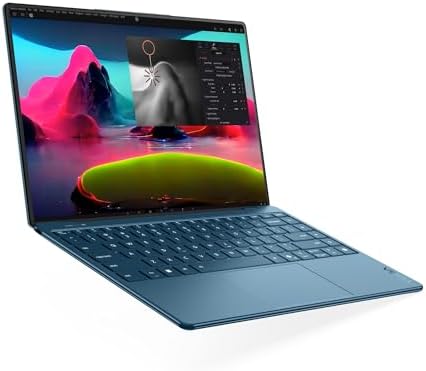
- UNOPENED RETAIL PACKAGING, sold as configured by Lenovo. Includes one year of Courier or Carry-in Lenovo Warranty. Add u…
- Powered by the Intel Core Ultra 7 258V processor, the Yoga Slim 9i laptop offers maximum performance, creative efficienc…
- This slim-bezel laptop display achieves a 98% active area ratio, so you get more than just a screen—you get space to bri…
Key Features
- 14-inch OLED display options
- 360-degree hinge
- Touchscreen
- Intel Core Ultra processors
- Stylus support on compatible configurations
- Premium aluminum construction
- Fast SSD
- USB-C/Thunderbolt
- Excellent speakers
- Backlit keyboard
Why Buy?
The Yoga 9i is designed for users who want one device that can handle both productivity and entertainment.
You can use it for:
- Office work
- Note-taking
- Presentations
- Drawing
- Streaming
- Web browsing
- Video calls
- College work
The OLED display also provides excellent contrast and vibrant colors.
Best for: Professionals, students, creators, and premium 2-in-1 buyers.
Rating: 9.8/10
2. HP Spectre x360 14: Best Premium 2-in-1 Laptop
The HP Spectre x360 14 is one of the most attractive premium convertible laptops.
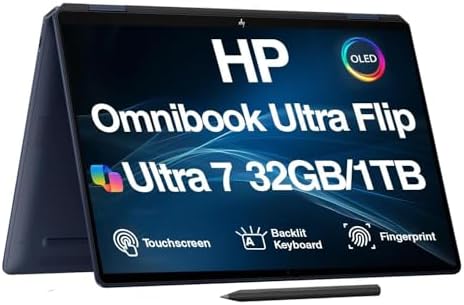
- [Powerful Performance] 15th Gen Ultra 7-258V 2.20GHz Processor (upto 4.8 GHz, 12MB Cache, 8-Cores, 8-Threads, 4 Performa…
- [High Speed and Multitasking] 32GB OnBoard RAM; Bluetooth 5.4, Webcam, Fingerprint, Backlit KB Standard Keyboard, Active…
- [Superior Display] 14.0″ OLED 2.8K (2880×1800) 120Hz Touchscreen Display; 65W PSU, Type-C Power-In, 4-Cell 64 WHr Batter…
Key Features
- 14-inch OLED display options
- 360-degree hinge
- Touchscreen
- Intel Core Ultra processors
- Premium metal construction
- Stylus support on select configurations
- USB-C/Thunderbolt
- High-quality webcam
- Excellent speakers
Why Buy?
The Spectre x360 combines a premium laptop experience with tablet flexibility.
The OLED touchscreen is particularly useful for:
- Creative work
- Digital drawing
- Watching movies
- Presentations
- Photo editing
- Note-taking
Best for: Professionals, creators, and users who want a premium convertible.
Rating: 9.7/10
3. Microsoft Surface Pro: Best Detachable 2-in-1
The Microsoft Surface Pro takes a different approach to the 2-in-1 category.
Instead of using a permanent 360-degree hinge, it combines a tablet-style touchscreen with a detachable keyboard and built-in kickstand.

- Brilliant LCD Display – The 13″ PixelSense touchscreen[1], with LCD and enriched HDR[2] tech, unveils crisper whites, da…
- Up to 15.5hours of battery life[3] – The new Surface Pro is designed for long days, late nights and everything in betwee…
- Productivity. All Day. Every Day. – Built with the latest Qualcomm Snapdragon X2 Plus (10 Core) processors, Surface Pro …
Key Features
- 13-inch touchscreen
- Detachable keyboard
- Kickstand
- Pen support
- Snapdragon X or compatible configurations
- USB-C
- Lightweight design
- High-resolution display
Why Buy?
The Surface Pro is particularly useful for people who want a tablet first and a laptop second.
It’s excellent for:
- Note-taking
- Drawing
- Reading
- Presentations
- Travel
- Web browsing
- Office work
Check application compatibility carefully if choosing an ARM-based configuration.
Best for: Students, travelers, note-takers, and tablet-focused users.
Rating: 9.5/10
4. Lenovo Yoga 7i: Best Value 2-in-1 Laptop
The Lenovo Yoga 7i offers many of the benefits of Lenovo’s premium Yoga lineup at a more accessible price.

- 【COPILOT+ PC WITH INTELLIGENT AI】 Experience a new era of productivity with the Lenovo Yoga 7i, powered by an Intel Core…
- 【14″ WUXGA OLED TOUCHSCREEN】 See your content in vivid detail on the Lenovo Yoga 14″ OLED touchscreen with 1920 x 1200 (…
- 【FAST LPDDR5X RAM & RESPONSIVE PERFORMANCE】 Built for smooth multitasking, this Lenovo Yoga 7i 2-in-1 laptop features 16…
Key Features
- 14-inch touchscreen
- 360-degree hinge
- Intel Core processor options
- OLED options on select models
- USB-C
- HDMI
- Backlit keyboard
- Stylus compatibility on select configurations
Why Buy?
The Yoga 7i is a versatile everyday machine.
It can comfortably handle:
- Office applications
- Schoolwork
- Web browsing
- Video calls
- Streaming
- Light creative work
Best for: Students, families, and professionals seeking value.
Rating: 9.4/10
5. HP Envy x360: Best Mid-Range 2-in-1
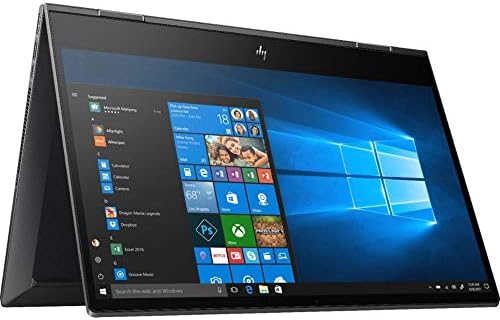
The HP Envy x360 is designed for users who want a convertible laptop without paying flagship prices.
Key Features
- 14-inch touchscreen
- 360-degree hinge
- AMD or Intel processor options
- OLED options
- USB-C
- HDMI
- Backlit keyboard
- Premium-inspired design
Why Buy?
It provides a good balance between performance, portability, and flexibility.
It’s especially suitable for students and home-office users.
Best for: Everyday productivity, school, home offices, and entertainment.
Rating: 9.3/10
6. ASUS Zenbook 14 Flip OLED: Best OLED 2-in-1
The ASUS Zenbook 14 Flip OLED is a strong option for users who prioritize display quality.

- Spectacular Visual Delights–【14″ WUXGA OLED 2-in-1 Touchscreen Display】Enjoy sharp, vivid picture quality with rich con…
- Reliable CPU Performance–【Intel Core Ultra 7 256V】Boost performance with next-generation processing power designed for …
- Memory & Storage–【16GB LPDDR5 RAM】Experience fast, efficient multitasking with advanced memory designed for responsive …
Key Features
- 14-inch OLED display
- Touchscreen
- 360-degree hinge
- Intel processor options
- Stylus support
- Fast SSD
- USB-C
- HDMI
- Premium construction
Why Buy?
OLED provides excellent contrast and deep blacks, making it particularly attractive for entertainment and creative work.
The convertible design adds flexibility for presentations and tablet use.
Best for: Creators, students, media consumption, and premium display enthusiasts.
Rating: 9.4/10
7. Dell Inspiron 14 2-in-1: Best Budget-Friendly Choice
The Dell Inspiron 14 2-in-1 provides a practical combination of touchscreen functionality and everyday computing.

- FLEXIBLE WORK-PLAY BALANCE – The Inspiron 7440 laptop features x360 degree hinge allows Flex ‘Laptop’ mode for everyday …
- ALL-DAY PERFORMANCE – Experience a whole new level of speed and power in a laptop powered by the latest Intel Core 5 120…
- CRISP TOUCH DISPLAY – 14″ WUXGA (1920 x 1200), 250 nits, 16:10, Touch, ComfortView, WVA Display; Integrated Intel Graphi…
Key Features
- 14-inch touchscreen
- 360-degree hinge
- Intel or AMD processor options
- SSD storage
- USB-C
- HDMI
- Wi-Fi
- Backlit keyboard on select models
Why Buy?
It’s a sensible choice for users who want a flexible laptop for basic tasks without spending heavily on premium features.
Best for: Students, home users, and budget-conscious buyers.
Rating: 9.1/10
8. Lenovo IdeaPad Flex 5: Best Affordable 2-in-1
The Lenovo IdeaPad Flex 5 is another strong budget option.

Key Features
- 14-inch touchscreen
- 360-degree hinge
- AMD or Intel processors
- SSD storage
- USB-C
- HDMI
- Wi-Fi
- Stylus compatibility on select models
Why Buy?
The Flex 5 provides plenty of flexibility for everyday use.
It is suitable for:
- Online learning
- Microsoft Office
- Web browsing
- Streaming
- Video calls
- Basic creative work
Best for: Students and first-time 2-in-1 buyers.
Rating: 9.0/10
9. Acer Spin 5: Best 2-in-1 for Students
The Acer Spin 5 is designed around portability and flexible touchscreen use.

- Spectacular Visual Delights–【14″ WUXGA Touch 2-in-1 Display】Combines sharp WUXGA clarity with responsive touch function…
- Outstanding CPU Performance–【Intel Ultra 5 115U Processor】Delivers reliable performance with low power consumption, ens…
- Exceptional Memory and Storage–【8GB LPDDR5 RAM】Provides smooth multitasking and responsive performance, allowing you to…
Key Features
- 14-inch touchscreen
- 360-degree hinge
- Stylus support
- Intel processor options
- SSD storage
- USB-C/Thunderbolt
- Lightweight construction
- Backlit keyboard
Why Buy?
The included or compatible stylus makes it useful for students who prefer handwritten notes.
It can also be used as a tablet for reading textbooks and documents.
Best for: Students, note-taking, and education.
Rating: 9.1/10
10. ASUS ROG Flow Z13: Best High-Performance 2-in-1
The ASUS ROG Flow Z13 is a unique option for users who want tablet-style portability with gaming-oriented hardware.

- 【Ryzen AI MAX+ 395 Power】 Built for serious gaming, creation and AI workloads, the Ryzen AI MAX+ 395 delivers 16 cores, …
- 【Radeon 8060S Gaming Graphics】 AMD Radeon 8060S integrated graphics deliver smooth gaming and creator performance in a c…
- 【13.4″ 2.5K 180Hz Touch Display】 Game and create on a 13.4-inch WQXGA 2560 x 1600 touchscreen with a 16:10 aspect ratio,…
Key Features
- 13-inch touchscreen
- Detachable keyboard
- High-refresh-rate display options
- Powerful processor
- Dedicated graphics on compatible configurations
- USB-C
- Gaming-focused design
- Compact form factor
Why Buy?
It offers a very different experience from traditional convertible laptops.
It’s suitable for:
- Gaming
- Creative applications
- Programming
- Video editing
- Travel
- Tablet-style computing
Best for: Gamers and power users who want maximum flexibility.
Rating: 9.3/10
What Is a 2-in-1 Laptop?
A 2-in-1 laptop is a computer designed to work in both traditional laptop and tablet-style configurations.
There are two main types:
Convertible 2-in-1
The screen rotates around a 360-degree hinge.
Examples include:
- Lenovo Yoga
- HP Spectre x360
- HP Envy x360
- Lenovo Flex
Detachable 2-in-1
The keyboard can be removed completely.
Examples include:
- Microsoft Surface Pro
- ASUS ROG Flow Z13
Why Buy a 2-in-1 Laptop?
A 2-in-1 can replace both a laptop and tablet for many users.
Advantages include:
- Touchscreen
- Tablet mode
- Laptop mode
- Presentation mode
- Stylus support
- Portable design
- Full desktop operating system
- Flexible viewing angles
They’re particularly useful for students, professionals, artists, and travelers.
What Makes a Good 2-in-1 Laptop?
When shopping for a convertible laptop, consider:
- Display quality
- Touch responsiveness
- Hinge quality
- Processor
- RAM
- SSD
- Battery life
- Weight
- Stylus support
- Keyboard
- Ports
- Build quality
The hinge is especially important because it will be used much more frequently than on a traditional laptop.
How Much RAM Do You Need?
8GB
Suitable for basic tasks such as:
- Browsing
- Office work
- Streaming
- Online classes
16GB
The recommended choice for most buyers.
It’s better for:
- Multitasking
- Programming
- Office work
- Photo editing
- Creative applications
32GB+
Useful for:
- Video editing
- Programming
- Virtual machines
- Professional creative work
What Storage Should You Choose?
256GB SSD
Suitable for basic users.
512GB SSD
The sweet spot for most 2-in-1 buyers.
1TB SSD
Better for:
- Large applications
- Photos
- Videos
- Games
- Professional work
An SSD provides significantly faster boot and application-loading times than older mechanical drives.
Best Screen Size for a 2-in-1
| Screen Size | Best For |
|---|---|
| 12–13″ | Maximum portability |
| 14″ | Best overall balance |
| 15–16″ | Productivity and entertainment |
A 14-inch 2-in-1 is often the best compromise between screen space and portability.
OLED vs IPS for 2-in-1 Laptops
| Feature | OLED | IPS |
|---|---|---|
| Contrast | Excellent | Good |
| Blacks | Excellent | Good |
| Colors | Excellent | Very good |
| Battery efficiency | Varies | Usually good |
| Price | Higher | Lower |
| Movies | Excellent | Very good |
| Productivity | Excellent | Excellent |
OLED is ideal if you watch movies, edit photos, or want a premium display.
IPS can provide excellent value and may be preferable for users prioritizing battery life and cost.
Are 2-in-1 Laptops Good for Students?
Yes.
Students can benefit from:
- Touchscreen note-taking
- Stylus support
- Tablet mode
- Laptop keyboard
- Lightweight designs
- Presentation modes
The Microsoft Surface Pro, Lenovo Yoga 7i, and Acer Spin series are particularly useful for education.
Are 2-in-1 Laptops Good for Drawing?
They can be excellent for drawing if they support a quality active stylus.
Look for:
- Pen support
- Pressure sensitivity
- Low pen latency
- High-resolution display
- Good color accuracy
- Comfortable tablet mode
The Lenovo Yoga, HP Spectre x360, and Surface Pro families are strong choices.
Are 2-in-1 Laptops Good for Programming?
Yes, although keyboard quality remains important.
Developers should prioritize:
- 16GB RAM
- 512GB SSD
- Modern processor
- Comfortable keyboard
- High-resolution display
The Lenovo Yoga 9i, ThinkPad-style convertible models, and Surface devices can work well for programming.
Are 2-in-1 Laptops Good for Gaming?
Most 2-in-1 laptops are not designed for demanding gaming because they prioritize portability and efficiency.
However, specialized devices such as the ASUS ROG Flow Z13 can provide much stronger gaming performance.
For serious gaming, a traditional gaming laptop is generally a better choice.
Battery Life
Battery life is especially important for 2-in-1 devices because they’re often used away from a desk.
For the best mobility:
- Choose efficient processors
- Consider a 13–14-inch display
- Avoid unnecessarily high-resolution screens if battery life is your priority
- Look for modern battery-management features
ARM-based Windows laptops can offer excellent efficiency, but always verify compatibility with your required applications.
Stylus Support
Not every touchscreen laptop includes a stylus.
Before buying, check:
- Whether a pen is included
- Compatible pen model
- Pressure sensitivity
- Tilt support
- Charging method
If you plan to draw or take handwritten notes, the stylus can be as important as the laptop itself.
2-in-1 Laptop vs Traditional Laptop
| Feature | 2-in-1 | Traditional Laptop |
|---|---|---|
| Touchscreen | Usually | Varies |
| Tablet mode | Yes | No |
| Stylus support | Common | Less common |
| Flexibility | Excellent | Good |
| Gaming | Limited on most | Better options |
| Productivity | Excellent | Excellent |
| Portability | Excellent | Varies |
| Keyboard | Good–excellent | Usually excellent |
| Price | Often higher | Wider range |
Choose a 2-in-1 if flexibility matters.
Choose a traditional laptop if maximum performance or value is more important.


Best 2-in-1 Laptops by Use Case
| Use Case | Best Choice | Key Feature |
|---|---|---|
| Best overall | Lenovo Yoga 9i | OLED + 360° hinge |
| Best premium | HP Spectre x360 | Premium design |
| Best tablet-style | Microsoft Surface Pro | Detachable keyboard |
| Best value | Lenovo Yoga 7i | Performance + flexibility |
| Best mid-range | HP Envy x360 | Balanced features |
| Best OLED | ASUS Zenbook 14 Flip | OLED touchscreen |
| Best budget | Dell Inspiron 14 2-in-1 | Affordable versatility |
| Best affordable | Lenovo IdeaPad Flex 5 | Strong everyday value |
| Best for students | Acer Spin 5 | Stylus support |
| Best performance | ASUS ROG Flow Z13 | Gaming hardware |
Pros and Cons of 2-in-1 Laptops
Pros
- Laptop and tablet functionality
- Touchscreen
- Stylus support
- Flexible viewing modes
- Excellent for students
- Great for presentations
- Convenient for travel
- Full desktop operating systems
- Good entertainment devices
Cons
- Often more expensive than traditional laptops
- Hinges can add weight
- Touchscreens can reduce battery life
- Some models have limited upgradeability
- Gaming performance is often limited
- Detachable keyboards can be less comfortable
How to Choose the Best 2-in-1 Laptop
For students: 14-inch display + 16GB RAM + 512GB SSD.
For note-taking: Touchscreen + active stylus + tablet mode.
For drawing: OLED/high-resolution display + pressure-sensitive pen.
For office work: 16GB RAM + comfortable keyboard + good battery life.
For travel: 13–14-inch lightweight design.
For entertainment: OLED display + high-quality speakers.
For programming: 16GB RAM + 512GB/1TB SSD + modern processor.
For gaming: Dedicated GPU and strong cooling; consider a gaming-focused 2-in-1.
Final Verdict
The Lenovo Yoga 9i is our overall choice for the best 2-in-1 laptop in 2026 because it provides an excellent balance of performance, portability, OLED display quality, premium construction, and 360-degree flexibility.
The HP Spectre x360 14 is an excellent premium alternative, particularly for users who want a sophisticated convertible design and OLED touchscreen.
For users who want a tablet-first experience, the Microsoft Surface Pro is one of the most flexible options available. The Lenovo Yoga 7i offers excellent value, while the HP Envy x360 provides a strong mid-range alternative.
If display quality is your priority, consider the ASUS Zenbook 14 Flip OLED. Budget shoppers should look at the Dell Inspiron 14 2-in-1 or Lenovo IdeaPad Flex 5.
For gaming and high-performance workloads, the ASUS ROG Flow Z13 is a unique choice that combines tablet-style portability with gaming hardware.
For most buyers, the ideal 2-in-1 configuration is 16GB RAM, 512GB SSD storage, a 14-inch touchscreen, a modern processor, active stylus support if needed, and strong battery life.
Frequently Asked Questions
What is the best 2-in-1 laptop in 2026?
The Lenovo Yoga 9i is our overall pick because it combines strong performance, premium construction, OLED display quality, and a flexible 360-degree hinge.
Are 2-in-1 laptops worth buying?
Yes, especially if you want touchscreen functionality, tablet mode, stylus support, and the productivity of a traditional laptop in one device.
Is a 2-in-1 laptop good for students?
Yes. 2-in-1 laptops are particularly useful for students because they can be used for typing, handwritten notes, presentations, reading, and online classes.
Which 2-in-1 laptop is best for drawing?
The Microsoft Surface Pro, Lenovo Yoga series, and HP Spectre x360 are strong options when paired with a compatible pressure-sensitive stylus.
Are 2-in-1 laptops good for programming?
Yes. Choose a model with 16GB RAM, at least a 512GB SSD, a modern processor, and a comfortable keyboard.
How much RAM should a 2-in-1 laptop have?
16GB is the recommended amount for most users. 8GB can work for basic tasks, while 32GB is better for demanding professional workloads.
Is 512GB SSD enough?
Yes. 512GB is an excellent starting point for most users. Choose 1TB if you store many videos, games, photos, or large applications.
Are OLED 2-in-1 laptops worth it?
OLED models can provide excellent contrast, deep blacks, and vibrant colors. They’re particularly attractive for movies, creative work, and premium everyday use.
Can a 2-in-1 replace a tablet?
For many users, yes. Tablet mode and stylus support make a 2-in-1 a practical tablet replacement while retaining full laptop functionality.
Can you game on a 2-in-1 laptop?
Light and casual gaming is possible on many models. For demanding games, choose a model with dedicated graphics, such as a gaming-focused convertible.
What screen size is best for a 2-in-1 laptop?
A 14-inch screen is the best overall balance for most users. A 13-inch model is better for portability, while 15–16 inches provides more workspace.
What should I look for when buying a 2-in-1 laptop?
Prioritize touchscreen quality, hinge durability, processor performance, 16GB RAM, SSD storage, battery life, stylus compatibility, keyboard quality, weight, ports, and build quality.