If you click on the links and make a purchase, we may earn a commission.
Choosing the best laptop for programming in 2026 depends on more than processor speed. Developers need a reliable keyboard, sharp display, sufficient RAM, fast SSD storage, strong battery life, good connectivity, and enough processing power for IDEs, containers, virtual machines, databases, and development tools.
Table of Contents

Image Credit: Pixabay
Whether you’re a beginner learning Python, a web developer building applications, a software engineer working with large codebases, or a developer running Docker and virtual machines, the right laptop can make your workflow significantly faster and more comfortable.
This guide compares the best laptops for programming across different budgets and use cases, including Windows, macOS, Linux-friendly options, business laptops, and powerful developer workstations.
Quick Comparison: Best Laptops for Programming
| Laptop | Best For | Key Feature | Display | RAM Options | Rating |
|---|---|---|---|---|---|
| MacBook Pro 14 | Best Overall | Excellent performance + battery | 14.2″ | 16GB+ | 9.8/10 |
| MacBook Air 15 | Best Portable | Battery + silent design | 15.3″ | 16GB+ | 9.5/10 |
| ThinkPad X1 Carbon | Best Business | Excellent keyboard | 14″ | 16GB+ | 9.6/10 |
| Dell XPS 14 | Best Premium Windows | Performance + design | 14.5″ | 16GB+ | 9.5/10 |
| ASUS Zenbook 14 OLED | Best Value | OLED + portability | 14″ | 16GB+ | 9.4/10 |
| HP Spectre x360 | Best 2-in-1 | Convertible touchscreen | 14″ | 16GB+ | 9.3/10 |
| Lenovo Legion Pro 5 | Best for Heavy Development | Powerful CPU/GPU | 16″ | 16–32GB+ | 9.4/10 |
| Framework Laptop | Best Upgradeability | Modular design | 13–16″ | Configurable | 9.5/10 |
| Microsoft Surface Laptop | Best Battery | Efficient platform | 13.8″/15″ | 16GB+ | 9.3/10 |
| Acer Aspire 5 | Best Budget | Affordable productivity | 15.6″ | 8–16GB | 9.0/10 |
Configurations vary by model and region. Check the exact CPU, RAM, SSD, operating system, and display configuration before purchasing.
1. MacBook Pro 14 — Best Laptop for Programming Overall
The MacBook Pro 14 is our overall pick for programmers who want a powerful, portable, and reliable development machine.
Apple’s modern silicon delivers strong CPU performance while maintaining excellent power efficiency. This is especially useful for developers who spend long periods compiling code, running development environments, or working away from a desk.

- FAST RUNS IN THE FAMILY — The 14-inch MacBook Pro with the M5 Pro or M5 Max chip brings next-generation speed and powerf…
- BUCKLE UP — Along with a next-generation CPU, faster unified memory, and up to 2x faster SSD storage,* M5 Pro and M5 Max…
- BUILT FOR AI — Apple silicon, and every major component that powers it, is designed to run demanding on-device AI worklo…
Key Features
- 14.2-inch high-resolution display
- Apple silicon
- 16GB+ memory configurations
- Fast SSD storage
- Excellent battery life
- Thunderbolt/USB-C
- HDMI
- SD card slot
- High-quality keyboard
- Excellent speakers
Why Buy?
The MacBook Pro works well with:
- Python
- JavaScript
- TypeScript
- Swift
- Java
- C/C++
- Rust
- Go
- Docker
- Git
- VS Code
- JetBrains IDEs
Its Unix-based environment is also attractive for developers who prefer macOS command-line tools.
Best for: Professional developers, software engineers, web developers, and programmers who value portability.
Rating: 9.8/10
2. MacBook Air 15 — Best Portable Programming Laptop
The MacBook Air 15 is an excellent choice for developers who prioritize portability and battery life.
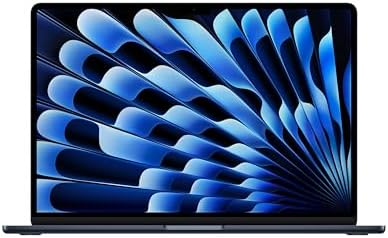
- BUILT FOR COLLEGE. AND BEYOND — MacBook Air with the M5 chip packs blazing speed and powerful AI capabilities into an in…
- TEAR THROUGH TOUGH ASSIGNMENTS — With its faster CPU and unified memory, the M5 chip delivers even more performance and …
- MAKE QUICK WORK OF YOUR TO-DO LIST — Apple Intelligence helps you write, express yourself, and get things done effortles…
Key Features
- 15.3-inch display
- Apple silicon
- 16GB+ memory options
- Fanless design
- Long battery life
- High-resolution display
- USB-C
- MagSafe charging
- Lightweight chassis
Why Buy?
The larger 15-inch screen provides more space for code while keeping the laptop relatively thin and portable.
It is excellent for:
- Web development
- Python
- JavaScript
- Mobile development
- Writing
- Research
- University projects
The fanless design is particularly useful in quiet environments.
Best for: Students, web developers, freelancers, and mobile programmers.
Rating: 9.5/10
3. Lenovo ThinkPad X1 Carbon — Best Business Laptop for Programming
The Lenovo ThinkPad X1 Carbon is one of the strongest choices for developers who prioritize keyboard quality and business reliability.
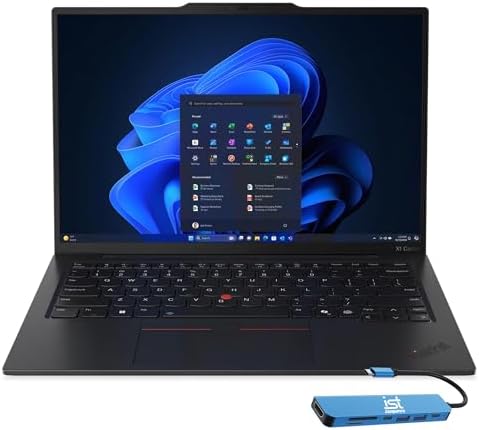
- ULTRA-PORTABLE DURABILITY – The ThinkPad X1 Carbon Gen 13 Aura Edition is Lenovo’s flagship ultra-premium AI business la…
- POWERFUL AI PROCESSING – Powered by Intel Core Ultra 7 258V processor (up to 4.8GHz, 8 cores) for fast, efficient comput…
- STUNNING VISUALS – 14″ 2.8K QHD+ (2880×1800) OLED display with 500 nits brightness, 120Hz VRR, and 100% DCI-P3 color del…
Key Features
- 14-inch display
- Intel Core Ultra processor options
- Lightweight design
- Excellent keyboard
- TrackPoint
- Business security features
- USB-C/Thunderbolt
- HDMI
- Wi-Fi
Why Buy?
Programmers can spend many hours typing every day, making keyboard quality extremely important.
The ThinkPad’s keyboard is one of its biggest strengths.
It’s particularly suitable for:
- Software engineering
- Backend development
- Enterprise development
- Linux development
- Programming courses
- Business applications
Best for: Professional developers and business users.
Rating: 9.6/10
4. Dell XPS 14 — Best Premium Windows Laptop for Programming
The Dell XPS 14 combines premium construction with strong processing capabilities.

- 【AI Powered Intel Core Ultra 7 255H 】Experience intelligent, high-performance computing with advanced AI acceleration, p…
- 【14.5″ WUXGA 120Hz Display】Enjoy sharp, detailed visuals with a smooth 120Hz refresh rate, delivering fluid motion and r…
- 【16GB LPDDR5X】Elevate your projects with a high-speed RAM, ensuring faster data processing, seamless multitasking, and i…
Key Features
- 14-inch-class display
- Intel Core Ultra processors
- Optional dedicated graphics on select configurations
- Premium chassis
- USB-C/Thunderbolt
- High-resolution display options
- Large touchpad
- Fast SSD
Why Buy?
The XPS 14 is suitable for developers who want a premium Windows environment without purchasing a large workstation.
It can comfortably handle:
- IDEs
- Web development
- Databases
- Docker
- Compilers
- Office applications
- Multiple browser tabs
Best for: Professional Windows developers.
Rating: 9.5/10
5. ASUS Zenbook 14 OLED — Best Value Programming Laptop
The ASUS Zenbook 14 OLED provides an attractive combination of portability, performance, and display quality.
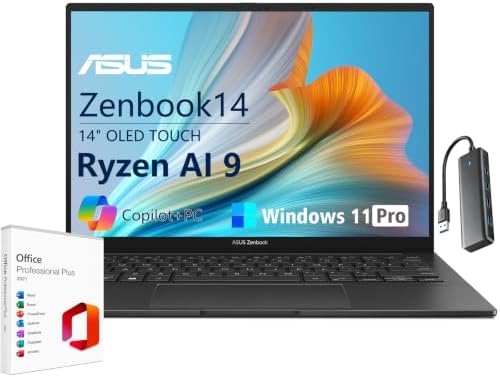
- AI-POWERED PERFORMANCE: The ASUS Zenbook 14 OLED Laptop is powered by the AMD Ryzen AI 9 465 processor with 10 cores, 20…
- STUNNING 14″ OLED TOUCH DISPLAY: The ASUS Zenbook 14 delivers crisp 1920 x 1200 WUXGA visuals on a 16:10 OLED touchscree…
- MEMORY & FAST STORAGE: With 16GB LPDDR5X memory at 7500MHz, enjoy smooth multitasking across browsing, editing and every…
Key Features
- 14-inch OLED display
- Intel/AMD processor options
- 16GB+ RAM configurations
- Fast SSD
- USB-C
- HDMI
- Wi-Fi
- Lightweight design
Why Buy?
The OLED screen provides excellent contrast and sharp text, which can make long coding sessions more comfortable.
It is also compact enough for students and developers who work from multiple locations.
Best for: Students, web developers, freelancers, and general programmers.
Rating: 9.4/10
6. HP Spectre x360 — Best 2-in-1 Programming Laptop
The HP Spectre x360 is a versatile option for developers who also want a touchscreen convertible laptop.
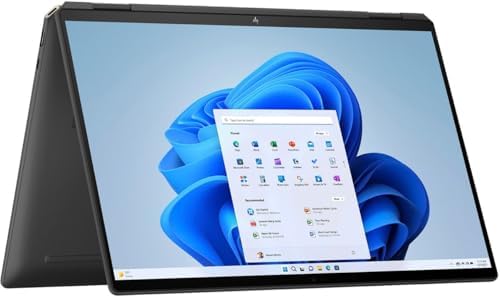
- Powerful Intel Evo Ultra 7 155H 16-Core (Base Clock 2.4GHz, Up to 4.8 GHz with Intel Turbo Boost Technology, 24 MB Intel…
- [[ Customization ]] Upgraded to 16GB DDR5 SDRAM 4800 MHz | 1TB NVMe M.2 Solid State Drive | Windows 11 Pro
- Brilliant 16″ WQXGA (2560 x 1600) IPS Touchscreen 400 nits, edge-toedge glass, micro-edge, Corning Gorilla Glass NBT, Lo…
Key Features
- 14-inch display
- OLED options
- 360-degree hinge
- Touchscreen
- Intel Core Ultra
- USB-C/Thunderbolt
- Premium build
- Stylus support on select configurations
Why Buy?
The 2-in-1 design makes the laptop useful beyond programming.
You can use it for:
- Coding
- Note-taking
- Presentations
- Reading
- Media consumption
- Digital sketches
Best for: Students and developers who want a flexible laptop.
Rating: 9.3/10
7. Lenovo Legion Pro 5 — Best for Heavy Development
A gaming laptop can be an excellent development workstation, and the Lenovo Legion Pro 5 is a strong example.

- Ultra Power and Performance – The Lenovo Legion Pro 5 Gen 10 is designed for gamers seeking high performance and immersi…
- Stunning Visuals – exceptional speed and display quality with vibrant 16.0″ IPS WQXGA (2560×1600) 240Hz Display; 500nits…
- Smooth Gameplay and Expanded Connectivity – 16GB DDR5 SODIMM RAM, 1TB 2242 PCIe NVMe SSD, 802.11be, Bluetooth 5.4, HDMI,…
Key Features
- 16-inch display
- Powerful processor options
- NVIDIA GeForce RTX graphics
- 16GB–32GB+ RAM configurations
- Fast SSD
- Advanced cooling
- USB-C
- HDMI
- Ethernet
Why Buy?
Developers working with:
- Android Studio
- Unreal Engine
- Unity
- AI development
- Machine learning
- 3D applications
- Virtual machines
can benefit from powerful hardware.
The downside is its larger size and weight compared with ultrabooks.
Best for: Game developers, AI developers, engineers, and power users.
Rating: 9.4/10
8. Framework Laptop — Best for Upgradeability
The Framework Laptop is particularly interesting for programmers who value repairability and hardware flexibility.

- 【Ryzen 7 7735HS vs Common Mainstream CPUs】Powered by AMD Ryzen 7 7735HS, this 15.6 inch laptop is positioned above commo…
- 【Radeon 680M for Work and Light Creation】AMD Radeon 680M integrated graphics based on RDNA 2 gives you smoother visual p…
- 【16GB DDR5 5600MHz and 512GB PCIe 4.0 SSD】With 16GB DDR5 5600MHz memory and a 512GB PCIe 4.0 SSD, this laptop is built t…
Key Features
- Modular design
- Replaceable components
- Upgradeable memory on supported configurations
- Replaceable SSD
- Modular ports
- Multiple screen-size options
- Linux-friendly configurations
Why Buy?
Instead of replacing an entire laptop when your requirements change, modular designs can allow you to upgrade individual components.
This can be particularly appealing to technically minded users.
Best for: Developers, Linux users, engineers, and hardware enthusiasts.
Rating: 9.5/10
9. Microsoft Surface Laptop — Best Battery-Focused Programming Laptop
The Microsoft Surface Laptop is designed for users who want a clean, portable Windows experience.

- Brilliant Display – Immersive Brilliance or Incredible image quality – The 13″ PixelSense Flow touchscreen offers a vibr…
- All-day Energy – Up to 23 hours of battery life[1] for local video playback for uninterrupted streaming.
- Power up – Built with the latest Qualcomm Snapdragon X Plus (8 Core) processors, Surface Laptop delivers powerful perfor…
Key Features
- 13.8-inch or 15-inch options
- Snapdragon X or Intel configurations
- Touchscreen
- USB-C
- USB-A
- Long battery-life potential
- Premium keyboard
- Lightweight design
Why Buy?
It’s particularly useful for developers who prioritize portability and battery life.
However, if you use specialized developer tools, libraries, drivers, or virtualization software, check ARM compatibility before choosing a Snapdragon configuration.
Best for: Web developers, students, and mobile Windows developers.
Rating: 9.3/10
10. Acer Aspire 5 — Best Budget Laptop for Programming
The Acer Aspire 5 is an affordable option for beginners and students.

- 【Unleash Powerful Performance】Elevate your experience with the Acer Aspire 5 Laptop featuring an Intel Core i5-13420H pr…
- 【15.6″ Touchscreen FHD IPS Display】 15.6″ FHD IPS (1920×1080) Anti Glare Display with 85% screen-to-body ratio, 16:9 asp…
- 【8GB LPDDR5 RAM + 512GB PCIe SSD Storage】16GB high-bandwidth LPDDR5 RAM to smoothly run multiple applications and browse…
Key Features
- 15.6-inch display
- Intel or AMD processor options
- SSD storage
- 8GB–16GB RAM configurations
- USB-C
- HDMI
- Multiple USB ports
- Wi-Fi
Why Buy?
It can handle basic programming tasks such as:
- HTML/CSS
- JavaScript
- Python
- C
- C++
- Java
- SQL
- Web development
For serious development, choose a configuration with 16GB RAM and a 512GB SSD if available.
Best for: Students, beginners, and budget-conscious programmers.
Rating: 9.0/10
What Makes a Good Programming Laptop?
The best programming laptop should provide a comfortable development environment.
Prioritize:
- Processor
- RAM
- SSD
- Keyboard
- Display
- Battery
- Connectivity
- Operating system
- Upgradeability
- Portability
The ideal specification depends heavily on your development workload.
How Much RAM Does a Programmer Need?
8GB RAM
Suitable for:
- Basic coding
- HTML/CSS
- Simple Python projects
- Learning programming
However, 8GB can become restrictive when using modern IDEs and many browser tabs.
16GB RAM
The recommended choice for most programmers.
It’s suitable for:
- VS Code
- JetBrains IDEs
- Web development
- Python
- Java
- Databases
- Docker
- Multiple applications
32GB RAM
Recommended for:
- Android Studio
- Docker-heavy workflows
- Virtual machines
- Game development
- AI development
- Large projects
64GB+
Useful for specialized workloads involving multiple virtual machines, large datasets, or professional development environments.
How Much SSD Storage Do Programmers Need?
256GB
Acceptable for beginners, but storage can become limited quickly.
512GB
The recommended starting point for most developers.
1TB
Better for developers who use:
- Docker images
- Virtual machines
- Android Studio
- Game engines
- Large repositories
- Databases
What Processor Is Best for Programming?
Programming generally benefits from a combination of single-core responsiveness and multi-core performance.
Look for recent:
- Intel Core/Core Ultra
- AMD Ryzen
- Apple silicon
- Snapdragon X for compatible Windows workloads
For basic web development, you don’t need a flagship processor.
For compiling large projects, virtualization, game development, and AI workloads, additional CPU performance can be valuable.
Is a Dedicated GPU Necessary for Programming?
Usually, no.
Most developers can use integrated graphics.
A dedicated GPU becomes important for:
- Game development
- 3D development
- Machine learning
- AI development
- CUDA workloads
- GPU computing
- Video editing
For general web, backend, mobile, and software development, investing in more RAM and storage may be more useful than buying a powerful GPU.
Best Laptop for Web Development
Web developers should prioritize:
- 16GB RAM
- 512GB SSD
- Modern CPU
- Good keyboard
- High-resolution display
- Excellent battery life
The MacBook Air 15, ThinkPad X1 Carbon, ASUS Zenbook 14 OLED, and MacBook Pro 14 are excellent choices.
Best Laptop for Software Engineering
Software engineers working on large codebases should consider:
- 16–32GB RAM
- 512GB–1TB SSD
- Powerful multi-core processor
- Comfortable keyboard
- Good display
- Reliable connectivity
The MacBook Pro 14, ThinkPad X1 Carbon, and Dell XPS 14 are strong choices.
Best Laptop for AI and Machine Learning
AI development is different from conventional programming.
If you’re running models locally, consider:
- Dedicated NVIDIA GPU
- High VRAM capacity
- 32GB+ RAM
- 1TB+ SSD
- Powerful CPU
- Good cooling
The Lenovo Legion Pro 5 and similar high-performance RTX laptops can be useful for local AI development.
Cloud GPU services may be more practical for very large models.
Best Laptop for Game Development
Game developers should prioritize:
- Powerful CPU
- Dedicated GPU
- 16–32GB RAM
- 1TB SSD
- High-resolution display
- Good cooling
A laptop such as the Lenovo Legion Pro 5 can provide significantly more graphics performance than an ultrabook.
Best Laptop for Android Development
Android Studio can be demanding, particularly when using emulators.
We recommend:
- 16GB RAM minimum
- 32GB for heavy workloads
- 512GB+ SSD
- Modern multi-core CPU
- Good cooling
A 16-inch Windows laptop or MacBook Pro can provide a comfortable development environment.
macOS vs Windows for Programming
| Feature | macOS | Windows |
|---|---|---|
| Web development | Excellent | Excellent |
| iOS development | Required | No |
| Android development | Excellent | Excellent |
| Gaming development | Good | Excellent |
| Linux compatibility | Unix-based | WSL/Linux options |
| Hardware choice | Limited | Excellent |
| NVIDIA CUDA | No | Yes |
| Battery efficiency | Excellent | Varies |
| Business laptops | Excellent | Excellent |
If you plan to develop iOS or macOS applications, you need a Mac.
Windows is more flexible for gaming, NVIDIA CUDA, and hardware variety.
Linux Programming Laptops
Developers who prefer Linux should consider hardware with strong Linux support.
The ThinkPad family and Framework Laptop are particularly attractive because of their compatibility and developer-oriented communities.
Before installing Linux, check compatibility for:
- Wi-Fi
- Bluetooth
- Touchpad
- Webcam
- Fingerprint reader
- GPU
- Suspend/resume
Best Programming Laptop by Use Case
| Use Case | Best Laptop | Key Feature |
|---|---|---|
| Best overall | MacBook Pro 14 | Performance + battery |
| Best portable | MacBook Air 15 | Lightweight design |
| Best business | ThinkPad X1 Carbon | Excellent keyboard |
| Best Windows | Dell XPS 14 | Premium performance |
| Best value | ASUS Zenbook 14 OLED | OLED + portability |
| Best 2-in-1 | HP Spectre x360 | Convertible design |
| Best heavy development | Lenovo Legion Pro 5 | Powerful hardware |
| Best upgradeability | Framework Laptop | Modular components |
| Best battery-focused Windows | Surface Laptop | Efficient platform |
| Best budget | Acer Aspire 5 | Affordable performance |
Keyboard and Display Matter More Than You Think
Programmers spend many hours staring at code and typing.
A good keyboard should have:
- Comfortable key travel
- Good feedback
- Reliable layout
- Backlighting
- Full-size arrow keys
For the display, prioritize:
- 14–16-inch size
- High resolution
- Good brightness
- Sharp text
- Comfortable viewing
A 16:10 display is particularly useful because it provides more vertical space for code.
Ports and Connectivity
Developers often connect:
- External monitors
- SSDs
- Ethernet adapters
- USB devices
- Smartphones
- Development boards
Look for:
- USB-C
- Thunderbolt/USB4
- USB-A
- HDMI
- Headphone jack
A good dock can also turn a portable laptop into a full desktop workstation.
Pros and Cons of Programming Laptops
Pros
- Portable development environment
- Powerful modern CPUs
- Excellent SSD performance
- Long battery-life options
- High-resolution displays
- External-monitor support
- Suitable for multiple programming languages
- Can run development servers locally
Cons
- Premium models can be expensive
- RAM may not be upgradeable
- Some ARM Windows software may have compatibility limitations
- Gaming laptops can be heavy
- Battery life varies significantly
How to Choose the Best Programming Laptop
For beginners: 8GB–16GB RAM + 512GB SSD.
For web development: 16GB RAM + 512GB SSD.
For professional development: 16–32GB RAM + 1TB SSD.
For Docker and VMs: 32GB RAM is recommended.
For game development: Dedicated RTX GPU + 32GB RAM when possible.
For AI development: NVIDIA RTX GPU + high VRAM + 32GB RAM.
For iOS development: MacBook.
For Linux: Consider ThinkPad or Framework hardware.
For travel: 13–14-inch laptop.
For multitasking: 15–16-inch display.
Final Verdict
The MacBook Pro 14 is our overall pick for the best laptop for programming in 2026. It offers a powerful processor, excellent battery efficiency, a high-quality display, fast storage, and a Unix-based development environment that works particularly well for many software-development workflows.
For Windows developers, the Dell XPS 14 is an excellent premium choice, while the Lenovo ThinkPad X1 Carbon remains one of the best options for programmers who prioritize keyboard quality and business reliability.
The MacBook Air 15 is ideal for students and developers who value portability and battery life. The ASUS Zenbook 14 OLED offers an attractive balance between price, portability, and display quality.
For developers working with AI, game engines, 3D applications, or GPU-intensive workloads, the Lenovo Legion Pro 5 offers substantially more graphics power.
For users who want hardware they can repair and upgrade, the Framework Laptop is one of the most interesting choices.
For most programmers, the sweet spot is 16GB RAM, a 512GB or 1TB SSD, a modern processor, a 14–16-inch high-resolution display, and a comfortable keyboard. If you regularly use virtual machines, Docker containers, Android emulators, or large development environments, stepping up to 32GB RAM can be worthwhile.
Frequently Asked Questions
What is the best laptop for programming in 2026?
The MacBook Pro 14 is our overall choice because it combines strong performance, battery life, portability, and a developer-friendly operating environment.
Is 16GB RAM enough for programming?
Yes. 16GB is enough for most programmers, including web development, Python, Java, JavaScript, C++, and general software engineering. Heavy Docker, VM, and Android workloads may benefit from 32GB.
Is 8GB RAM enough for coding?
8GB can work for basic programming and learning, but 16GB is a much better choice for a new laptop because modern development environments can consume significant memory.
Is MacBook good for programming?
Yes. MacBooks are excellent for programming, particularly web development, software engineering, Unix-based workflows, and Apple-platform development.
Do programmers need a dedicated GPU?
Usually not. Integrated graphics are sufficient for most programming. A dedicated GPU becomes important for AI, machine learning, game development, 3D development, and GPU computing.
What is the best laptop for web development?
The MacBook Air 15, MacBook Pro 14, ThinkPad X1 Carbon, and ASUS Zenbook 14 OLED are strong options for web developers.
What laptop is best for AI programming?
For local AI and machine learning, choose a Windows laptop with a capable NVIDIA RTX GPU, sufficient VRAM, 32GB RAM, and fast SSD storage.
Is 512GB SSD enough for programming?
Yes, 512GB is enough for many developers. Developers using Docker, virtual machines, Android Studio, game engines, or large databases should consider 1TB or more.
Is a gaming laptop good for programming?
Yes. Gaming laptops often provide powerful CPUs, dedicated GPUs, substantial cooling, and upgradeable components. They’re particularly useful for game development and AI workloads.
What laptop is best for software engineering?
The MacBook Pro 14, ThinkPad X1 Carbon, and Dell XPS 14 are excellent choices for professional software engineering.
Is Windows or Mac better for programming?
Neither is universally better. macOS is excellent for Unix-based development and required for Apple’s development tools, while Windows offers broader hardware choices, gaming support, and NVIDIA CUDA capabilities.
What specifications should I look for in a programming laptop?
For most developers, look for 16GB RAM, 512GB–1TB SSD storage, a modern multi-core processor, a high-resolution 14–16-inch display, a comfortable keyboard, strong battery life, and USB-C connectivity.