If you click on the links and make a purchase, we may earn a commission.
The best NAS storage devices provide a convenient way to store, organize, protect, and access files across multiple computers and devices. Unlike a standard external hard drive, a NAS—or Network Attached Storage—connects to your network and can serve as a centralized storage hub for your home or business.
Table of Contents

Image Credit: Pexels
A modern NAS can do much more than store files. Depending on the model and software ecosystem, it can support automatic backups, media streaming, remote file access, cloud synchronization, surveillance cameras, virtual machines, Docker containers, photo management, and private cloud services.
The right NAS depends on your storage requirements, number of users, desired performance, drive configuration, and technical experience. A two-bay NAS may be ideal for home users, while businesses and enthusiasts may benefit from four-, six-, or eight-bay systems.
In this guide, we’ve compared the best NAS storage devices in 2026 for home users, businesses, media servers, backups, photographers, content creators, and advanced users.
Quick Comparison: Best NAS Storage Devices
| NAS Storage Device | Best For | Key Feature | Drive Bays | Network | Rating |
|---|---|---|---|---|---|
| Synology DiskStation DS224+ | Best Overall | Easy-to-use NAS software | 2 | 1GbE | 9.6/10 |
| Synology DiskStation DS923+ | Best for Home Office | Expandable storage | 4 | 1GbE* | 9.5/10 |
| Synology DS1522+ | Best 5-Bay NAS | Flexible expansion | 5 | Multi-Gig/1GbE* | 9.4/10 |
| QNAP TS-464 | Best Performance | Strong hardware & connectivity | 4 | 2.5GbE | 9.6/10 |
| QNAP TS-233 | Best Budget NAS | Affordable two-bay design | 2 | 1GbE | 9.1/10 |
| ASUSTOR Lockerstor 4 Gen2 | Best for Power Users | Multi-Gig networking | 4 | 2.5GbE* | 9.3/10 |
| TerraMaster F4-424 | Best Value | Powerful hardware for the price | 4 | 2.5GbE | 9.2/10 |
| UGREEN NASync Series | Best Modern Hardware | High-performance configurations | Varies | Multi-Gig* | 9.2/10 |
Specifications vary by exact model and configuration.
1. Synology DiskStation DS224+: Best NAS Overall
The Synology DS224+ is our top choice for most home users and small offices because it combines straightforward setup, reliable hardware, and an excellent software ecosystem.
Its two drive bays provide a simple entry point into NAS storage while allowing users to configure redundant storage using compatible drives.

- Celeron J4125 4-Core 2.0GHz CPU, Up To 2.7GHz Turbo; 6GB DDR4 non-ECC SODIMM Memory; 8TB (2 x 4TB) 6Gb/s SATA HDDs for H…
- Consolidate and Safeguard: Integrated security features ensure centralized access and protect all your data, offering a …
- Comprehensive Data Management: Manage and share various types of data, including files, photos, and surveillance videos,…
Key Features
- 2 drive bays
- Synology DiskStation Manager
- Automatic backup tools
- File synchronization
- Remote access
- Media management
- Photo management
- RAID support
- 1GbE networking
- Compact desktop design
The biggest advantage of Synology is its software experience. Even users who aren’t NAS experts can generally navigate its operating system more easily than some competing platforms.
Best For
Home users, families, small offices, photographers, backups, and personal cloud storage.
Our Rating: 9.6/10
2. Synology DiskStation DS923+: Best NAS for Home Offices
The DS923+ is a more expandable solution for users who need additional drive bays and greater storage flexibility.

- Secure private cloud – Safely access and share files and media from anywhere, and keep friends, partners, or collaborato…
- Comprehensive data protection – Back up your media and documents to multiple destinations, and leverage snapshots to pro…
- Versatile video surveillance – Protect your home or business with intuitive monitoring, archiving, and analysis tools fo…
Key Features
- 4 drive bays
- Expandable storage
- Synology DSM
- RAID support
- NVMe SSD support
- Remote access
- Backup applications
- File synchronization
- Virtualization features
- Optional networking upgrades
With four bays, you have considerably more flexibility for redundancy and storage capacity compared with a basic two-bay NAS.
Best For
Home offices, small businesses, photographers, professionals, and growing storage libraries.
Our Rating: 9.5/10
3. Synology DS1522+: Best 5-Bay NAS
The Synology DS1522+ is designed for users who want more storage capacity and expansion options without moving to a large enterprise rack system.

- Flexible 5-bay storage you can grow – Expand capacity with the DX525 expansion unit (sold separately) to build up to 300…
- Fast out of the box – Integrated 2.5 GbE delivers excellent network performance immediately; optional 10 GbE networking …
- All-in-one data platform with DSM – DiskStation Manager (DSM) provides file sharing, sync, backup, media management, pri…
Key Features
- 5 drive bays
- RAID support
- Expandable storage
- Multiple network ports
- Synology DSM
- Backup tools
- File synchronization
- Virtualization support
- NVMe cache support
- Optional faster networking
Five bays give users more flexibility when balancing storage capacity, redundancy, and future expansion.
Best For
Small businesses, content creators, home labs, advanced users, and large media libraries.
Our Rating: 9.4/10
4. QNAP TS-464: Best Performance NAS
The QNAP TS-464 is an excellent choice for users who want strong hardware and faster network connectivity.

- Your Personal Cloud: QTS makes it simple to back up, access, and share photos, videos, and data from any phone or comput…
- Effortless Multimedia: Intel UHD Graphics hardware-transcodes video so you can stream movies and music smoothly to your …
- Snappy Everyday Speed: built-in 2.5GbE plus dual M.2 PCIe SSD slots for caching and Qtier auto-tiering keep transfers an…
Key Features
- 4 drive bays
- 2.5GbE networking
- Intel-based processor
- M.2 NVMe support
- HDMI output
- QNAP operating system
- RAID support
- Container support
- Virtualization capabilities
- Media server functionality
The inclusion of 2.5GbE makes it particularly attractive for users with a compatible high-speed network.
Best For
Power users, media servers, small businesses, virtualization, and high-speed file transfers.
Our Rating: 9.6/10
5. QNAP TS-233: Best Budget NAS
The QNAP TS-233 offers an affordable way to enter the NAS market.
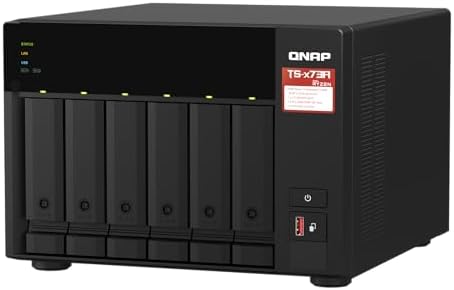
- Both 2.5GbE ports are backwards compatible with 1GbE/ 100MbE speeds. Up to 5 Gbps transfer speeds can be achieved by usi…
- Add extra functionality with PCIe cards, including 10GbE ports, SSD caching, extra USB 3.2 Gen 2 ports, wireless network…
- Supports entry-level NVIDIA graphics cards for video processing or GPU-passthrough to VMs.
Key Features
- 2 drive bays
- Compact design
- RAID support
- QNAP software
- Backup functionality
- Remote access
- Media applications
- Private cloud capabilities
It may not offer the performance of higher-end NAS systems, but it’s well suited to basic storage and backup tasks.
Best For
First-time NAS buyers, families, home users, and basic backup requirements.
Our Rating: 9.1/10
6. ASUSTOR Lockerstor 4 Gen2: Best for Power Users
ASUSTOR’s Lockerstor series targets users who want high-performance hardware and multi-Gigabit networking.
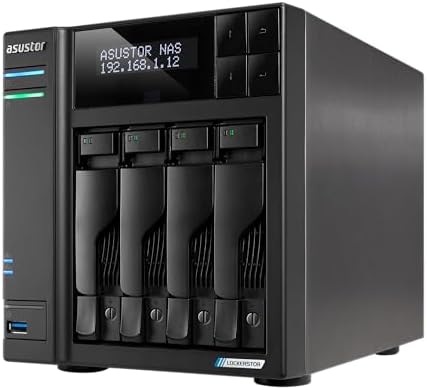
- [Intel Quad-Core Efficient Processing Power] Powered by Intel Celeron N5105 quad-core CPU for smooth multitasking, file …
- [Hybrid Storage NAS for Performance & Flexibility] Supports both SATA HDD/SSD and NVMe SSD cache, delivering a flexible …
- [Dual 5GbE High-Speed Network Connectivity] Equipped with dual 5-Gigabit Ethernet ports, delivering significantly faster…
Key Features
- 4 drive bays
- Multi-Gig networking on selected models
- M.2 NVMe support
- RAID support
- ASUSTOR operating system
- Media server applications
- Backup tools
- Surveillance support
- Container support
Its combination of hardware and connectivity makes it suitable for demanding home labs and professional users.
Best For
Power users, content creators, home labs, media servers, and advanced storage setups.
Our Rating: 9.3/10
7. TerraMaster F4-424: Best NAS Value
The TerraMaster F4-424 offers a compelling combination of modern hardware, four drive bays, and fast networking.

- Peak Performance 4-Bay NAS: Unleash the power of the F4-424 Pro NAS storage, featuring a Core i3-N305 8-core 8-thread CP…
- Enhanced Application Speed: The F4-424 Pro NAS enclosure, equipped with a robust CPU and DDR5 memory, achieves a remarka…
- High-Speed Connectivity: The F4-424 Pro NAS case features dual 2.5 GbE interfaces and can achieve a linear data transmis…
Key Features
- 4 drive bays
- 2.5GbE networking
- NVMe SSD support
- RAID functionality
- Modern processor
- Backup applications
- Multimedia capabilities
- Compact desktop design
It’s worth considering if you want more hardware performance without paying premium prices.
Best For
Home labs, media storage, small businesses, and value-focused buyers.
Our Rating: 9.2/10
8. UGREEN NASync Series: Best Modern NAS Hardware
The UGREEN NASync family brings modern processors, high-speed connectivity, and multiple drive configurations to the NAS market.

- Entry-level NAS Personal Storage:UGREEN NAS DH2300 is your first and best NAS made easy. It is designed for beginners wh…
- Set Your Devices Free, Expand Your Digital World: This unified storage hub supports massive capacity up to 64TB.*Storage…
- The Smarter Long-term Way to Store: Unlike cloud storage with recurring monthly fees, a UGREEN NAS enclosure requires on…
Key Features
- Multiple drive-bay options
- High-speed networking on selected models
- NVMe SSD support
- Modern processors
- RAID support
- Backup functionality
- Media applications
- Private cloud features
- Modern hardware design
UGREEN is particularly interesting for users who want modern connectivity and high-performance hardware.
Best For
Power users, content creators, home offices, media libraries, and high-speed storage environments.
Our Rating: 9.2/10
What Is a NAS?
A Network Attached Storage (NAS) device is a dedicated computer connected to your network that provides centralized storage.
Instead of plugging an external hard drive into one computer, a NAS can allow multiple authorized devices to access files through your local network.
You can use a NAS for:
- File storage
- Computer backups
- Photo libraries
- Video storage
- Media streaming
- Cloud synchronization
- Remote access
- Surveillance
- Home labs
Why Buy a NAS?
A NAS can provide several advantages over traditional external storage.
Centralized Storage
All your files can be stored in one location.
Automatic Backups
A NAS can automatically back up computers and mobile devices depending on its software.
Multiple Users
Family members or employees can access shared folders with individual permissions.
Private Cloud
You can access selected files remotely without relying entirely on third-party cloud storage.
Expandable Storage
Multi-bay systems can accommodate several drives and larger capacities.
How Many Drive Bays Do You Need?
The number of bays is one of the most important NAS purchasing decisions.
| NAS Bays | Best For |
|---|---|
| 1 | Basic network storage |
| 2 | Home users & backups |
| 4 | Home offices & small businesses |
| 5–6 | Advanced users |
| 8+ | Businesses & large storage environments |
A two-bay NAS is an excellent starting point for many households.
A four-bay NAS offers considerably more flexibility for capacity and redundancy.
What Is RAID?
RAID allows multiple drives to work together in different configurations.
Common configurations include:
RAID 0
Focuses on performance and combines drive capacity, but provides no redundancy.
RAID 1
Mirrors data between two drives, providing redundancy.
RAID 5
Uses distributed parity and requires multiple drives.
RAID 6
Provides additional redundancy compared with RAID 5.
RAID 10
Combines mirroring and striping for performance and redundancy.
Remember that RAID is not a backup. A NAS should still have a separate backup of important data.
Compare NAS HDD vs. SSD
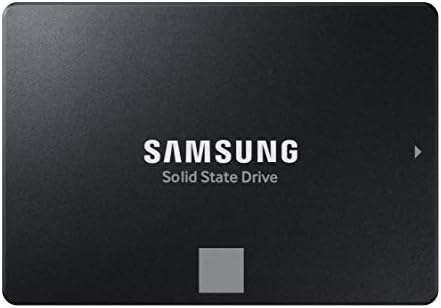
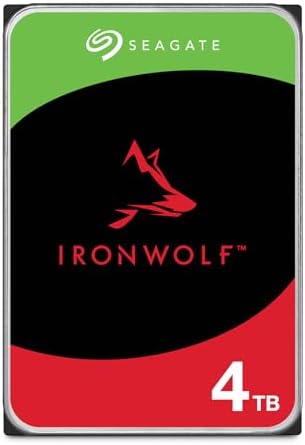


| Feature | NAS HDD | NAS SSD |
|---|---|---|
| Cost per TB | Lower | Higher |
| Capacity | Very high | High |
| Sequential storage | Good | Excellent |
| Random performance | Lower | Much higher |
| Noise | Higher | Very low |
| Power use | Higher | Lower |
| Best for | Large storage | Performance |
For large media libraries and backups, NAS hard drives generally offer better value.
SSDs make more sense when you need high random performance, low latency, or intensive workloads.
What Should You Look for in a NAS?
1. Drive Bays
Choose a system with enough bays for both current storage and future growth.
2. Networking
A basic 1GbE connection is adequate for many home users.
A 2.5GbE or faster connection can significantly improve file transfer performance when your computers and network infrastructure support it.
3. CPU and RAM
More powerful processors and additional RAM can help with:
- Multiple users
- Containers
- Virtual machines
- Media processing
- Large file transfers
- Advanced applications
4. NVMe Support
Some NAS systems include M.2 slots for SSD caching or storage.
This can improve certain workloads, but SSD caching isn’t automatically beneficial for every NAS setup.
5. Software
The NAS operating system is extremely important.
Look for:
- Easy setup
- Backup applications
- File synchronization
- Remote access
- User management
- Mobile apps
- Security updates
- Container support
Best NAS Storage Device by Use Case
| Use Case | Recommended |
|---|---|
| Best overall | Synology DS224+ |
| Best home office | Synology DS923+ |
| Best 5-bay | Synology DS1522+ |
| Best performance | QNAP TS-464 |
| Best budget | QNAP TS-233 |
| Best power user | ASUSTOR Lockerstor |
| Best value | TerraMaster F4-424 |
| Best modern hardware | UGREEN NASync |
| Best for backups | Synology |
| Best media server | QNAP |
| Best home lab | QNAP/ASUSTOR |
| Best small business | Synology/QNAP |
| Best private cloud | Synology |
NAS for Photo and Video Storage
Photographers and video creators can benefit significantly from centralized NAS storage.
A NAS can store:
- RAW photographs
- 4K video
- Project files
- Lightroom libraries
- Archived footage
- Finished projects
However, video editors working directly from a NAS should consider network speed.
A 1GbE connection can become a bottleneck when working with very large video files.
For demanding workflows, 2.5GbE, 5GbE, 10GbE, or faster networking may be more appropriate.
NAS for Home Backup
One of the best uses for a NAS is automated backup.
You can configure it to back up:
- Windows PCs
- Macs
- Smartphones
- Photos
- Documents
- Work files
A good strategy is to automate backups rather than relying on manually copying files.
For critical information, maintain an additional backup outside the NAS.
NAS Security Tips
Because a NAS is connected to your network, security should be a priority.
Use:
- Strong unique passwords
- Multi-factor authentication where available
- Regular firmware updates
- Limited user permissions
- Secure remote-access methods
- Firewall protection
- Separate accounts for users
- Regular backups
Avoid exposing unnecessary NAS services directly to the public internet.
Final Verdict
The Synology DS224+ is our best overall NAS storage device for most home users because it combines straightforward software, useful backup features, reliable hardware, and a mature application ecosystem.
For users who need more capacity and expansion, the Synology DS923+ and DS1522+ provide additional drive bays and greater flexibility. The QNAP TS-464 is a strong performance-focused alternative, particularly for users with a 2.5GbE network.
Budget buyers can consider the QNAP TS-233, while power users may prefer the ASUSTOR Lockerstor 4 Gen2 or TerraMaster F4-424.
Before buying, determine how much storage you need, how many users will access the NAS, whether you need RAID, what network speed you have, and which applications you plan to run.
For most households, a two-bay NAS with 1GbE networking is an excellent starting point. For small businesses, creators, and advanced users, a four-bay or larger NAS with 2.5GbE or faster networking provides more room for growth.
Most importantly, remember that RAID is not a backup. A NAS can protect against certain drive failures, but important data should also exist in a separate backup location.
Frequently Asked Questions
What is the best NAS storage device in 2026?
The Synology DS224+ is our best overall choice for home users because of its user-friendly software, backup features, and reliable two-bay design.
How many NAS bays do I need?
Two bays are sufficient for many home users. Choose four or more bays if you need greater capacity, more RAID options, or future expansion.
Is NAS better than an external hard drive?
A NAS is better for centralized storage, automatic backups, multiple users, remote access, and network sharing. An external hard drive is simpler and usually cheaper for basic local storage.
Is RAID the same as backup?
No. RAID can provide redundancy against certain drive failures, but it does not protect against accidental deletion, malware, theft, fire, or other disasters.
Can I use SSDs in a NAS?
Yes, many NAS systems support SSDs. SSDs provide higher performance and lower latency but generally cost more per terabyte than hard drives.
What is the best NAS for home use?
The Synology DS224+ is an excellent home NAS for users who want simple setup, centralized storage, backups, and private cloud features.
Is 1GbE fast enough for NAS?
For basic backups, documents, photos, and media streaming, 1GbE can be sufficient. Users transferring large files may benefit from 2.5GbE or faster networking.
Can a NAS replace cloud storage?
A NAS can provide private cloud-style functionality, but it doesn’t completely replace the benefits of professional cloud services. A hybrid approach can provide both convenience and redundancy.
Can a NAS stream 4K video?
Many NAS devices can stream 4K video, but performance depends on the processor, codecs, network connection, storage configuration, and whether transcoding is required.
What hard drives should I use in a NAS?
Use drives specifically designed for NAS workloads from reputable manufacturers. Check compatibility with the NAS manufacturer’s supported-drive list when possible.
How much NAS storage do I need?
For basic home backup, 4TB–8TB of usable storage may be enough. Photographers, video creators, and businesses may require significantly more.
Can I access my NAS remotely?
Many NAS platforms support secure remote access. Configure remote access carefully and use strong authentication and current security updates.
Is Synology better than QNAP?
Neither is universally better. Synology is widely appreciated for its software ecosystem and ease of use, while QNAP often offers strong hardware specifications and advanced connectivity options.
What should I look for when buying a NAS?
Focus on drive bays, supported drive types, RAID options, CPU, RAM, network speed, NVMe support, backup software, remote access, security features, application support, expansion capability, and price.
Best Products
Best Smartphones for Everyday Use in 2026
Best Laptops for Students in 2026