If you click on the links and make a purchase, we may earn a commission.
The best mesh Wi-Fi systems can eliminate frustrating dead zones, improve wireless coverage, and provide a more reliable connection throughout your home. Unlike a traditional router that broadcasts from one location, a mesh Wi-Fi system uses multiple nodes to create a unified wireless network across different rooms and floors.
Table of Contents
Image Credit: Canva
Mesh Wi-Fi is particularly useful for large homes, multi-story properties, thick walls, smart homes, gaming setups, and households with many connected devices. Modern systems support Wi-Fi 6, Wi-Fi 6E, and Wi-Fi 7, along with multi-gigabit Ethernet, automatic updates, parental controls, security features, and easy smartphone-based setup.
The best mesh system isn’t necessarily the fastest or most expensive model. Your home size, internet speed, number of devices, wireless requirements, and budget should determine your choice.
In this guide, we’ve compared the best mesh Wi-Fi systems in 2026 for large homes, gaming, streaming, families, apartments, multi-gigabit internet, and easy whole-home networking.
Quick Comparison: Best Mesh Wi-Fi Systems
| Mesh Wi-Fi System | Best For | Key Feature | Wi-Fi | Ethernet | Rating |
|---|---|---|---|---|---|
| TP-Link Deco BE65 | Best Overall | Wi-Fi 7 & multi-gig connectivity | Wi-Fi 7 | 2.5GbE | 9.7/10 |
| ASUS ZenWiFi XT9 | Best Wi-Fi 6 Mesh | Strong tri-band performance | Wi-Fi 6 | 2.5GbE | 9.6/10 |
| Amazon eero Max 7 | Best Easy Wi-Fi 7 Mesh | Simple setup & management | Wi-Fi 7 | Multi-Gig | 9.5/10 |
| TP-Link Deco XE75 Pro | Best Wi-Fi 6E | 6GHz backhaul | Wi-Fi 6E | 2.5GbE | 9.4/10 |
| TP-Link Deco X55 | Best Value | Affordable whole-home Wi-Fi | Wi-Fi 6 | Gigabit | 9.3/10 |
| Amazon eero 6+ | Best Simple Value | Easy app-based setup | Wi-Fi 6 | Gigabit | 9.1/10 |
| NETGEAR Orbi 970 Series | Best Premium | High-end Wi-Fi 7 | Wi-Fi 7 | Multi-Gig | 9.7/10 |
| ASUS ZenWiFi BQ16 Pro | Best Premium Mesh | Quad-band Wi-Fi 7 | Wi-Fi 7 | Multi-Gig | 9.7/10 |
Specifications and included node counts vary by configuration and market.
1. TP-Link Deco BE65 — Best Mesh Wi-Fi System Overall
The TP-Link Deco BE65 is our top overall mesh Wi-Fi system because it combines Wi-Fi 7, multi-gigabit Ethernet, strong whole-home coverage, and a relatively straightforward setup.
It is designed for households that want modern wireless technology without the complexity of enterprise networking.

- 𝐅𝐞𝐚𝐭𝐮𝐫𝐞-𝐑𝐢𝐜𝐡 𝐖𝐢-𝐅𝐢 𝐁𝐮𝐢𝐥𝐭 𝐭𝐨 𝐋𝐚𝐬𝐭: Get expansive whole-home coverage, fast Wi-Fi 7 speeds, and a future-ready 10G WAN/LAN…
- 𝗩𝗮𝘀𝘁 𝗠𝗲𝘀𝗵 𝗖𝗼𝘃𝗲𝗿𝗮𝗴𝗲 & 𝗗𝗲𝘃𝗶𝗰𝗲 𝗖𝗮𝗽𝗮𝗰𝗶𝘁𝘆: The mesh router covers up to a vast 3,000 sq.ft. and supports over 200 devices wit…
- 𝐁𝐄𝟏𝟎𝟎𝟎𝟎 𝐓𝐫𝐢-𝐁𝐚𝐧𝐝 𝐖𝐢-𝐅𝐢 𝟕 𝐒𝐩𝐞𝐞𝐝𝐬: Delivers up to 5,188 Mbps (6 GHz), 4,324 Mbps (5 GHz), and 574 Mbps (2.4 GHz) speeds fo…
Key Features
- Wi-Fi 7
- Tri-band design
- 6GHz support
- Multi-Link Operation
- 320MHz channels where supported
- Multiple 2.5GbE ports
- Mesh networking
- HomeShield security
- Mobile app management
- Expandable Deco ecosystem
The system is particularly attractive for homes with multiple Wi-Fi 7 devices and high-speed internet.
Best For
Large homes, families, smart homes, gaming, 4K streaming, and multi-gigabit internet.
Our Rating: 9.7/10
2. ASUS ZenWiFi XT9 — Best Wi-Fi 6 Mesh System
The ASUS ZenWiFi XT9 remains an excellent option for users who don’t necessarily need Wi-Fi 7.
Its tri-band design provides strong performance and can be particularly useful when multiple nodes communicate with each other.

- Powerful WiFi 7 mesh future-proofs your smart home with blazing-fast quad-band connectivity up to 30000 Mbps with Multi-…
- Ultimate AiMesh powered by AI delivers robust backhaul connections and seamless connectivity for all devices, covering u…
- Easily establish up to three SSIDs with Smart Home Master for simple IoT device setup and management, instant VPN connec…
Key Features
- Wi-Fi 6
- Tri-band connectivity
- 2.5GbE
- AiMesh support
- Strong whole-home coverage
- Dedicated backhaul options
- WPA3 security
- VPN support
- Parental controls
- AiProtection
Best For
Large homes, multi-story properties, gaming, streaming, and users wanting advanced configuration.
Our Rating: 9.6/10
3. Amazon eero Max 7 — Best Easy Wi-Fi 7 Mesh
The eero Max 7 is designed for users who want modern Wi-Fi 7 performance without complicated networking configuration.
The eero app handles much of the setup and ongoing network management.

- THE SPEED OF EERO MAX 7 – With two 10 Gigabit Ethernet ports, you can enjoy wired speeds up to 9.4 Gbps, wireless speeds…
- THE POWER OF WI-FI 7 TECHNOLOGY – Wi-Fi 7 technology can provide more than twice the speed of Wi-Fi 6, so you can enjoy …
- OUR SOFTWARE MAKES ALL THE DIFFERENCE – Our patented TrueMesh software, combined with TrueRoam and TrueChannel, proactiv…
Key Features
- Wi-Fi 7
- Tri-band
- Multi-gigabit Ethernet
- Mesh networking
- Automatic updates
- App-based setup
- Smart-home integration
- Whole-home coverage
Its simplicity makes it particularly attractive to families and users who don’t want to manually configure advanced networking settings.
Best For
Large homes, families, smart homes, streaming, and easy Wi-Fi 7 deployment.
Our Rating: 9.5/10
4. TP-Link Deco XE75 Pro — Best Wi-Fi 6E Mesh
The Deco XE75 Pro offers Wi-Fi 6E and adds access to the 6GHz band.

- WiFi 6E Tri-Band Mesh WiFi – Cover up to 7,200 Sq.Ft with next-gen seamless WiFi and make dead zones and buffering a thi…
- Brand-New 6 GHz Band – Experience the latest frequency of WiFi, eliminating interference from all legacy devices. The 6 …
- True Tri-Band Speed – All three WiFi bands work together to unleash your network’s total speeds up to 5,400 Mbps for 200…
Key Features
- Wi-Fi 6E
- Tri-band
- 6GHz wireless
- 2.5GbE
- Mesh networking
- Easy mobile setup
- HomeShield security
- Automatic network management
- Expandable Deco ecosystem
The additional 6GHz band can provide a cleaner wireless connection for compatible devices.
Best For
Modern laptops, smartphones, home offices, gaming, and users who want 6GHz without moving to Wi-Fi 7.
Our Rating: 9.4/10
5. TP-Link Deco X55 — Best Mesh Wi-Fi Value
The TP-Link Deco X55 is one of the best choices for buyers who prioritize value.
It uses Wi-Fi 6 and provides a simple way to extend wireless coverage across a larger property.
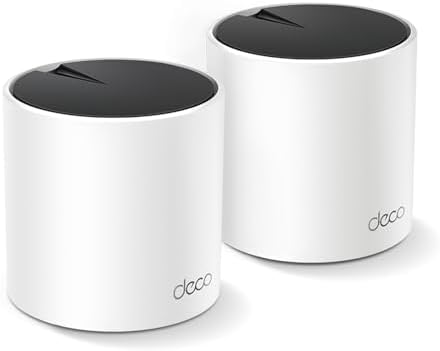
- Wi-Fi 6 Mesh Wi-Fi – Next-gen Wi-Fi 6 AX3000 whole home mesh system to eliminate weak Wi-Fi for good(2×2/HE160 2402 Mbps…
- Whole Home WiFi Coverage – Covers up to 4500 square feet with seamless high-performance Wi-Fi 6 and eliminate dead zones…
- Connect More Devices – Deco X55(2-pack) is strong enough to connect up to 150 devices with strong and reliable Wi-Fi¹
Key Features
- Wi-Fi 6
- Dual-band
- Mesh networking
- Gigabit Ethernet
- Easy setup
- WPA3
- HomeShield
- Automatic network management
- Expandable Deco ecosystem
Best For
Families, apartments, medium-sized homes, smart homes, and budget-conscious buyers.
Our Rating: 9.3/10
6. Amazon eero 6+ — Best Simple Mesh Wi-Fi System
The eero 6+ is focused on simple whole-home networking.
The app-guided setup makes it easy for non-technical users to create a mesh network.

- GIGABIT SPEEDS FOR LESS – Supports wifi speeds up to a gigabit, without the premium price tag. eero 6+ is our most affor…
- WI-FI 6 GETS A BANDWIDTH BOOST – eero 6+ supports additional wifi bandwidth on the 160 MHz radio channel (that’s just wi…
- CONNECTIVITY YOU CAN COUNT ON – eero 6+ gives you all the connectivity with all the reliability. So you can work from ho…
Key Features
- Wi-Fi 6
- Dual-band
- Gigabit Ethernet
- Mesh networking
- Automatic updates
- Simple mobile app
- Smart-home integration
- Expandable system
Best For
Apartments, families, smart homes, and users who prioritize simplicity.
Our Rating: 9.1/10
7. NETGEAR Orbi 970 Series — Best Premium Mesh Wi-Fi
The NETGEAR Orbi 970 Series is aimed at users who want premium Wi-Fi 7 performance and extensive whole-home coverage.

- Orbi 970 Series mesh router with WiFi 7 unleashes speeds up to 27Gbps for unparalleled performance and coverage for your…
- WiFi 7 delivers 2.4x faster speeds than WiFi 6 and maximizes performance across all your WiFi devices
- NETGEAR routers come with security measures built in, including automatic firmware updates. Our Advanced Router Protecti…
Key Features
- Wi-Fi 7
- Multi-band design
- Multi-gigabit Ethernet
- High wireless capacity
- Advanced security
- Orbi app
- Dedicated backhaul capabilities
- Large-area coverage
It is designed for demanding households with fast broadband and many connected devices.
Best For
Large homes, multi-gigabit internet, gaming, 4K/8K streaming, and enthusiasts.
Our Rating: 9.7/10
8. ASUS ZenWiFi BQ16 Pro — Best Premium Wi-Fi 7 Mesh
The ASUS ZenWiFi BQ16 Pro is designed for users who want premium Wi-Fi 7 mesh performance and advanced networking capabilities.
- Powerful WiFi 7 mesh future-proofs your smart home with blazing-fast quad-band connectivity up to 30000 Mbps with Multi-…
- Ultimate AiMesh powered by AI delivers robust backhaul connections and seamless connectivity for all devices, covering u…
- Easily establish up to three SSIDs with Smart Home Master for simple IoT device setup and management, instant VPN connec…
Key Features
- Wi-Fi 7
- Quad-band architecture
- Multi-gigabit Ethernet
- AiMesh
- Multi-Link Operation
- 6GHz support
- Advanced security
- VPN support
- Parental controls
- High-capacity networking
Best For
Large properties, enthusiasts, gaming, high-speed broadband, and advanced smart homes.
Our Rating: 9.7/10
What Is a Mesh Wi-Fi System?
A mesh Wi-Fi system uses multiple interconnected wireless nodes to provide network coverage across a larger area.
Instead of relying on one router, you can place nodes in different areas of your home.
For example:
Internet → Main Mesh Node → Secondary Node → Additional Node
All nodes typically operate as one network, allowing devices to move around the home without manually switching Wi-Fi networks.
Mesh Wi-Fi vs. Traditional Router
| Feature | Traditional Router | Mesh Wi-Fi |
|---|---|---|
| Coverage | Limited by location | Whole-home |
| Dead zones | More likely | Fewer |
| Expansion | Limited | Easy |
| Large homes | May struggle | Excellent |
| Multi-story homes | Can struggle | Better |
| Setup | Simple | Usually simple |
| Cost | Lower | Higher |
| Best for | Small homes | Medium/large homes |
A traditional router is usually more economical for a small apartment.
A mesh system becomes more attractive as the home becomes larger or more complicated.
Wi-Fi 6 vs. Wi-Fi 6E vs. Wi-Fi 7 Mesh
| Feature | Wi-Fi 6 | Wi-Fi 6E | Wi-Fi 7 |
|---|---|---|---|
| 2.4GHz | Yes | Yes | Yes |
| 5GHz | Yes | Yes | Yes |
| 6GHz | No | Yes | Yes |
| 320MHz | No | No | Yes |
| MLO | No | No | Yes |
| Best for | Value | Modern devices | Future-ready |
| Typical cost | Lower | Medium | Higher |
Wi-Fi 6 remains sufficient for many households, while Wi-Fi 7 provides more advanced capabilities for high-performance networks.
What Should You Look for in a Mesh Wi-Fi System?
1. Number of Nodes
The number of nodes you need depends on your home.
A typical system might include:
- 2 nodes for smaller homes
- 3 nodes for larger homes
- Additional nodes for difficult layouts
More nodes aren’t always better. Placing too many close together can create unnecessary wireless interference.
2. Backhaul
Backhaul refers to how mesh nodes communicate with each other.
It can be:
- Wireless
- Wired Ethernet
- Dedicated wireless band
A wired Ethernet backhaul can provide excellent performance because it reduces the wireless traffic required between nodes.
3. Ethernet Speed
Look for:
- Gigabit Ethernet
- 2.5GbE
- 5GbE
- 10GbE
Multi-gigabit Ethernet is especially useful if you have high-speed broadband or a NAS.
4. Tri-Band vs. Dual-Band
A dual-band system generally uses:
- 2.4GHz
- 5GHz
A tri-band system adds another band, often:
- 2.4GHz
- 5GHz
- 6GHz
An additional band can provide more capacity and may improve mesh backhaul performance.
Why Is Tri-Band Mesh Better?
Tri-band mesh systems can dedicate one wireless band to communication between nodes or distribute traffic more efficiently.
This can be especially helpful when:
- Nodes are connected wirelessly
- Many devices are active
- You have a large home
- You’re streaming high-resolution video
- Multiple users are gaming
If your budget allows, a tri-band mesh system is often preferable for larger homes.
How Many Mesh Nodes Do You Need?
| Home Type | Suggested Nodes |
|---|---|
| Small apartment | 1–2 |
| Medium home | 2 |
| Large home | 2–3 |
| Multi-story home | 3+ |
| Very large property | Depends on layout |
Don’t automatically choose the largest package.
Start with enough nodes to cover your home and add additional units only where necessary.
Where Should You Place Mesh Nodes?
Placement is critical.
Main Node
Place the primary node:
- Near the center of the home
- In an open area
- Away from cabinets
- Away from large metal objects
Secondary Node
Place it between the main node and the area with poor coverage, rather than directly inside the dead zone.
A node cannot effectively extend a weak connection if it receives a poor signal itself.
Mesh Wi-Fi for Gaming
Mesh networking can be excellent for gaming in larger homes, especially when the gaming room is far from the primary router.
Look for:
- Tri-band wireless
- Strong backhaul
- Ethernet ports
- QoS
- Low-latency performance
- Multi-gigabit Ethernet
If possible, connect a gaming PC or console to the nearest mesh node using Ethernet.
Mesh Wi-Fi for 4K Streaming
Modern mesh systems are well suited to 4K streaming.
They can provide reliable connections for:
- Smart TVs
- Streaming boxes
- Smartphones
- Tablets
- Gaming consoles
- Wireless speakers
For households with several simultaneous streams, a tri-band or Wi-Fi 7 mesh system can provide additional capacity.
Mesh Wi-Fi for Smart Homes
Smart homes can contain dozens or even hundreds of connected devices.
Examples include:
- Security cameras
- Smart lights
- Smart locks
- Thermostats
- Smart speakers
- TVs
- Appliances
- Sensors
Wi-Fi 6 and newer mesh systems are particularly useful for high-device-density environments.
Wired vs. Wireless Mesh Backhaul
| Backhaul | Advantages | Disadvantages |
|---|---|---|
| Wireless | Easy installation | Uses wireless capacity |
| Ethernet | Fast & reliable | Requires Ethernet cabling |
| Dedicated band | Good wireless performance | Usually costs more |
If your home already has Ethernet wiring, a wired backhaul can be one of the best ways to maximize mesh performance.
Best Mesh Wi-Fi System by Use Case
| Use Case | Recommended |
|---|---|
| Best overall | TP-Link Deco BE65 |
| Best Wi-Fi 6 | ASUS ZenWiFi XT9 |
| Best Wi-Fi 7 | TP-Link Deco BE65 |
| Best simple mesh | Amazon eero Max 7 |
| Best Wi-Fi 6E | TP-Link Deco XE75 Pro |
| Best value | TP-Link Deco X55 |
| Best budget-friendly simple mesh | Amazon eero 6+ |
| Best premium | NETGEAR Orbi 970 |
| Best premium ASUS mesh | ASUS ZenWiFi BQ16 Pro |
| Best for large homes | NETGEAR Orbi 970 |
| Best for gaming | ASUS ZenWiFi XT9 |
| Best for multi-gig internet | TP-Link Deco BE65 |
| Best for families | TP-Link Deco X55 |
How to Improve Mesh Wi-Fi Performance
Follow these practical tips:
- Place the main node centrally.
- Keep nodes elevated and unobstructed.
- Don’t put secondary nodes inside dead zones.
- Use Ethernet backhaul where possible.
- Keep firmware updated.
- Avoid placing nodes too close together.
- Use 5GHz or 6GHz for high-bandwidth devices when appropriate.
- Connect stationary devices to Ethernet when possible.
- Reduce wireless interference.
- Use the manufacturer’s app to monitor signal quality.
Final Verdict
The TP-Link Deco BE65 is our best overall mesh Wi-Fi system in 2026 because it combines Wi-Fi 7, multi-gigabit Ethernet, whole-home coverage, and modern networking features.
For users who don’t need Wi-Fi 7, the ASUS ZenWiFi XT9 remains an excellent Wi-Fi 6 mesh system with strong performance and advanced configuration options.
The Amazon eero Max 7 is ideal for shoppers who prioritize simple installation and automatic network management. For Wi-Fi 6E, the TP-Link Deco XE75 Pro offers access to the 6GHz band, while the TP-Link Deco X55 is an excellent value choice.
Premium buyers should consider the NETGEAR Orbi 970 Series or ASUS ZenWiFi BQ16 Pro, particularly when building a high-performance multi-gigabit network.
Before buying, consider your home size, number of floors, internet speed, number of devices, Ethernet availability, Wi-Fi generation, backhaul requirements, and budget.
If your current router provides poor coverage, upgrading to mesh can often make a bigger difference than simply buying a faster single router.
For most medium and large homes, a two- or three-node Wi-Fi 6 or Wi-Fi 7 mesh system provides an excellent balance of coverage, performance, and convenience.
Frequently Asked Questions
What is the best mesh Wi-Fi system in 2026?
The TP-Link Deco BE65 is our overall pick for its combination of Wi-Fi 7 performance, multi-gigabit Ethernet, coverage, and modern features.
Is mesh Wi-Fi better than a regular router?
Mesh Wi-Fi is better for larger homes, multi-story properties, and homes with dead zones. A traditional router can be more cost-effective for small apartments.
How many mesh Wi-Fi nodes do I need?
Most homes need two or three nodes. The exact number depends on the home’s size, construction, floor plan, and interference.
Is Wi-Fi 7 mesh worth it?
Wi-Fi 7 mesh is worth considering if you have compatible devices, multi-gigabit internet, or want a future-ready network. Wi-Fi 6 mesh can provide better value for many households.
What is the best mesh Wi-Fi for gaming?
The ASUS ZenWiFi XT9 is an excellent Wi-Fi 6 option, while Wi-Fi 7 systems such as the TP-Link Deco BE65 offer newer wireless capabilities.
Does mesh Wi-Fi reduce internet speed?
Wireless mesh nodes can experience some performance loss depending on how they communicate with the main node. Tri-band systems and wired Ethernet backhaul can help minimize this limitation.
Is wired backhaul better than wireless mesh?
Yes. Ethernet backhaul generally provides more consistent performance because mesh nodes communicate over a wired connection instead of consuming wireless bandwidth.
Can mesh Wi-Fi support 4K streaming?
Yes. Modern Wi-Fi 6, Wi-Fi 6E, and Wi-Fi 7 mesh systems can support multiple 4K streams when internet bandwidth and network coverage are sufficient.
What is the best budget mesh Wi-Fi system?
The TP-Link Deco X55 is a strong value choice for users who want Wi-Fi 6 whole-home coverage without paying premium Wi-Fi 7 prices.
What is the difference between dual-band and tri-band mesh?
Dual-band systems use 2.4GHz and 5GHz, while tri-band systems add another wireless band. Tri-band systems can provide additional capacity and better wireless backhaul performance.
Can I mix different mesh nodes?
Compatibility depends on the manufacturer’s ecosystem. It’s generally best to use compatible nodes from the same mesh platform.
Where should I place my mesh Wi-Fi nodes?
Place secondary nodes between the main router and weak-coverage areas. Avoid placing them directly inside dead zones because they need a strong connection to the network.
Does mesh Wi-Fi work with any internet provider?
Most mesh systems can work with major internet providers, but compatibility depends on your modem, gateway, and ISP configuration.
What should I look for when buying a mesh Wi-Fi system?
Focus on Wi-Fi standard, number of nodes, coverage, tri-band capability, 6GHz support, Ethernet speed, backhaul options, security features, parental controls, app quality, expandability, and price.
Best Products
Best Smartphones for Everyday Use in 2026
Best Laptops for Students in 2026