
- Home /
- How to Choose the Right Hostinger Hosting Plan
How to Choose the Right Hostinger Hosting Plan
The right Hostinger hosting plan depends on your website type, traffic, resources, technical requirements, and growth expectations.
Copy Link
OUR EXPERT

Software & Tools

Software Analyst
- Updated: Sept. 2026
Image Credit: hostinger
Pros
- User-friendly hPanel control panel
- Free SSL certificates
- WordPress-friendly tools
- LiteSpeed technology
- AI website and productivity tools
- Global data-center network
- 30-day money-back guarantee
Cons
- Renewal prices are higher than introductory rates
- Features and resources vary significantly between plans
- Some advanced features require higher-tier hosting
Choosing the right web hosting plan is one of the most important decisions when starting a website. The wrong plan can leave you paying for resources you do not need—or force you to upgrade when your website begins attracting more visitors.
Hostinger offers several hosting options designed for different types of websites, including shared hosting, WordPress hosting, cloud hosting, and VPS hosting. The best choice depends on your website type, expected traffic, technical requirements, budget, and future growth.
In this guide, we explain how to choose the right Hostinger hosting plan and what to consider before purchasing.
Affiliate Disclosure: This article may contain affiliate links. If you purchase through our links, we may earn a commission at no additional cost to you. Our recommendations are based on the information and features available at the time of publication.
Hostinger Hosting Plans at a Glance
Before choosing a plan, it helps to understand the main hosting categories.
| Hosting Type | Best For | Technical Level | Growth Potential |
|---|---|---|---|
| Shared Hosting | Blogs and small websites | Beginner | Moderate |
| WordPress Hosting | WordPress websites | Beginner–Intermediate | Moderate |
| Cloud Hosting | Growing websites | Beginner–Intermediate | High |
| VPS Hosting | Advanced websites and applications | Intermediate–Advanced | Very High |
Your first decision should be choosing the type of hosting rather than simply selecting the cheapest plan.
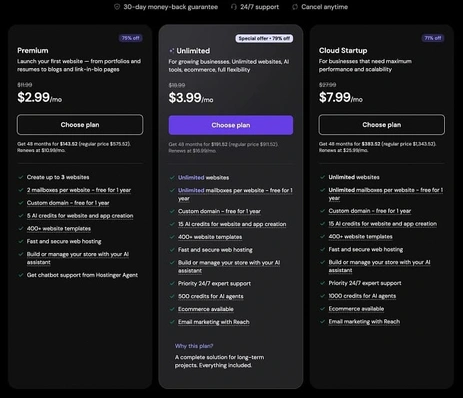
Image Credit: hostinger
1. Start by Identifying Your Website Type
The first question to ask is: What type of website are you building?
A personal blog, affiliate website, company website, online portfolio, ecommerce store, and web application can have very different hosting requirements.
For example, a simple blog may work perfectly well with shared hosting. An online store with thousands of visitors may eventually require cloud hosting or VPS resources.
Common website types include:
- Personal blogs
- Affiliate websites
- Business websites
- Portfolio websites
- News websites
- WordPress sites
- Ecommerce stores
- Online communities
- Web applications
Understanding your website’s purpose makes the next decisions much easier.
2. Consider Your Expected Traffic
Traffic is one of the most important factors when selecting hosting.
If you are launching a new website with only a few visitors per day, you probably do not need a high-resource server.
However, websites expecting significant organic search traffic, advertising traffic, or large campaigns should consider scalability.
A useful approach is to start with resources appropriate for your current traffic, while making sure the provider offers an easy upgrade path.
For example:
Low traffic: Shared hosting may be sufficient.
Growing traffic: Consider a higher-tier shared or cloud plan.
High traffic: Cloud hosting or VPS may provide more resources and control.
Do not purchase a powerful server simply because you expect your website to become popular someday. Start with a realistic requirement and upgrade when your website actually needs additional resources.
3. Choose Shared Hosting for Simple Websites
Shared hosting is generally the easiest starting point for new website owners.
With shared hosting, multiple websites operate on the same server infrastructure. This allows hosting companies to offer lower prices compared with dedicated resources.
Hostinger’s shared hosting plans can be suitable for:
- New blogs
- Small business websites
- Affiliate websites
- Personal websites
- Portfolios
- Simple WordPress websites
The main advantage is affordability and simplicity.
The limitation is that shared hosting provides fewer resources and less server-level control than VPS hosting.
For a new website, however, shared hosting can provide enough capacity to establish your website and begin attracting visitors.
4. Consider WordPress Hosting
If your website is built with WordPress, a WordPress-focused hosting plan can make management easier.
Hostinger provides WordPress tools designed to simplify tasks such as installation, updates, caching, SSL configuration, and website management.
WordPress hosting may be particularly useful for:
- Bloggers
- Affiliate marketers
- Content websites
- Small businesses
- Review websites
- Online magazines
If your main website platform is WordPress, look for features such as automatic updates, caching, backups, SSL, staging, and WordPress optimization.
5. Choose Cloud Hosting for Growing Websites
Cloud hosting is designed for websites that require more resources and scalability than entry-level shared hosting.
It can be useful when your website begins receiving significantly more traffic or requires additional CPU, RAM, and storage resources.
Cloud hosting may be suitable for:
- High-traffic blogs
- Growing affiliate websites
- Ecommerce stores
- Business websites
- Content-heavy websites
- Multiple websites
One advantage of moving to cloud hosting is that you can obtain more resources without immediately managing a traditional VPS server yourself.
If your website is growing consistently, cloud hosting can provide a middle ground between simple shared hosting and more technical VPS infrastructure.
6. Choose VPS Hosting for More Control
VPS hosting is generally intended for users who need greater control over their server environment.
A VPS can provide dedicated virtualized resources and greater flexibility for configuring software, applications, databases, and server settings.
It may be appropriate for:
- Developers
- Web applications
- Advanced ecommerce projects
- High-resource websites
- Custom software
- Businesses requiring server-level configuration
However, VPS hosting can require significantly more technical knowledge.
If you are a beginner running a normal WordPress blog, you probably do not need VPS hosting immediately.
7. Check Storage and Bandwidth
Storage and bandwidth are two important specifications to compare between plans.
Storage determines how much website data you can store, including images, videos, databases, files, and backups.
Bandwidth relates to the amount of data transferred between your website and visitors.
A basic text-focused blog may use relatively little storage. An image-heavy website, ecommerce store, or website publishing videos can require considerably more.
Do not focus only on storage numbers. Also check whether the plan includes other resource limitations such as CPU, RAM, inode limits, or database limits.
8. Look at Backups and Security
A hosting plan should provide reasonable security and backup features.
When comparing Hostinger plans, check:
- SSL certificates
- Automatic backups
- Malware protection
- Firewall protection
- Account security
- Two-factor authentication
- CDN availability
- Backup frequency and retention
Backups are particularly important because they can help restore a website after accidental deletion, technical problems, or certain security incidents.
Remember that hosting security is only one part of website security. You should also keep WordPress, themes, and plugins updated and use strong account credentials.
9. Think About Website Performance
Website speed affects user experience and can influence how visitors interact with your website.
When comparing plans, look for technologies such as:
- SSD or NVMe storage
- LiteSpeed web servers
- Built-in caching
- Object caching
- CDN support
- Multiple server locations
Hostinger offers performance features across its hosting products, although exact features depend on the plan.
Your website itself also affects performance. Large images, excessive plugins, poorly optimized themes, third-party scripts, and inefficient databases can slow down even a good hosting setup.
10. Compare the Introductory and Renewal Prices
One of the biggest mistakes beginners make is looking only at the promotional price.
Hosting companies frequently advertise discounted introductory rates for longer subscription periods. The price after the initial term can be different.
Before purchasing, check:
Initial price + subscription length + renewal price + included features
Also consider whether your plan includes a free domain, email accounts, backups, CDN access, and other features you would otherwise need to purchase separately.
Which Hostinger Plan Should You Choose?
A simple decision framework can help:
Choose Shared Hosting If:
You are launching a new blog, portfolio, small business website, or affiliate website and want an affordable, easy-to-manage solution.
Choose WordPress Hosting If:
Your website primarily uses WordPress and you want WordPress-focused management and performance features.
Choose Cloud Hosting If:
Your website is growing and needs more resources, scalability, and performance than your current shared hosting plan provides.
Choose VPS Hosting If:
You need greater server control, custom configurations, or resources for advanced applications and have the technical knowledge to manage them.
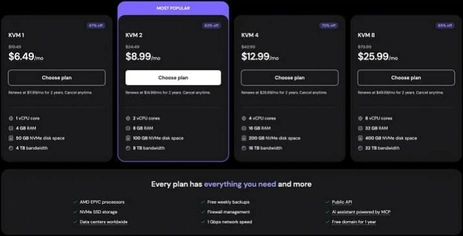
Image Credit: hostinger
Final Thoughts
The right Hostinger hosting plan depends on your website type, traffic, resources, technical requirements, and growth expectations.
For most beginners, starting with an affordable shared or WordPress hosting plan can be a practical approach. As traffic and resource requirements increase, you can consider moving to cloud hosting. Advanced users and developers may benefit from VPS hosting when they need greater control.
Most importantly, do not choose a plan based solely on price. Compare storage, performance features, backups, security, included domains, renewal costs, and upgrade options before making your decision.
Ready to compare Hostinger plans?
FAQs About Choosing a Hostinger Plan
1. Which Hostinger plan is best for beginners?
A basic shared or WordPress hosting plan is generally suitable for beginners launching a small website, blog, portfolio, or affiliate site.
2. Which Hostinger plan is best for WordPress?
WordPress-focused hosting can be a suitable choice for users who want WordPress management tools, caching, backups, SSL, and performance features.
3. Should I choose Hostinger shared or cloud hosting?
Choose shared hosting for a new or relatively small website. Consider cloud hosting when your website requires substantially more resources or is experiencing consistent growth.
4. Do I need Hostinger VPS hosting?
Most beginners do not need VPS hosting. VPS is more appropriate when you require greater server control, custom configurations, or resources for advanced applications.
5. Can I upgrade my Hostinger hosting plan later?
Hostinger provides upgrade options between hosting products and plans, allowing websites to move to higher-resource solutions as their requirements change.
6. How much Hostinger storage do I need?
The amount depends on your website. A text-based blog needs much less storage than an ecommerce store, image-heavy website, or site containing large media files.
7. Should I choose hosting based only on price?
No. Compare the introductory price, renewal price, storage, resources, backups, security features, performance technology, and included services before purchasing.
Mobile Guides

4.7
Editorial Rating
If you click on the links and make a purchase, we may earn a commission.
SD
EDITORS' CHOICE
- Best overall hosting in our hands‑on testing of 20+ providers.
- Achieved 100% uptime and 99/100 speed across all test locations.
- Offers AI content tools, image generator, WordPress troubleshooter.

Post Views: 7
