If you click on the links and make a purchase, we may earn a commission.
The best indoor security cameras make it easier to monitor your home, family, pets, children, and valuable belongings from almost anywhere. Modern indoor cameras offer much more than basic video recording. Many include 2K or 4K video, night vision, motion and person detection, two-way audio, pan-and-tilt controls, privacy modes, local storage, cloud recording, and smart-home integration.
Table of Contents
Image Credit: canva
Choosing the right model depends on what you want to monitor. A compact fixed camera may be perfect for a bedroom or office, while a pan-and-tilt model can cover a larger room. Pet owners may prioritize automatic tracking, while privacy-conscious shoppers may prefer local storage and a physical privacy shutter.
In this guide, we’ve compared the best indoor security cameras in 2026 for different budgets and use cases.
Quick Comparison: Best Indoor Security Cameras
| Indoor Security Camera | Best For | Key Feature | Video | Storage | Rating |
|---|---|---|---|---|---|
| Google Nest Cam Indoor | Best Overall | Intelligent alerts | HD | Cloud/Local* | 9.7/10 |
| Eufy Indoor Cam S350 | Best Image Quality | Dual-camera 4K system | 4K | Local/Cloud* | 9.6/10 |
| Aqara Camera Hub G3 | Best Smart Home | Pan/tilt + hub | 2K | Local/Cloud* | 9.4/10 |
| TP-Link Tapo C225 | Best Value | Smart tracking | 2K | Local/Cloud* | 9.4/10 |
| Ring Indoor Cam | Best Ring | Simple Ring integration | HD | Cloud/Local* | 9.2/10 |
| Wyze Cam v4 | Best Budget | High resolution | 2.5K | Local/Cloud* | 9.3/10 |
| Blink Mini 2 | Best Compact | Small affordable design | HD | Cloud/Local* | 9.1/10 |
| Reolink E1 Zoom | Best Local Storage | Optical zoom | 5MP | Local | 9.3/10 |
Storage options and advanced features can vary by model, plan, and region. Check the manufacturer’s current specifications before purchasing.
1. Google Nest Cam Indoor — Best Indoor Security Camera Overall
The Google Nest Cam Indoor is our overall choice for homeowners who want a reliable indoor camera with intelligent alerts and straightforward smart-home integration.
Google’s ecosystem makes it particularly useful for households already using Google Home products.
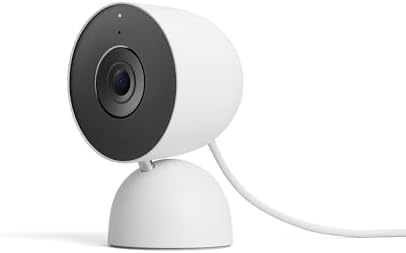
- Meet the smarter, sharper wired Google Nest Cam Indoor; with 2K HDR video and Gemini, it knows what to look out for and …
- With an Advanced subscription to Google Home Premium, know more about what’s happening with notifications like “Kids are…
- Google Nest Cam Indoor keeps your data safe with encrypted video, two-step verification, and enhanced security through y…
Key Features
- HD video
- Intelligent activity detection
- Person, animal, and vehicle detection on supported configurations
- Night vision
- Two-way audio
- Smartphone notifications
- Google Home integration
- Activity history
- Wired operation
Its intelligent notifications can help reduce unnecessary alerts compared with cameras that simply react to every movement.
Best For
Families, Google Home users, general home monitoring, and homeowners who prioritize intelligent notifications.
Our Rating: 9.7/10
2. Eufy Indoor Cam S350 — Best Indoor Camera for Image Quality
The Eufy Indoor Cam S350 is designed for users who want detailed indoor video and advanced camera movement.
Its dual-camera system can provide high-resolution monitoring while offering additional viewing flexibility.

- Crystal Clear Views: Dual cameras and 4K UHD resolution ensure sharp, detailed images of your home
- Enhanced Zoom: 4K wide-angle and 2K telephoto cameras combine for an impressive 8x hybrid zoom
- Full Space Coverage: 360° pan and tilt capabilities eliminate blind spots, making it ideal for pet monitoring
Key Features
- 4K-resolution imaging
- Dual-camera design
- Pan and tilt
- Intelligent tracking
- Night vision
- Two-way audio
- Motion detection
- Local storage options
- Smart-home integration
The combination of high resolution and pan-and-tilt functionality makes it particularly useful for larger rooms.
Best For
Pet monitoring, large rooms, families, and shoppers prioritizing image quality.
Our Rating: 9.6/10
3. Aqara Camera Hub G3 — Best Smart-Home Indoor Camera
The Aqara Camera Hub G3 combines a security camera with smart-home hub functionality.
That makes it particularly interesting for users building a connected home rather than simply adding a standalone camera.

- Super-Crisp 2K Resolution & 360° Viewing and Night Vision: (Note: A 5V 2A USB-A power supply is required and is not incl…
- HomeKit Support & Wide Compatibility: The Camera E1 provides full support for HomeKit Secure Video (An active iCloud sub…
- Privacy Protection and On-device Detection for Local Automation: The Camera E1 offers an automated privacy mode that can…
Key Features
- 2K video
- Pan and tilt
- AI recognition features
- Two-way audio
- Local storage
- Smart-home hub
- Privacy functionality
- Smart-home platform compatibility
The pan-and-tilt system can provide broad coverage of a room.
Best For
Smart-home enthusiasts, Apple Home users, and households using Aqara products.
Our Rating: 9.4/10
4. TP-Link Tapo C225 — Best Value Indoor Security Camera
The TP-Link Tapo C225 is an excellent choice for shoppers who want a feature-rich indoor camera without paying premium prices.

- 【Red Dot Winner 2022】Awarded the prestigious Red Dot Design Award in 2022, this security camera Tapo C225 not only perfo…
- 【Pan/Tilt and 2K QHD】With Tapo C225, never miss a detail. This security camera provides a 360° horizontal field of view …
- 【Innovative Physical Privacy Mode】Taking privacy to the next level, the camera’s housing cleverly blocks the lens when p…
Key Features
- 2K video
- Pan and tilt
- Smart tracking
- Person detection
- Motion detection
- Night vision
- Two-way audio
- Local storage support
- Privacy mode
Its combination of camera movement and intelligent detection makes it suitable for monitoring children and pets.
Best For
Families, pet owners, bedrooms, living rooms, and budget-conscious buyers.
Our Rating: 9.4/10
5. Ring Indoor Cam — Best Indoor Camera for Ring Users
The Ring Indoor Cam is a straightforward choice for homeowners already using Ring doorbells and outdoor cameras.

- Get the whole picture – Watch over your home day or night in 1080p HD video with Live View and Color Night Vision.
- Video previews – Record a few extra seconds before every motion event with Advanced Pre-Roll to get a more complete pict…
- Privacy at your fingertips – Turn off your camera and mic with the manual Privacy Cover, then reactivate with a simple s…
Key Features
- HD video
- Motion detection
- Two-way talk
- Night vision
- Smartphone alerts
- Privacy features
- Ring ecosystem integration
- Alexa compatibility
Its biggest advantage is ecosystem compatibility. Managing multiple Ring devices through the same platform can simplify home monitoring.
Best For
Ring users, Alexa households, apartments, and basic indoor security.
Our Rating: 9.2/10
6. Wyze Cam v4 — Best Budget Indoor Security Camera
The Wyze Cam v4 offers a strong feature set for shoppers who want affordable indoor monitoring.

- SMART 2.5K QHD RESOLUTION — CAPTURE EVERY DETAIL — Record in crystal-clear 2560×1440 video with a 120° wide field of vie…
- ENHANCED COLOR NIGHT VISION — SEE CLEARLY IN TOTAL DARKNESS — Industry-leading Starlight Sensor paired with a 72-lumen s…
- IP65 WEATHERPROOF — BUILT FOR EVERY SEASON — Rated IP65 for dust-tight, water-jet-resistant protection against rain, sno…
Key Features
- 2.5K video
- Color night vision
- Motion detection
- Smart alerts
- Two-way audio
- Local storage support
- Compact design
- Smartphone monitoring
It is especially attractive if you want several cameras throughout your home without spending a premium on every unit.
Best For
Bedrooms, offices, apartments, pets, and budget-conscious buyers.
Our Rating: 9.3/10
7. Blink Mini 2 — Best Compact Indoor Camera
The Blink Mini 2 is designed for users who want a small and affordable camera for simple indoor monitoring.
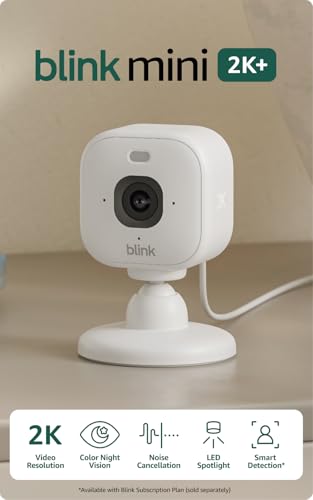
- Mini camera, max performance — Mini 2K+ is our third-generation compact plug-in camera, delivering sharper 2K video reso…
- See everything, miss nothing — With 2K video resolution, expansive coverage, and up to 4x zoom, you’ll capture more deta…
- Two-way talk that feels natural — Enjoy improved audio with noise cancellation for clearer conversations around your hom…
Key Features
- Compact design
- HD video
- Motion detection
- Two-way audio
- Night vision
- Smartphone alerts
- Alexa compatibility
- Simple installation
Its small footprint makes it easy to place on shelves, desks, counters, and other areas where a larger camera would be inconvenient.
Best For
Small rooms, apartments, bedrooms, offices, and beginners.
Our Rating: 9.1/10
8. Reolink E1 Zoom — Best Indoor Camera for Local Storage
The Reolink E1 Zoom is an attractive option for users who prefer local recording and additional optical zoom capability.

- What’s in the bundle?
- 1*REOLINK E1 Zoom
- 1*REOLINK Doorbell WiFi
Key Features
- High-resolution video
- Optical zoom
- Pan and tilt
- Motion detection
- Night vision
- Two-way audio
- Local storage
- Smartphone app
The ability to zoom optically can be useful when monitoring larger rooms.
Best For
Home offices, living rooms, pets, and users prioritizing local storage.
Our Rating: 9.3/10
What Makes a Good Indoor Security Camera?
Buying a security camera based only on resolution can be a mistake. Several other features determine how useful the camera will be.
1. Video Resolution
Indoor security cameras commonly use:
- 1080p
- 2K
- 2.5K
- 4K
For basic room monitoring, 1080p can be sufficient. Higher resolutions can provide more detail when you need to identify objects farther from the camera.
However, resolution isn’t everything. Image processing, lighting, lens quality, and compression also affect the final picture.
2. Pan and Tilt
A fixed camera can only monitor the area within its field of view.
A pan-and-tilt camera can move horizontally and vertically to cover more of a room.
This can be particularly useful for:
- Pets
- Children
- Large living rooms
- Home offices
- Playrooms
Some models can automatically follow detected movement.
3. Night Vision
Indoor cameras should also work in low-light conditions.
Look for:
- Infrared night vision
- Color night vision
- Low-light image processing
- Automatic IR switching
Night vision is particularly important if you plan to use a camera in a nursery, hallway, or room that becomes dark overnight.
4. Two-Way Audio
Two-way audio allows you to communicate through the camera.
You can use it to:
- Talk to family members
- Calm a pet
- Communicate with children
- Speak to someone in another room
Good microphone and speaker quality can make a major difference.
5. Person and Pet Detection
Basic motion detection can produce frequent alerts from shadows, curtains, pets, or changes in lighting.
AI-powered detection can identify specific types of activity.
Depending on the camera, features may include:
- Person detection
- Pet detection
- Vehicle detection
- Sound detection
- Baby crying detection
- Motion tracking
Always check whether advanced detection requires a subscription.
Local Storage vs. Cloud Storage
Storage is one of the biggest differences between indoor security cameras.
| Feature | Local Storage | Cloud Storage |
|---|---|---|
| Monthly fee | Often lower | May require subscription |
| Remote access | Depends on system | Usually convenient |
| Privacy | Greater control | Stored on provider’s servers |
| Backup | You manage it | Provider-managed |
| Setup | Can be more complex | Usually easier |
| Storage capacity | Depends on card/device | Depends on plan |
Local Storage
Local storage may use:
- microSD cards
- HomeBase-style hubs
- Network storage
- Internal storage
It’s attractive to users who want more control over recordings.
Cloud Storage
Cloud services provide convenient remote access and automatic backups but may require a recurring subscription for advanced features.
Best Indoor Security Cameras by Use Case
| Use Case | Recommended Camera |
|---|---|
| Best overall | Google Nest Cam Indoor |
| Best image quality | Eufy Indoor Cam S350 |
| Best smart home | Aqara Camera Hub G3 |
| Best value | TP-Link Tapo C225 |
| Best Ring camera | Ring Indoor Cam |
| Best budget | Wyze Cam v4 |
| Best compact camera | Blink Mini 2 |
| Best local storage | Reolink E1 Zoom |
| Best for pets | Eufy Indoor Cam S350 |
| Best for large rooms | Eufy Indoor Cam S350 |
Indoor Security Camera for Pets
Pet owners often benefit from cameras with:
- Pan and tilt
- Automatic tracking
- Two-way audio
- High-resolution video
- Night vision
- Pet detection
A pan-and-tilt camera can follow your pet around a room more effectively than a fixed camera.
The Eufy Indoor Cam S350 and TP-Link Tapo C225 are particularly appealing for this type of use.
Indoor Security Camera for Babies and Children
If you’re monitoring children, prioritize reliability and privacy.
Useful features include:
- Clear night vision
- Two-way audio
- Sound detection
- Motion alerts
- Pan and tilt
- Secure account access
- Privacy mode
A security camera isn’t a replacement for appropriate supervision, but it can provide useful remote visibility.
Privacy Features Matter
Indoor cameras operate inside your private living space, making privacy particularly important.
Look for features such as:
- Physical privacy shutters
- Camera-off modes
- Local storage
- Two-factor authentication
- Encrypted connections
- Customizable activity zones
Avoid placing cameras in highly private areas.
If multiple people live in your home, make sure everyone understands where cameras are installed and when they are active.
Do Indoor Security Cameras Need Wi-Fi?
Most smart indoor security cameras require Wi-Fi for live viewing, smartphone notifications, cloud recording, and remote access.
Before installing a camera, test the wireless signal in the exact location.
If your Wi-Fi signal is weak, consider:
- A mesh Wi-Fi system
- Additional access points
- Router repositioning
- Ethernet-connected cameras
A reliable network is essential for consistent smart-camera performance.
Wired vs. Wireless Indoor Cameras
| Feature | Wired | Wireless |
|---|---|---|
| Power | Continuous | Battery or USB |
| Charging | Not required | May be required |
| Placement | Less flexible | More flexible |
| Reliability | Excellent | Depends on battery/Wi-Fi |
| Best For | Permanent locations | Flexible placement |
For most indoor installations, wired USB-powered cameras are convenient because you don’t have to worry about recharging batteries.
How to Position an Indoor Security Camera
Position the camera where it provides useful coverage without unnecessarily invading privacy.
Good locations include:
- Living rooms
- Hallways
- Home offices
- Entry areas
- Pet areas
Avoid positioning cameras where they can unnecessarily capture private spaces.
For better coverage:
- Place the camera at an elevated position.
- Point it toward entrances.
- Avoid direct windows when possible.
- Test nighttime visibility.
- Check Wi-Fi signal strength.
- Enable appropriate privacy settings.
Are Indoor Security Cameras Worth It?
For many households, indoor security cameras are worthwhile because they provide convenient remote monitoring.
They can help you:
- Check on pets
- Monitor entrances
- Keep an eye on children
- Monitor a home office
- Receive activity alerts
- Check your home while traveling
However, privacy and subscription costs should be considered before purchasing.
Final Verdict
The Google Nest Cam Indoor is our overall pick for the best indoor security camera in 2026. Its intelligent alerts, easy smartphone monitoring, and smart-home integration make it a strong all-around choice.
The Eufy Indoor Cam S350 is an excellent alternative for shoppers prioritizing high-resolution video, while the TP-Link Tapo C225 offers an impressive combination of features and value.
For smart-home enthusiasts, the Aqara Camera Hub G3 adds useful automation functionality. Budget shoppers should consider the Wyze Cam v4 or Blink Mini 2, while the Reolink E1 Zoom is appealing to users who prioritize local storage and optical zoom.
Before buying, consider video resolution, pan and tilt, night vision, motion detection, AI alerts, two-way audio, storage, subscription fees, privacy features, Wi-Fi performance, and smart-home compatibility.
The best indoor security camera is the one that provides the coverage you need while respecting privacy and fitting your budget.
Frequently Asked Questions
What is the best indoor security camera in 2026?
The Google Nest Cam Indoor is our overall choice because it combines intelligent alerts, reliable monitoring, night vision, and smart-home integration.
What is the best indoor security camera for pets?
The Eufy Indoor Cam S350 is a strong choice because of its high-resolution video, pan-and-tilt functionality, and tracking capabilities.
What is the best indoor security camera without a subscription?
Reolink and Eufy offer indoor cameras with local-storage options that can reduce reliance on monthly cloud subscriptions. Check individual models for exact features.
Are indoor security cameras worth buying?
Yes. They can provide convenient remote monitoring for pets, children, home offices, entrances, and other areas of your home.
Do indoor cameras record continuously?
Some models support continuous recording, particularly when connected to constant power and local storage. Others primarily record motion-triggered events.
Do indoor security cameras need Wi-Fi?
Most smart indoor cameras use Wi-Fi for live streaming, smartphone notifications, remote access, and cloud services.
Is 4K necessary for an indoor security camera?
Not always. 1080p or 2K is sufficient for many rooms. Higher resolution becomes more useful when you need additional detail or plan to digitally zoom into footage.
What is better: a fixed or pan-and-tilt camera?
A fixed camera is simpler and usually cheaper. A pan-and-tilt model provides broader coverage and can be particularly useful for pets, children, and larger rooms.
Can indoor security cameras detect pets?
Many modern cameras can detect animals or pets, although advanced detection features may depend on the model and subscription plan.
Can I talk through an indoor security camera?
Yes. Most modern indoor security cameras include two-way audio, allowing you to communicate through a smartphone app.
Where should I place an indoor security camera?
Good locations include living rooms, hallways, home offices, and entry areas. Avoid placing cameras in areas where people reasonably expect privacy.
How much storage do I need?
The amount depends on resolution, recording frequency, and retention requirements. Motion-triggered recording generally uses much less storage than continuous recording.
What should I consider before buying an indoor security camera?
Consider video quality, night vision, pan-and-tilt capability, AI detection, audio quality, local versus cloud storage, subscription costs, privacy controls, Wi-Fi requirements, smart-home compatibility, and total ownership cost.
Best Products
Best Smartphones for Everyday Use in 2026
Best Laptops for Students in 2026