If you click on the links and make a purchase, we may earn a commission.
Choosing the best 4K monitors can dramatically improve your desktop experience. A 4K display provides four times as many pixels as a Full HD monitor, delivering sharper text, more detailed images, and additional workspace for productivity.
Table of Contents
Image Credit: Canva
Whether you’re building a gaming setup, editing photos and videos, working from home, or simply want a premium display, there are excellent 4K monitors available in 2026.
The best model depends on your priorities. Gamers should look for high refresh rates, low response times, and adaptive sync. Content creators should prioritize color accuracy, HDR, and wide color gamut coverage. Office users may care more about text clarity, USB-C connectivity, ergonomics, and eye comfort.
Below are some of the best 4K monitors in 2026, covering gaming, productivity, professional content creation, and value.
Quick Comparison: Best 4K Monitors
| Monitor | Best For | Key Feature | Panel Type | Refresh Rate | Rating |
|---|---|---|---|---|---|
| Dell UltraSharp U3225QE | Best Overall | 4K + premium productivity features | IPS Black | 120Hz | 9.5/10 |
| LG UltraGear 32GS95UE | Best Gaming | Dual-mode OLED | OLED | 240Hz | 9.6/10 |
| Samsung Odyssey Neo G8 | Best Premium Gaming | Mini-LED HDR | VA Mini-LED | 240Hz | 9.4/10 |
| ASUS ROG Swift PG32UCDM | Best OLED Gaming | 4K QD-OLED | QD-OLED | 240Hz | 9.6/10 |
| BenQ PD3225U | Best for Creators | Professional color accuracy | IPS Black | 60Hz | 9.2/10 |
| Gigabyte M32U | Best Value Gaming | 4K 144Hz | IPS | 144Hz | 9.0/10 |
| LG 32UN650-W | Best Budget 4K | Affordable 32-inch 4K | IPS | 60Hz | 8.7/10 |
Specifications and availability may vary by region and configuration.
1. Dell UltraSharp U3225QE: Best 4K Monitors Overall
The Dell UltraSharp U3225QE is an excellent all-around 4K monitors for professionals, remote workers, programmers, photographers, and anyone who wants a premium desktop display.
Its 31.5-inch 4K resolution provides plenty of workspace while keeping text and images sharp. The IPS Black panel technology offers strong contrast compared with traditional IPS displays.
The monitor is also designed around productivity, with USB-C connectivity, integrated connectivity features, and an ergonomic stand.
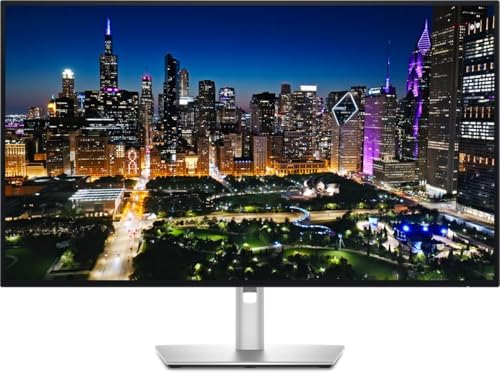
- Energy efficiency class: F
- 31.5 inch 16:9, resolution: 3840 x 2.160 4K (Ultra HD)
- Response time: 5 ms, Contrast: 2000:1 Panel: IPS
Key Features
- 31.5-inch 4K UHD resolution
- IPS Black panel
- 120Hz refresh rate
- Excellent color reproduction
- USB-C connectivity
- Built-in hub functionality
- Ergonomic height adjustment
- Premium professional design
The U3225QE is particularly useful for users who connect a laptop and want one monitor to serve as the center of their workstation.
Best for: Office work, programming, productivity, MacBook users, professionals, and multitasking.
Our Rating: 9.5/10
👉 Check the latest Dell UltraSharp U3225QE price and deals.
2. LG UltraGear 32GS95UE: Best 4K Gaming Monitor
The LG UltraGear 32GS95UE is one of the most exciting choices for serious gamers.
Its OLED panel provides excellent contrast and extremely fast pixel response times, while its high refresh rate makes fast games appear exceptionally smooth.
One of its standout features is its ability to switch between 4K at 240Hz and Full HD at 480Hz, giving gamers flexibility depending on the type of game being played.

- 32″ 4K UHD Glossy OLED Display – Experience ultra-sharp visuals and lifelike color on a stunning 32-inch 4K UHD (3840 x …
- Bright OLED Gaming – This UltraGear features Micro Lens Array+ technology. So with a typical brightness of 275 nits, thi…
- VESA DisplayHDR True Black 400 & 1.5M:1 Contrast Ratio – VESA DisplayHDR True Black 400 certified with upt to DCI-P3 98….
Key Features
- 32-inch OLED display
- 4K UHD resolution
- 240Hz refresh rate
- Dual-mode gaming
- 480Hz Full HD mode
- Extremely fast response
- Excellent HDR performance
- AMD FreeSync support
The OLED technology produces deep blacks and vibrant colors, making games and movies look highly immersive.
Best for: Competitive gamers, PC gamers, console gamers, and premium gaming setups.
Our Rating: 9.6/10
👉 Compare LG UltraGear 32GS95UE prices and gaming deals.
3. Samsung Odyssey Neo G8: Best Premium Mini-LED 4K Monitor
The Samsung Odyssey Neo G8 combines 4K resolution with a high refresh rate and Mini-LED backlighting.
Mini-LED technology allows the display to achieve higher brightness and stronger HDR performance than many conventional IPS monitors.
The curved design also creates a more immersive gaming experience.

- SAMSUNG’S 32″ ODYSSEY G7 G73SH: Delivers next-level gameplay
- OLED TECHNOLOGY: Provides sharp 4K visuals (3840 x 2160), featuring a glossy OLED screen for scenes that unfold in vivid…
- DUAL MODE: enables effortless toggling between resolutions and refresh rates, offering 4K at 165Hz for stunning visuals …
Key Features
- 32-inch 4K display
- Mini-LED backlighting
- 240Hz refresh rate
- Curved design
- Strong HDR
- High brightness
- AMD FreeSync Premium Pro
- Gaming-focused features
It’s a particularly strong choice for users who want high-end gaming performance without moving entirely to OLED.
Best for: Premium gaming, HDR gaming, immersive setups, and high-end PC systems.
Our Rating: 9.4/10
👉 Check current Samsung Odyssey Neo G8 prices and offers.
4. ASUS ROG Swift PG32UCDM: Best 4K OLED Gaming Monitor
The ASUS ROG Swift PG32UCDM is designed for gamers who want the benefits of OLED combined with 4K resolution and an extremely high refresh rate.
Its QD-OLED technology provides excellent contrast, vivid colors, and fast response times.

- Immersive 4K QD-OLED Display: 32-inch 4K (3840 x 2160) QD-OLED gaming monitor with 240 Hz refresh rate and 0.03 ms (GTG)…
- Advanced Heat Management System: Highly efficient custom heatsink, advanced airflow design, and graphene film for better…
- Exceptional HDR Performance: VESA DisplayHDR 400 True Black compliance, 99% DCI-P3 gamut, true 10-bit, and Delta E < 2 c...
Key Features
- 32-inch 4K QD-OLED
- 240Hz refresh rate
- Extremely fast response time
- HDR support
- HDMI 2.1
- DisplayPort connectivity
- USB-C connectivity
- Gaming-focused OLED protection
This monitor is especially appealing to users with powerful graphics cards capable of driving demanding games at high frame rates.
Best for: Enthusiast PC gamers, competitive gaming, HDR gaming, and premium setups.
Our Rating: 9.6/10
👉 Compare ASUS ROG Swift PG32UCDM prices and configurations.
5. BenQ PD3225U: Best 4K Monitor for Creators
The BenQ PD3225U is designed specifically for creative professionals.
Photographers, video editors, graphic designers, architects, and other creators can benefit from its focus on color accuracy and professional workflow features.

- DEEP BLACK IPS PANEL w 2000:1 CONTRAST RATIO: Enjoy unrivaled depth and contrast with the 2000:1 IPS Black Technology
- MADE for Mac DESIGNERS: 32″ 4K monitor features Pantone Validated and Calman verified color accurate technology. Built w…
- DISPLAY PILOT 2 & HOTKEY PUCK: Sleek display management and easy brightness control right from your Mac. Easy input swit…
Key Features
- 32-inch 4K UHD display
- IPS Black technology
- Wide color gamut
- Professional color accuracy
- USB-C connectivity
- Thunderbolt connectivity
- Built-in KVM functionality
- Ergonomic stand
The monitor is a particularly strong choice for Mac users who want a large, accurate display for professional creative applications.
Best for: Photographers, video editors, designers, developers, and creative professionals.
Our Rating: 9.2/10
👉 Check the latest BenQ PD3225U price and creator-focused deals.
6. Gigabyte M32U: Best Value 4K Gaming Monitor
The Gigabyte M32U remains an excellent option for gamers who want 4K resolution and high refresh rates without paying flagship OLED prices.
Its 144Hz refresh rate provides smooth gameplay, while the IPS panel offers good image quality for general productivity.

- Immersive Ultra Wide Gaming Experience: Dominate the battlefield on this stunning 34 inch curved monitor. Its 21:9 ultra…
- Vivid Color & Advanced Visual Tools: See every detail in stunning clarity. This ultrawide monitor delivers vibrant, accu…
- Gamer-Centric Multitasking Modes: Gain a tactical advantage with built-in gaming tools. Features like Night Vision, Cros…
Key Features
- 32-inch 4K UHD display
- IPS panel
- 144Hz refresh rate
- 1ms-class response performance
- HDMI 2.1
- USB-C connectivity
- KVM functionality
- Adaptive Sync
It is particularly attractive for users who want one monitor for both gaming and work.
Best for: PC gaming, console gaming, productivity, and value-focused buyers.
Our Rating: 9.0/10
👉 Compare Gigabyte M32U prices and current gaming deals.
7. LG 32UN650-W: Best Budget 4K Monitor
If you mainly want sharp 4K resolution for work, entertainment, and everyday computing, the LG 32UN650-W is worth considering.
It doesn’t offer the extreme refresh rates of premium gaming monitors, but its 32-inch 4K display provides plenty of workspace at a more accessible price.

- 33 Inch UHD (3840 x 2160) IPS Display.Response time:5.0 milliseconds.Specific uses for product – Business, personal
- Viewing Angle is 178˚(R/L), 178˚(U/D); Brightness is 350nits(Typ); Aspect Ratio is 16:9
- DCI-P3 95% Color Gamut
Key Features
- 32-inch 4K UHD display
- IPS panel
- HDR support
- AMD FreeSync
- Ergonomic stand
- Wide viewing angles
- Good color reproduction
- Affordable positioning
Best for: Office work, students, home offices, casual gaming, and budget buyers.
Our Rating: 8.7/10
👉 Check LG 32UN650-W prices and available discounts.
What Should You Look for in a 4K Monitor?
Buying a 4K monitors involves more than simply checking the resolution.
1. Panel Type
The three most common panel technologies are IPS, VA, and OLED.
IPS: Excellent viewing angles and color performance. Great for work and general use.
VA: Usually provides better contrast than IPS and works well for gaming and movies.
OLED: Excellent blacks, contrast, and response times, making it ideal for premium gaming and entertainment.
2. Refresh Rate
A 60Hz monitor is sufficient for office work, browsing, programming, and general productivity.
Gamers should consider 120Hz, 144Hz, 165Hz, or higher.
Competitive gamers may benefit from 240Hz or more.
3. HDR
HDR can improve highlights, shadows, and overall image depth.
However, not all HDR monitors provide the same experience. High brightness and local dimming are important considerations.
4. Connectivity
Look for:
- HDMI 2.1
- DisplayPort
- USB-C
- USB hub
- Thunderbolt on professional displays
USB-C is especially useful for laptop users because compatible monitors can carry video, data, and power through a single cable.
5. Screen Size
For 4K resolution, 27 to 32 inches is a popular range.
A 27-inch 4K display provides very high pixel density, while a 32-inch monitor provides more physical workspace.
6. Ergonomics
A good stand should offer height, tilt, and swivel adjustments.
VESA compatibility is also useful if you plan to use a monitor arm.
Best 4K Monitor by Use Case
| Use Case | Best Choice |
|---|---|
| Best overall | Dell UltraSharp U3225QE |
| Gaming | LG UltraGear 32GS95UE |
| Premium OLED gaming | ASUS ROG Swift PG32UCDM |
| Mini-LED gaming | Samsung Odyssey Neo G8 |
| Photo editing | BenQ PD3225U |
| Video editing | BenQ PD3225U |
| MacBook users | Dell U3225QE / BenQ PD3225U |
| Value gaming | Gigabyte M32U |
| Budget 4K | LG 32UN650-W |
| Office productivity | Dell U3225QE |
| Programming | Dell U3225QE |
4K Monitor vs. 1440p Monitor
A 4K monitors provides significantly more pixels than a 1440p display, resulting in sharper text and more detailed images.
However, 4K gaming requires more graphics processing power.
For office productivity and creative work, 4K can be an excellent investment because additional screen detail and workspace can improve usability.
For gaming, 1440p can sometimes offer a better balance between image quality and frame rate.
Do You Need a Powerful PC for 4K?
For basic office work, almost any modern computer capable of supporting 4K output can drive a 4K monitor.
Gaming is different.
To play modern games at 4K with high frame rates, you generally need a powerful dedicated graphics card.
Before purchasing a high-refresh-rate 4K gaming monitor, make sure your GPU can produce enough frames to take advantage of the display.
Final Verdict
The Dell UltraSharp U3225QE is our top overall recommendation because it provides excellent 4K image quality, productivity features, connectivity, and professional usability.
For gaming, the LG UltraGear 32GS95UE and ASUS ROG Swift PG32UCDM are outstanding choices, particularly for users with high-end gaming PCs. The Samsung Odyssey Neo G8 is another excellent option if you prefer Mini-LED technology and a curved display.
Creative professionals should consider the BenQ PD3225U, while gamers looking for better value should consider the Gigabyte M32U.
For basic productivity and home-office use, the LG 32UN650-W offers a more affordable way to enjoy 4K resolution.
Before buying, compare panel technology, refresh rate, HDR capability, ports, ergonomics, warranty, and current pricing. The best 4K monitor isn’t necessarily the most expensive—it is the one that matches your computer, workflow, and budget.
Frequently Asked Questions
Is a 4K monitor worth it in 2026?
Yes. A 4K monitors can provide sharper text, more desktop workspace, and greater image detail, making it particularly useful for productivity, creative work, and premium gaming.
What is the best 4K monitor for gaming?
The LG UltraGear 32GS95UE and ASUS ROG Swift PG32UCDM are excellent premium gaming choices, particularly for users who want 4K OLED and high refresh rates.
Is 4K better than 1440p?
4K provides higher resolution and sharper images, while 1440p requires less graphics processing power. The better choice depends on your computer and intended use.
Is 60Hz enough for a 4K monitor?
Yes for office work, browsing, programming, and productivity. Gamers generally benefit from 120Hz or higher.
What size is best for a 4K monitors?
27 and 32 inches are popular sizes. A 27-inch display offers very high pixel density, while 32 inches provides a larger working area.
Are OLED 4K monitors worth buying?
OLED monitors can provide exceptional contrast, black levels, colors, and response times. They are particularly attractive for gaming and entertainment.
What is the best 4K monitor for work?
The Dell UltraSharp U3225QE is an excellent choice for professional productivity because of its large 4K display, connectivity, ergonomics, and productivity-focused design.
What is the best 4K monitor for photo editing?
The BenQ PD3225U is designed for creative professionals and is an excellent option for photographers and designers who prioritize color accuracy.
Do I need HDMI 2.1 for 4K?
Not always. HDMI 2.1 is particularly useful for high-refresh-rate 4K gaming and modern gaming consoles. Basic 4K productivity can work perfectly well with older standards.
Can a laptop run a 4K monitors?
Yes. Many modern laptops can output 4K through HDMI, DisplayPort, USB-C, or Thunderbolt. Check your laptop’s specifications before purchasing.
What graphics card is needed for 4K gaming?
The exact requirement depends on the game and desired frame rate. Modern high-end GPUs are generally preferable for demanding 4K gaming, especially if you want high refresh rates and advanced ray tracing.
Should I buy a 4K 60Hz or 4K 144Hz monitor?
Choose 4K 60Hz for productivity and general use. Choose 4K 144Hz or higher if gaming performance and smooth motion are important.
4K monitors, 4K monitors, 4K monitors, 4K monitors, 4K monitors, 4K monitors, 4K monitors, 4K monitors, 4K monitors
Best Products
Best Smartphones for Everyday Use in 2026
Best Laptops for Students in 2026