If you click on the links and make a purchase, we may earn a commission.
The best external SSDs provide a fast, portable, and reliable way to expand storage for laptops, desktops, gaming consoles, cameras, and other compatible devices. Compared with traditional external hard drives, SSDs generally offer faster transfer speeds, quieter operation, better portability, and greater resistance to physical shock.
Table of Contents
Image Credit: Canva
Whether you need extra storage for large video projects, a portable drive for work, faster game storage, or a dependable backup solution, there are many excellent options available in 2026.
In this guide, we’ve compared the best external SSDs based on speed, capacity, portability, compatibility, durability, and overall value.
Quick Comparison: Best External SSDs
| External SSD | Best For | Key Feature | Interface | Capacity Options | Rating |
|---|---|---|---|---|---|
| Samsung T9 | Best Overall | Up to 2,000MB/s speeds | USB 3.2 Gen 2×2 | Up to 4TB | 9.6/10 |
| SanDisk Extreme Pro Portable SSD | Best Rugged | Fast, durable design | USB 3.2 | Up to 4TB | 9.4/10 |
| Crucial X10 Pro | Best Value Performance | High-speed transfers | USB 3.2 Gen 2×2 | Up to 4TB | 9.3/10 |
| Samsung T7 Shield | Best for Travel | Rugged construction | USB 3.2 Gen 2 | Up to 4TB | 9.3/10 |
| WD My Passport SSD | Best Compact SSD | Slim portable design | USB 3.2 Gen 2 | Up to 2TB | 9.0/10 |
| Kingston XS2000 | Best Small SSD | Extremely compact | USB 3.2 Gen 2×2 | Up to 4TB | 9.1/10 |
| Crucial X9 Pro | Best Affordable | Strong everyday performance | USB 3.2 Gen 2 | Up to 4TB | 8.9/10 |
Maximum speeds and available capacities vary by model and host device. Real-world performance can differ.
1. Samsung T9: Best External SSD Overall
The Samsung T9 is our top overall external SSDs recommendation for users who want a combination of excellent performance, portability, and capacity.
It can reach advertised sequential transfer speeds of up to 2,000MB/s when connected to compatible USB 3.2 Gen 2×2 hardware. This makes it particularly useful for moving large files such as 4K video, RAW photos, software projects, and game libraries.

- NONSTOP SPEED: Race through projects with our fastest SSD for creators; Load, edit and transfer with sustained read and …
- DYNAMIC THERMAL GUARD: When you’re elbow-deep in a passion project, the T9 Portable SSD stays cool; Its advanced thermal…
- ADAPTS TO EVERY NEED: Whether you’re using a desktop, camera or a gaming console3, count on the T9 Portable SSD for exte…
Key Features
- Up to 2,000MB/s sequential read and write speeds
- Capacities up to 4TB
- USB 3.2 Gen 2×2
- Compact portable design
- AES 256-bit hardware encryption
- Dynamic Thermal Guard
- USB-C connectivity
- Compatible with PCs, Macs, and other supported devices
The T9 is an excellent choice for professionals and enthusiasts who regularly move large files.
One important consideration is that you need a compatible USB 3.2 Gen 2×2 port to take advantage of its maximum performance.
Best for: Professionals, video editors, photographers, gamers, and demanding storage workloads.
Our Rating: 9.6/10
2. SanDisk Extreme Pro Portable SSD: Best Rugged External SSD
The SanDisk Extreme Pro Portable SSD is designed for people who need fast storage that can handle travel and outdoor use.
Its rugged construction makes it particularly appealing to photographers, videographers, and creators who regularly carry storage between locations.

- Carry your photo and video collection in this compact drive, ready to relive at a moment’s notice.
- Easy Content Management: Select, copy, move, and organize content from your iPhone or iPad to the drive using the Files …
- Time Machine Compatibility: Time Machine compatible for seamless backup solutions with your Mac devices
Key Features
- High-speed USB connectivity
- Up to 4TB capacity
- Rugged portable design
- Water and dust resistance on supported models
- Shock resistance
- Compact form factor
- USB-C connectivity
- Hardware encryption
The rugged design provides extra peace of mind when you’re carrying the drive in a camera bag or backpack.
For professionals working on location, durability can be just as important as raw transfer speed.
Best for: Photographers, videographers, travelers, and outdoor creators.
Our Rating: 9.4/10
3. Crucial X10 Pro: Best Value High-Speed External SSD
The Crucial X10 Pro is a strong option for users who want high performance without moving directly into the most expensive professional storage products.
It provides fast transfers and a compact design, making it useful for large media files, backups, and everyday professional workloads.

- CRUCIAL X10 PRO 2TB PORTABLE SSD USB 3.2 GEN 2X2 SOLID STATE DRIVE
Key Features
- Up to 2,100MB/s advertised read speeds
- USB 3.2 Gen 2×2
- Capacities up to 4TB
- Compact design
- Portable construction
- USB-C connectivity
- Password protection
- Durable design
The X10 Pro is particularly attractive to creators who need to move large files regularly.
Best for: Content creators, photographers, video editors, and performance-focused buyers.
Our Rating: 9.3/10
4. Samsung T7 Shield: Best External SSD for Travel
The Samsung T7 Shield is an excellent choice for people who want dependable portable storage with a rugged exterior.
It offers a useful combination of speed, durability, and compact size.
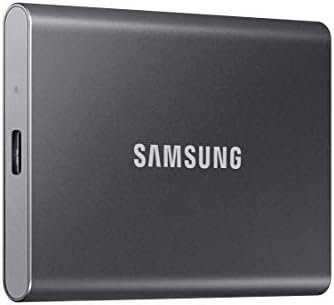
- MADE FOR THE MAKERS: Create; Explore; Store; The T7 Portable SSD delivers fast speeds and durable features to back up an…
- SHARE IDEAS IN A FLASH: Don’t waste a second waiting and spend more time doing; The T7 is embedded with PCIe NVMe techno…
- ALWAYS MAKE THE SAVE: Compact design with massive capacity; With capacities up to 4TB, save exactly what you need to you…
Key Features
- Up to 1,050MB/s read speeds
- Up to 1,000MB/s write speeds
- USB 3.2 Gen 2
- IP65-rated protection
- Shock resistance
- Capacities up to 4TB
- USB-C connectivity
- AES 256-bit hardware encryption
The T7 Shield is particularly useful for photographers and travelers who need to carry an SSD in challenging environments.
Its IP65 rating helps protect against dust and water exposure under specified conditions.
Best for: Travel, photography, field work, students, and everyday portable storage.
Our Rating: 9.3/10
5. WD My Passport SSD: Best Compact External SSD
The WD My Passport SSD is designed for users who want a slim and portable external storage solution.
Its compact design makes it easy to carry with a laptop without adding much weight to your bag.

- Slim durable design to help take your important files with you
- Vast capacities up to 6TB[1] to store your photos, videos, music, important documents and more
- Back up smarter with included device management software[2] with defense against ransomware
Key Features
- USB 3.2 Gen 2
- Fast everyday transfers
- Compact design
- Multiple capacity options
- USB-C connectivity
- Password protection
- Hardware encryption
- Portable form factor
It is a practical choice for students, office workers, photographers, and laptop users who need additional storage.
Best for: Everyday users, students, office work, and laptop storage expansion.
Our Rating: 9.0/10
6. Kingston XS2000: Best Small External SSD
The Kingston XS2000 is one of the most portable external SSDs choices for users who value a very small physical footprint.
Despite its compact design, it offers high-speed USB connectivity and capacities that can accommodate large libraries.

- Industry-leading read/write speeds up to 2,000MB/s. Requires compatible devices to reach USB 3.2 Gen 2×2 USB-C Performan…
- Capacities up to 4TB to support high resolution images, 8K videos, and large documents.
- Pocket-sized Portability
Key Features
- USB 3.2 Gen 2×2
- Up to 2,000MB/s advertised speeds
- Capacities up to 4TB
- Extremely compact
- Portable design
- USB-C connection
- Protective rubber sleeve
Its small size makes it particularly convenient for people who work between multiple computers.
Best for: Travelers, professionals, students, and ultra-portable storage.
Our Rating: 9.1/10
7. Crucial X9 Pro: Best Affordable External SSD
The Crucial X9 Pro offers a strong combination of speed, portability, and value.
It is not designed to compete with the fastest USB 3.2 Gen 2×2 drives, but its performance is more than sufficient for many everyday storage tasks.

- High-speed Performance: Designed for casual gamers and everyday use, this external SSD with up to 1050MB/s accelerates l…
- Built to Last: Perfect for travel and all types of weather with IP55 water and dust resistance. Plus, it’s drop resistan…
- Broad Compatibility: External drive connects effortlessly with Windows, Mac, iPad Pro, Chromebooks, Android, Linux, PS4,…
Key Features
- Up to 1,050MB/s advertised read speeds
- USB 3.2 Gen 2
- Capacities up to 4TB
- Compact design
- Portable construction
- USB-C connectivity
- Password protection
- Durable build
For general backups, document storage, photo libraries, and everyday file transfers, the X9 Pro is an attractive option.
Best for: Students, home users, office work, backups, and value-focused buyers.
Our Rating: 8.9/10
What Should You Look for in an External SSD?
Buying an external SSDs isn’t simply about choosing the drive with the highest advertised speed.
1. Storage Capacity
Choose capacity according to what you plan to store.
500GB
Suitable for documents, smaller photo libraries, and basic backups.
1TB
A good all-around choice for laptops, photography, and general media storage.
2TB
Ideal for large photo libraries, video projects, games, and professional files.
4TB+
Best for professionals with large video libraries, extensive backups, or large game collections.
For many users, 1TB or 2TB provides the best balance between price and capacity.
2. Transfer Speed
External SSDs speeds depend on both the drive and the USB port.
Common interfaces include:
- USB 3.2 Gen 1
- USB 3.2 Gen 2
- USB 3.2 Gen 2×2
- USB4
- Thunderbolt
A drive advertised at 2,000MB/s won’t necessarily deliver that performance when connected to a slower USB port.
Always check your computer’s ports before purchasing.
3. USB-C Compatibility
USB-C has become increasingly common on modern laptops, desktops, tablets, and phones.
However, USB-C describes the connector shape, not necessarily the transfer speed.
Two USB-C ports can have dramatically different performance.
Check the actual USB standard supported by your device and cable.
4. Durability
If you’re using an SSD primarily at home, durability may be less important.
For travel and outdoor work, consider features such as:
- Dust resistance
- Water resistance
- Shock resistance
- Rugged housing
- Protective covers
The Samsung T7 Shield and SanDisk Extreme Pro are particularly appealing for mobile workflows.
5. Encryption and Security
If you store sensitive business files, photographs, financial documents, or work projects, security features can be important.
Some external SSDs provide hardware encryption and password protection.
You should also maintain a separate backup rather than relying on a single SSD for critical files.
Best External SSD by Use Case
| Use Case | Recommended SSD |
|---|---|
| Best overall | Samsung T9 |
| Professional video | Samsung T9 |
| Rugged use | SanDisk Extreme Pro |
| Travel | Samsung T7 Shield |
| Best value performance | Crucial X10 Pro |
| Most compact | Kingston XS2000 |
| Everyday use | WD My Passport SSD |
| Budget storage | Crucial X9 Pro |
| Photography | SanDisk Extreme Pro |
| Laptop expansion | Samsung T7 Shield |
| Large backups | Samsung T9 |
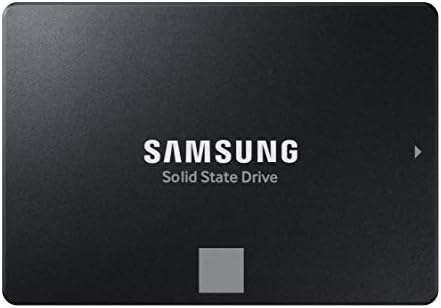
External SSD vs. External HDD
External SSDs and HDDs both have their place.
External SSD advantages
- Much faster file transfers
- Silent operation
- Smaller and lighter
- Better resistance to physical shock
- Excellent for portable workflows
External HDD advantages
- Lower cost per terabyte
- Very large capacities available
- Useful for long-term bulk storage
If you frequently move large files, an SSD is usually worth the additional cost.
For inexpensive archival storage where speed isn’t important, an HDD can still make sense.
Compare External SSD vs. External HDD


Are External SSDs Good for Gaming?
Yes. External SSDs can significantly improve storage management for gaming.
They provide faster load times than traditional external hard drives, although the exact experience depends on the console, game, and connection.
PC gamers can also use external SSDs for game libraries and additional storage.
However, always check the specific storage requirements and supported external-drive functionality of your gaming platform before purchasing.
Are External SSDs Good for Video Editing?
Absolutely.
External SSDs are particularly useful for video editors who work with large 4K or higher-resolution files.
A fast SSD can make it easier to:
- Transfer video footage
- Store project files
- Move editing libraries
- Back up camera media
- Work between computers
- Store proxy files
For professional video editing, prioritize sustained performance, capacity, durability, and the fastest interface supported by your computer.
How to Protect Your External SSD
Even rugged SSDs shouldn’t be treated as indestructible.
Follow these practices:
- Safely eject the drive when appropriate.
- Keep important files backed up elsewhere.
- Avoid excessive heat.
- Use high-quality cables.
- Keep the drive protected during travel.
- Don’t rely on one drive for irreplaceable data.
- Regularly check backups.
A useful backup strategy is to keep important data in at least two separate locations.
Final Verdict
The Samsung T9 is our top overall external SSD because it combines excellent performance, compact portability, strong security features, and capacities up to 4TB.
The SanDisk Extreme Pro Portable SSD is an excellent choice for photographers and creators who need rugged storage, while the Samsung T7 Shield is particularly well suited to travel and field work.
For high-speed value, the Crucial X10 Pro is worth considering. The Kingston XS2000 is ideal if physical size is a priority, while the Crucial X9 Pro provides strong everyday performance at a more accessible price.
Before buying, check your computer’s USB standard, required capacity, expected workload, durability requirements, and current pricing. The fastest SSD isn’t always the best choice if your device cannot take advantage of its maximum transfer speed.
Frequently Asked Questions
What is the best external SSDs in 2026?
The Samsung T9 is our top overall pick because it combines fast transfer speeds, portability, security features, and capacities up to 4TB.
Is an external SSDs better than an external HDD?
For speed, portability, and durability, an SSD is generally better. HDDs remain attractive when you need large amounts of inexpensive storage.
How much external SSD storage do I need?
For most users, 1TB or 2TB is a good starting point. Professionals working with large video libraries may benefit from 4TB or more.
What is the fastest external SSDs?
The fastest option depends on the drive and connection standard. Models using USB 3.2 Gen 2×2 can reach around 2,000MB/s under compatible conditions.
Does USB-C mean the SSD is fast?
No. USB-C describes the physical connector. The actual transfer speed depends on the USB protocol and hardware supported by the device, cable, and SSD.
Are external SSDs good for gaming?
Yes. External SSDs can provide faster storage performance than traditional external HDDs, although compatibility and game-installation rules vary between platforms.
Are external SSDs good for video editing?
Yes. Fast external SSDs are excellent for storing video footage, project files, proxies, and editing libraries, especially when using USB 3.2 Gen 2×2, USB4, or Thunderbolt connections.
Is 1TB enough for an external SSD?
1TB is enough for many users, including document backups, photography, and general storage. Video professionals and gamers may prefer 2TB or 4TB.
Are portable SSDs durable?
SSDs have no spinning mechanical platters, making them generally more resistant to physical shock than HDDs. Rugged models provide additional protection against dust, water, and impacts.
Can I use an external SSD with a Mac?
Many external SSDs work with Macs after being formatted appropriately. Always check the drive’s compatibility and the file-system requirements for your intended workflow.
Can I use an external SSD with a phone?
Some modern smartphones support external USB-C storage, but compatibility, power requirements, file-system support, and available speeds vary by device.
Should I buy a 2TB or 4TB SSD?
Choose 2TB if you want a good balance between capacity and cost. Choose 4TB if you regularly work with large video files, extensive photo libraries, or large game collections.
Best Products
Best Smartphones for Everyday Use in 2026
Best Laptops for Students in 2026